
Inleiding
This manual provides detailed instructions for the assembly, operation, and maintenance of your FLEXISPOT One-Piece Standing Desk with Rattan Drawers. Please read this manual thoroughly before installation and use to ensure proper function and safety. Keep this manual for future reference.

Image: The FLEXISPOT One-Piece Standing Desk in black with rattan drawers, featuring a monitor shelf and an integrated control panel.
Belangrike veiligheidsinligting
Om beserings of skade aan die produk te voorkom, volg die volgende veiligheidsriglyne:
- Volg altyd die monteerinstruksies noukeurig.
- Hou kinders en troeteldiere weg van die bymekaarmaakarea.
- Use appropriate tools and safety gear during assembly.
- Maak seker dat alle verbindings stewig is voordat u die lessenaar gebruik.
- Do not overload the desk. The maximum weight capacity is 110 lbs.
- Hou hande en voorwerpe weg van bewegende dele tydens hoogteverstelling.
Pakketinhoud
Verify that all components are present before beginning assembly. The desk ships in two separate packages.
- Desktop with integrated monitor shelf and rattan drawers
- Lessenaarraam en -pote
- Beheerpaneel
- Kragadapter en kabels
- Monteringshardeware (skroewe, boute, gereedskap)
- Gebruikershandleiding

Image: A diagram illustrating the dimensions of the desk components and indicating that the product ships in two separate packages.
Monteer-instruksies
Assembly typically takes approximately one hour. Refer to the separate detailed assembly guide included in your package for step-by-step instructions and diagrams. Ensure all fasteners are correctly identified and used in their designated locations.
- Pak al die komponente uit en verifieer dit teen die lys van die pakketinhoud.
- Attach the desk legs to the desktop frame using the provided hardware.
- Connect the control panel and motor cables as instructed.
- Secure any cable management components.
- Place the desk in its desired location.
Opstelling
After assembly, connect the desk to a power source.
- Plug the power adapter into the desk's control box.
- Steek die kragsnoer in 'n standaard elektriese aansluiting.
- The desk is now ready for initial use.
Bedryfsinstruksies
Hoogte verstelling
The desk features an electric motor system for smooth height transitions.
- Druk die Oppyltjie knoppie om die lessenaar op te lig.
- Druk die Afpyltjie knoppie om die lessenaar te laat sak.
- The desk can adjust between 28.9 inches (minimum) and 46.5 inches (maximum).
- The motor operates quietly, typically below 50dB.

Image: The desk shown at its minimum (28.9") and maximum (46.5") adjustable heights.
Geheuevoorinstellings
Program up to three preferred height settings for quick adjustments.
- Verstel die lessenaar tot jou verlangde hoogte.
- Druk die M button, then press one of the numbered preset buttons (1, 2, of 3) binne 3 sekondes om die huidige hoogte te stoor.
- To recall a saved height, simply press the corresponding numbered preset button.

Beeld: 'n Nabyskoot view of the desk's control panel, highlighting the up/down arrows and memory preset buttons.
Monitor rak
The integrated monitor shelf is designed to elevate screens to an ergonomic eye level.
- Place your monitor(s) on the shelf to reduce neck and back strain.
- This helps maintain proper posture during extended work sessions.

Image: Visual comparison of poor posture versus ergonomic sitting and standing postures facilitated by the adjustable desk.
Rattan Drawers
The desk includes both sliding-door desktop compartments and an under-desk drawer for organized storage.
- Use the desktop compartments (47.2"x8.7"x5.5") for easy access to frequently used items.
- The under-desk drawer (23.6"x11.8"x3.9") provides discreet storage for documents or books.
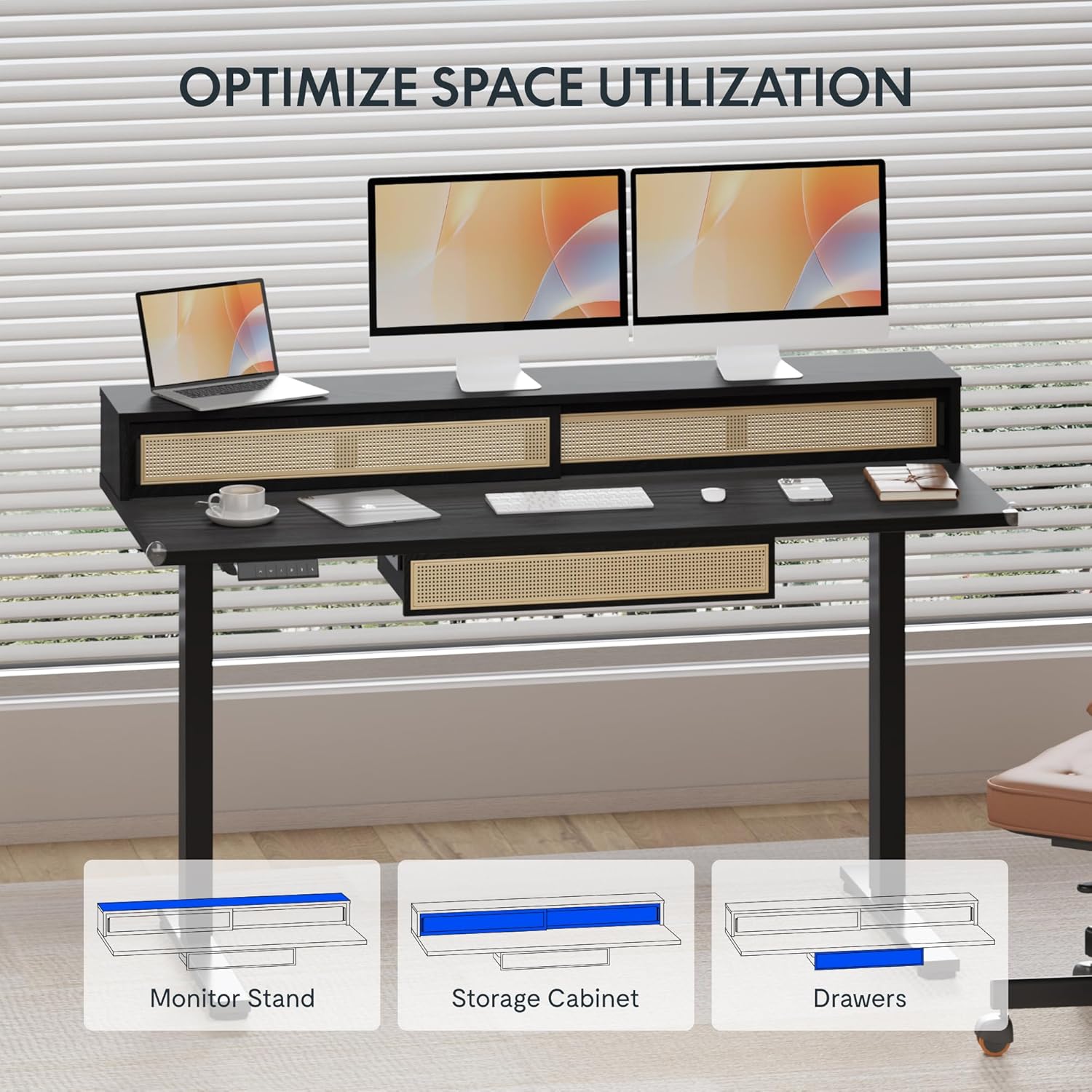
Image: An illustration demonstrating the various storage options, including the monitor stand, storage cabinet, and drawers, for optimal space utilization.
Onderhoud
Gereelde onderhoud verseker die lang lewensduur en optimale prestasie van u lessenaar.
- Skoonmaak: Vee die lessenaaroppervlaktes af met 'n sagte, damp lap. Vermy skuur skoonmakers of harde chemikalieë wat die afwerking kan beskadig.
- Inspeksie: Kontroleer gereeld alle skroewe en boute om seker te maak dat hulle styf vas is. Draai weer vas indien nodig.
- Kabelbestuur: Maak seker dat kabels netjies georganiseer is en nie die beweging van die lessenaar belemmer nie.
Probleemoplossing
As jy probleme met jou lessenaar ondervind, raadpleeg die volgende algemene oplossings:
| Probleem | Moontlike oorsaak | Oplossing |
|---|---|---|
| Die lessenaar beweeg nie of reageer nie op kontroles nie. | Power connection issue, cable disconnected, motor error. | Check power cord connection to outlet and desk. Ensure all motor cables are securely connected. Unplug and replug the power for 10 seconds to reset. |
| Die lessenaar beweeg oneweredig of maak ongewone geraas. | Uneven load, loose connections, obstruction. | Ensure weight is evenly distributed. Check for any obstructions under the desk. Verify all assembly screws are tight. |
| Geheue-voorinstellings werk nie. | Voorinstellings nie korrek gestoor nie. | Re-save the desired height settings by pressing 'M' then the preset number within 3 seconds. |
Spesifikasies
| Kenmerk | Detail |
|---|---|
| Handelsmerk | FLEXISPOT |
| Produk Afmetings (D x B x H) | 23.6"D x 47.2"W x 29"H (at lowest point) |
| Kleur | Swart |
| Basis materiaal | Allooi staal |
| Top materiaal tipe | Hout |
| Minimum Hoogte | 28.9 duim |
| Maksimum Hoogte | 46.5 duim |
| Aantal laaie | 1 (under-desk) |
| Enclosed Shelves | 2 (sliding-door desktop compartments) |
| Spesiale kenmerk | Corded electric height adjustment, Memory Presets |
| Vereiste samestelling | Ja |
Waarborg en Ondersteuning
FLEXISPOT provides comprehensive warranty coverage for your standing desk:
- Raam en motor: 5-year coverage.
- Elektronika: 2-year coverage.
This warranty ensures lasting security for your workspace investment. For customer support, technical assistance, or warranty claims, please refer to the contact information provided in your product packaging or visit the official FLEXISPOT webwebwerf.