
1. Belangrike veiligheidsinligting
Please read all instructions and warnings carefully before using the AUVON Wireless TENS Machine. Failure to follow these instructions may result in injury or damage to the device.
- TENS units should not be used by individuals with pacemakers, pregnant women, or those with epilepsy.
- Consult your doctor before use if you have any medical conditions.
- Do not apply pads over open wounds, rashes, swollen, red, infected, or inflamed skin areas.
- Moet nie gebruik terwyl jy bestuur of swaar masjinerie gebruik nie.
- Hou buite bereik van kinders.
- Do not immerse the device or pads in water.
2. Produk verbyview
The AUVON Wireless TENS Machine T24AB3 is a compact, rechargeable, and wireless Transcutaneous Electrical Nerve Stimulation (TENS) device designed for pain relief and muscle stimulation. It offers a drug-free and non-invasive method to manage pain in various body areas.
Sleutel kenmerke:
- Draadlose ontwerp: Eliminates tangled wires for convenient use anywhere.
- 24 Voorgeprogrammeerde modusse: Combines TENS, EMS, and massage therapy for varied relief.
- 30 Intensiteitsvlakke: Allows precise control over stimulation strength.
- Herlaaibare battery: 790 mAh charging case provides up to 40 hours of total use.
- Vinnige laai: 10 minutes of charge provides 1 hour of therapy.
- Mediese graad pads: Latex-free electrode pads in two sizes for targeted application.
Pakketinhoud:
- 1 x draadlose laaikas
- 2 x Pods
- 4 x Small Electrode Pads (2.4" x 1.7")
- 2 x Large Electrode Pads (2.2" x 5.1")
- 1 x Gebruikershandleiding
- 1 x Quick Guide
- 1 x Tipe C-kabel
- 1 x Pads Use Tips
- 1 x sak
- 1 x geskenkdoos
3. Opstelling
3.1 Laai die toestel
Before first use, fully charge the wireless charging case and pods. The charging case has a 790 mAh rechargeable battery, providing up to 40 hours of total use (40 hours for a single pod, 20 hours for two pods). Each pod runs up to 8 hours on a full charge.
- Connect the provided Type-C cable to the charging port on the charging case.
- Connect the other end of the cable to a wall adapter, power bank, or laptop.
- The display on the charging case will indicate charging status. A full charge provides significant usage time. A 10-minute charge can provide approximately 1 hour of therapy.
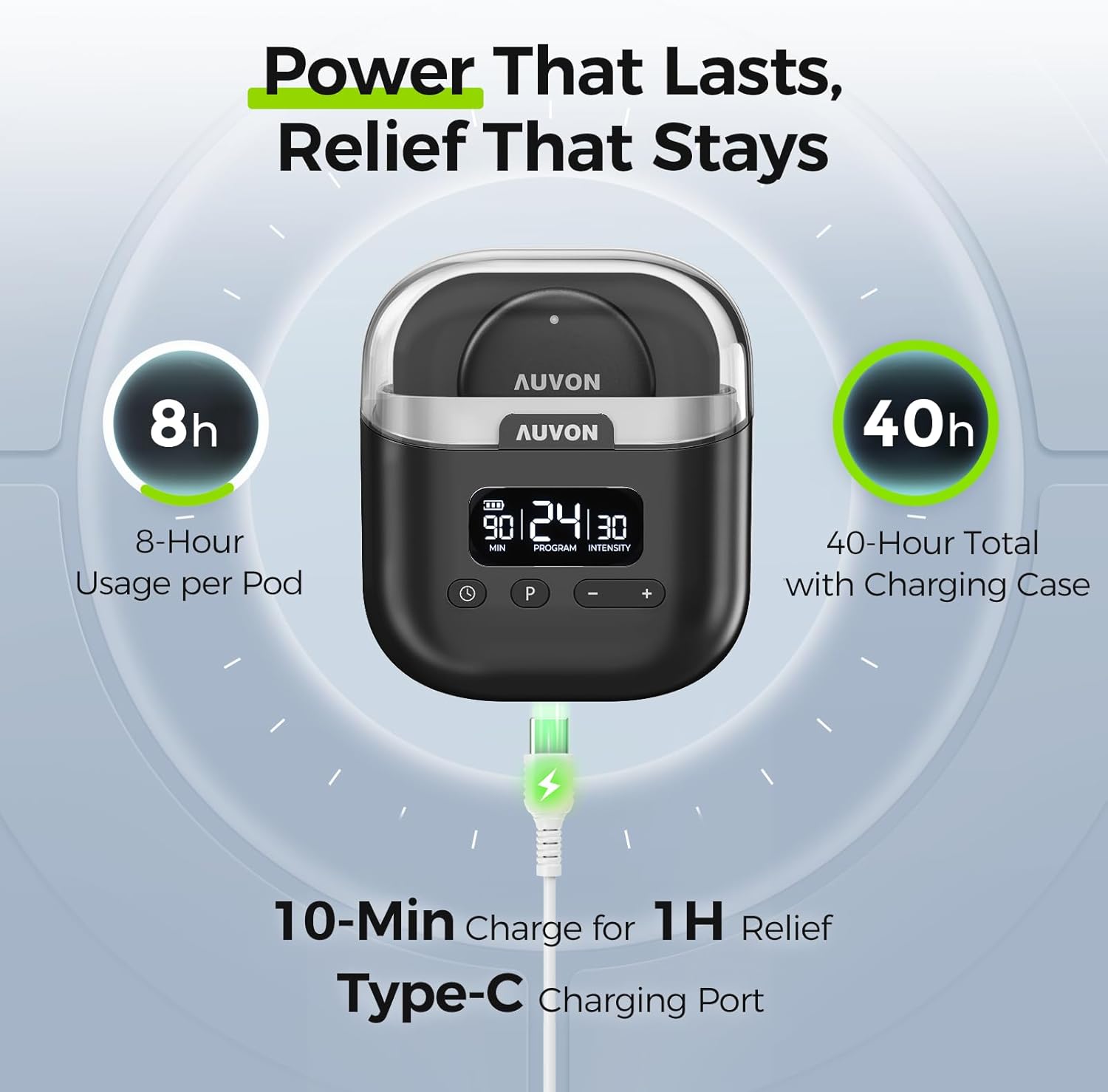
Image: The AUVON TENS machine charging case displaying battery life and charging indicators. It highlights 8 hours of usage per pod and 40 hours total with the charging case, along with 10-minute fast charging via a Type-C port.
3.2 Attaching and Applying Pads
The device uses medical-grade, latex-free electrode pads for safe and effective application.
- Ensure your skin is clean, dry, and free of lotions or oils before applying the pads.
- Remove the protective film from the electrode pad.
- Snap the pod onto the electrode pad using the magnetic connection.
- Apply the pad firmly to the desired area of your body. Ensure full contact with the skin.

Image: A diagram illustrating the layers of the medical-grade TENS pads (Soft PU Leather, Conductive Layer, Insulating Layer, Gel Layer) and showing the two available pad sizes: 2.4" x 1.7" for arms, legs, etc., and 2.2" x 5.1" for back, shoulder, etc., along with the magnetic snap button connection.

Beeld: Bvamples of the AUVON TENS machine applied to different body areas for pain relief, including the neck, arm, lower back, and leg.
4. Bedryfsinstruksies
The AUVON TENS machine features a clear display and intuitive controls on its charging case for easy operation.
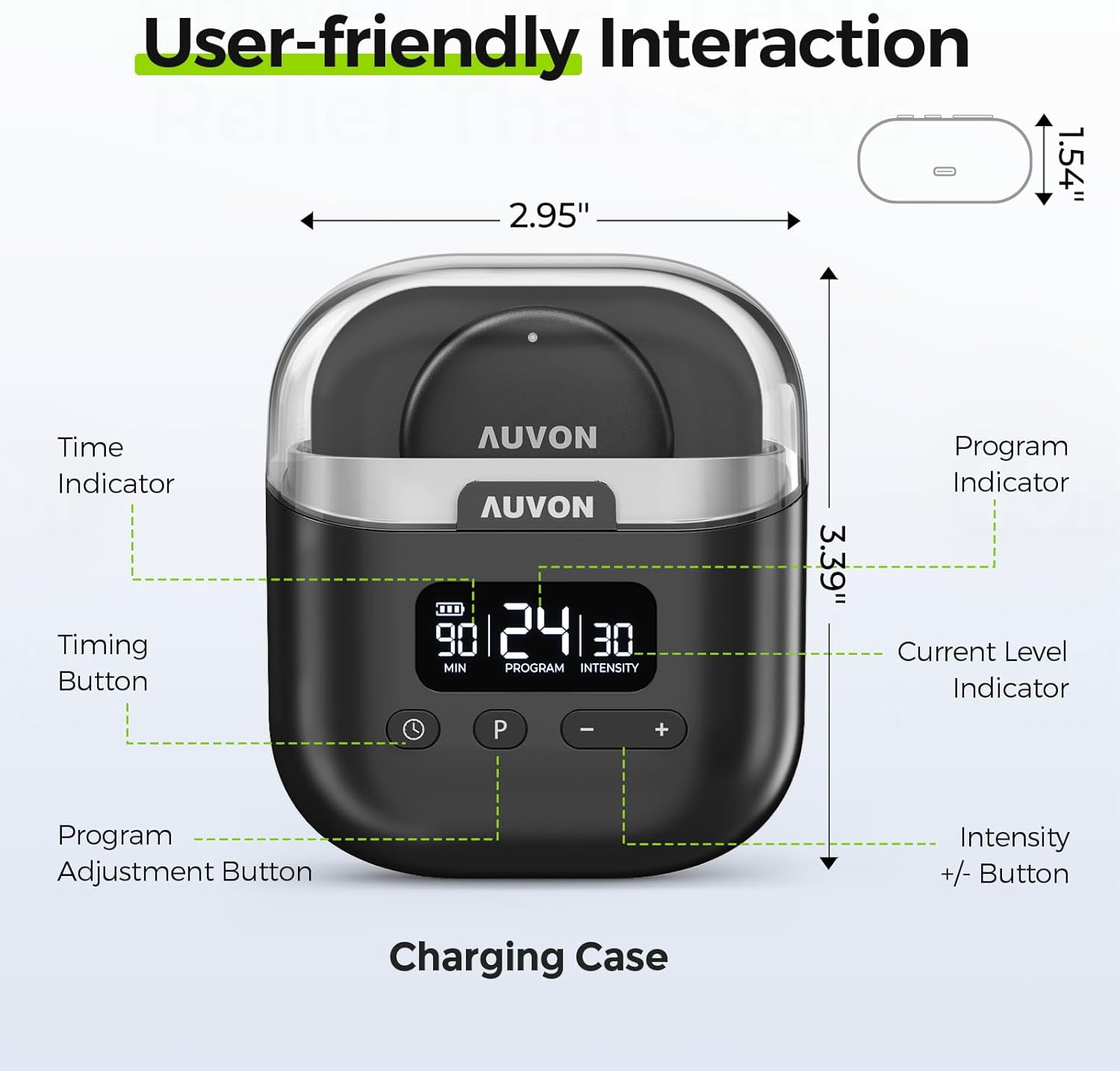
Image: The AUVON TENS machine charging case with its user interface clearly labeled, showing the Time Indicator, Timing Button, Program Adjustment Button, Program Indicator, Current Level Indicator, and Intensity +/- Buttons.
4.1 Krag aan/af
- To power on, press and hold the Power/Timing Button (labeled with a clock icon) on the charging case.
- To power off, press and hold the Power/Timing Button again.
4.2 Selecting a Mode
The device offers 24 pre-programmed modes combining TENS, EMS, and massage therapies.
- Press the Program Adjustment Button (labeled 'P') to cycle through the 24 available modes.
- The 'PROGRAM' indicator on the display will show the current mode number.
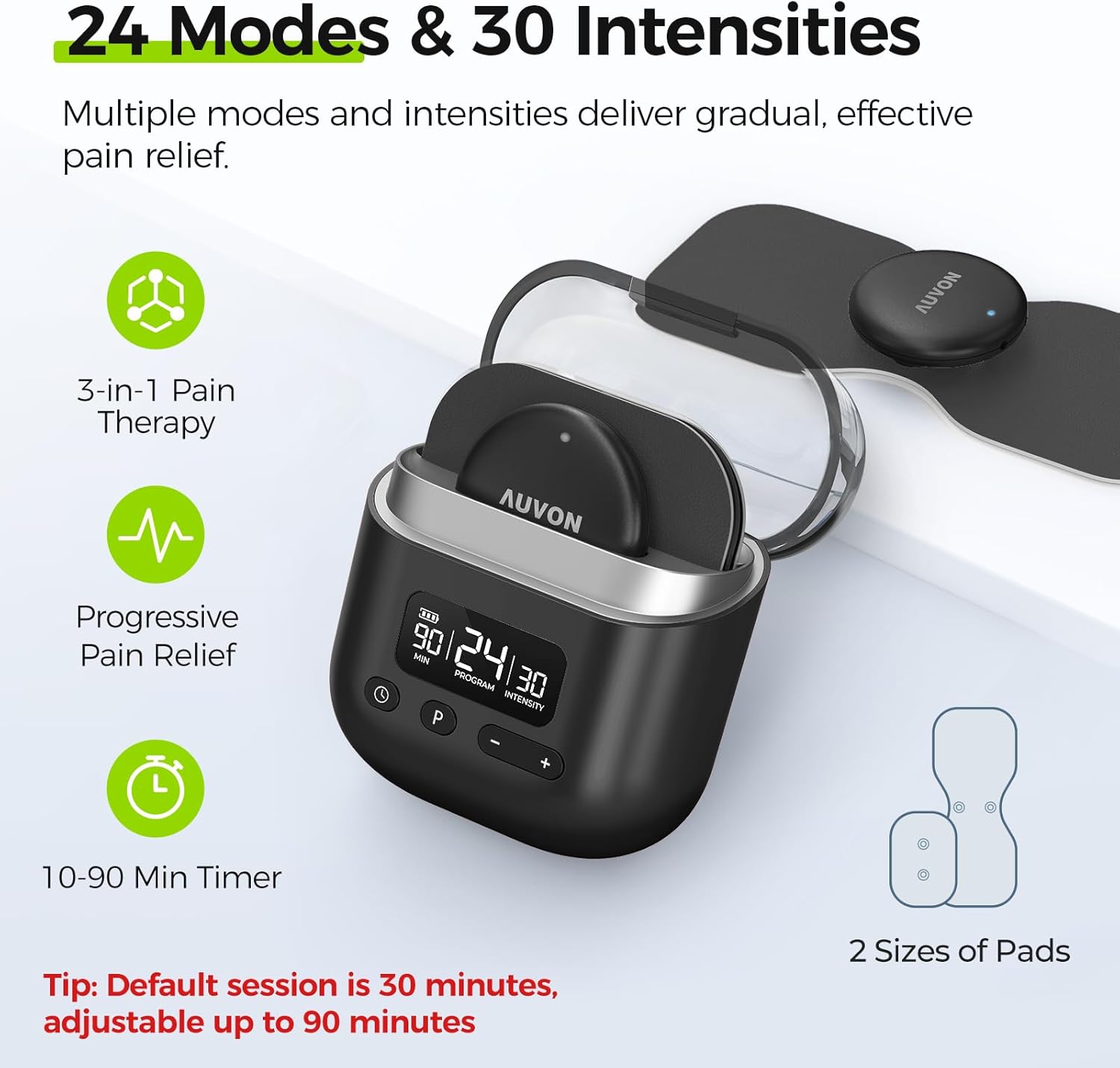
Image: The AUVON TENS machine charging case display, highlighting the 24 modes and 30 intensity levels available for personalized pain relief. It also shows the 10-90 minute timer setting.
4.3 Aanpassing van intensiteit
There are 30 adjustable intensity levels to customize your therapy.
- Press the '+' button to increase the intensity.
- Press the '-' button to decrease the intensity.
- The 'INTENSITY' indicator on the display will show the current level.
4.4 Stel die timer
The default session time is 30 minutes, adjustable from 10 to 90 minutes.
- Press the Power/Timing Button (labeled with a clock icon) to adjust the session duration.
- The 'MIN' indicator on the display will show the selected time.
5. Onderhoud en versorging
Proper maintenance ensures the longevity and effectiveness of your AUVON TENS machine and electrode pads.
- Na elke gebruik: Turn off the device and carefully remove the pads from your skin.
- Pad Storage: Cover the pads with the included pad holders/protective film and place them back in the pouch.
- Pad Longevity: Applying a few drops of water to the adhesive surface before and after usage can help increase the pads' lifespan, which is up to 45 uses under ideal conditions.
- Toestelberging: Store the TENS unit and pads in a cool, dry place away from direct sunlight and extreme temperatures.
- Laai Onderhoud: If the unit is not used regularly, charge it at least every 3 months to maintain battery health.
- Skoonmaak: Vee die toestel af met 'n sagte, damp cloth. Do not use abrasive cleaners or immerse in liquids.
6. Probleemoplossing
If you encounter issues with your AUVON Wireless TENS Machine, please refer to the following common solutions:
| Probleem | Moontlike oorsaak | Oplossing |
|---|---|---|
| Toestel kan nie aangeskakel word nie. | Low battery or device not charged. | Charge the device using the provided Type-C cable. Ensure the charging case has power. |
| Geen of swak sensasie. | Pads not making full contact, pads are dry/worn out, or intensity is too low. | Ensure pads are firmly applied to clean skin. Apply a few drops of water to pads or replace them if worn. Increase intensity using the '+' button. |
| Pads do not stick well. | Skin is oily/dirty, pads are dry, or pads have reached end of life. | Clean and dry skin thoroughly before application. Apply a few drops of water to the pads. Replace pads if they no longer adhere. |
| Irregular or uncomfortable sensation. | Poor pad contact or incorrect pad placement. | Re-position pads to ensure full and even contact. Refer to placement guidelines in the Quick Guide. |
If the problem persists after trying these solutions, please contact AUVON customer support.
7. Spesifikasies
| Kenmerk | Detail |
|---|---|
| Modelnommer | T24AB3 |
| Kragbron | Batteryaangedrewe (1 litiumioonbattery ingesluit) |
| Spesiale kenmerke | TENS, EMS, and Massage Therapy Modes |
| Koordloos | Ja |
| Materiaal | Plastiek |
| Laaikas battery | 790 mAh (up to 40h total use) |
| Pod Battery Life | Up to 8 hours per pod |
| Vinnige laai | 10 min charge for 1 hour therapy |
| Afmetings (Pakket) | 19.51 x 13.41 x 6.4 cm; 331 g |
| UPC | 195028005776 |
8. Waarborg en Ondersteuning
AUVON provides a 24-maande produkwaarborg en lewenslange kliëntediens for the T24AB3 Wireless TENS Machine.
For product inquiries, technical assistance, or warranty claims, please contact AUVON customer support through the retailer where you purchased the product or visit the official AUVON store online.
AUVON Store: https://www.amazon.ca/stores/AUVON/page/EC523B19-300B-4B4E-8B75-BB7DDC5D2196