
1. Produk verbyview
The WOBANE Wardrobe Lighting with Motion Sensor (Model WBE037) is a versatile, rechargeable LED light designed for various indoor applications such as wardrobes, cabinets, bedsides, and hallways. It features an eye-protection design, multiple operating modes, dimmable brightness, and adjustable color temperature to suit different preferences and environments.

Beeld 1.1: verbyview of the WOBANE Wardrobe Lighting package, showing three light bars and their respective USB-C charging cables and metal mounting plates.
Sleutel kenmerke:
- Eye Protection Design: Trapezoidal structure prevents direct light exposure, reducing glare and flickering for comfortable use.
- Dubbele bedryfsmodusse: Manual (always on) and Automatic (motion sensor activated).
- Dimbare helderheid: Traplose dim van 10% tot 100%.
- Verstelbare kleurtemperatuur: Three settings (2700K Warm White, 4000K Natural White, 6000K Cool White) with memory function.
- USB herlaaibaar: Built-in 900mAh battery, easily charged via USB Type-C.
- Maklike installasie: Magnetic attachment with included metal plates, no tools required.
2. Veiligheidsinligting
Lees en verstaan asseblief alle veiligheidsinstruksies voordat u hierdie produk gebruik. Bewaar hierdie handleiding vir toekomstige verwysing.
- Moenie die toestel aan water of oormatige vog blootstel nie.
- Moenie probeer om die toestel uitmekaar te haal, te herstel of te wysig nie. Dit sal die waarborg ongeldig maak.
- Gebruik slegs die meegeleverde USB Tipe-C-kabel of 'n gesertifiseerde ekwivalent vir laai.
- Keep the device away from high temperatures and direct sunlight.
- This product contains a rechargeable battery. Dispose of it responsibly according to local regulations.
- Ensure the installation surface is clean and dry before attaching the metal plates.
3. Opstelling
3.1 Laai die toestel
Before first use, fully charge the light bar. The built-in 900mAh battery provides extended usage time.
- Connect the provided USB Type-C cable to the charging port on the light bar.
- Koppel die ander kant van die kabel aan 'n standaard USB-kragadapter (nie ingesluit nie) of 'n rekenaar se USB-poort.
- Die laai-aanwyserliggie sal rooi brand tydens laai.
- Once fully charged, the indicator light will turn green. A full charge typically takes approximately 3 hours.

Image 3.1: The light bar being charged via USB-C, with indicators showing red for charging and green for fully charged.
3.2 Installasiemetodes
The WOBANE light bar offers two convenient installation methods:
- Direkte magnetiese aanhegting: If your desired installation surface is metallic (e.g., iron), the light bar can be directly adsorbed onto it using its built-in magnets.
- Kleefmetaalplate: For non-metallic surfaces (e.g., wood, plastic), use the included adhesive metal plates.
- Clean the installation surface thoroughly to ensure it is free of dust and grease.
- Peel off the protective film from one side of the adhesive metal plate.
- Firmly press the metal plate onto the desired location for at least 3 seconds.
- Repeat for the second metal plate, ensuring they are aligned with the magnets on the light bar.
- Magnetically attach the light bar to the installed metal plates.

Image 3.2: Illustration of direct magnetic attachment to metal surfaces and using adhesive metal plates for non-metallic surfaces.
4. Bedryfsinstruksies
4.1 Moduskeuse
The light bar features a switch to select between three modes: Manual (M), Automatic (A), and Off (O).

Image 4.1: The mode switch with 'A' for Auto, 'O' for Off, and 'M' for Manual, along with motion detection range.
- 'M' (Manual Mode): The light will remain continuously on until manually switched off.
- 'Af' (Af): Die lig is afgeskakel.
- 'A' (Automatic Mode - Motion Sensor): The light automatically turns on when human motion is detected within a maximum range of 3 meters and a 120° angle. It will automatically turn off after 10, 25, or 40 seconds of inactivity, depending on the selected timer setting.
4.2 Helderheid aanpas (verduistering)
To adjust the brightness, use the dedicated button on the light bar:
- Traplose verduistering: Long press the button to smoothly adjust the brightness from 10% to 100%. Release the button when the desired brightness is reached.
4.3 Changing Color Temperature
The light offers three color temperature options. To cycle through them:
- Kleur temperatuur aanpassing: Click the button (short press) to switch between 2700K (Warm White), 4000K (Natural White), and 6000K (Cool White). The device has a memory function that will recall the last selected color temperature setting.
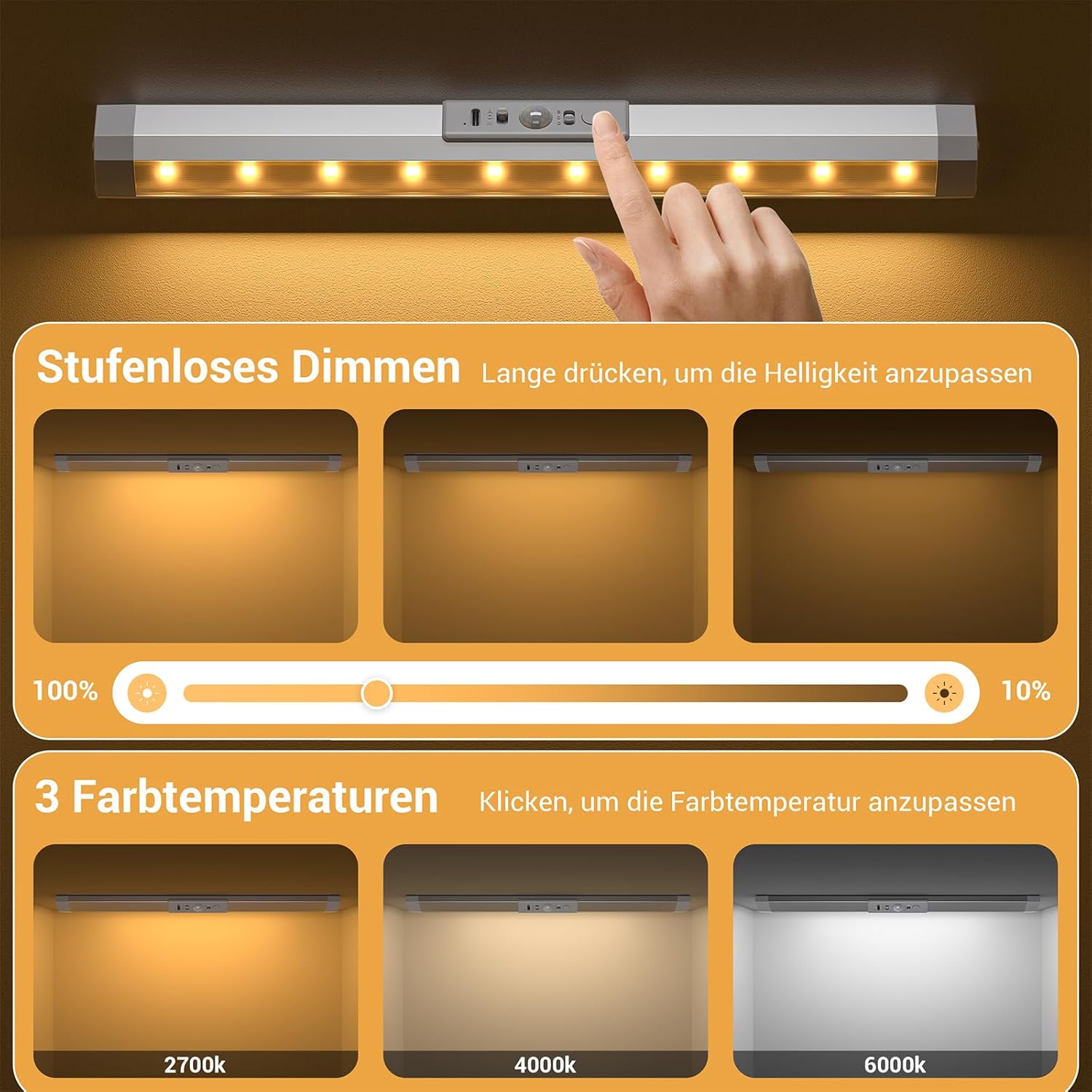
Image 4.2: Visual representation of stepless dimming from 100% to 10% and the three available color temperatures: 2700K, 4000K, and 6000K.
5. Onderhoud
5.1 Skoonmaak
To maintain the appearance and functionality of your WOBANE light bar:
- Vee die oppervlak af met 'n sagte, droë lap.
- Moenie skuurmiddels, oplosmiddels of harde chemikalieë gebruik nie, aangesien dit die afwerking of elektroniese komponente kan beskadig.
5.2 Batterysorg
To prolong the life of the built-in rechargeable battery:
- Vermy om die battery gereeld heeltemal te dreineer.
- Charge the device regularly, even if not in constant use, to maintain battery health.
- Bêre die toestel op 'n koel, droë plek wanneer dit nie vir lang tye gebruik word nie.
6. Probleemoplossing
If you encounter any issues with your WOBANE light bar, please refer to the following common problems and solutions:
- Lig gaan nie aan nie:
- Maak seker dat die battery gelaai is. Koppel aan 'n kragbron en kyk na die laai-aanwyser.
- Verify the mode switch is set to 'M' (Manual) or 'A' (Automatic).
- Motion sensor not working in 'A' (Automatic) mode:
- Check if the ambient light is too bright. The motion sensor may not activate in well-lit conditions to conserve battery.
- Ensure there are no obstructions blocking the sensor.
- Confirm motion is within the 3-meter, 120° detection range.
- Lig flikker of dof onverwags:
- Die battery is dalk laag. Laai die toestel weer.
- Ensure the light bar is securely attached and connections are stable.
- Light does not hold a charge:
- Try using a different USB Type-C cable and power adapter to rule out faulty accessories.
- If the issue persists, the battery may need service. Contact customer support.
If these steps do not resolve the issue, please contact WOBANE customer support for further assistance.
7. Spesifikasies
Detailed technical specifications for the WOBANE Wardrobe Lighting (Model WBE037):

Image 7.1: Dimensions of the WOBANE light bar (30cm length, 3.5cm width, 1.8cm height) and its components, including the PC cover and 10 SMD 2835 LEDs.
| Spesifikasie | Waarde |
|---|---|
| Modelnommer | WBE037 |
| Handelsnaam | WOBANE |
| Vervaardiger | Shenzhen Wobane Trading Co.,Ltd |
| Produk afmetings | 30 x 3.5 x 1.8 cm |
| Item gewig | 430 g (for pack of 3) |
| Materiaal | Aluminium |
| Kleur | Silwer |
| Kragbron | Battery aangedrewe |
| Battery Tipe | 1 Nie-standaard battery (ingesluit) |
| Battery kapasiteit | 900mAh |
| Ligbrontipe | LED (10*SMD 2835 LEDs) |
| Totale Lumens | 72 lumen |
| Kleur Temperature | 2700K, 4000K, 6000K |
| Bewegingsensorreeks | 3 meters, 120° |
| Outo-afskakeltyd | 10/25/40 seconds (adjustable) |
| Binne/buiteluggebruik | Binneshuise |
| Spesifieke gebruike | Cabinet, Wardrobe, Hallway, Bedside |
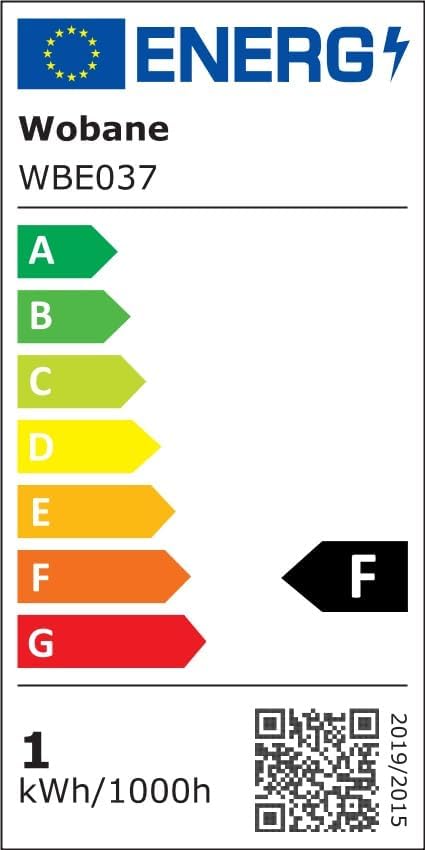
Image 7.2: EU Energy Label for Model WBE037, indicating an energy efficiency class F. For more details, refer to the official EPREL database: https://eprel.ec.europa.eu/qr/2043182
8. Waarborg en Ondersteuning
WOBANE products are manufactured with quality and reliability in mind. For warranty information, product support, or any inquiries, please contact your retailer or the manufacturer directly.
- Vervaardiger: Shenzhen Wobane Trading Co.,Ltd
- Behou asseblief jou aankoopbewys vir waarborgeise.