
1. Inleiding
Thank you for choosing the AIWA FPH-S100/4G Simple Mobile Phone. This device is designed for ease of use, featuring large keys, a clear display, and essential functions like 4G connectivity, an SOS emergency button, FM radio, and a flashlight. This manual provides detailed instructions to help you set up, operate, and maintain your new phone.
2. Produk verbyview
The AIWA FPH-S100/4G is a user-friendly mobile phone with a focus on simplicity and accessibility. It supports 4G LTE for reliable calls and features a 1.8-inch color screen.

Figuur 2.1: Voorkant view of the AIWA FPH-S100/4G mobile phone, displaying the screen and large, clearly labeled keypad.

Figuur 2.2: Terug view of the AIWA FPH-S100/4G mobile phone, highlighting the prominent orange SOS button and the integrated camera.

Figuur 2.3: Kant view of the AIWA FPH-S100/4G mobile phone, illustrating its ergonomic design.

Figuur 2.4: Top view of the AIWA FPH-S100/4G mobile phone, featuring the built-in LED flashlight.
Sleutel kenmerke:
- Groot sleutels: Easy to see and press for comfortable dialing and texting.
- SOS-knoppie: Dedicated button for quick access to emergency contacts.
- 1.8" LCD-skerm: Clear color screen for easy viewing of numbers and text.
- 4G LTE-konnektiwiteit: Ensures clear and stable call quality.
- FM Radio: Listen to your favorite radio stations on the go.
- LED flitslig: Convenient for low-light situations.
- USB-C Laai: Modern and reversible connector for easy charging.
- Dubbele SIM-ondersteuning: Use two SIM cards simultaneously.
- TF-kaartgleuf: Expandable storage for contacts, photos, and more.
3. Opstelling
3.1. Pakketinhoud
Maak seker dat alle items in die boks teenwoordig is:
- AIWA FPH-S100/4G Mobile Phone
- USB kabel
- Gebruikershandleiding (hierdie dokument)
3.2. Die installering van die battery
- Verwyder die agterblad van die foon deur dit versigtig van die kerf oop te wrik.
- Rig die batterykontakte met die terminale binne-in die foon.
- Druk die battery af totdat dit stewig in plek is.
- Plaas die agterste deksel terug en maak seker dat dit in posisie klik.
3.3. SIM-kaarte en TF-kaart insit
The phone supports two SIM cards and one TF (microSD) card for expandable storage.
- With the back cover and battery removed, locate the SIM card slots and the TF card slot.
- Carefully insert your SIM card(s) into the designated slots with the gold contacts facing down, following the orientation indicated on the phone.
- Insert the TF card into its slot, ensuring it is properly seated.
- Plaas die battery en agterblad weer terug.
3.4. Aanvanklike laai
Laai die foon se battery volledig voor die eerste gebruik.
- Connect the USB-C cable to the charging port on the phone.
- Koppel die ander kant van die USB-kabel aan 'n versoenbare USB-kragadapter (nie ingesluit nie) of 'n rekenaar se USB-poort.
- Die battery-aanwyser op die skerm sal die laaistatus wys.
- Sodra dit ten volle gelaai is, ontkoppel die laaier.


Figuur 3.1: Icons representing USB-C charging and the flash card slot.
4. Bedryfsinstruksies
4.1. Skakel aan/af
- Om aan te skakel: Druk en hou die Red Call End/Power knoppie totdat die skerm verlig.
- Om af te skakel: Druk en hou die Red Call End/Power button until the power off options appear, then select 'Power Off'.
4.2. Maak en Ontvang Oproepe
- Om 'n oproep te maak: Enter the phone number using the large keypad. Press the Groen Oproep knoppie om die oproep te begin.
- Om 'n oproep te beantwoord: Wanneer die telefoon lui, druk die Groen Oproep knoppie.
- Om 'n oproep te beëindig: Druk die Red Call End/Power knoppie.

Figuur 4.1: The phone's simplified interface, showing the large numeric keypad for easy dialing.
4.3. SOS-noodknoppie
The dedicated SOS button provides a quick way to contact pre-set emergency numbers.
- Setting Up Emergency Contacts: Navigate to the 'SOS Settings' in the phone's menu. Add up to 5 emergency contact numbers. These contacts will be called in sequence when the SOS button is activated.
- Aktivering van SOS: Hou die lemoen ingedruk SOS button on the back of the phone for a few seconds. The phone will automatically dial the emergency contacts one by one until a connection is made. It will also send a pre-set emergency SMS message to these contacts.
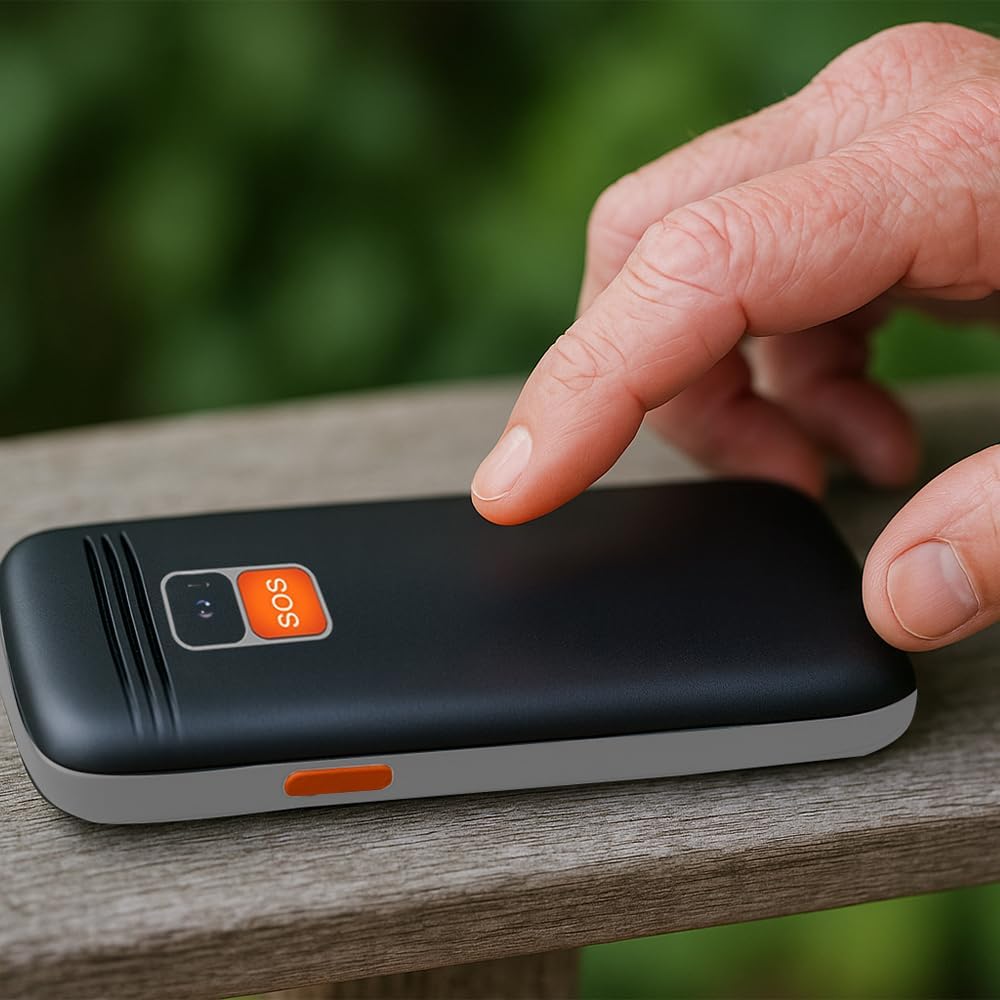
Figuur 4.2: A user activating the SOS emergency function by pressing the dedicated button on the phone's rear.
4.4. Gebruik die flitslig
To turn the LED flashlight on or off, locate the dedicated flashlight button on the side of the phone (or refer to the manual for specific key combination if not a dedicated button). Press and hold or toggle the button as instructed.

Figuur 4.3: Icon indicating the flashlight function.
4.5. FM Radio
To use the FM radio, connect a wired headset (not included) to the 3.5mm audio jack, as it acts as an antenna. Navigate to the 'FM Radio' application in the phone's menu to scan for stations and adjust volume.

Figuur 4.4: Icon representing the earphone output port.
4.6. Bluetooth-verbinding
Om met 'n Bluetooth-toestel te koppel:
- Gaan na 'Instellings' > 'Bluetooth'.
- Skakel Bluetooth 'Aan'.
- Kies 'Soek vir devices' to find available Bluetooth accessories.
- Select your desired device from the list and follow the on-screen prompts to pair.
5. Onderhoud
5.1. Maak die toestel skoon
Use a soft, dry, lint-free cloth to clean the phone's screen and body. Avoid using harsh chemicals, cleaning solvents, or abrasive materials, as these can damage the phone's surface.
5.2. Batteryversorging
- Vermy die blootstelling van die battery aan uiterste temperature (warm of koud).
- Moenie die battery deurboor, uitmekaar haal of wysig nie.
- As die foon nie vir 'n lang tydperk gebruik gaan word nie, laai dit tot ongeveer 50% voordat dit gebêre word.
5.3. Berging
Store the phone in a cool, dry place away from direct sunlight and moisture when not in use.
6. Probleemoplossing
This section addresses common issues you might encounter with your AIWA FPH-S100/4G.
| Probleem | Moontlike oorsaak | Oplossing |
|---|---|---|
| Foon skakel nie aan nie. | Low battery or battery not installed correctly. | Charge the battery for at least 30 minutes. Ensure the battery is correctly inserted. |
| Geen netwerksein nie. | SIM card not inserted, out of network coverage, or SIM card issue. | Check SIM card installation. Move to an area with better network coverage. Contact your service provider if the issue persists. |
| Kan nie oproepe maak of ontvang nie. | No network signal, incorrect call settings, or insufficient balance (prepaid). | Verify network signal. Check call barring settings. Ensure sufficient credit if using a prepaid SIM. |
| SOS-knoppie werk nie. | Emergency contacts not set up or incorrect numbers. | Go to 'SOS Settings' and ensure emergency contacts are correctly saved. Test the function in a non-emergency situation. |
| FM-radio werk nie. | Headset not connected or faulty. | Ensure a wired headset is properly connected, as it functions as the antenna. Try a different headset if available. |
7. Spesifikasies
Detailed technical specifications for the AIWA FPH-S100/4G mobile phone.
| Kenmerk | Spesifikasie |
|---|---|
| Model Naam | FPH-S100/4G |
| Handelsmerk | Geen |
| Bedryfstelsel | Symbian 9.1 |
| Mobiele Tegnologie | 4G |
| Draadlose Diensverskaffer | Alle diensverskaffers |
| Kleur | Swart |
| Connector Tipe | USB Tipe-C |
| Vormfaktor | Kroeg |
| Tipe vertoon | LCD |
| Vertoon grootte | 1.8 duim |
| Battery kapasiteit | 800 mAh (Verwyderbaar) |
| Afmetings (Pakket) | 15 x 15 x 10 cm |
| Gewig | 58 g |
| Ingesluit komponente | USB kabel |


Figuur 7.1: Icons highlighting the 1.8" LCD display and the phone's light weight of 58g.
8. Waarborg en Ondersteuning
8.1. Produkwaarborg
The AIWA FPH-S100/4G mobile phone comes with a 2 jaar produkwaarborg vanaf die aankoopdatum. Hierdie waarborg dek vervaardigingsdefekte en wanfunksies onder normale gebruik. Bewaar asseblief u bewys van aankoop vir waarborgeise.
8.2. Kliëntediens
For technical assistance, troubleshooting beyond this manual, or warranty inquiries, please contact your retailer or the official Aiwa customer support. Refer to the contact information provided with your purchase or visit the official Aiwa webwebwerf vir ondersteuningsbesonderhede.