
1. Inleiding
The PGST Door Window Sensor is an essential accessory designed to enhance the security of your home when integrated with a compatible PGST Home Security System host, such as the A519W, A103F, A01F, or A02F models. This wireless sensor detects the opening and closing of doors and windows, triggering an alarm and sending notifications to your smartphone via the connected security system.
This manual provides detailed instructions for the setup, operation, and maintenance of your PGST Door Window Sensor to ensure optimal performance and reliable home protection.
2. Opstelling
2.1 Initial System Setup (Siren/Hub)
Before connecting the door window sensor, ensure your PGST A519W Siren/Hub is powered on and connected to your mobile application. The following video demonstrates the initial setup of the siren/hub and pairing of accessories.
Video: PGST A519W Alarm System Operation. This video demonstrates the setup process for the PGST A519W alarm system, including pairing the siren with the mobile app and connecting accessories like the remote control and door magnetic sensor.
2.2 Pairing the Door Window Sensor
Follow these steps to pair your PGST Door Window Sensor with your A519W Home Security System:
- Prepare the Siren/Hub: Ensure your PGST Siren/Hub is powered on and connected to your mobile application (e.g., Tuya Smart or Smart Life app).
- Enter Pairing Mode on Siren: Press the pairing button on the PGST Siren/Hub three times in quick succession. The indicator lights on the siren will begin to flash, indicating it is in pairing mode.
- Activate the Door Window Sensor: Separate the two magnetic parts of the door window sensor. The siren will emit a sound, confirming successful pairing.
- Bevestig saambinding: Once paired, the siren will typically make a confirmation sound. You can also check your mobile app under the 'Accessories' section to see if the sensor has been added.
2.3 Installation of the Door Window Sensor
The PGST Door Window Sensor is designed for easy, self-adhesive installation.
- Kies ligging: Select a door or window where you wish to install the sensor. Ensure the surfaces are clean, dry, and smooth.
- Posisionering: The sensor consists of two parts: a main sensor unit and a smaller magnetic strip. Mount the main sensor unit on the fixed frame of the door or window, and the magnetic strip on the moving part (door or window itself).
- Belyning: Ensure the two parts are aligned with each other and are no more than 1 cm (0.4 inches) apart when the door/window is closed. The small alignment marks on both parts should face each other.
- Adhere: Remove the protective backing from the adhesive pads on both sensor parts and firmly press them onto the chosen surfaces for at least 30 seconds.
- Toets: After installation, arm your security system and open the door/window to verify that the sensor triggers an alarm.
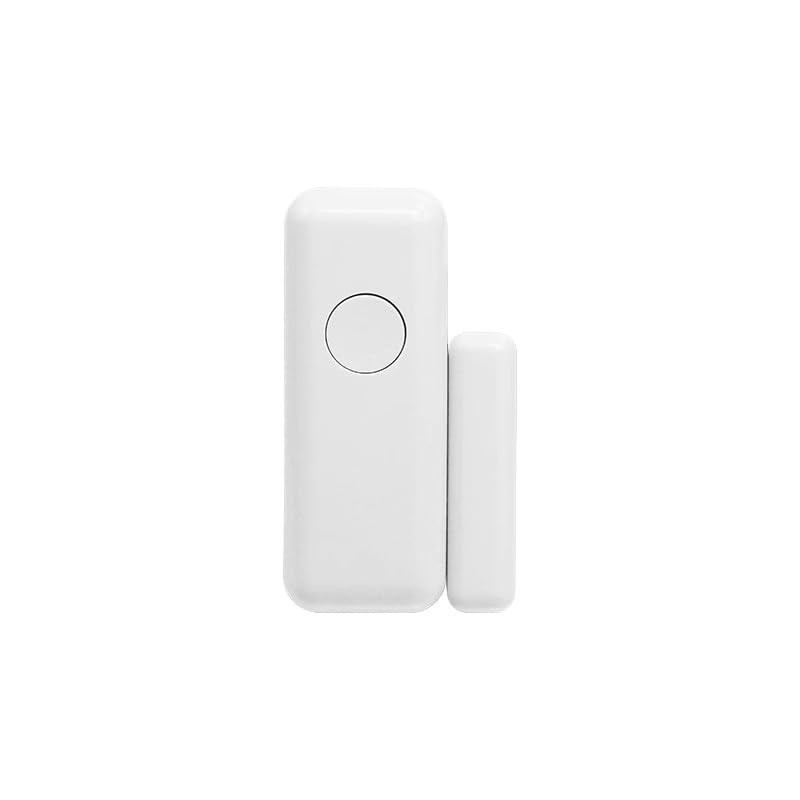
Image: PGST Door Window Sensor, consisting of two magnetic parts. The larger part contains the sensor electronics, and the smaller part is a magnet. They are designed to be mounted on a door/window frame and the moving door/window, respectively.
3. Bedryf
Once installed and paired, the PGST Door Window Sensor operates as an integral part of your PGST Home Security System.
- Bewapen die stelsel: When your security system is armed (via the mobile app or remote control), the door window sensor becomes active.
- Triggering an Alarm: If a protected door or window is opened while the system is armed, the magnetic contact between the two sensor parts will be broken. This immediately triggers the alarm on the siren/hub.
- Kennisgewings: Simultaneously, the system will send instant alerts to your smartphone via the connected mobile application, notifying you of the triggered event.
- Ontwapen die stelsel: When the system is disarmed, the door window sensor will not trigger an alarm if a door or window is opened.
4. Onderhoud
4.1 Batteryvervanging
The door window sensor is battery-powered. When the battery level is low, your security system may send a low battery notification via the mobile app. To replace the battery:
- Gently slide open the cover of the main sensor unit.
- Remove the old battery (typically a standard coin cell battery, e.g., CR2032).
- Insert a new battery, ensuring correct polarity (+/-).
- Maak die deksel stewig toe.
- Test the sensor to ensure it is functioning correctly after battery replacement.
4.2 Skoonmaak
To maintain optimal performance, periodically clean the sensor:
- Use a soft, dry cloth to wipe the exterior of the sensor.
- Do not use liquid cleaners, aerosols, or abrasive solvents, as these can damage the device.
5. Probleemoplossing
- Sensor not pairing:
- Ensure the siren/hub is in pairing mode (lights flashing).
- Check the sensor's battery.
- Ensure the sensor is within range of the siren/hub.
- Try resetting the siren/hub if other accessories are also failing to pair.
- Vals alarms:
- Verify that the two sensor parts are securely mounted and remain within 1 cm when the door/window is closed.
- Check for any loose connections or physical obstructions.
- Ensure the battery is not critically low, as this can sometimes cause erratic behavior.
- No alerts on smartphone:
- Confirm your PGST Siren/Hub is connected to your home Wi-Fi network and has internet access.
- Check your mobile app settings to ensure notifications are enabled for the security system.
- Verify your smartphone's notification settings for the app are enabled.
- Sensor not responding:
- Vervang die battery.
- Re-pair the sensor with the siren/hub.
6. Spesifikasies
| Kenmerk | Beskrywing |
|---|---|
| Handelsmerk | PGST |
| Produk Tipe | Door Window Sensor (Accessory) |
| Kragbron | Battery aangedrewe |
| Verbindingstegnologie | Draadloos |
| Alerttipe | Entry Detection |
| Installasie metode | Selfklevend |
| Versoenbare stelsels | PGST A519W, A103F, A01F, A02F Home Security System Hosts |
| Beheer metode | App (via main system) |
| UPC | 735083581060 |
7. Waarborg en Ondersteuning
For warranty information and technical support, please refer to the documentation provided with your complete PGST Home Security System or visit the official PGST webwebwerf. Jy kan ook jou kleinhandelaar kontak vir hulp.
Bewaar u aankoopbewys as bewys van aankoop vir enige waarborgeise.