
1. Inleiding
Thank you for choosing the Kinglucky ClipFree Open-Ear Headphones Model A8. These innovative headphones combine high-quality audio with a unique jewelry-inspired design, featuring detachable butterfly earrings. Designed for comfort and awareness, they provide a secure fit without blocking your ear canal, allowing you to enjoy your audio while staying connected to your surroundings. This manual will guide you through the setup, operation, and maintenance of your new headphones.
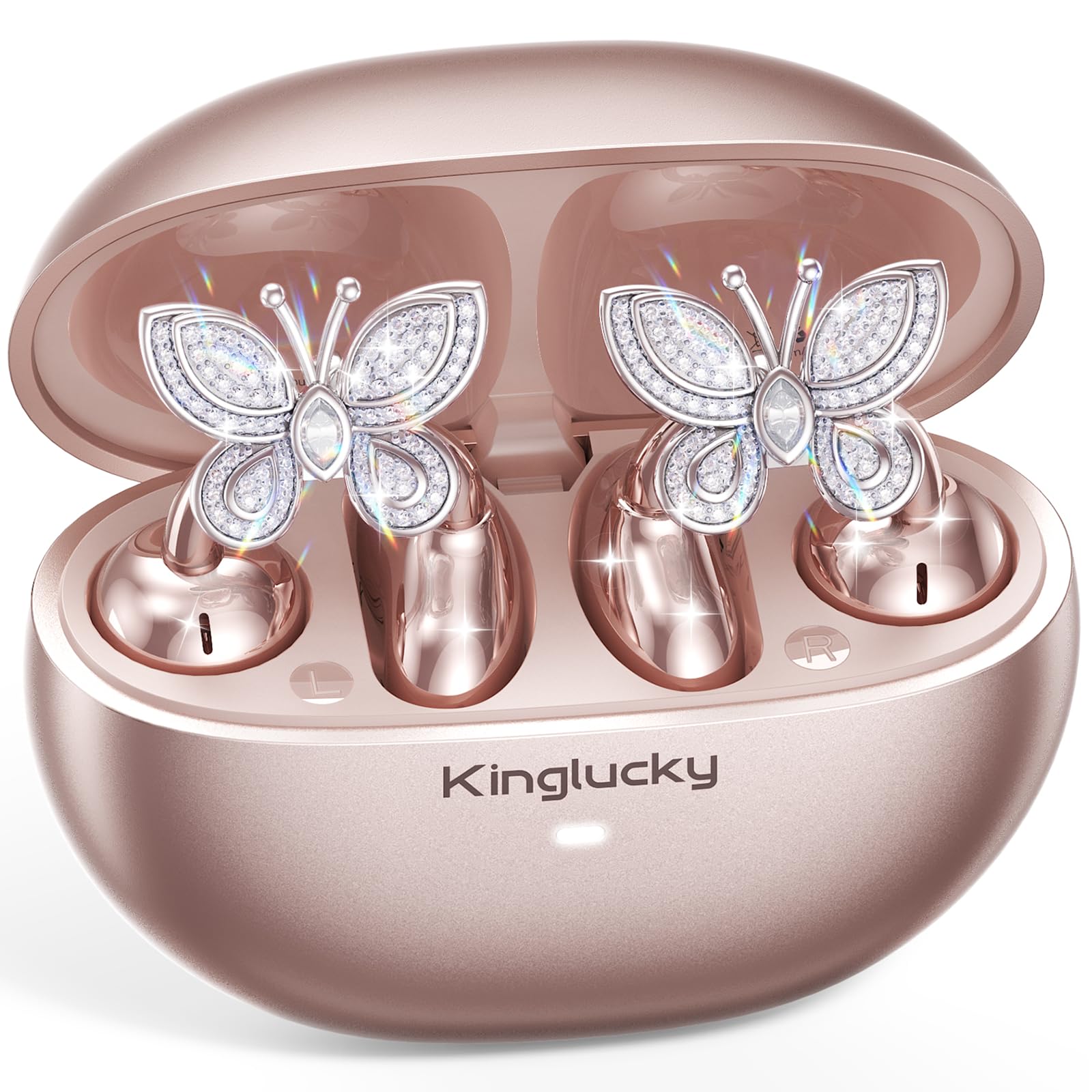
Image: Kinglucky ClipFree Open-Ear Headphones Model A8 in Rose Gold charging case.
2. Wat is in die boks
Your Kinglucky ClipFree Open-Ear Headphones package includes the following items:
- Kinglucky OpenEarRing A8 Headphones (Rose Gold)
- Laaikas
- Crystal Butterfly Ear Clip Charms (Detachable)
- USB-C-laaikabel
- Gebruikershandleiding (hierdie dokument)

Image: All components included in the Kinglucky ClipFree Open-Ear Headphones package.
3. Setup: First-Time Pairing
Follow these steps to pair your Kinglucky headphones with your device for the first time:
- Verwyder beskermende films: Carefully remove any protective films from the charging contacts on the earbuds.
- Place in Charging Case: Place both ear clips into the charging case and close the lid. Ensure they are seated correctly.
- Open Lid & Pair: Open the charging case lid. The earbuds will automatically enter pairing mode. On your device (smartphone, tablet, etc.), go to Bluetooth settings and select "Kinglucky Earbuds" from the list of available devices to connect.

Image: Visual guide for the initial pairing process of the earbuds.
4. Wearing the Earbuds & Attaching Charms
The Kinglucky ClipFree headphones are designed for an open-ear fit, resting gently on your ear without entering the ear canal. This ensures comfort and situational awareness.
4.1 Dra van die oordopjes
Gently place the ear clip over the helix (the outer rim) of your ear. Adjust for a secure and comfortable fit. The speaker component should be positioned near your ear canal for optimal sound delivery.

Image: The C-shaped design ensures a comfortable and stable fit on the ear.
4.2 Attaching the Butterfly Charms
To personalize your headphones, you can attach the included crystal butterfly charms:
- Gently Open Ear Cuff: Locate the small opening on the earbud's cuff.
- Clip onto Earphone Stem: Carefully clip the butterfly charm onto the stem of the earphone.
- Posisie: Place the earbud with the attached charm over your ear. Ensure the charm is securely fastened.
The silicone pad helps secure the charm. The charms are detachable and not stored in the charging case.

Image: Step-by-step guide to attaching the butterfly charms to your earbuds.
5. Bedryfsinstruksies
5.1 Raak kontroles
Die oordopjes beskik oor intuïtiewe aanraakkontroles vir die bestuur van jou klank en oproepe:
- Speel/pouse: Enkele tik op enige van die oordopjes.
- Beantwoord/beëindig oproep: Enkele tik op enige van die oordopjes.
- Volgende snit: Dubbeltik op die regteroorfone.
- Vorige snit: Dubbeltik op die linker oordopje.
- Volume op: Tik drie keer op die regteroorfone.
- Volume af: Tik drie keer op die linker oordopje.
- Aktiveer stemassistent: Druk lank (2 sekondes) op enige oordopjes.
5.2 Laai
Om jou oorfone en laaikas te laai:
- Oordopjes: Place the earbuds into the charging case. They will automatically begin charging. The indicator light on the case will show charging status.
- Laaikas: Connect the provided USB-C charging cable to the port on the back of the charging case and to a power source. The indicator light will show charging progress.
A full charge provides up to 50 hours of total playtime with the charging case.

Image: The charging case provides extended battery life for your earbuds.
5.3 Multipunt-paring
Your Kinglucky headphones support MultiPoint Pairing, allowing seamless connection to two devices simultaneously. This enables you to effortlessly switch between your phone, tablet, smartwatch, or computer without re-pairing.

Beeld: MultiPoint-paring maak gelyktydige verbinding met twee toestelle moontlik.
6. Kenmerke en voordele
- Jewelry-Inspired Design: Unique clip-on open-ear earbuds with detachable crystal butterfly earrings, offering both audio and style.
- Secure & Comfortable Open-Ear Fit: Weighing just 4.0g each, they rest gently on the ear without blocking the canal, providing a pressure-free and stable fit. Ideal for small ears, long hair, or glasses.
- Duidelike klankgehalte: Tuned for clear vocals and balanced sound, allowing you to enjoy podcasts, calls, and music without the fatigue of in-ear headphones.
- Bluetooth 6.0: Ensures fast pairing and a stable wireless connection.
- IP56 Waterbestandheid: Designed to withstand sweat and rain, making them suitable for daily commutes, office calls, and light workouts.
- Verlengde speeltyd: Up to 50 hours of listening time with the portable charging case.
- AI-Powered Call Clarity: Equipped with 2 beamforming microphones and advanced noise-canceling technology for crisp conversations.

Image: The unique design blends elegance with everyday comfort and functionality.
7. Spesifikasies
| Kenmerk | Detail |
|---|---|
| Model Naam | A8 |
| Handelsmerk | Kinglucky |
| Verbindingstegnologie | Draadloos (Bluetooth 6.0) |
| Oorplasing | Oop oor |
| Vormfaktor | Ware draadloos |
| Batterylewe | Tot 50 uur (met laaikas) |
| Waterweerstandvlak | IP56 (Sweat and Rain Resistant) |
| Beheer metode | Raak |
| Materiaal | Plastic, Metal, Rhinestones |
| Item gewig | 3.17 ons |
| Ingesluit komponente | USB-C-kabel |
8. Onderhoud
To ensure the longevity and optimal performance of your Kinglucky headphones, follow these maintenance guidelines:
- Skoonmaak: Gebruik 'n sagte, droë lap om die oorfone en laaikas skoon te maak. Vermy die gebruik van harde chemikalieë of skuurmiddels.
- Laai kontakte: Maak die laaikontakte op beide die oordopjes en binne-in die houer gereeld skoon met 'n droë wattestokkie om 'n goeie verbinding te verseker.
- Berging: Wanneer dit nie gebruik word nie, bêre die oordopjes in hul laaikassie om hulle teen stof en skade te beskerm.
- Waterblootstelling: While IP56 rated for sweat and rain, avoid submerging the headphones in water. Dry them thoroughly if they get wet.
- Charms: Handle the detachable charms with care to prevent damage to the crystals or clips.
9. Probleemoplossing
If you encounter any issues with your Kinglucky headphones, refer to the following common solutions:
- Oordopjes koppel nie:
- Maak seker dat albei oordopjes ten volle gelaai is.
- Skakel Bluetooth op jou toestel af en skakel dit dan weer aan.
- Forget "Kinglucky Earbuds" from your device's Bluetooth list and attempt to re-pair.
- Place earbuds back in the case, close the lid for 5 seconds, then open to reset pairing mode.
- Geen geluid of lae volume:
- Check the volume levels on both your device and the earbuds (using touch controls).
- Ensure earbuds are correctly seated on your ears.
- Confirm the earbuds are connected to the correct device.
- Een oordoppie werk nie:
- Plaas albei oordopjes terug in die laaikas, maak die deksel toe en maak dit dan weer oop.
- Maak seker dat beide oordopjes gelaai is.
- Probeer om die oordopjes terug te stel (verwys na die volledige handleiding vir spesifieke terugstelinstruksies indien beskikbaar).
- Laai kwessies:
- Maak seker dat die USB-C-kabel stewig aan beide die kas en die kragbron gekoppel is.
- Kontroleer of die laaikontakte op die oordopjes en omhulsel skoon en vry van puin is.
- Probeer 'n ander USB-C-kabel of kragadapter.
10. Waarborg en ondersteuning
Kinglucky is committed to providing quality products and customer satisfaction. Your Kinglucky ClipFree Open-Ear Headphones Model A8 come with the following:
- 18 maande waarborg: Scan the QR code on the product packaging to activate your warranty within 14 days of purchase.
- 180-dae waarborg: Enjoy peace of mind with our extended guarantee.
- Gratis vervanging: In case of eligible issues, a free replacement will be provided.
- 24/7 Fast Support: For any questions, concerns, or assistance, please contact Kinglucky customer support.
If you encounter issues such as a used item, no sound, inability to pair, or charging problems, please reach out to our support team for hassle-free assistance.

Image: Kinglucky customer care details for support and warranty.