
Inleiding
This manual provides comprehensive instructions for the OMAIC EN2Q36H replacement remote control, designed for Hisense Smart TVs. It covers essential information regarding setup, operation, and maintenance to ensure optimal performance and user experience. This remote offers a direct replacement solution without the need for complex programming.
Opstelling
The OMAIC EN2Q36H remote control is designed for immediate use with compatible Hisense Smart TVs. No programming or pairing is required.
Battery installasie
- Vind die batterykompartement aan die agterkant van die afstandbeheer.
- Skuif die batteryklep afwaarts of in die rigting wat deur die pyl aangedui word om dit oop te maak.
- Insert two AAA alkaline batteries (not included), ensuring the positive (+) and negative (-) terminals align correctly with the markings inside the compartment.
- Plaas die batteryklep terug deur dit terug in posisie te skuif totdat dit stewig klik.
Once batteries are installed, the remote is ready to operate your Hisense Smart TV.

Bedryfsinstruksies
This remote control utilizes infrared (IR) technology for communication with your Hisense Smart TV. Ensure a clear line of sight between the remote and the TV's IR receiver for optimal performance.
Sleutel kenmerke
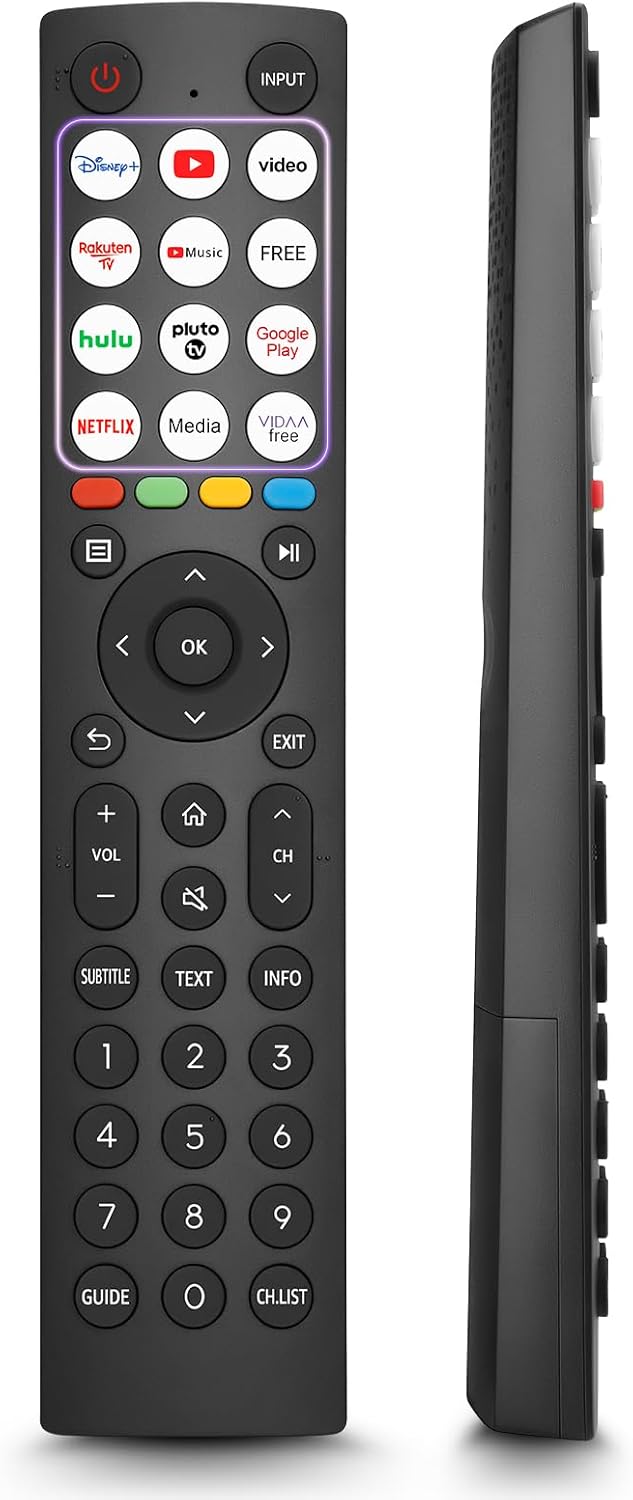
- 12 Shortcut Buttons: Quickly access popular streaming services and applications with dedicated buttons.
- Strong IR Signal: Provides a longer transmission distance and quick response without noticeable delay.
- Duursame konstruksie: Made from high-quality ABS and silicone materials for extended lifespan.

Knoppie Funksies
Familiarize yourself with the functions of each button on your OMAIC EN2Q36H remote control:
| Knoppie | Funksie |
|---|---|
| KRAG | Switches the TV on or into standby mode. |
| INSET | Kies invoerbronne (HDMI, AV, ens.). |
| APP Buttons | Quick access buttons for specific applications (e.g., Disney+, Netflix, YouTube). |
| SPYSKAART | Displays the Quick Setup menu. |
| MEDIA Beheer | Buttons for Play, Pause, Stop, Fast Forward, Rewind. |
| Navigation (Up/Down/Left/Right) | Navigates on-screen menus and adjusts system settings. |
| OK | Confirms selection in on-screen menus. |
| TERUG | Keer terug na die vorige menu. |
| EXIT | Verlaat die huidige spyskaart. |
| VOL +/- | Pas die volumevlak aan. |
| TUIS | Enters the Home screen. |
| DEM | Demp of herstel die TV-klank. |
| CH ^/v | Switches channels. |
| SUBTITLE | Activates or deactivates subtitle mode. |
| TEKS | Turns teletext function on and off. |
| INLIGTING | Displays current program information. |
| NUMBER Buttons (0-9) | Direct channel selection or number input. |
| GIDS | Displays the Electronic Programme Guide (DTV input). |
| CH.LYS | Displays the Channel List on the screen. |

Compatible Hisense TV Models
The OMAIC EN2Q36H replacement remote control is compatible with the following Hisense VIDAA 4K HDTV Smart TV series:
- 32A4K, 40A4K, 43A4K
- 32A5KQ, 40A5KQ
- 43A6K, 50A6K, 55A6K, 58A6K, 65A6K, 70A6K, 75A6K, 85A6K
- 55U6KQ, 65U6KQ
- 43A7KQ, 50A7KQ, 55A7KQ, 65A7KQ, 75A7KQ
- 43E7KQ, 50E7KQ, 55E7KQ, 65E7KQ, 75E7KQ
Onderhoud
Om die lang lewensduur en behoorlike werking van u afstandbeheerder te verseker, volg hierdie onderhoudsriglyne:
- Skoonmaak: Use a soft, dry cloth to clean the remote. Avoid using liquid cleaners or abrasive materials, as they may damage the surface or internal components.
- Battery vervanging: Replace batteries when the remote's response becomes sluggish or stops working. Always replace both batteries at the same time with new ones of the same type (AAA alkaline).
- Berging: Bêre die afstandbeheerder op 'n koel, droë plek weg van direkte sonlig, uiterste temperature en hoë humiditeit.
- Vermy druppels: Beskerm die afstandbeheerder teen fisiese impak, aangesien val die interne stroombane kan beskadig.
Probleemoplossing
Indien u probleme met u afstandbeheer ondervind, raadpleeg die volgende stappe vir probleemoplossing:
| Probleem | Moontlike oorsaak | Oplossing |
|---|---|---|
| Remote reageer nie | Dooie of verkeerd geplaasde batterye. | Vervang batterye met nuwe AAA alkaliese batterye en maak seker dat die polariteit korrek is. |
| Remote reageer nie | Obstruksie tussen afstandbeheerder en TV. | Ensure a clear line of sight to the TV's IR receiver. Remove any objects blocking the path. |
| Remote reageer nie | Die afstandbeheerder is te ver van die TV af. | Move closer to the TV. The remote has an extended range, but extreme distances may affect performance. |
| Knoppies is klewerig of reageer nie | Vuilgoed of puin onder knoppies. | Maak die omgewing rondom die knoppies versigtig skoon met 'n sagte, droë lap. Vermy vloeistowwe. |
| Spesifieke funksies werk nie | TV model incompatibility (rare). | Verify your Hisense TV model is listed in the 'Compatible Hisense TV Models' section. |
Spesifikasies
| Kenmerk | Detail |
|---|---|
| Model Naam | EN2Q36H |
| Handelsmerk | OMAIC |
| Versoenbare toestelle | Hisense Slim-TV's |
| Verbindingstegnologie | Infrarooi (IR) |
| Aantal knoppies | 48 |
| Tipe beheer | Knoppie beheer |
| Spesiale kenmerke | Universal, Comfortable |
| Kleur | Swart |
| Battery Beskrywing | AAA (Alkaline) |
| Supported Devices (Max) | 1 |
| Produk Afmetings (Ongeveer) | 34.7 x 24.7 x 2.2 cm |
| Produk Gewig (Ongeveer) | 80 gram |

Waarborg en Ondersteuning
OMAIC is committed to the quality and compatibility of its replacement remote controls. We provide professional after-sales support to ensure customer satisfaction.
If you have any questions or concerns regarding your OMAIC EN2Q36H remote control or your order, please contact us directly. Our support team aims to respond to inquiries within 12 working hours.