
1. Inleiding
The TOOLTOP O9 is a versatile 4-in-1 handheld device integrating a dual-channel oscilloscope, a digital multimeter, and a function signal generator. Designed for professionals and enthusiasts, it offers a 50MHz bandwidth, 208MS/s sampling rate, and a 3.98-inch high-definition TFT display. This manual provides essential information for the safe and effective operation of your device.
2. Veiligheidsinligting
Before using the device, please read and understand all safety instructions. Failure to follow these instructions may result in electric shock, fire, or damage to the device or other equipment.
- Maak altyd seker dat die toestel in 'n goeie werkende toestand is voor gebruik.
- Do not exceed the maximum input ratings specified for each function.
- Use only the probes and accessories provided or approved by TOOLTOP.
- Avoid using the device in wet environments or near explosive gases.
- Disconnect power to the circuit under test before making connections.
- Refer to the CAT II 400V rating for safe measurement limits.
3. Pakketinhoud
Verifieer dat alle items in jou pakket teenwoordig is:
- TOOLTOP O9 Main Unit
- Oscilloscope Probes (x2)
- Multimeter Toetskabels
- USB-laaikabel
- Gebruikershandleiding
- EVA Dratas
4. Produk verbyview
The TOOLTOP O9 features a robust design with a 3.98-inch color display and intuitive controls for easy operation across its multiple functions.
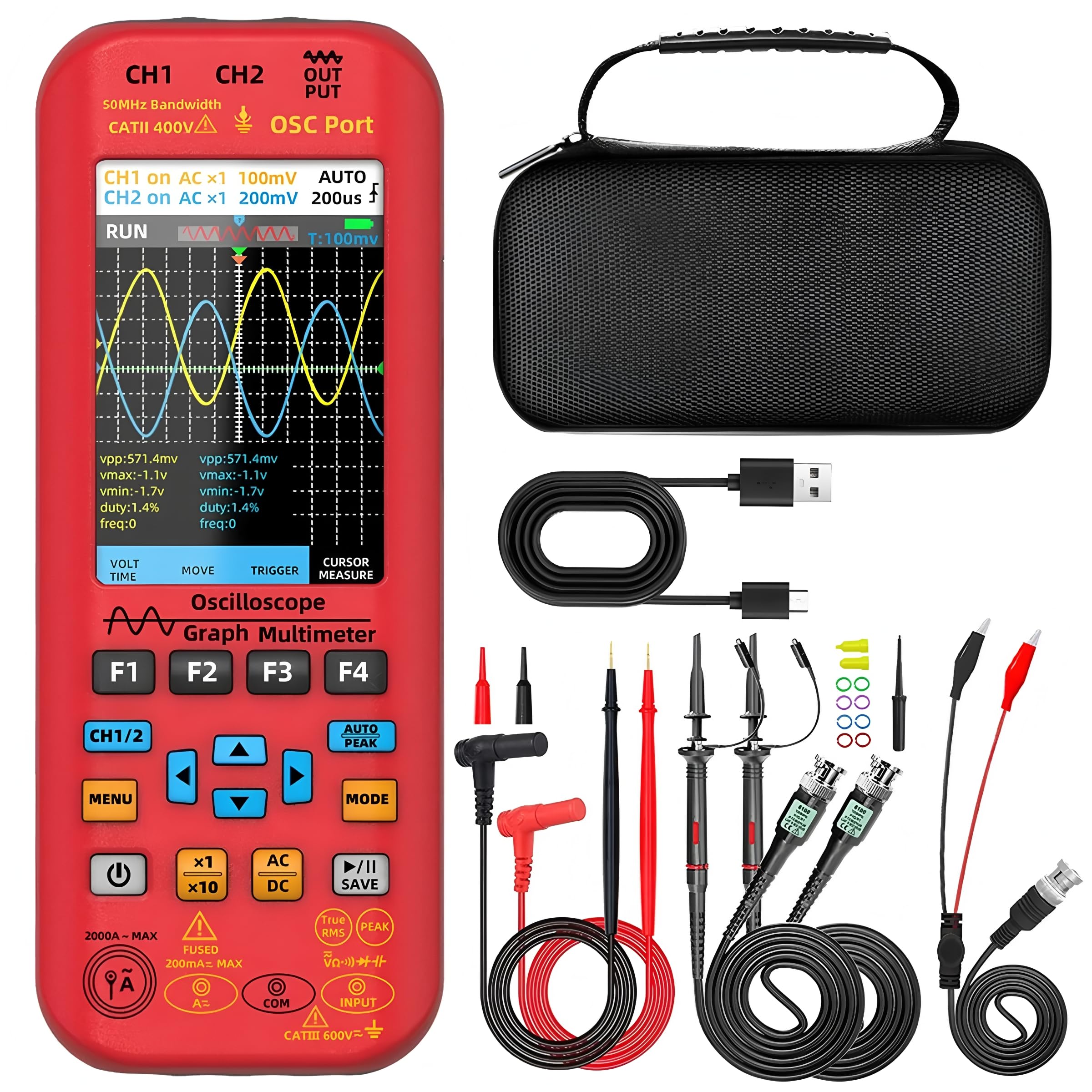
Figuur 4.1: Voorkant view of the TOOLTOP O9 device, highlighting the display, control buttons, and input ports. Key features like 50MHz bandwidth, 480x320 resolution, and data saving are indicated.

Figure 4.2: Close-up of the TOOLTOP O9 display in oscilloscope mode, showing dual-channel waveforms and measurement parameters. Features like LCD color screen, automatic shutdown, and data saving are emphasized.
5. Opstelling
5.1. Laai die battery
The device is equipped with a built-in 5000mAh rechargeable lithium battery. Connect the provided USB charging cable to the device's charging port and a suitable USB power adapter (not included). The charging indicator will show the charging status. A full charge provides approximately 10 hours of operation in oscilloscope mode and 24 hours in multimeter mode.
5.2. Skakel aan/af
Press and hold the power button (usually marked with a circle and a vertical line) to turn the device on or off. The device will perform a self-test upon startup.
5.3. Connecting Probes/Test Leads
Ensure the device is off before connecting any probes or test leads. Connect the oscilloscope probes to the CH1 and CH2 BNC connectors for waveform measurements. For multimeter functions, connect the test leads to the appropriate input jacks (VΩmA, COM, etc.) as indicated on the device.
6. Bedryfsinstruksies
6.1. Ossilloskoopmodus
To enter Oscilloscope mode, press the 'MODE' button until the oscilloscope interface is displayed. The device supports dual-channel input with a 50MHz bandwidth.
- Voltage Scale Adjustment: Use the 'VOLT' button and arrow keys to adjust the vertical sensitivity (Volts/Div) for each channel.
- Time Base Adjustment: Use the 'TIME' button and arrow keys to adjust the horizontal time base (Seconds/Div).
- Snellerinstellings: Press the 'TRIGGER' button to access trigger settings, including trigger level, edge type, and mode.
- Outomatiese meting: Press 'AUTO PEAK' for automatic waveform scaling and display.
- Wysermeting: Use the 'CURSOR MEASURE' button to enable cursors for precise voltage and time measurements.

Figure 6.1: The TOOLTOP O9 displaying dual-channel waveforms, demonstrating its 50MHz bandwidth capability. The image shows the device connected to another oscilloscope for comparison, highlighting its dual-channel display feature.
6.2. Digital Multimeter Mode
Press the 'MODE' button to switch to Digital Multimeter mode. The device offers 6000 counts with True-RMS measurement capabilities.
- Voltage Meting (WS/GS): Connect test leads to VΩmA and COM. Select AC or DC voltage modus.
- Stroommeting (WS/GS): Connect test leads to the appropriate current input (e.g., 20A MAX) and COM. Select AC or DC current mode. The device supports flexible current clamp up to 6000A (clamp nie ingesluit).
- Weerstandmeting: Connect test leads to VΩmA and COM. Select resistance mode.
- Kapasitansiemeting: Connect test leads to VΩmA and COM. Select capacitance mode.
- Diode Test and Continuity: Connect test leads to VΩmA and COM. Select diode or continuity mode.

Figure 6.2: The TOOLTOP O9 in multimeter mode, accurately measuring AC voltage within an electrical panel. This demonstrates its high precision and fast measurement capabilities for daily electrical tasks.
6.3. Function Signal Generator Mode
The built-in DDS function signal generator can output 7 types of function signals with a maximum output of 2MHz. Press the 'MODE' button to cycle to the signal generator interface.
- Golfvormkeuse: Use the menu to select desired waveform (e.g., Sine, Square, Triangle).
- Frekwensie aanpassing: Adjust the output frequency in 1Hz steps.
- Amplitude and Duty Cycle: Pas die amplitude and duty cycle as required for specific applications.
6.4. Databerging en -uitvoer
The device supports saving measurement data and waveforms. Saved data can be exported to a flash drive or computer for further analysis.

Figure 6.3: The TOOLTOP O9 connected to a laptop via USB, demonstrating its high-speed transmission for waveform saving and viewing. This allows for convenient secondary analysis of collected signals on a computer.
7. Onderhoud
- Skoonmaak: Gebruik 'n sagte, damp lap om die toestel skoon te maak. Moenie skuurmiddels of oplosmiddels gebruik nie.
- Batterysorg: For optimal battery life, avoid fully discharging the battery frequently. Charge the device regularly, especially if stored for extended periods.
- Berging: Store the device in its carrying case in a cool, dry place away from direct sunlight and extreme temperatures.
- Sonde-inspeksie: Regularly inspect probes and test leads for any signs of damage. Replace damaged accessories immediately.
8. Probleemoplossing
| Probleem | Moontlike oorsaak | Oplossing |
|---|---|---|
| Toestel skakel nie aan nie | Low battery; Device fault | Charge the battery; Contact support if issue persists |
| No waveform displayed in oscilloscope mode | Probe not connected; Incorrect trigger settings; Signal too small/large | Check probe connection; Adjust trigger level/mode; Adjust voltage scale (Volts/Div) |
| Multimeter readings are inaccurate | Incorrect function selected; Damaged test leads; External interference | Verify mode selection; Inspect/replace test leads; Move away from strong electromagnetic fields |
| Cannot export data | USB connection issue; Incompatible flash drive | Ensure secure USB connection; Try a different flash drive; Check device settings for export options |
9. Spesifikasies
| Kenmerk | Spesifikasie |
|---|---|
| Modelnommer | TT-BSIDE-O9 |
| Vertoon | 3.98 inch TFT, 480*320px resolution |
| Ossilloskoop bandwydte | 50 MHz |
| Sampling Koers | 208 MS/s |
| Kanale | Dubbele kanaal |
| Max Invoer Voltage | ±400V (peak) |
| Multimeter Digits | 6000 Counts, True-RMS |
| Multimeter funksies | AC/DC Voltage, Current, Temperature, Capacitance, Resistance, Diode, NVC, Continuity |
| Seingenerator-uitset | 7 types of function signals, max 2MHz, 1Hz step |
| Battery | 5000mAh rechargeable lithium battery (18650*2) |
| Batterylewe | Approx. 10H (Oscilloscope), 24H (Multimeter) |
| Afmetings | 7.87 x 5.91 x 3.94 duim |
| Gewig | 1 kilogram (2.2 pond) |
| Sertifiserings | CE, RoHS |
10. Waarborg en Ondersteuning
The TOOLTOP O9 device comes with a manufacturer's warranty. Please refer to the warranty card included in your package for specific terms and conditions. For technical support, troubleshooting assistance, or to inquire about spare parts, please contact TOOLTOP customer service through the official website or your purchase platform. EU spare part availability duration is 1 year.