
GTRACING 114vc07
GTRACING Speeltafel Model 114vc07 Instruksiehandleiding
Omvattende gids vir montering, werking en onderhoud.
1. Inleiding
Thank you for choosing the GTRACING Gaming Desk. This manual provides essential information for the safe and efficient assembly, operation, and maintenance of your new desk. Please read these instructions carefully before beginning assembly and retain them for future reference.
2. Belangrike veiligheidsinligting
Always assemble the desk according to the provided instructions. Be cautious when moving the desk, as it can be heavy and may pose a risk of injury if not handled properly.
- Maak seker dat alle verbindings veilig is voor gebruik.
- Do not overload the desk or monitor stand beyond the recommended weight capacity (300 lbs).
- Keep liquids away from electrical components (power outlets, USB ports, LED lights).
- Children should not climb on or play with the desk.
- Gooi verpakkingsmateriaal verantwoordelik weg.
3. Pakketinhoud
Verify that all components are present before assembly. If any parts are missing or damaged, please contact GTRACING customer support.
- Desk components (desktop panels, legs, monitor stand parts)
- Integrated power strip (2 AC outlets, 2 USB ports)
- LED lig strook
- Extended mouse pad
- Headphone hooks (x2)
- Monteringshardeware (skroewe, boute, ens.)
- Monteer gereedskap
- Instruksie handleiding
4. Monteer-instruksies
Assembly is required. Please follow the detailed step-by-step instructions provided in the separate assembly guide included with your package. All necessary tools are included.
- Pak al die komponente uit en verifieer dit teen die lys van die pakketinhoud.
- Identifiseer alle hardeware en gereedskap.
- Assemble the desk frame and legs.
- Attach the desktop panels.
- Install the monitor stand.
- Mount the integrated power strip.
- Attach the LED light strip.
- Install the headphone hooks.
- Place the extended mouse pad.

Image: All components of the GTRACING Gaming Desk laid out, ready for assembly. This includes the desktop pieces, legs, monitor stand, and various hardware.

Image: A fully assembled GTRACING Gaming Desk, showcasing the monitor stand, LED lighting, and carbon fiber texture.
5. Bedryfsinstruksies
5.1. LED-beligtingstelsel
The GTRACING Gaming Desk features an integrated LED light strip to enhance your gaming or work environment. The LED lights offer 16 color changes and 6 dynamic modes.
- Connect the LED light strip to the designated power source.
- Use the included remote control to power on/off, change colors, and select dynamic modes.
- Ensure the remote control has a working battery and is pointed towards the LED receiver for optimal functionality.
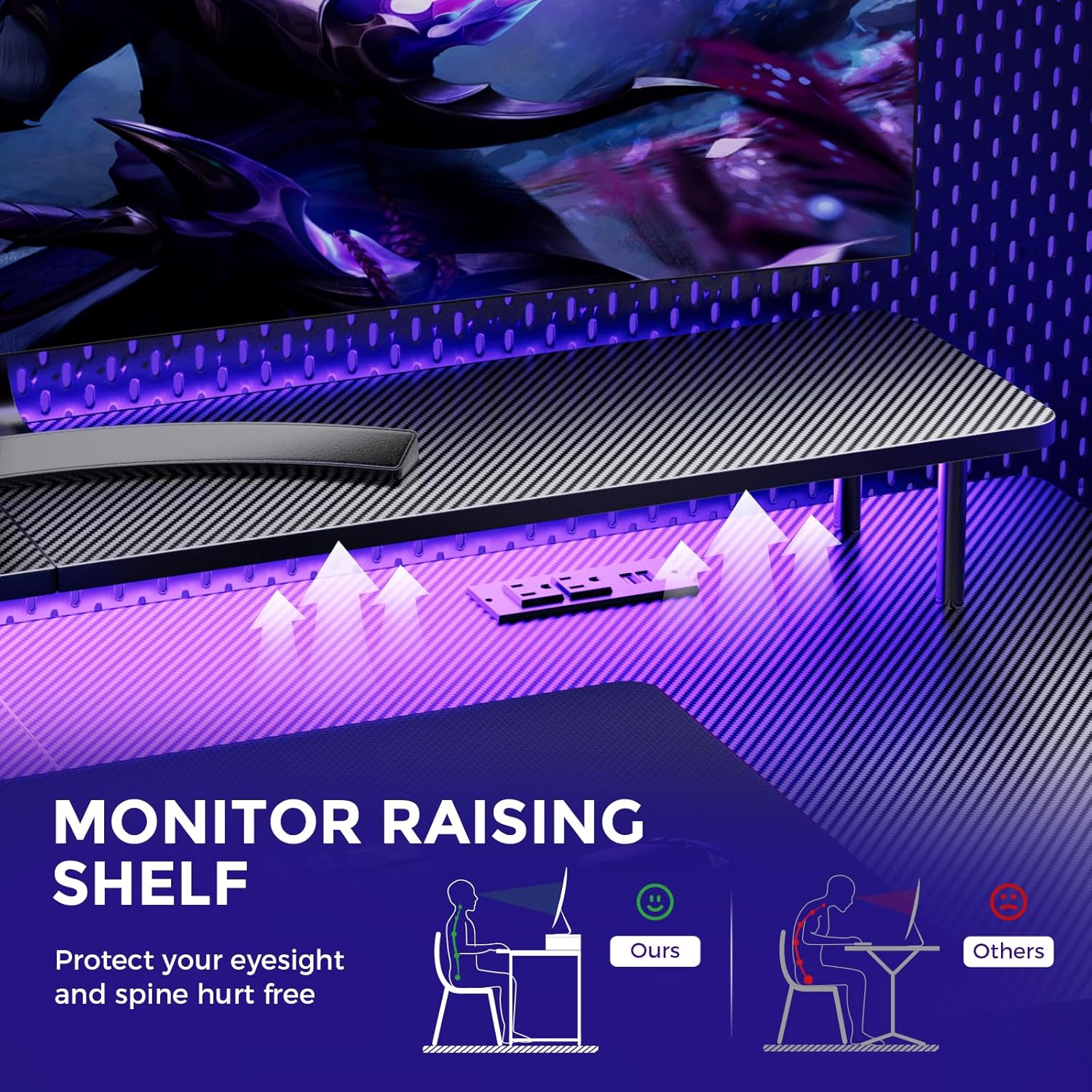
Image: A hand holding a remote control, demonstrating the control over the RGB LED light strip installed beneath the monitor stand of the desk.
Video: An official product video demonstrating the GTRACING 55 Inch Gaming Desk with LED Lights, showcasing its features and aesthetic appeal in a gaming setup.
5.2. Integrated Power Outlets & USB Ports
The desk includes a built-in power strip with 2 AC outlets (120V/12A) and 2 USB charging ports (5V/2A) for convenient device charging and power supply.
- Steek die lessenaar se hoofkragkabel in 'n muuraansluiting.
- Connect your devices to the AC outlets or USB ports as needed.
- Avoid exceeding the maximum power rating of the outlets.

Beeld: 'n Nabyskoot view of the recessed power strip on the desk, showing two AC outlets and two USB charging ports in use, charging a phone and earbuds.
5.3. Ergonomiese monitorstaander
The raised monitor stand positions your screen at eye level, promoting better posture and reducing neck strain during extended use. It also provides additional storage space.

Image: A diagram comparing correct ergonomic posture achieved with the monitor stand to incorrect posture without it, highlighting benefits for eyesight and spine.
6. Onderhoud
- Skoonmaak: Wipe the carbon fiber surface with a soft, damp lap. Vermy harde chemikalieë wat die afwerking kan beskadig.
- Hardeware: Kontroleer gereeld alle skroewe en boute om te verseker dat hulle styf bly. Draai vas indien nodig.
- Elektriese komponente: Keep the power outlets and USB ports free from dust and debris. Do not attempt to repair electrical components yourself.
7. Probleemoplossing
7.1. LED Lights Not Working or Remote Not Responding
- Gaan kragverbinding na: Ensure the LED light strip is securely plugged into the power source and the desk's main power cord is connected to a live wall outlet.
- Afstandsbattery: Verify that the remote control has a fresh battery and is inserted correctly.
- Lyn van sig: Ensure there is a clear line of sight between the remote control and the LED receiver. Obstructions can block the signal.
- Handleiding: If the remote is unresponsive, check if there's a manual button on the LED controller itself to cycle through modes or power on/off.
7.2. Lessenaaronstabiliteit
- Draai hardeware vas: Re-check and tighten all assembly screws and bolts.
- Vlak oppervlak: Ensure the desk is placed on a flat, level surface.
8. Spesifikasies
| Kenmerk | Detail |
|---|---|
| Handelsmerk | GTRACING |
| Modelnommer | 114vc07 |
| Produk afmetings | 24" D x 55" B x 30" H |
| Kleur | Koolstof swart |
| Top materiaal tipe | Koolstofvesel |
| Basis materiaal | Vlekvrye staal |
| Maksimum gewig aanbeveling | 300 pond |
| Geïntegreerde kragstrook | 2 WS-aansluitingspunte (120V/12A), 2 USB-poorte (5V/2A) |
| Spesiale kenmerke | Built-In USB Outlet, Ergonomic, Monitor Stand, LED Lights, Headphone Hook |
| Vergadering benodig | Ja (Gereedskap Ingesluit) |

Image: A detailed diagram illustrating the dimensions of the GTRACING Gaming Desk, including the main desktop and the monitor stand.
9. Waarborg en Kliëntediens
GTRACING is committed to providing high-quality products and customer satisfaction. For any questions, concerns, or missing parts, please contact our customer service team.
- Free Replacement/Refund: Binne 30 dae na aankoop.
- Free Replacement/Repair: Within 1 year of purchase.
- Kontakinligting:
- E-pos: info@gtracing.com
- Phone: 1-888-660-5669 (9:00-5:30 PST Mon-Fri)
- Webwebwerf: www.gtracing.com

Image: GTRACING customer service representatives ready to assist with product inquiries and support.
Verwante Dokumente - 114vc07
 |
Wrought Studio EHCM1441 L-vormige rekenaarlessenaar-monteringsinstruksies Omvattende monteerinstruksies vir die Wrought Studio EHCM1441 L-vormige rekenaarlessenaar. Hierdie gids verskaf 'n gedetailleerde onderdelelys, hardeware-inventaris en stap-vir-stap instruksies om jou te help om jou nuwe tuiskantoorlessenaar met laaie, LED-ligte, kragaansluiting en monitorstaander te monteer. |
 |
Wrought Studio Nellie 59" Computer Desk User Manual User manual for the Wrought Studio Nellie 59" computer desk, detailing assembly, parts, safety, and customer support for optimal setup and use. |
 |
HDIR1009 L-Shaped Gaming Desk Installation and Assembly Guide Step-by-step installation and assembly instructions for the HDIR1009 51-inch L-shaped gaming desk with monitor stand and LED lights. Includes parts list, hardware guide, and assembly steps for home office or gaming setup. |
 |
MOTPK Gaming Desk User Manual & Assembly Guide Comprehensive user manual and assembly guide for the MOTPK Gaming Desk. Includes package contents, precautions, parts list, step-by-step assembly instructions, and troubleshooting tips. |
 |
EUREKA ERGONOMIC 60" L-Shaped Electric Standing Desk Assembly and Operation Manual Comprehensive guide for assembling and operating the EUREKA ERGONOMIC 60-inch L-Shaped Electric Standing Desk. Includes parts list, hardware, step-by-step assembly instructions, operating procedures, and troubleshooting. |
 |
Jojoka L-vormige speeltafel-monteringsinstruksies Omvattende monteringsgids vir die Jojoka L-vormige speeltafel, met stap-vir-stap instruksies, 'n gedetailleerde onderdelelys en belangrike veiligheidsinligting vir tuiskantoor- en speelopstellings. |
Ask a question about this manual
Ask about setup, troubleshooting, compatibility, parts, safety, or missing instructions. Manuals+ will review the question and use this page’s manual context to help answer it.