
1. oorview
The VAIO SX-R Laptop is a high-performance portable computer designed for productivity and creative tasks. It features an Intel Core Ultra 7 processor, a vibrant 14-inch WQXGA touch display, ample geheue en vinnige berging, alles loop op Windows 11 Pro.

Figure 1: VAIO SX-R Laptop, open view.
2. Produkkenmerke
- Intel Core Ultra 7 Processor: Equipped with 16 cores and AI-enhanced performance for speed and intelligent task management.
- 14" WQXGA Touch Display (2560x1600): High-resolution screen with wide color gamut and touch capability.
- 32 GB LPDDR5 RAM: Provides superior multitasking capabilities with instant responsiveness.
- 1TB PCIe NVMe SSD: Offers massive storage with ultra-fast read/write speeds.
- Windows 11 Pro: Includes enterprise-grade security and productivity features.
- IR Camera & Fingerprint Reader: Enhanced security and convenient login options.
- Koolstofvesel-onderstel: Liggewig en duursame konstruksie.
- Water Resistant Keyboard: Designed to withstand accidental spills.

Figure 2: Key features of the VAIO SX-R Laptop.
3. Fisiese Oorview
3.1 Poorte en verbindings
The VAIO SX-R Laptop is equipped with a variety of ports for connectivity. Refer to the diagram below for port locations and types.
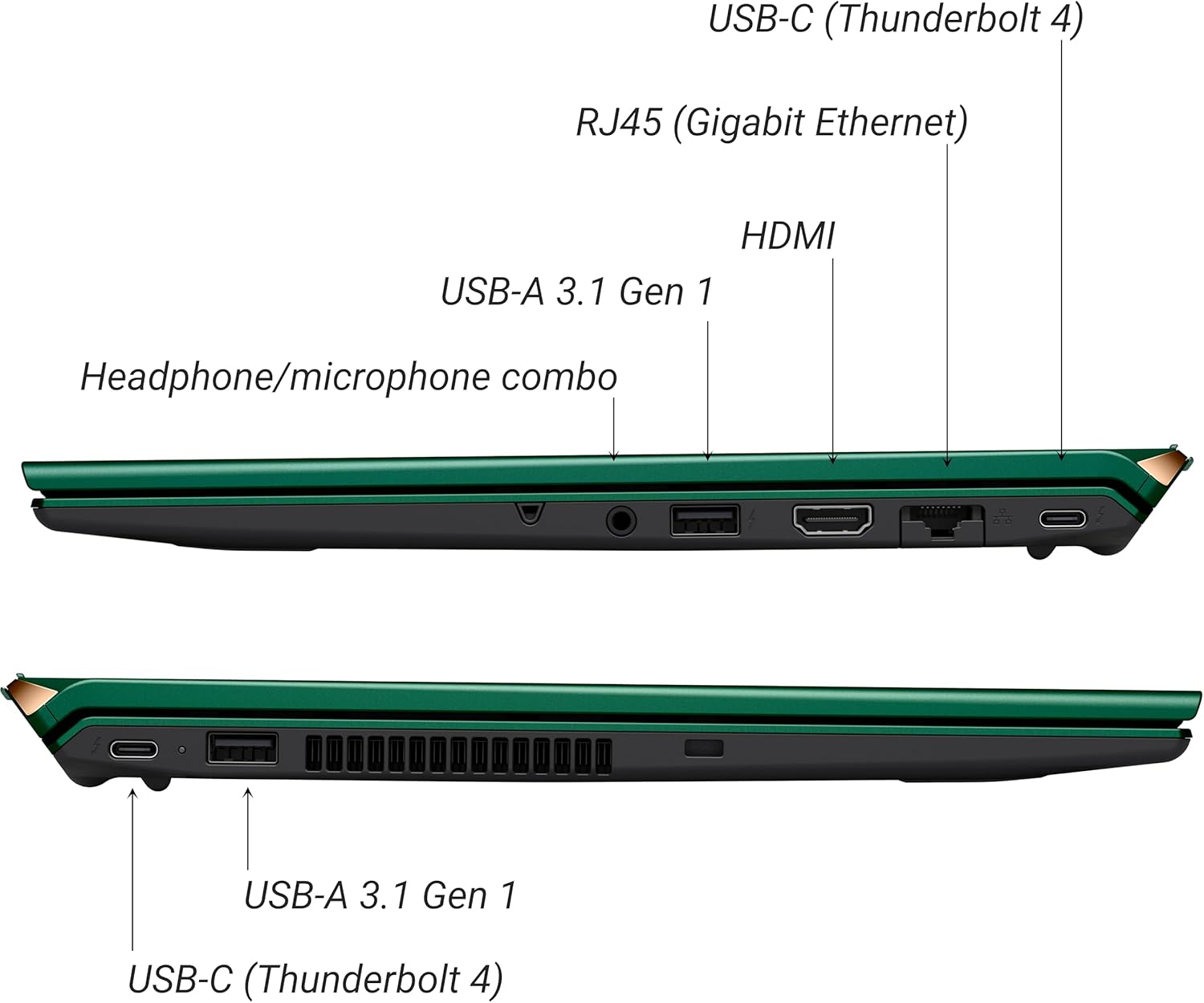
Figuur 3: Kant view of VAIO SX-R Laptop ports.
- USB-C (Thunderbolt 4): Hoëspoed-data-oordrag, video-uitset en kraglewering.
- RJ45 (Gigabit Ethernet): Vir bedrade netwerkverbindings.
- HDMI: Vir die koppeling aan eksterne skerms.
- USB-A 3.1 Gen 1: Vir die koppeling van USB-toestelle.
- Koptelefoon/Mikrofoon-kombinasie-aansluiting: Vir klankinvoer en -uitvoer.
3.2 Sleutelbord en raakvlak
The laptop features a full-sized keyboard and a responsive touchpad for navigation and input.

Figuur 4: Sleutelbord- en raakvlakuitleg.
4. Opstelling
4.1 Aanvanklike aanskakeling
- Unpack the VAIO SX-R laptop and all accessories.
- Koppel die kragadapter aan die skootrekenaar se laaipoort en dan aan 'n kragaansluiting.
- Open the laptop lid. The system may power on automatically or you may need to press the power button located on the top right of the keyboard.
- Volg die instruksies op die skerm om die Windows 11 Pro-opstelling te voltooi, insluitend taal, streek, netwerkverbinding en die skep van gebruikersrekeninge.
4.2 Koppel aan 'n netwerk
- Wi-Fi: During initial setup or via Windows settings, select your preferred Wi-Fi network and enter the password. The VAIO SX-R supports Wi-Fi 7 for fast and stable wireless connectivity.
- Bedraad (Ethernet): Connect an Ethernet cable from your router or modem to the RJ45 port on the laptop.
5. Bedryfsinstruksies
5.1 Power On/Off and Sleep
- Krag aan: Maak die deksel oop of druk die aan/uit-knoppie.
- Sluit af: Klik die Start-knoppie, dan Aan/Aan > Skakel af.
- Slaap: Maak die deksel toe of klik die Start-knoppie, dan Aan/Uit > Slaap.
5.2 Using the Touch Display
The 14-inch WQXGA display supports touch input. You can interact with the screen using gestures similar to a tablet or smartphone.
5.3 IR Camera and Fingerprint Reader
For enhanced security and convenience, the laptop includes an IR camera for Windows Hello face recognition and a fingerprint reader.
- Windows Hello Face Recognition: Configure this feature in Windows Settings > Accounts > Sign-in options. The IR camera will recognize your face to unlock the device.
- Vingerafdrukleser: Set up your fingerprint in Windows Settings > Accounts > Sign-in options for quick and secure access.
6. Onderhoud
6.1 Algemene sorg
- Hou die skootrekenaar in 'n skoon, droë omgewing.
- Vermy om die skootrekenaar aan uiterste temperature of direkte sonlig bloot te stel.
- Moenie swaar voorwerpe op die skootrekenaar plaas nie.
6.2 Skoonmaak
- Gebruik 'n sagte, pluisvrye lap om die skerm en die buitekant skoon te maak.
- Vir hardnekkige vlekke, liggies veeampMaak die lap skoon met water of 'n skermskoonmaakoplossing.
- Do not spray cleaners directly onto the laptop.
6.3 Batterysorg
- Om die batterylewe te verleng, vermy om die battery gereeld heeltemal te ontlaai.
- Bêre die skootrekenaar met 'n gedeeltelike lading (ongeveer 50%) indien dit nie vir lang tye gebruik word nie.
7. Probleemoplossing
7.1 Kragprobleme
- Skootrekenaar skakel nie aan nie: Maak seker dat die kragadapter stewig gekoppel is en dat die aansluiting funksioneel is. Probeer 'n ander aansluiting.
- Battery laai nie: Kontroleer die kragadapter en kabel vir skade. Maak seker dat die laaipoort skoon is.
7.2 Vertoonprobleme
- Geen vertoon nie: Koppel 'n eksterne monitor om te kyk of die probleem met die skootrekenaar se interne skerm is.
- Raakskerm reageer nie: Restart the laptop. Ensure display drivers are up to date.
7.3 Konnektiwiteitsprobleme
- Geen Wi-Fi-verbinding nie: Check if Wi-Fi is enabled in Windows settings. Restart your router. Update wireless drivers.
- Bluetooth werk nie: Ensure Bluetooth is enabled and your device is discoverable.
8. Spesifikasies
| Kenmerk | Detail |
|---|---|
| Model Naam | VAIO SX-R (VJS4R1X0811G) |
| Verwerker | Intel Core Ultra 7 (16-Core, AI-Boosted) |
| Bedryfstelsel | Windows 11 Pro |
| Vertoon | 14 Inches WQXGA Touch (2560x1600) |
| RAM | 32 GB LPDDR5 |
| Berging | 1TB PCIe NVMe SSD |
| Grafika | Integrated Intel Arc Graphics |
| Draadlose konneksie | 802.11ax (Wi-Fi 7), Bluetooth |
| Hawens | USB-C (Thunderbolt 4) x2, USB-A 3.1 Gen 1 x3, HDMI x1, RJ45 (Gigabit Ethernet) x1, Headphone/microphone combo x1 |
| Kamera | IR Camera (Windows Hello compatible) |
| Sekuriteitskenmerke | Fingerprint Reader, IR Camera |
| Batterylewe | Tot 10 uur (gemiddeld) |
| Gewig | 3.1 pond |
| Afmetings (LxBxH) | 14.2 x 15 x 3.3 duim |
9. Durability and Testing
VAIO laptops are engineered with Japanese precision and undergo rigorous quality control to ensure reliability and performance. This includes various tests to withstand daily use.
9.1 Manufacturing and Quality Assurance
Video 1: VAIO Manufacturing and Durability Testing. This video demonstrates the quality control processes and durability tests performed on VAIO laptops, including keystroke testing, dust testing, LCD screen pressure testing, and opening/closure testing.
9.2 Key Durability Features
- Water Resistant Keyboard: The keyboard is designed to resist damage from accidental liquid spills.
- Skermduursaamheid: The display undergoes pressure testing to ensure resilience.
- Drop Toets: The laptop is tested to withstand drops from up to 3 feet.

Figure 5: Water resistant keyboard testing.

Figure 6: Screen durability test in progress.

Figure 7: 3-foot drop test for VAIO laptops.
10. Waarborg en Ondersteuning
Your VAIO SX-R Laptop comes with a standard manufacturer's warranty. For specific warranty terms and conditions, please refer to the documentation included with your product or visit the official VAIO support webwebwerf.
For technical support, troubleshooting assistance, or service requests, please contact VAIO customer support. Information regarding support channels can be found on the VAIO webwebwerf of in jou produk se verpakking.
Protection plans are available for purchase to extend coverage beyond the standard warranty. Options include 2-Year and 4-Year Protection Plans, as well as a Complete Protect + Norton 360 monthly plan.