
1. Inleiding
Thank you for choosing the Generic JP901 Vibration Massage Office Chair. This manual provides essential information for the safe assembly, operation, and maintenance of your new chair. Please read this manual thoroughly before use and retain it for future reference.

Image 1.1: The Generic JP901 Vibration Massage Office Chair in a modern office environment.
2. Veiligheidsinstruksies
Om veilige werking te verseker en beserings of skade te voorkom, volg asseblief die volgende veiligheidsriglyne:
- Moenie op die stoel staan nie.
- Moenie die stoel gebruik as enige onderdele beskadig of vermis is nie.
- Hou kinders en troeteldiere weg van die stoel tydens montering.
- Maak seker dat alle skroewe en boute stewig vasgedraai is voor gebruik.
- Do not expose the chair to direct sunlight or extreme temperatures.
- Unplug the massage and heat unit when not in use or before cleaning.
- Consult a physician before using the massage and heat functions if you have any medical conditions.
3. Pakketinhoud
Verifieer asseblief dat alle komponente teenwoordig is voordat u met montering begin. Indien enige onderdele ontbreek of beskadig is, kontak kliëntediens.
- rugleuning
- Seat Cushion with Footrest
- Armleunings (2)
- Gas-hyssilinder
- Basis met wiele
- Meganismeplaat
- Remote Control for Massage/Heat
- Hardewarepakket (skroewe, wassers, inbussleutel)
4. Monteer-instruksies
Follow these steps to assemble your office chair. It is recommended to assemble the chair on a soft, clean surface to prevent damage.
- Heg wiele aan die basis vas: Insert the five wheels into the holes on the chair base until they click into place.
- Voeg gashyser in: Plaas die gassilinder in die middelste gat van die gemonteerde basis.
- Heg Meganismeplaat aan: Maak die meganismeplaat aan die onderkant van die sitkussing vas met die meegeleverde skroewe. Maak seker dat die voorkant van die meganisme na die voorkant van die sitplek wys.
- Koppel sitplek aan gashef: Plaas die gemonteerde sitplek versigtig op die gassilinder.
- Heg armleunings aan: Secure the armrests to both the seat cushion and the backrest using the designated screws. Do not overtighten initially.
- Heg rugleuning aan: Connect the backrest to the seat and armrests. Once all connections are made, tighten all screws securely.
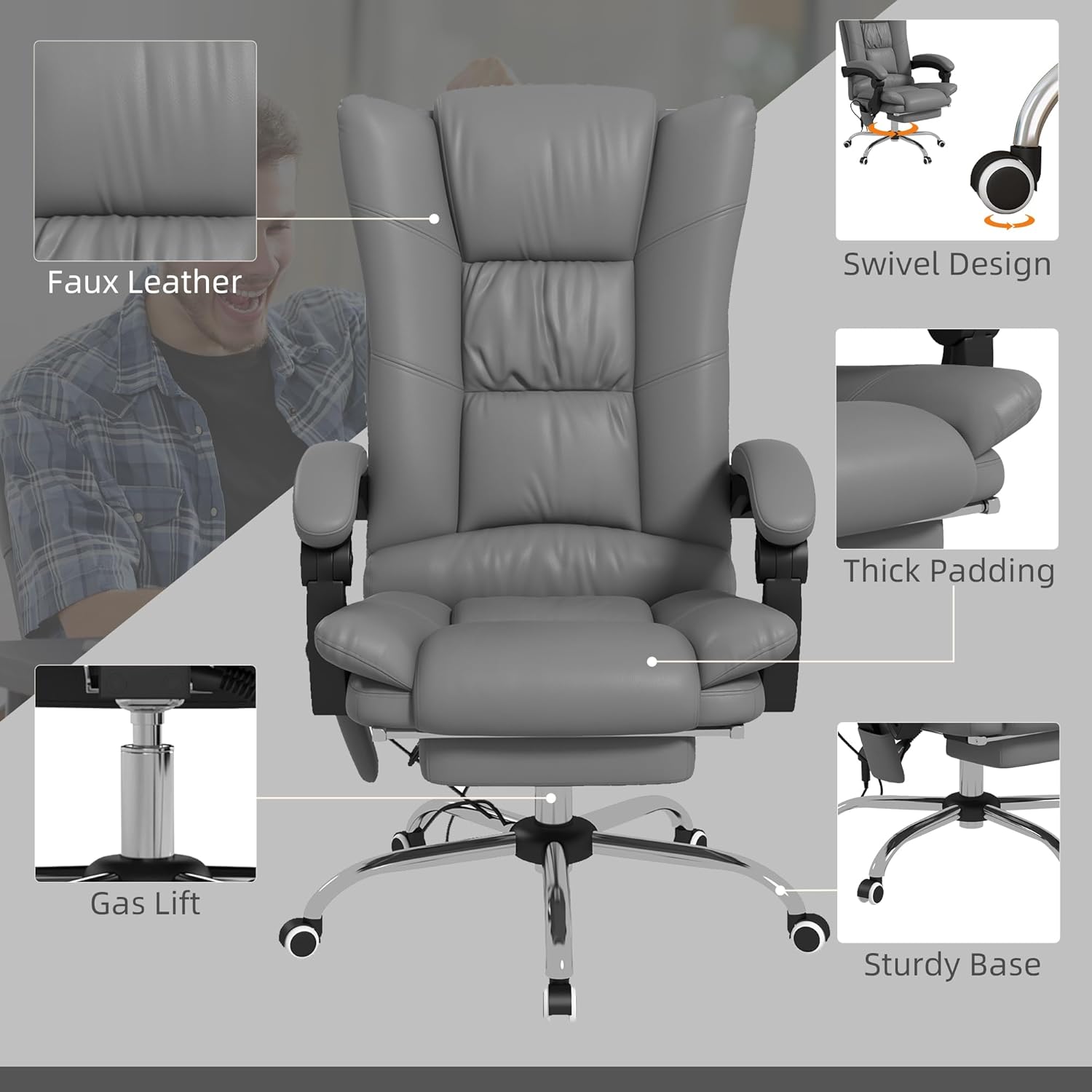
Image 4.1: Key components and features of the chair, including the gas lift and sturdy base.

Image 4.2: The durable PU wheels are designed for smooth, quiet movement on various floor surfaces.
5. Bedryfsinstruksies
5.1. Hoogte aanpassing
To adjust the chair height:
- Om in te samel: While seated, lift the lever located on the right side of the chair. The chair will rise. Release the lever at the desired height.
- Om te verlaag: While seated, lift the lever located on the right side of the chair. The chair will lower. Release the lever at the desired height.

Image 5.1: Use the lever to adjust the chair's height up or down.
5.2. Leunfunksie
The chair features a 135° reclining backrest for enhanced comfort.
- Om te leun: Pull the lever located on the left side of the chair upwards. Lean back to the desired angle (up to 135°). Release the lever to lock the position.
- Om regop terug te keer: Pull the lever upwards and lean forward. The backrest will return to its upright position. Release the lever to lock.

Image 5.2: The chair reclines up to 135 degrees, suitable for various activities.
5.3. Voetsteun Bediening
The integrated footrest can be extended for leg support:
- Om te verleng: Pull the footrest outwards from under the seat.
- To retract: Push the footrest back under the seat until it is fully stored.
5.4. Vibration Massage and Heat Functions
The chair features a four-point vibration massage system and a lumbar heating function, controlled by a remote.
- Krag aan/af: Druk die kragknoppie op die afstandbeheerder.
- Masseermodusse: Select from three massage modes (M1, M2, M3) to vary the vibration pattern.
- Intensiteitsvlakke: Adjust the vibration intensity (L, M, H) to your preference.
- Geteikende massering: Select specific areas (THIGH, LUMBAR, BACK) for focused massage.
- Hitte funksie: Press the heat button to activate or deactivate the lumbar heating. There are 3 heat levels.
- Afteller: Set the operating time for the massage and heat functions using the timer button.
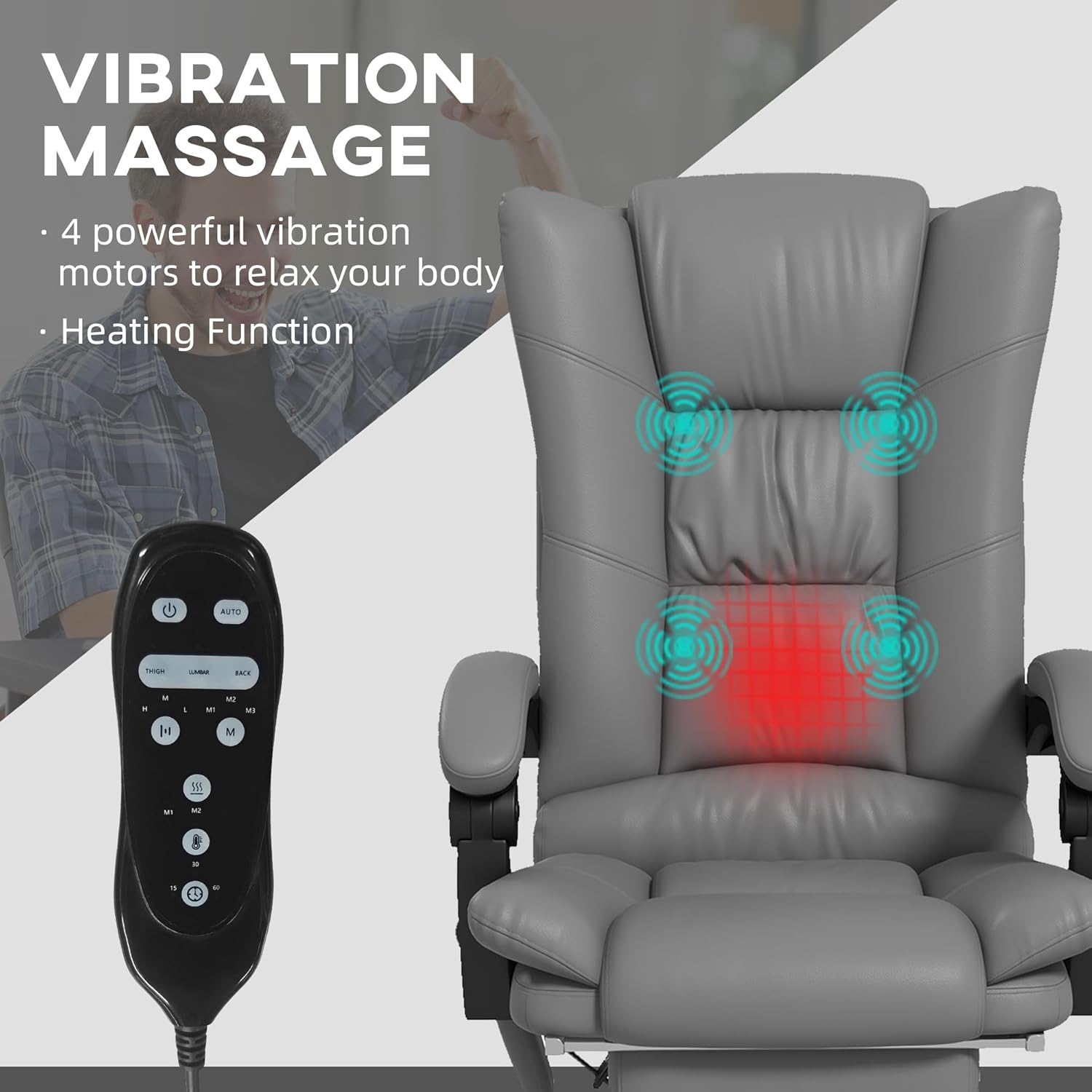
Image 5.3: The remote control allows adjustment of massage modes, intensity, and heat settings.
6. Onderhoud
Regular maintenance will prolong the life and appearance of your chair.
- Skoonmaak: Wipe the faux leather with a soft, damp lap. Vir hardnekkige vlekke, gebruik 'n sagte seepoplossing en vee dit dadelik droog. Vermy harde chemikalieë of skuurmiddels.
- Hardeware: Kontroleer gereeld alle skroewe en boute om seker te maak dat hulle styf vas is. Draai weer vas indien nodig.
- Beweeg: When moving the chair, lift it rather than dragging it to prevent damage to the base and floor.
- Berging: Store the chair in a cool, dry place away from direct sunlight when not in use for extended periods.
7. Probleemoplossing
| Probleem | Moontlike oorsaak | Oplossing |
|---|---|---|
| Stoel verstel nie hoogte nie. | Gas lift cylinder is faulty or lever is not engaged correctly. | Ensure the lever is fully pulled. If issue persists, contact customer support for gas lift replacement. |
| Massering-/hittefunksie werk nie. | Power cable unplugged, remote control batteries dead, or internal wiring issue. | Check power connection. Replace remote batteries. If still not working, contact customer support. |
| Chair wobbles or makes noise. | Los skroewe of ongelyke vloer. | Kontroleer en draai alle monteerskroewe vas. Maak seker dat die stoel op 'n plat oppervlak is. |
| Footrest is difficult to extend/retract. | Meganisme-obstruksie of gebrek aan smering. | Check for any obstructions. Apply a silicone-based lubricant to the sliding mechanism if needed. |
8. Spesifikasies
- Model: JP901
- Handelsmerk: Generies
- Kleur: Grys
- Materiaal: Faux leer
- Algehele afmetings (D x B x H): 25.25" x 27.5" x 46.5"
- Verstelbare hoogte reeks: 17.75" - 20.75" (Seat Height)
- Leunhoek: Tot 135°
- Masseerpunte: 4 (Vibration)
- Hitte funksie: Lumbar, 3 levels
- Wiele: PU, 360° Swivel

Image 8.1: Detailed dimensions of the Generic JP901 chair.

Image 8.2: Armrest height measurement.
9. Waarborg en Ondersteuning
This product comes with a standard manufacturer's warranty against defects in materials and workmanship. For specific warranty details, please refer to the documentation included with your purchase or contact the retailer.
For technical support, replacement parts, or any inquiries, please contact your point of purchase or the manufacturer directly. Please have your model number (JP901) and purchase date available when contacting support.