
1. Inleiding
Dankie vir die aankoopasing the iFFALCON 40S55T 40-inch Full HD Google TV. This manual provides essential information for the safe and efficient use of your television. Please read it thoroughly before operating the device and retain it for future reference.
The iFFALCON 40S55T is a tunerless smart TV designed for streaming content, offering a Full HD display, Google TV operating system, Chromecast built-in, and Dolby Audio for an immersive entertainment experience.
2. Veiligheidsinligting
Volg altyd basiese veiligheidsmaatreëls wanneer u hierdie televisie gebruik om die risiko van brand, elektriese skok en besering te verminder.
- Moenie die TV aan reën of vog blootstel nie.
- Moenie die TV oopmaak nieasing; verwys alle diens na gekwalifiseerde personeel.
- Verseker behoorlike ventilasie rondom die TV.
- Hou die TV weg van direkte sonlig, hittebronne en sterk magnetiese velde.
- Use only the power cord and accessories supplied by the manufacturer.
- Ontkoppel die TV tydens weerligstorms of wanneer dit vir lang tye nie gebruik word nie.
3. Pakketinhoud
Verifieer dat alle items in die boks teenwoordig is:
- iFFALCON 40S55T 40-inch Full HD Google TV
- Afstandbeheer
- TV-staander (2 stukke)
- Skroewe vir TV-staander
- Kragkabel
- Waarborgkaart
- Instructiehandleiding (hierdie dokument)
4. Opstelling
4.1 Bevestig die TV-staander
- Plaas die TV versigtig met die gesig na onder op 'n sagte, plat oppervlak om skermskade te voorkom.
- Rig elke staanderstuk met die ooreenstemmende gleuwe aan die onderkant van die TV.
- Maak die staanplekke vas met die meegeleverde skroewe. Maak seker dat hulle stewig vasgedraai is.
4.2 Aansluitkrag
Connect the power cable to the TV's power input and then plug it into a wall outlet. The TV will enter standby mode.
4.3 Initial Setup (Google TV & Network)
Upon first power-on, the TV will guide you through the initial setup process for Google TV. This includes:
- Taalkeuse.
- Koppel aan 'n Wi-Fi-netwerk.
- Signing in with your Google account to access personalized content and apps.
- Aanvaarding van terme en voorwaardes.
4.4 Konnektiwiteit
The iFFALCON 40S55T offers various connection options for external devices.

Beeld: Oorview of the TV's connectivity options, including HDMI, USB, Bluetooth, and Wi-Fi.
- HDMI-poorte: Koppel eksterne toestelle soos speletjiekonsoles, Blu-ray-spelers of dekodeerders aan.
- USB-poort: Vir die koppeling van USB-bergingstoestelle om media te speel files.
- Wi-Fi: For wireless internet connection to access streaming services and online features.
- Bluetooth: For connecting wireless headphones, speakers, or other Bluetooth-enabled accessories.
4.5 Tunerless Operation
This TV is designed as a tunerless model, meaning it does not have a built-in tuner for terrestrial (over-the-air) broadcasts. To watch terrestrial, BS, or CS broadcasts, an external tuner is required and must be purchased separately.

Image: The iFFALCON 40S55T TV showcasing its smart features, highlighting its tunerless design and ability to enjoy internet video content without an antenna connection.
5. Bediening van die TV
5.1 Afstandbeheer oorview
The remote control provides access to all TV functions, including power, volume, channel navigation, and smart TV features. It also supports voice search via 'Hey Google'.

Image: The TV remote control, featuring quick access buttons for popular streaming services and a dedicated microphone button for voice commands.
- Kragknoppie: Skakel die TV aan of af.
- Navigasie-knoppies: Gebruik die rigtingblokkie en OK-knoppie om deur spyskaarte te navigeer.
- Volume-/Kanaalknoppies: Adjust volume and change channels (if an external tuner is connected).
- Toepassing-kortpadknoppies: Direct access to popular streaming services like Netflix, YouTube, etc.
- Mikrofoonknoppie: Press and hold to activate 'Hey Google' voice search.
5.2 Google TV-kenmerke
Your iFFALCON TV runs on Google TV, providing a personalized and integrated entertainment experience.
- Inhoudsamevoeging: Google TV organizes movies, shows, and live TV from all your apps and subscriptions into one place.
- Gepersonaliseerde Aanbevelings: Gebaseer op jou viewing history and preferences, Google AI suggests content you might enjoy.
- Stemsoektog: Use the 'Hey Google' feature on your remote to quickly find content, get information, or control smart home devices.
- Chromecast Ingeboude: Easily cast content from your smartphone, tablet, or computer directly to your TV screen.

Image: A smartphone screen mirroring content to the iFFALCON TV, demonstrating the Chromecast built-in feature for enjoying mobile content on a larger display.
5.3 Beeldinstellings
The TV incorporates advanced image processing technologies to deliver a superior viewondervinding.
- AI PQ Processor: TCL's proprietary AiPQ Processor intelligently adjusts image quality at the pixel level, enhancing clarity, color, and contrast for a vivid and realistic picture.
- Full HD (FHD): Experience sharp and detailed images with Full High Definition resolution, offering 200% more detail than standard HD screens.

Image: A visual comparison illustrating the enhanced detail and clarity provided by Full HD resolution compared to standard HD.
- HDR10/HLG Support: Enjoy a wider range of colors and contrast with HDR10 and HLG compatibility, revealing stunning detail in both bright and dark scenes.

Beeld: Die TV-skermvertoningasing the vibrant and detailed picture quality achieved with HDR10/HLG technology.
- Mikroverduistering: This technology analyzes the image in hundreds of separate zones to adjust brightness and darkness independently, enhancing contrast and picture quality.

Image: A visual representation of Micro Dimming technology, illustrating how it enhances contrast and picture depth by adjusting brightness in specific areas of the screen.
5.4 Sound Settings (Dolby Audio)
The TV features Dolby Audio for clear, rich, and immersive sound.
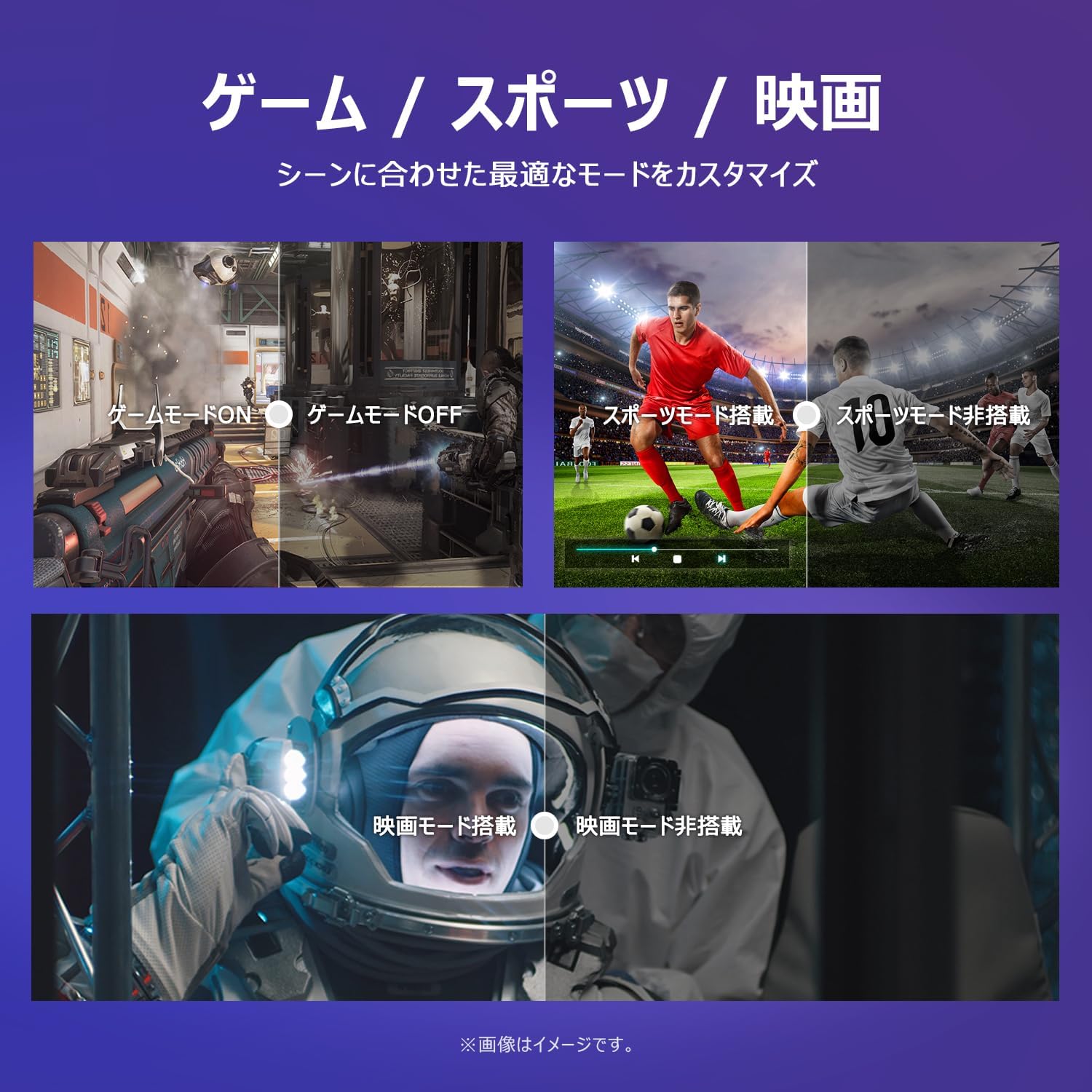
Image: The TV screen with a visual representation of sound, highlighting the immersive audio experience provided by Dolby Audio.
Access the sound settings menu to adjust modes like Standard, Music, Movie, or Custom to suit your preferences.
5.5 Spelmodus
Activate Game Mode for an optimized gaming experience with reduced input lag.
Image: Visual comparisons demonstrating the optimized settings for Game Mode, Sports Mode, and Movie Mode, adapting the TV's performance to different content types.
The TV also offers dedicated Sports Mode and Movie Mode to enhance viewing for specific content types.
5.6 Stelselinstellings
The quick settings menu allows you to customize frequently used system settings and rearrange their order for intuitive and convenient access.

Beeld: A view of the TV's quick system settings interface, illustrating how users can easily access and customize various functions like brightness, picture mode, and network settings.
6. Onderhoud
Behoorlike sorg en onderhoud sal die lewensduur van jou televisie verleng.
- Skoonmaak van die skerm: Vee die skerm liggies af met 'n sagte, pluisvrye lap. Vir hardnekkige merke, gebruik 'n skermskoonmaker wat spesifiek vir TV's ontwerp is, en wend dit op die lap aan, nie direk op die skerm nie.
- Maak die C skoonasing: Gebruik 'n sagte, droë lap om die TV af te vee.asing. Moenie skuurmiddels of oplosmiddels gebruik nie.
- Ventilasie: Maak seker dat die ventilasie-openinge aan die agterkant van die TV nie geblokkeer is om oorverhitting te voorkom nie.
- Kragkabel: Regularly check the power cord for any damage. If damaged, contact customer support for replacement.
7. Probleemoplossing
Indien u probleme met u TV ondervind, raadpleeg die volgende algemene probleme en oplossings. Indien die probleem voortduur, kontak kliëntediens.
| Probleem | Moontlike oorsaak | Oplossing |
|---|---|---|
| Geen krag nie | Kragkabel nie gekoppel nie; Kragaansluiting werk nie | Ensure power cable is securely plugged in; Test outlet with another device |
| Geen beeld nie, maar klank is teenwoordig | Verkeerde invoerbron; Probleem met eksterne toestel | Druk die 'Invoer'-knoppie op die afstandbeheerder om die korrekte bron te kies; Kontroleer die verbindings van die eksterne toestel. |
| Geen klank nie, maar beeld is teenwoordig | Volume gedemp of te laag; Probleem met eksterne oudiostelsel | Unmute or increase volume; Check audio cable connections to external sound system |
| Afstandbeheer werk nie | Batterye is leeg; Obstruksie tussen afstandbeheerder en TV | Replace batteries; Remove any obstructions; Ensure remote is pointed at the TV's IR sensor |
| Kan nie aan Wi-Fi koppel nie | Verkeerde wagwoord; Routerprobleem; TV te ver van router af | Verify Wi-Fi password; Restart router; Move TV closer to router or use a Wi-Fi extender |
8. Spesifikasies
Detailed technical specifications for the iFFALCON 40S55T TV:

Image: Dimensional drawing of the iFFALCON 40S55T TV, indicating its physical measurements.
| Kenmerk | Spesifikasie |
|---|---|
| Skerm grootte | 40 duim |
| Tipe vertoon | VA Liquid Crystal |
| Resolusie | Vol HD (1920 x 1080) |
| Herlaaitempo | 60 Hz |
| Aspekverhouding | 16:9 |
| Kontrasverhouding | 1000:1 |
| Bedryfstelsel | Google TV |
| Oudio-uitset | 20 Watts (2.1 channels) |
| HDMI-poorte | 2 |
| USB-poorte | 1 |
| Draadlose konneksie | Wi-Fi, Bluetooth |
| Produkafmetings (B x H x D) | 89.2 x 55.8 x 18.4 cm (met staander) |
| Produk Gewig | 4.63 kg |
| Muurbevestigingsversoenbaar | Ja |
| Bykomstighede ingesluit | Stand, Remote Control, Warranty Card, Power Cable |
9. Waarborg en Ondersteuning
Your iFFALCON 40S55T TV comes with a manufacturer's warranty. Please refer to the included warranty card for specific terms, conditions, and duration of coverage.
For technical support, troubleshooting assistance beyond this manual, or warranty claims, please contact iFFALCON customer service. Contact information can typically be found on the warranty card or the official iFFALCON webwebwerf.
Please have your model number (40S55T) and purchase date ready when contacting support.