
1. Inleiding
The MiLESEEY S7 Pro is an advanced laser distance meter designed for precise and efficient measurements in various environments, particularly large outdoor projects. Featuring a digital viewfinder, P2P technology, and app connectivity, this tool offers enhanced accuracy and functionality for professional and DIY users. This manual provides detailed instructions for the safe and effective operation of your device.
2. Veiligheidsinligting
Lees en verstaan asseblief alle veiligheidsinstruksies voordat u die toestel gebruik. Versuim om hierdie instruksies te volg, kan lei tot blootstelling aan laserstraling, elektriese skok, brand of ernstige besering.
- Laserbestraling: This device emits Class 2 laser radiation. Do not stare into the laser beam or direct it at other people or animals.
- Oogbeskerming: Always wear appropriate eye protection when operating the device, especially in bright conditions where the laser dot may be difficult to see.
- Kinders: Hou die toestel buite bereik van kinders.
- Omgewing: Moenie die toestel in plofbare atmosfere of naby vlambare vloeistowwe of gasse gebruik nie.
- Wysigings: Moenie probeer om die toestel te wysig of uitmekaar te haal nie. Herstelwerk moet slegs deur gemagtigde dienspersoneel uitgevoer word.
- Batteryveiligheid: Use only the specified rechargeable AAA batteries. Ensure correct polarity when inserting batteries. Do not mix old and new batteries or different types of batteries.
3. Pakketinhoud
Verifieer dat alle items in jou pakket teenwoordig is:
- 1x MiLESEEY S7 Pro Outdoor Laser Measure
- 1x Dratas
- 1x Handband
- 1x Gebruikershandleiding (hierdie dokument)
- 3x Rechargeable AAA Battery
- 1x USB-laaikabel

Image: Contents of the MiLESEEY S7 Pro package, showing the device, case, strap, manual, and batteries.
4. Opstelling
4.1 Battery installasie
- Vind die batteryklepdeksel aan die agterkant van die toestel.
- Open the cover and insert the three rechargeable AAA batteries, ensuring correct polarity (+/-).
- Maak die batterykompartement se deksel stewig toe.
4.2 Laai die toestel
Connect the device to a USB power source using the provided USB charging cable. The battery indicator on the display will show charging status. Ensure the device is fully charged before first use for optimal performance.
4.3 Aan-/afskakel
- Om aan te skakel, hou die Krag knoppie (
 ) until the display illuminates.
 - Druk en hou die. In om uit te skakel Krag button again. The device will also automatically power off after a period of inactivity to conserve battery.
5. Bedryfsinstruksies
5.1 Basiese Meting
- Point the laser aperture towards the target.
- Druk die MEAS knoppie () een keer om die laser te aktiveer.
- Druk die MEAS druk weer op die knoppie om 'n meting te neem. Die resultaat sal op die skerm vertoon word.
5.2 Digitaal Viewvinder
The integrated 4X adjustable zoom digital camera with on-screen targeting crosshairs allows you to easily locate the laser spot and confidently measure outdoors, even in bright sunlight conditions.
- Die viewfinder display shows a live image of the target area.
- Use the crosshairs to precisely align the laser with your desired measurement point.
- Adjust the zoom level as needed for better visibility of distant targets.

Image: The MiLESEEY S7 Pro's digital viewfinder displaying a target with crosshairs for accurate laser point location.

Image: A user aiming the MiLESEEY S7 Pro laser distance meter outdoors, utilizing the digital viewfinder for precise targeting.
5.3 P2P Technology (Point-to-Point)
The 360° high-accuracy tilt sensor and integrated smart base enable P2P technology, allowing you to capture accurate measurements between any two points from a single remote location. This is ideal for complex measurements where direct access to both points is difficult.
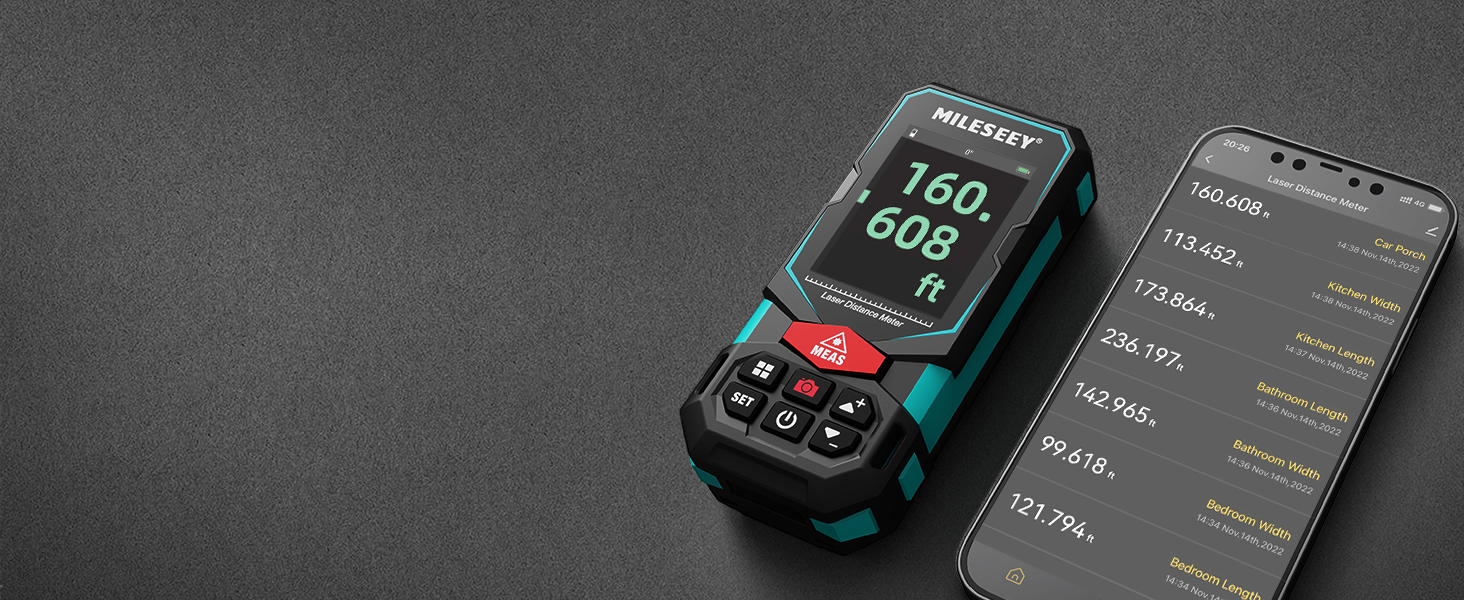
Image: An illustration of the P2P measurement capability, demonstrating how the device measures the distance between two points (P1 and P2) from a single vantage punt.
5.4 Toepassingsverbinding
The MiLESEEY S7 Pro connects to a dedicated app, allowing you to transfer measurement data directly to your smartphone or tablet. Within the app, you can:
- Voer afmetings op foto's op die perseel in.
- Draw projects and construct plans.
- Store up to 1,000 groups of data in the app's memory.
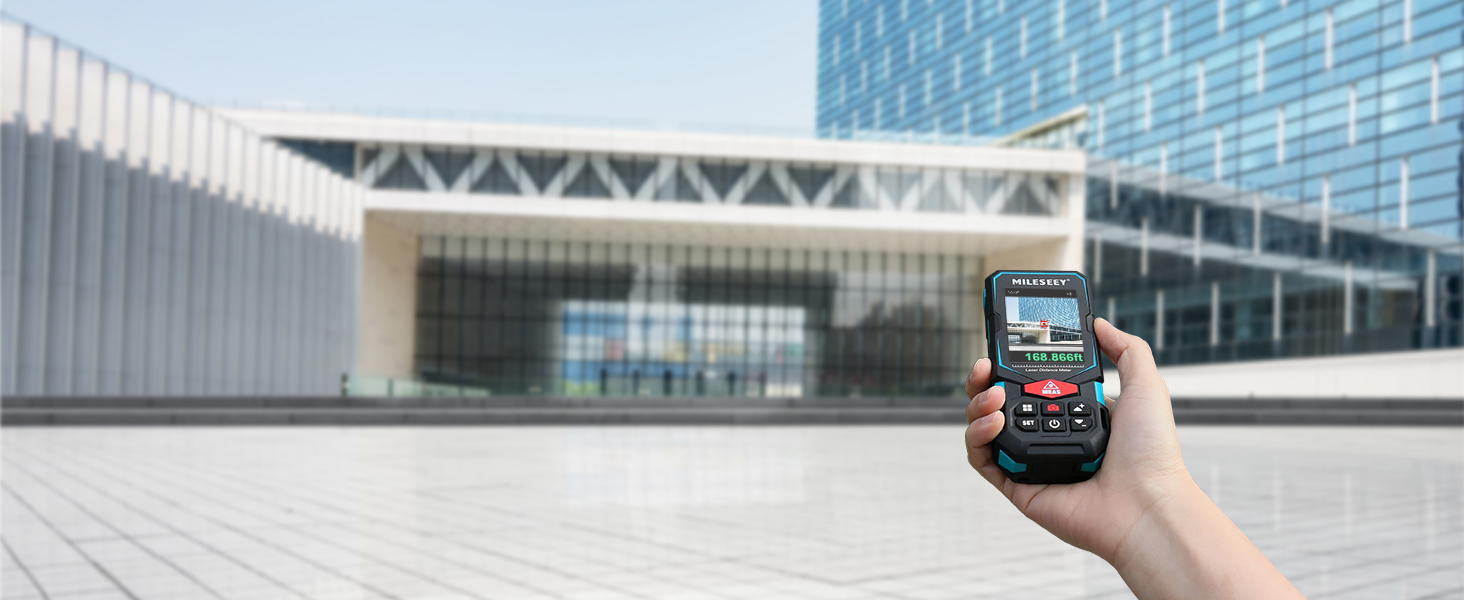
Image: The MiLESEEY S7 Pro connected to a smartphone, showing measurement data being displayed and managed within the companion application.
5.5 Meetmodusse
The device offers a variety of measurement modes accessible through its intuitive user interface:
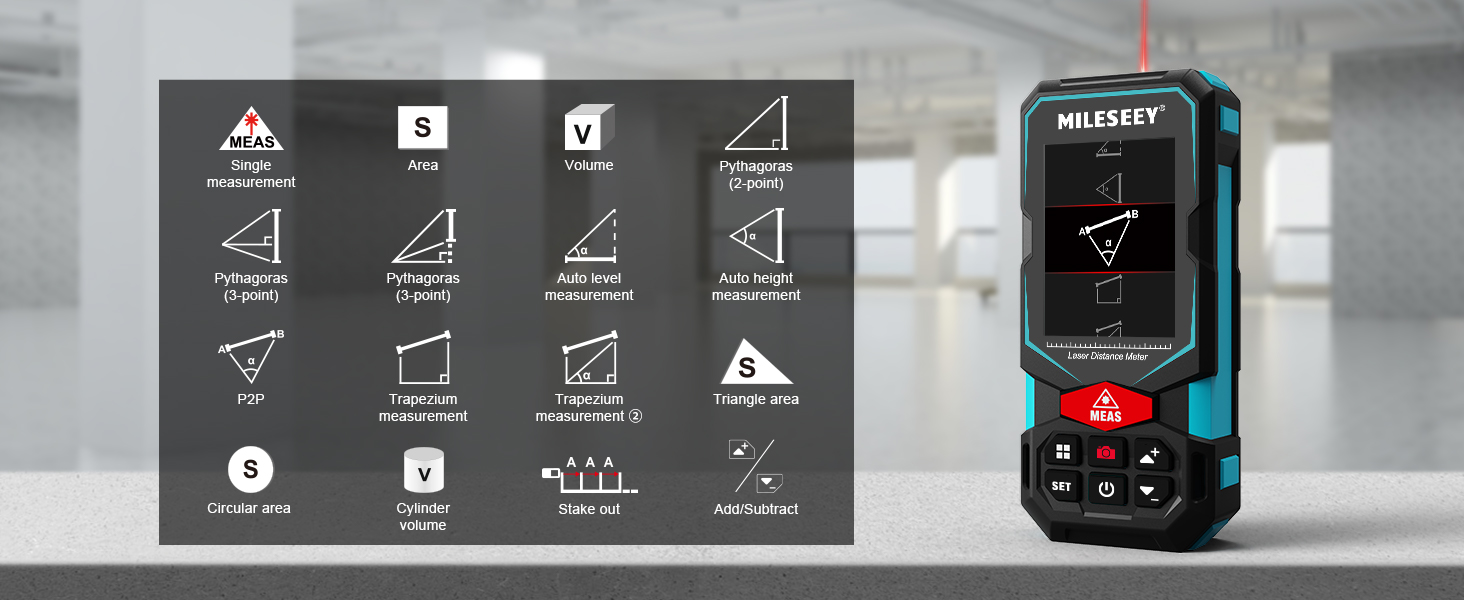
Image: A visual guide to the various measurement functions available on the MiLESEEY S7 Pro, including single measurement, area, volume, and advanced calculations.
- Enkele meting: Standaard afstandmeting.
- Area: Bereken die oppervlakte van 'n oppervlak.
- Volume: Bereken die volume van 'n ruimte.
- Pythagoras (2-point & 3-point): Indirect measurement using the Pythagorean theorem.
- Auto Level Measurement: Meet horisontale afstand outomaties.
- Auto Height Measurement: Meet vertikale hoogte outomaties.
- P2P: Point-to-point measurement (as described above).
- Trapezium Measurement: Calculates area of a trapezium.
- Triangle Area: Bereken die oppervlakte van 'n driehoek.
- Circular Area: Calculates the area of a circle.
- Silinder volume: Calculates the volume of a cylinder.
- Stake Out: Helps mark out specific distances.
- Tel op/Trek af: Allows for addition or subtraction of measurements.
5.6 Gebruikerskoppelvlak en skerm
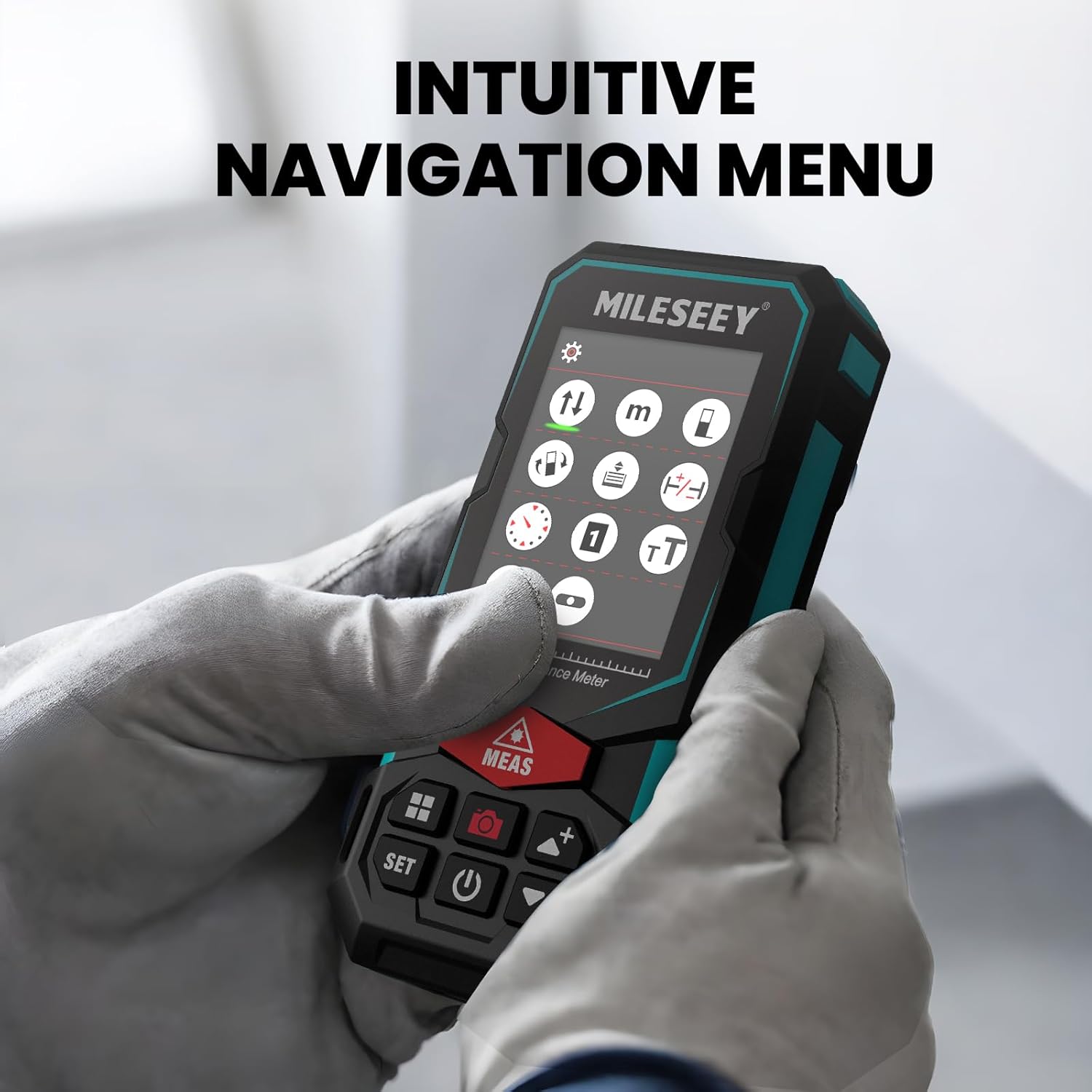
The S7 Pro features a humanized user interface with an intuitive navigation menu and a large 2.4" IPS backlit display. The rotation display keeps measurements aligned with the device, ensuring clear readability from any angle. You can easily switch between white text on a black screen and black text on a white screen for optimal visibility in varying light conditions.

Image: The MiLESEEY S7 Pro's display showcasing its intuitive navigation menu with various function icons.
Image: A user interacting with the MiLESEEY S7 Pro, highlighting the intuitive navigation menu on its screen.
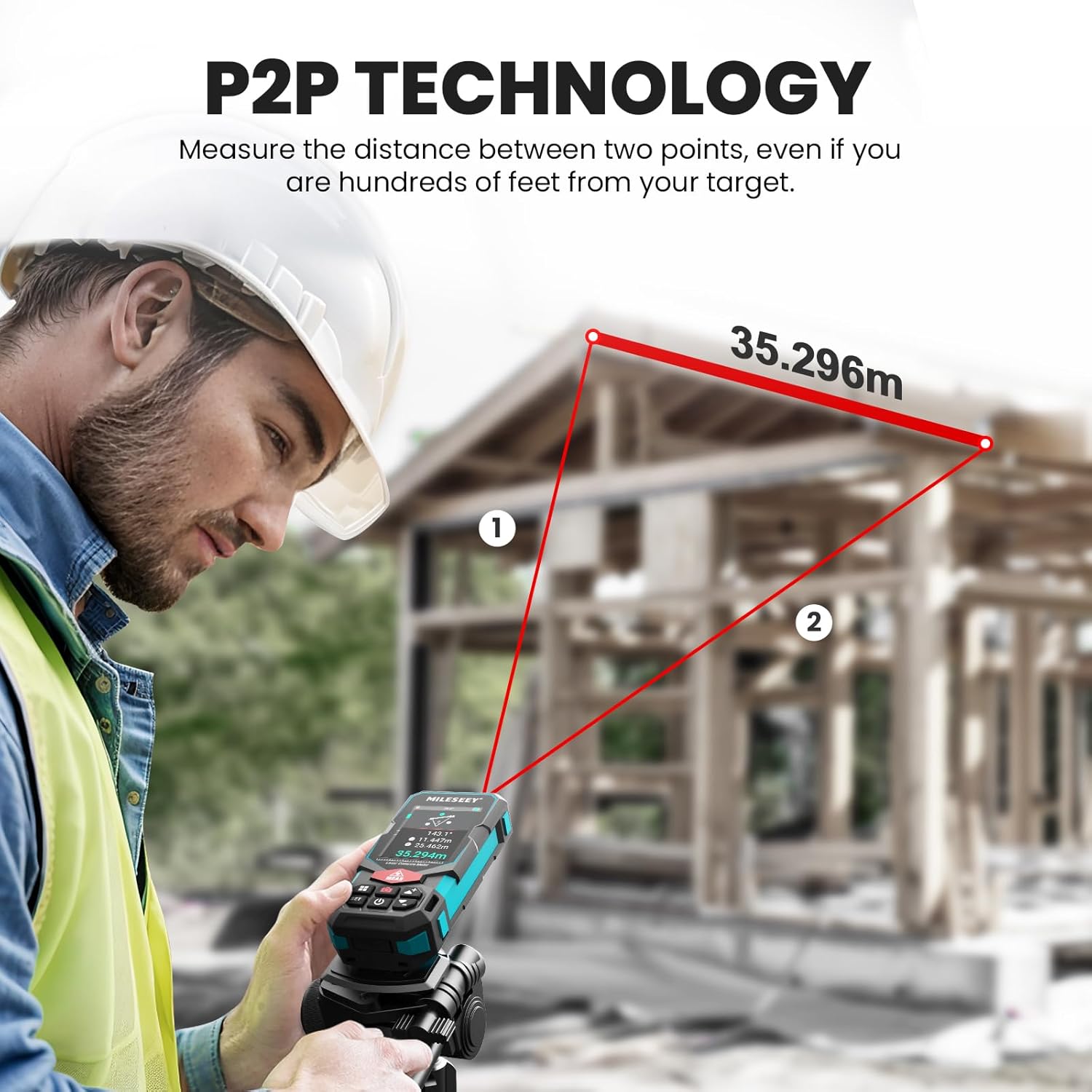
Image: The MiLESEEY S7 Pro's display demonstrating excellent visibility in both bright sunlight and low light environments.
6. Onderhoud
Proper maintenance ensures the longevity and accuracy of your MiLESEEY S7 Pro.
- Skoonmaak: Gebruik 'n sagte, damp cloth to clean the device. Do not use harsh chemicals or abrasive cleaners. Clean the lens regularly with a soft, lint-free cloth.
- Berging: Bêre die toestel in sy draagtas op 'n koel, droë plek wanneer dit nie gebruik word nie. Vermy uiterste temperature en direkte sonlig.
- Batterysorg: If the device will not be used for an extended period, remove the batteries to prevent leakage. Recharge batteries regularly to maintain their capacity.
- IP65 beskerming: The device features IP65 protection, making it resistant to dust and water splashes. However, it is not designed for submersion. Clean off any dust or dirt after use in harsh conditions.

Image: The MiLESEEY S7 Pro demonstrating its IP65 protection, shown covered in dust but still functional.

Image: The MiLESEEY S7 Pro, designed with IP65 protection, shown in a dusty environment, highlighting its durability.
7. Probleemoplossing
If you encounter issues with your MiLESEEY S7 Pro, refer to the following common problems and solutions:
| Probleem | Moontlike oorsaak | Oplossing |
|---|---|---|
| Toestel skakel nie aan nie. | Lae of dooie batterye; verkeerde batteryinstallasie. | Charge the batteries or replace them. Ensure batteries are inserted with correct polarity. |
| Onakkurate metings. | Laser beam obstructed; unstable surface; device not calibrated. | Ensure clear line of sight. Place device on a stable surface. Perform self-calibration if available (refer to device menu). |
| Probleme met programverbinding. | Bluetooth nie geaktiveer nie; toepassing nie opgedateer nie; toestel nie gekoppel nie. | Ensure Bluetooth is active on both devices. Update the app to the latest version. Follow app pairing instructions. |
| Display not clear in bright light. | Vertoon opsies. | Switch display mode to black text on white screen for better contrast. |
8. Spesifikasies
Key technical specifications for the MiLESEEY S7 Pro Laser Distance Meter:
- Handelsmerk: MiLESEEY
- Modelnommer: MCLD-CA-MS-S7
- Meetreeks: Up to 330 ft (100 yards)
- Akkuraatheid: Up to +/- 2mm (1/16")
- Digitaal Viewvind: 4X Adjustable Zoom Camera
- Verbinding: App Connected (P2P Technology)
- Beskermingsklas: IP65 (Dust and water splash resistant)
- Vertoon: 2.4" IPS Backlit Display
- Batterye: 3x Rechargeable AAA Battery (Included)
- Materiaal: Akrilonitrielbutadieenstireen, rubber
- Item gewig: 300 gram
- Produk afmetings: 12L x 5W x 2.5H sentimeter
9. Waarborg en Ondersteuning
The MiLESEEY S7 Pro Laser Distance Meter comes with a 24 maande waarborg from the date of purchase, covering manufacturing defects. For warranty claims, technical support, or any inquiries, please contact Mileseey Direct, the manufacturer's contact. Please retain your proof of purchase for warranty validation.