
1. Veiligheidsinligting
Lees en verstaan asseblief alle instruksies voordat u hierdie produk installeer of gebruik. Versuim om hierdie instruksies te volg, kan lei tot elektriese skok, brand of ander gevare wat skade aan eiendom of persoonlike besering kan veroorsaak.
- Always turn off power at the circuit breaker before installation or servicing.
- Raadpleeg 'n gekwalifiseerde elektrisiën as jy onseker is oor die installasieproses.
- Maak seker dat alle elektriese verbindings veilig is en voldoen aan plaaslike kodes en verordeninge.
- Do not install on a dimmer switch.
- Hierdie toestel is gegradeer vir buiteluggebruik en is waterbestand.
2. Pakketinhoud
Verifieer dat alle komponente teenwoordig is voordat u met die installasie begin.
- LED Outdoor Flood Wall Light (1 unit)
- Mounting Hardware (screws, wire connectors)
- Gasket
- Instruksie Handleiding

Figure 2.1: Product components and adjustable parts.
3. Produkkenmerke
The Maxxima LED Outdoor Flood Wall Light is designed for reliable outdoor security and illumination.
- Kragtige beligting: Delivers 950 lumens of 3000K warm white light with an energy-efficient 13W design.
- Gevorderde bewegingsopsporing: PIR motion sensor with up to a 70 ft range.
- Adjustable Timers: Choose from 1, 5, or 10 minutes for how long the light stays on after motion detection.
- Skemer-tot-dagbreek-sensor: Photocell sensor automatically operates at night and conserves energy during the day.
- Verstelbare kop: Easily direct the light beam with a 180° vertical tilt.
- Adjustable Arm and Sensor: 90° vertical arm tilt and 180° vertical tilt & horizontal swivel for the motion sensor, with 360° sensor rotation.
- Duursame konstruksie: Built with aluminum, rated for 50,000 lifetime hours, ETL listed.
Video 3.1: Oorview of Maxxima LED Outdoor Flood Light features and adjustability.
4. Installasie
4.1 Monteer die armatuur
- Skakel die krag by die stroombreker af voordat die installasie begin word.
- Remove the existing fixture (if any) and disconnect wiring.
- Attach the mounting plate to the junction box using the provided screws. Ensure the gasket is properly seated between the fixture and the mounting surface for a weather-tight seal.
- Feed the electrical wires from the junction box through the center hole of the mounting plate.
4.2 Bedradingsverbindings
Verbind die drade soos volg:
- Koppel die Swart draad van die toebehore na die Swart (Live/Hot) wire from the junction box.
- Koppel die Wit draad van die toebehore na die Wit (Neutral) wire from the junction box.
- Koppel die Groen (Ground) wire from the fixture to the Groen or bare copper (Ground) wire from the junction box.
- Secure all connections with the provided wire connectors.

Figure 4.1: Wiring connections for the flood light.
4.3 Finale Vergadering
- Steek alle drade versigtig in die aansluitkas.
- Align the fixture with the mounting plate and secure it with the remaining screws.
- Herstel krag by die stroombreker.
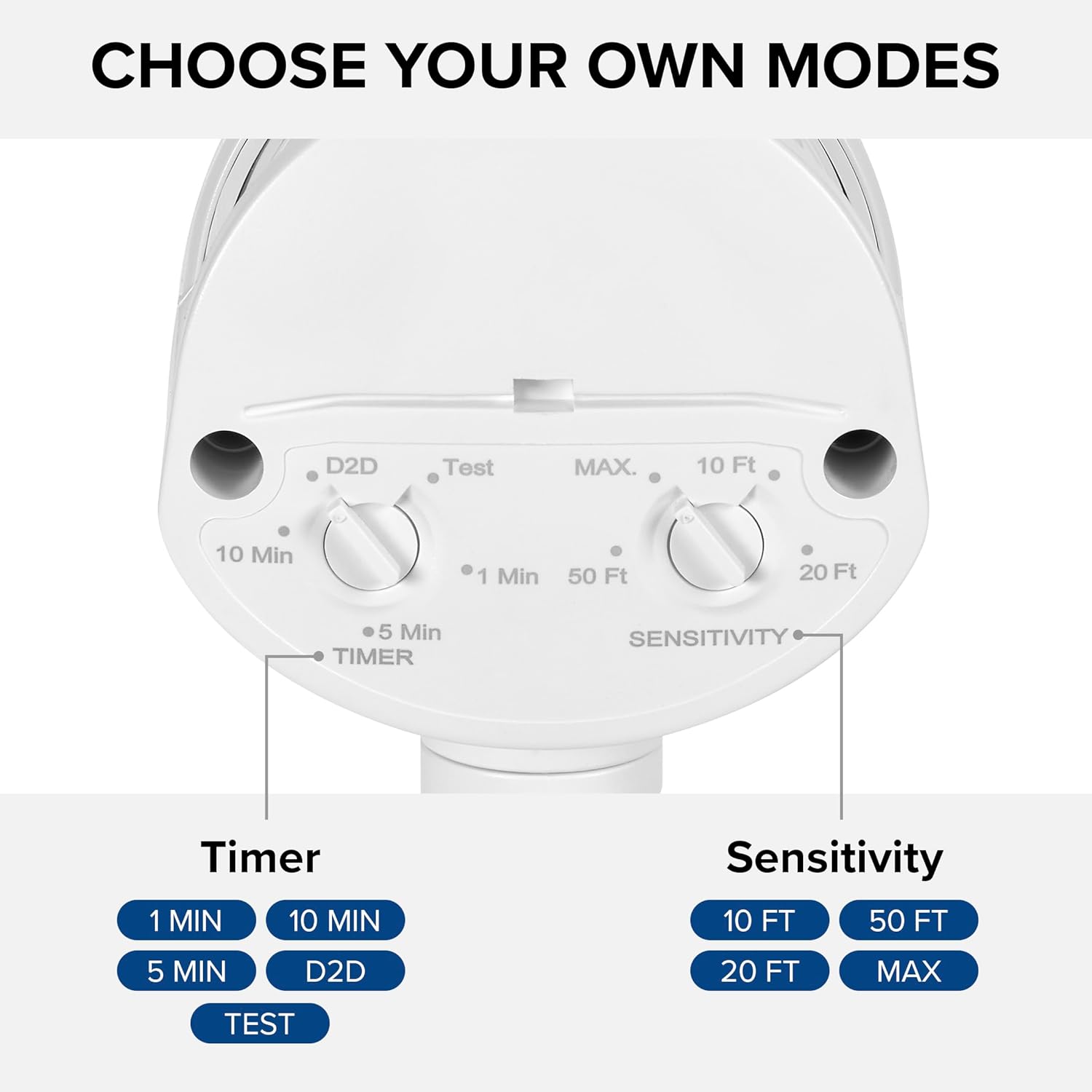
Figure 4.2: Installed flood light on an exterior wall.
5. Opstelling en Aanpassings
The flood light features adjustable settings for the motion sensor and timer.
5.1 Adjusting the Sensor and Timer
The sensor unit has two adjustable dials located on its underside:
- TIMER Dial: Controls how long the light stays on after motion is detected. Options include 1 minute, 5 minutes, 10 minutes, or Dusk-to-Dawn (D2D).
- SENSITIVITY Dial: Adjusts the motion detection range. Options include 10 ft, 20 ft, 50 ft, or MAX (up to 70 ft).
To adjust, gently rotate the dials to your desired setting. The 'Test' mode on the TIMER dial allows for quick testing of motion detection during daylight hours.
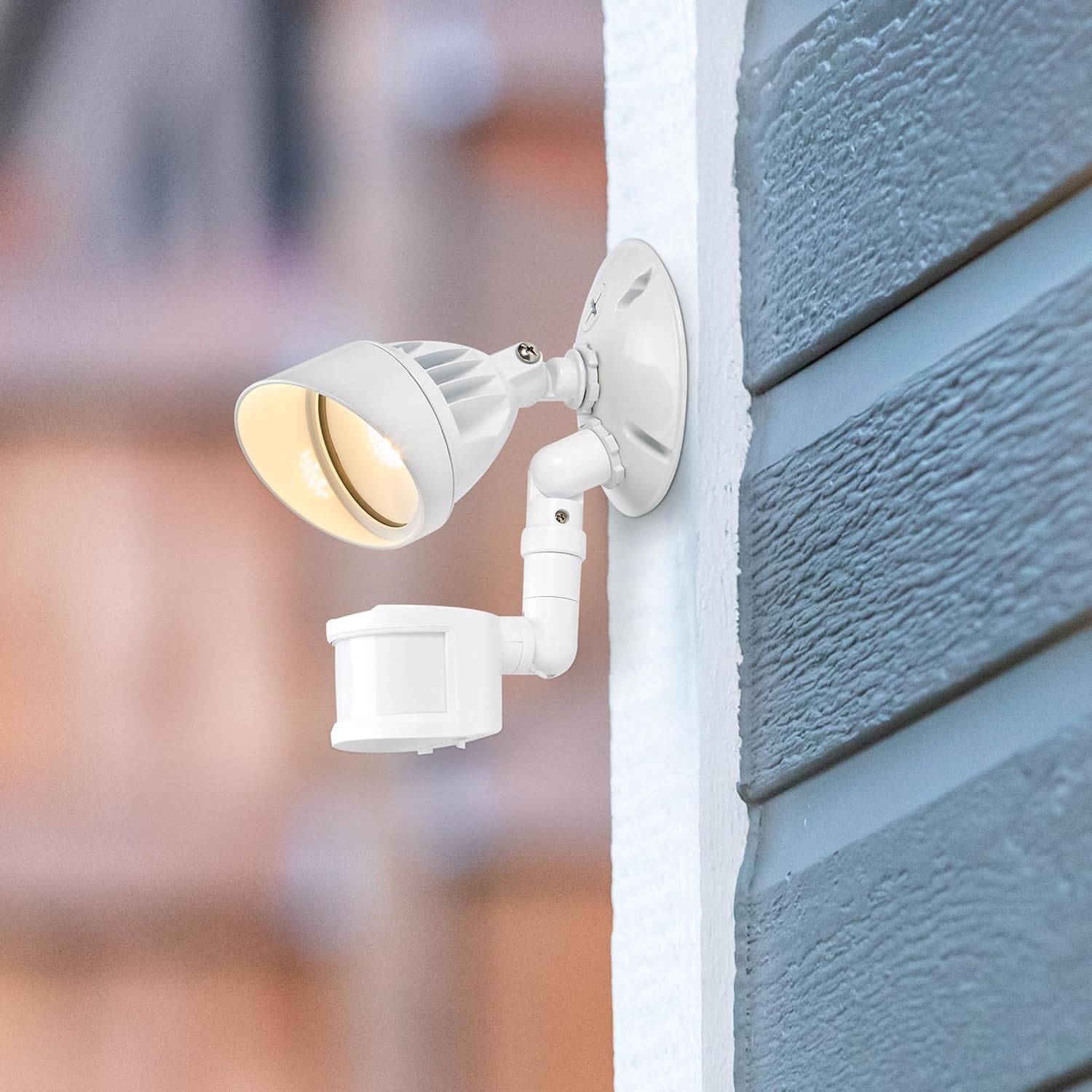
Figure 5.1: Timer and Sensitivity adjustment dials.
5.2 Adjusting Light Head and Sensor Position
The light head and motion sensor can be adjusted to cover specific areas:
- The light head can be tilted up to 180° vertically.
- The arm connecting the sensor to the base can tilt 90° vertically.
- The motion sensor itself can tilt 180° vertically and swivel 180° horizontally, with a full 360° rotation capability.

Figure 5.2: Adjustable light head and motion sensor.
6. Bedryfsinstruksies
Once installed and configured, the Maxxima LED Outdoor Flood Wall Light operates automatically based on its sensor settings.
- Dusk-to-Dawn Mode (D2D): When the TIMER dial is set to D2D, the light will automatically turn on at dusk and remain on until dawn, regardless of motion.
- Bewegingsensormodus: When the TIMER dial is set to 1, 5, or 10 minutes, the light will activate when motion is detected within the set sensitivity range and ambient light conditions (typically at night). The light will remain on for the selected duration after the last motion is detected, then turn off.
- Toets af: Setting the TIMER dial to 'Test' allows you to verify motion detection during daylight. The light will turn on for a few seconds when motion is detected, then turn off. This mode is useful for positioning the sensor.
7. Onderhoud
This LED flood light requires minimal maintenance.
- Skoonmaak: Vee die toebehore gereeld af met 'n sagte, damp lap om vuiligheid en puin te verwyder. Moenie skuurmiddels of oplosmiddels gebruik nie.
- Inspeksie: Regularly check for any loose connections or damage to the wiring or housing.
- The integrated LED light source is not user-replaceable.
8. Probleemoplossing
If you experience issues with your flood light, refer to the following table for common problems and solutions.
| Probleem | Moontlike oorsaak | Oplossing |
|---|---|---|
| Lig skakel nie aan nie. | No power; incorrect wiring; sensor settings. | Check circuit breaker. Verify wiring connections. Adjust sensor to 'Test' mode to confirm functionality. Ensure ambient light is low enough for operation (if not in D2D). |
| Lig bly voortdurend aan. | Sensor in D2D mode; constant motion detected; faulty sensor. | Check if TIMER dial is set to D2D. Ensure no objects are causing continuous motion detection. If problem persists, contact support. |
| Light turns on too frequently or not enough. | Sensitivity setting; sensor obstruction. | Adjust SENSITIVITY dial. Clear any obstructions from the sensor's field of view. |
| Ligte flikkerings. | Loose wiring; power fluctuations. | Turn off power and check all wiring connections. Consult an electrician if power fluctuations are suspected. |
9. Spesifikasies
| Eienskap | Waarde |
|---|---|
| Model Naam | MEL-S1013100W |
| Handelsmerk | Maxxima |
| Lig Uitset | 950 Lumen |
| Wattage | 13 Watt |
| Kleur temperatuur | 3000 Kelvin (Warm Wit) |
| Voltage | 120 Volt |
| Materiaal | Aluminium |
| Voltooi Tipe | Geverf |
| Bewegingsensorreeks | Tot 70 voet |
| Straalverspreiding | 220° |
| Lewenslange gradering | 50,000 uur |
| Sertifisering | ETL gelys |
| Produk afmetings | 6 cm L x 4.4 cm B x 6 cm H |
| Item gewig | 11.2 onse (0.7 pond) |
10. Waarborg
This Maxxima LED Outdoor Flood Wall Light is backed by a 3 jaar waarborg vanaf die aankoopdatum. Hierdie waarborg dek defekte in materiaal en vakmanskap onder normale gebruik. Bewaar asseblief u bewys van aankoop vir waarborgeise.
11. Ondersteuning
For technical assistance, troubleshooting, or warranty inquiries, please contact Maxxima customer service.
Visit the Maxxima Store: MaxximaLEDLighting on Amazon
Maxxima is an American company with USA-based offices and customer service.