
Infinity DM 56
Infiniity DM56 Sport Smartwatch User Manual
Model: DM 56
1. Inleiding
Thank you for choosing the Infiniity DM56 Sport Smartwatch. This device is designed to enhance your active lifestyle with advanced fitness tracking, health monitoring, and smart connectivity features. Equipped with a vibrant 1.43-inch AMOLED display, built-in GPS, and comprehensive health sensors, the DM56 is your reliable companion for both daily wear and intense workouts.
This manual provides detailed instructions on how to set up, operate, maintain, and troubleshoot your smartwatch to ensure optimal performance and longevity.

Beeld 1.1: Voorkant view of the Infiniity DM56 Sport Smartwatch, showcasing its round AMOLED display and rugged design.
2. Wat is in die boks
Upon opening your Infiniity DM56 Sport Smartwatch package, please ensure all the following items are present:
- Infiniity DM56 Sport Smartwatch
- Laai kabel
- Gebruikershandleiding (hierdie dokument)
3. Opstelling
3.1 Laai die slimhorlosie
Before first use, fully charge your DM56 smartwatch. A full charge typically takes approximately 2 hours.
- Connect the magnetic charging cable to the charging contacts on the back of the smartwatch. Ensure the pins align correctly.
- Steek die USB-punt van die laaikabel in 'n standaard USB-kragadapter (5V/1A aanbeveel) of 'n rekenaar se USB-poort.
- The watch display will show a charging indicator. Once fully charged, the indicator will change or disappear.
3.2 Koppel met jou slimfoon
To unlock the full potential of your DM56 smartwatch, you need to pair it with your smartphone via Bluetooth using the dedicated companion application. The DM56 is compatible with Android 5.0+ and iOS 11 and above.
- Laai die toepassing af: Soek vir the official Infiniity companion app (refer to the packaging or quick start guide for the exact app name) on the Google Play Store (for Android) or Apple App Store (for iOS) and install it.
- Aktiveer Bluetooth: Maak seker dat Bluetooth op jou slimfoon geaktiveer is.
- Maak die toepassing oop: Begin die metgesel-app op jou slimfoon en volg die instruksies op die skerm om 'n rekening te skep of aan te meld.
- Voeg toestel by: Binne die toepassing, navigeer na die 'Voeg Toestel By' of 'Koppel Toestel' afdeling. Die toepassing sal soek vir beskikbare slimhorlosies.
- Select DM56: Select 'DM56' from the list of found devices. A pairing request may appear on both your phone and the watch. Confirm the pairing on both devices.
- Voltooi opstelling: Once paired, the app will guide you through initial settings, such as profile information, notification permissions, and data synchronization.
4. Bediening van die slimhorlosie
4.1 Basiese navigasie
The DM56 features a responsive touchscreen and physical buttons for intuitive control.
- Raakskerm: Veeg op, af, links of regs om deur spyskaarte en kennisgewings te navigeer. Tik om items te kies.
- Fisiese knoppies: The watch has multiple buttons, typically labeled 'SPORT', 'SEL', 'BACK', and a dedicated 'GPS' button. Their functions may vary depending on the current screen or mode.
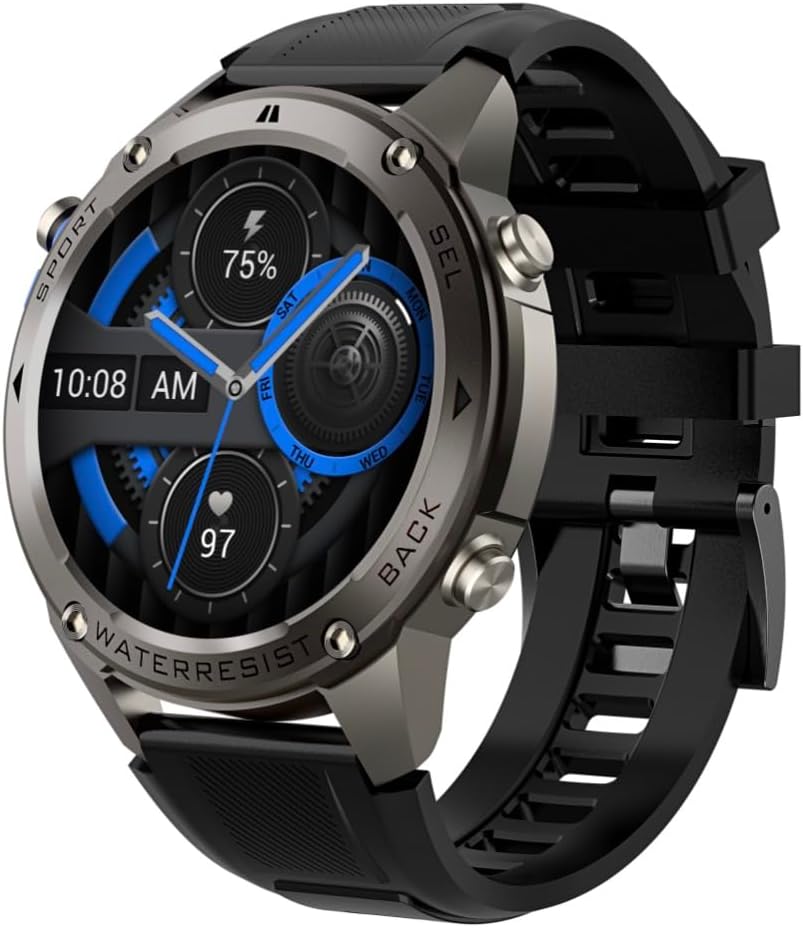
Beeld 4.1: Sykant view of the Infiniity DM56 Sport Smartwatch, highlighting the physical control buttons.
4.2 Vertoonkenmerke
The 1.43-inch AMOLED display offers vibrant colors and deep blacks with a resolution of 466x466 pixels.
- Altyd-aan-skerm: The DM56 supports Always-On Display functionality, allowing you to see the time and essential information at a glance without needing to raise your wrist or press a button. This feature can be configured in the watch settings.

Image 4.2: The Infiniity DM56 Sport Smartwatch display, showcasing a typical watch face with various data points.
4.3 Built-in GPS & Compass
The DM56 features dual-frequency GPS (L1+L5) and supports multiple satellite systems (GPS, GLONASS, BDS, Galileo, NAVIC, QZSS) for precise outdoor tracking. A built-in compass further aids navigation.
- GPS-dop: When starting an outdoor activity (e.g., running, cycling), the watch will automatically attempt to acquire a GPS signal. Ensure you are in an open area for faster signal acquisition. Your route, distance, and pace will be recorded.
- Kompas: Access the compass feature from the watch's menu to get real-time directional information.

Image 4.3: The Infiniity DM56 Sport Smartwatch from an angle, highlighting the dedicated GPS button on the side.

Beeld 4.4: 'n Nabyskoot view of the GPS button on the Infiniity DM56 Sport Smartwatch, indicating its function.
4.4 All-Day Health Monitoring
The DM56 is equipped with the VC30F sensor for continuous health monitoring.
- Hartslagmonitering: Track your heart rate in real-time throughout the day. View your current heart rate on the watch face or in the dedicated heart rate app.
- Bloedsuurstof (SpO2) Monitering: Meet jou bloed se suurstofversadigingsvlakke.
- Slaap dop: The watch automatically monitors your sleep patterns, including deep sleep, light sleep, and awake times. View detailed sleep analysis in the companion app.
- Stresopsporing: Monitor jou stresvlakke dwarsdeur die dag.
- pedometer: Counts your daily steps, distance, and estimated calories burned.
Note: The Infiniity DM56 Smartwatch is NOT A MEDICAL DEVICE. All health monitoring data is for reference only and should not be used for medical diagnosis or treatment.
4.5 Sportmodusse
The DM56 offers over 170 customizable sports modes, with 14 built-in modes such as outdoor running, cycling, and swimming. You can add up to 10 additional modes manually via the companion app.
- Begin 'n aktiwiteit: Navigate to the 'Workout' or 'Sports' menu on the watch, select your desired activity, and tap to start.
- Tydens aktiwiteit: The watch will display real-time metrics such as duration, distance, heart rate, and calories burned.
- Ending Activity: Swipe or press the designated button to pause or end the activity. Your workout data will be saved and synchronized with the app.
4.6 Smart Notifications & Calls
Once paired with your smartphone, the DM56 can receive notifications and handle calls directly on your wrist.
- Kennisgewings: Receive alerts for incoming calls, SMS messages, and app notifications (e.g., social media, email). Configure which app notifications you want to receive in the companion app.
- Make/Answer Call: The DM56 allows you to make and answer calls directly from the watch, utilizing its built-in microphone and speaker. Ensure the watch is connected to your phone via Bluetooth.
5. Onderhoud
5.1 Waterdigte gradering
The DM56 has a 5ATM waterproof rating, meaning it can withstand water pressures equivalent to a depth of 50 meters. This makes it suitable for swimming, showering, and other water-based activities. However, it is not recommended for diving or high-pressure water activities.
- Avoid exposing the watch to hot water, steam, or strong detergents.
- Na blootstelling aan soutwater, spoel die horlosie met vars water af en droog dit deeglik af.
5.2 Skoonmaak en versorging
Om die voorkoms en funksionaliteit van jou slimhorlosie te behou:
- Maak die horlosie se liggaam en band gereeld skoon met 'n sagte, damp lap.
- Maak seker dat die laaikontakte aan die agterkant van die horlosie skoon en droog is voordat u dit laai.
- Vermy die gebruik van skuur skoonmakers of oplosmiddels.
5.3 Optimalisering van batterylewe
The DM56 is powered by a 500mAh high-voltage battery, offering extended usage. To maximize battery life:
- Pas die skermhelderheid na 'n laer vlak aan.
- Limit the use of Always-On Display if not essential.
- Skakel onnodige kennisgewings af.
- Deaktiveer deurlopende hartklopmonitering indien dit nie 24/7 nodig is nie.
6. Probleemoplossing
If you encounter issues with your Infiniity DM56 smartwatch, try the following common solutions:
- Horlosie skakel nie aan nie: Maak seker dat die horlosie volledig gelaai is. Koppel dit aan die laaier en wag 'n paar minute voordat jy dit weer probeer aanskakel.
- Kan nie met foon koppel nie:
- Maak seker dat Bluetooth op jou foon en die horlosie geaktiveer is.
- Maak seker dat die horlosie binne Bluetooth-bereik van jou foon is.
- Herbegin beide die horlosie en jou foon.
- Vee die Bluetooth-kasgeheue op jou foon (Android) uit of vergeet die toestel en koppel dit weer.
- Maak seker dat die metgesel-app na die nuutste weergawe opgedateer is.
- Onakkurate gesondheidsdata:
- Maak seker dat die horlosie styf om jou pols gedra word, nie te styf of te los nie.
- Maak die sensor aan die agterkant van die horlosie skoon.
- Note that environmental factors and individual physiology can affect readings. Remember, it is not a medical device.
- Kennisgewings nie ontvang nie:
- Gaan kennisgewinginstellings na in die metgesel-toepassing.
- Ensure the app has necessary permissions on your phone (e.g., notification access).
- Verify that the watch is connected to your phone.
- Kort batterylewe: Refer to Section 5.3 for battery optimization tips.
Indien die probleem voortduur nadat u hierdie stappe probeer het, kontak asseblief kliëntediens vir verdere hulp.
7. Spesifikasies
| Kenmerk | Spesifikasie |
|---|---|
| Modelnommer | DM 56 |
| Vertoon | 1.43-duim AMOLED, 466x466 piksels |
| Sensors | Heart Rate (VC30F), Accelerometer (STK8321), Magnetometer (Compass), Barometer+Altitude (SPL07-03) |
| Konnektiwiteit | Bluetooth 5.3 |
| Battery kapasiteit | 500mAh |
| Waterdigte vlak | 5 OTM |
| Verenigbaarheid | Android 5.0+ and iOS 11 and above |
| Item gewig | 3 onse |
| Pakket afmetings | 4.25 x 4.25 x 2.8 duim |
| Bedryfstelsel | Android Wear 2.7 (Note: This refers to the underlying OS, not necessarily full Android Wear functionality) |
| GPS | Ingeboude GPS (L1+L5 dubbelfrekwensie) |
| Vorm | Ronde |
| Battery Tipe | Nonstandard Battery, Lithium Ion |
8. Waarborg en Ondersteuning
The Infiniity DM56 Sport Smartwatch comes with a standard manufacturer's warranty. Please refer to the warranty card included in your product packaging for specific terms and conditions, including warranty duration and coverage details.
For technical support, troubleshooting assistance beyond what is covered in this manual, or warranty claims, please contact Infiniity customer service through the contact information provided on the product packaging or the official Infiniity webwebwerf.
Bewaar asseblief u aankoopbewys vir waarborgdoeleindes.
Ask a question about this manual
Ask about setup, troubleshooting, compatibility, parts, safety, or missing instructions. Manuals+ will review the question and use this page’s manual context to help answer it.