
IKIER IKIER K1 Pro Max
IKIER K1 Pro Max Lasergraveer Gebruikershandleiding
Model: IKIER K1 Pro Max | Brand: IKIER
1. Inleiding
Welcome to the user manual for the IKIER K1 Pro Max Laser Engraver. This powerful machine is designed for precision engraving and cutting on a variety of materials including wood, metal, acrylic, and leather. Featuring a 48000mW laser output, advanced autofocus, and high-speed capabilities, the K1 Pro Max offers versatility and efficiency for your creative projects. Please read this manual thoroughly before operation to ensure safe and optimal use of your device.

Image: The IKIER K1 Pro Max Laser Engraver, showcasing its main components and the R2 Rotary Roller accessory, along with examples of engraved and cut materials.
2. Veiligheidsinligting
Operating a laser engraver involves inherent risks. Adhere to all safety guidelines to prevent injury or damage.
- Oogbeskerming: Always wear appropriate laser safety goggles (OD6+) when the laser is active. Direct exposure to the laser beam can cause severe eye damage.
- Ventilasie: Operate the machine in a well-ventilated area or use an exhaust system to remove fumes and particles generated during engraving/cutting. Some materials produce toxic fumes.
- Brandgevaar: Laser engraving/cutting can ignite materials. Never leave the machine unattended during operation. Keep a fire extinguisher nearby.
- Materiaalversoenbaarheid: Only engrave or cut materials approved for laser processing. Avoid PVC, vinyl, or other chlorine-containing materials as they produce corrosive and toxic gases.
- Elektriese veiligheid: Ensure the machine is properly grounded. Do not operate with wet hands or in damp conditions. Disconnect power before performing maintenance.
- Child Lock & Safety Features: Utilize the child lock feature to prevent unauthorized use. Familiarize yourself with the gyroscope, omnidirectional limit switch, and flame detector safety functions.
- Laser klas: This product is a Class 4 laser device. Exercise extreme caution.

Image: Illustration of the four safety functions: Child lock, Gyroscope, Omnidirectional limit switch, and Flame Detector, designed to enhance operational safety.
3. Pakketinhoud
Upon opening the package, verify that all components are present and undamaged. The standard package for the IKIER K1 Pro Max typically includes:
- IKIER K1 Pro Max Laser Engraver Unit (Pre-assembled frame)
- 48000mW Laser Module
- R2 Rotary Roller (Optional, may be included depending on package)
- Kragadapter en kabel
- USB kabel
- Veiligheidsbril
- Air Assist Pump and Tubing
- Sample Materials for Testing
- Gebruikershandleiding (Hierdie dokument)
- Gereedskap vir montering (indien nodig)
4. Opstelgids
Follow these steps to set up your IKIER K1 Pro Max Laser Engraver:
- Uitpak: Carefully remove all components from the packaging. Retain the original packaging for future storage or transport.
- Vergadering: The K1 Pro Max frame comes largely pre-assembled. Attach the gantry to the main frame using the provided screws. Ensure all connections are secure.
- Lasermodule-installasie: Mount the laser module onto the gantry according to the instructions in the quick start guide. Connect the necessary cables.
- Lugbystandverbinding: Connect the air assist pump to the designated port on the laser module and the machine.
- Kragverbinding: Connect the power adapter to the machine and then to a suitable power outlet. Do not power on yet.
- Sagteware installasie: Install the recommended software (e.g., LaserGRBL, LightBurn) on your computer. The IKIER APP is also available on app stores.
- Aanvanklike verbinding: Connect the engraver to your computer via USB or Wi-Fi (if supported).
5. Bedryfsinstruksies
This section outlines the basic operation of your laser engraver.
- Krag aan: Turn on the machine using the main power switch. Observe the LED display for status.
- Materiaal plasing: Place your material securely on the working surface. Ensure it is flat and stable.
- Outofokus: The IKIER K1 Pro Max features a motorized Z-axis for automatic focusing. The machine will measure the distance to the object and adjust the focus automatically.
- Power Switching (48W/24W): Utilize the power switch on the laser module to select between 48W for cutting and 24W for fine engraving.
- Sagteware voorbereiding: Open your chosen software (e.g., LightBurn). Import or create your design. Configure laser parameters (speed, power, passes) based on your material and desired outcome.
- Air Assist Control: The smart air assist system automatically adjusts airflow. Ensure it is enabled for cutting (strong airflow) and set to weak airflow for engraving.
- Begin werking: Initiate the engraving or cutting process from the software. Monitor the machine closely during operation.
- Offline Working: For offline operation, copy your engraving or cutting files to a USB drive and use the 4.3-inch touch screen to control the machine.
- Skakel af: Once the task is complete, power off the machine and disconnect from the power source.

Image: Visual representation of the cutting mode (48W high power) and engraving mode (24W small light spot 2K fine engraving) with their respective power switching options.

Image: Depiction of the motorized Z-axis, infrared cross positioning, and autofocus sensing point, highlighting the automatic focusing and air assist features.
6. Sleutel kenmerke
- Powerful 48W Laser Output: The K1 Pro Max utilizes the latest laser technology, delivering up to 48000mW output power. This enables single-pass cutting of 25mm wood, 19mm black acrylic, and 0.3mm stainless steel. It can also directly carve colored patterns on mirror stainless steel, ceramics, and opaque glass.
- Resume Engraving Function: An advanced automatic power failure recovery system remembers the engraving position, allowing the machine to quickly locate and continue engraving from where it left off after an unexpected power outage. This prevents material waste and ensures uninterrupted production.
- Motorized Z-axis with Autofocus: Eliminates manual focusing. The intelligent Z-axis automatically measures the distance to the object and adjusts the focus for precise results.
- Revolutionary Design & High Engraving Speed: Upgraded optical axis and linear guides provide stability and reliability, supporting engraving speeds up to 900mm/s, which is significantly faster than many other machines.
- Super Cooling System: Features an innovative dual air duct design with 4 high-quality copper tubes for heat conduction, double rows of large fins, and a high-power fan for maximum heat dissipation of the laser module.
- 32-bit Smart Motherboard: Greatly improves data processing capacity and speeds up machine efficiency.
- Ryk koppelvlak: Includes USB, HDMI, Type-C, Power, and Air Assist interfaces for versatile connectivity.
- PC Software and APP Compatibility: Compatible with Windows and macOS systems, supporting software like LaserGRBL and LightBurn. The IKIER APP is available on the Apple App Store and Google Play Store.
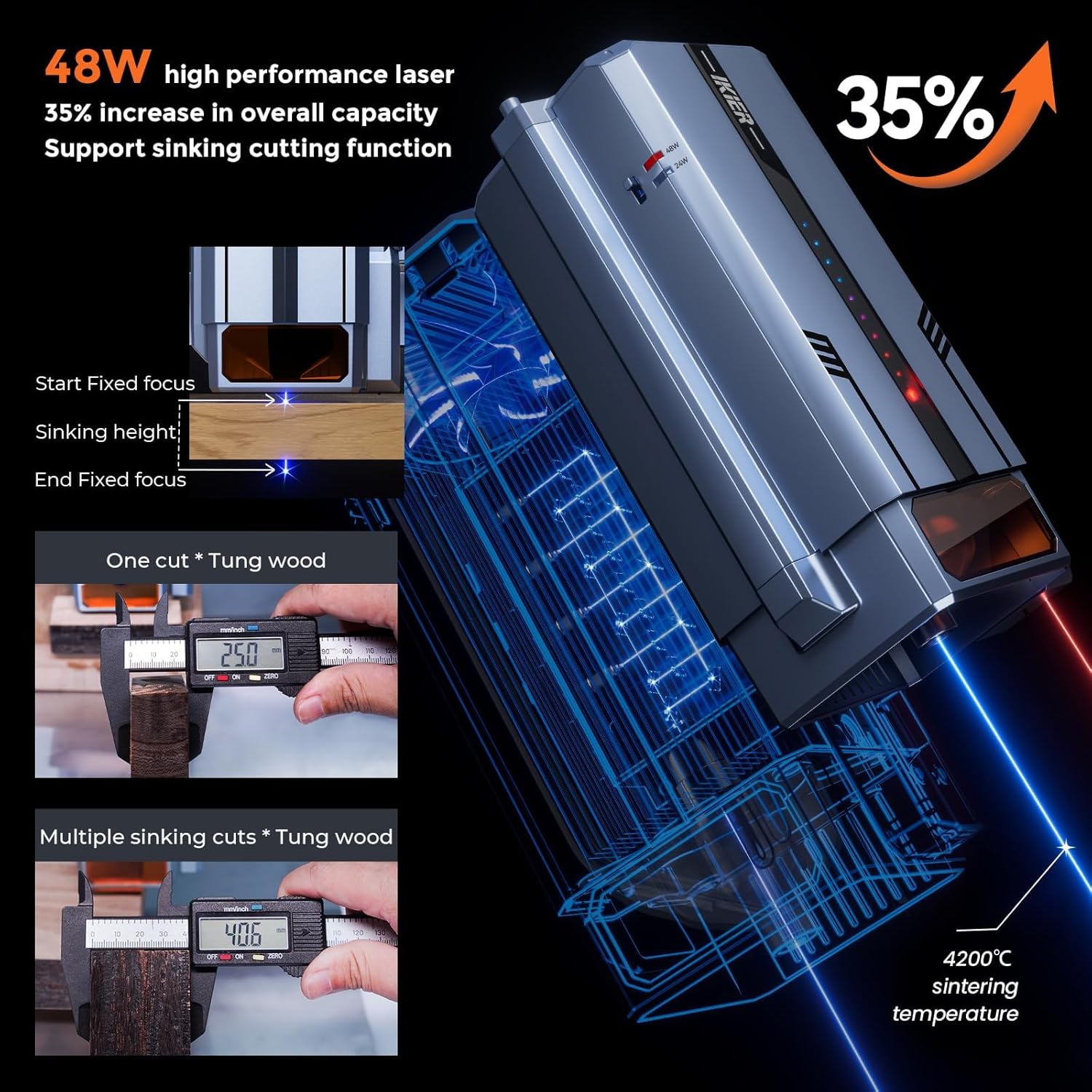
Image: Details on the 48W laser performance, including a 35% increase in overall capacity and support for the sinking cutting function, showing how the laser adjusts focus during multi-pass cuts.

Beeld: Intern view of the new 32-bit motherboard and a close-up of the upgraded optical axis and linear guides, illustrating how they contribute to the 900mm/s engraving speed and improved accuracy.
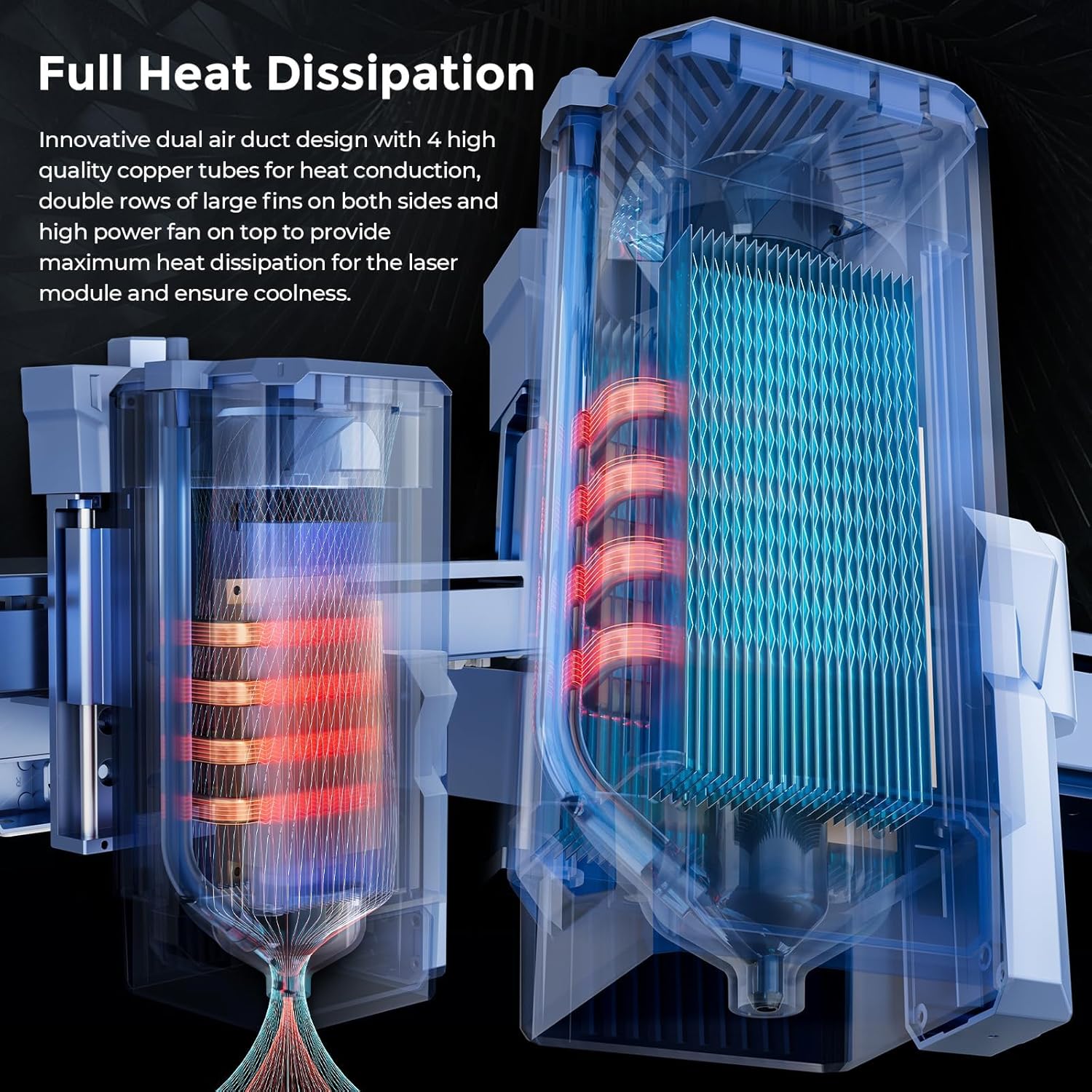
Image: Diagram illustrating the innovative dual air duct design, copper tubes, and large fins for efficient heat dissipation within the laser module.
7. Onderhoud
Regular maintenance ensures the longevity and optimal performance of your IKIER K1 Pro Max.
- Skoonmaak van die laserlens: Periodically clean the laser lens with a lint-free cloth and lens cleaning solution. A dirty lens can reduce laser power and engraving quality.
- Skoonmaak van die werkarea: Verwyder puin en stof van die werkoppervlak en rondom die masjien na elke gebruik.
- Smering: Apply a small amount of lubricant to the linear guides and screws as recommended by the manufacturer to ensure smooth movement.
- Firmware -opdaterings: Check the official IKIER website or app for any available firmware updates to ensure your machine operates with the latest improvements and bug fixes.
- Kabel inspeksie: Regularly inspect all cables for signs of wear or damage. Replace any damaged cables immediately.
8. Probleemoplossing
Hierdie afdeling bied oplossings vir algemene probleme wat u mag teëkom.
| Probleem | Moontlike oorsaak | Oplossing |
|---|---|---|
| Masjien skakel nie aan nie. | Power cable disconnected; power switch off; faulty power supply. | Ensure power cable is securely connected. Check main power switch. Test power outlet. Contact support if issue persists. |
| Autofocus not working correctly. | Obstruction in sensor path; Z-axis mechanism issue; software glitch. | Clear any debris around the autofocus sensor. Check for smooth movement of the Z-axis. Restart the machine and software. Ensure firmware is up to date. |
| Poor engraving/cutting quality. | Incorrect focus; dirty laser lens; wrong power/speed settings; material not flat. | Verify autofocus is correctly set. Clean the laser lens. Adjust power and speed settings for the material. Ensure material is flat on the workbed. |
| Machine moves or fires unexpectedly. | Firmware issue; software communication error; electrical interference. | Immediately power off the unit. Restart the machine and computer. Ensure software is correctly configured and updated. Check for loose connections. If persistent, contact technical support. |
| Connection issues (USB/Wi-Fi). | Driver issues; incorrect port selection; Wi-Fi interference. | Reinstall drivers. Try a different USB port or cable. Check Wi-Fi signal strength and network settings. |
9. Spesifikasies
| Kenmerk | Detail |
|---|---|
| Modelnommer | IKIER K1 Pro Max |
| Laser uitset krag | 48000mW (48W) |
| Graveerspoed | Tot 900 mm/s |
| Produk afmetings | 25.5 x 29.5 x 8.7 duim |
| Item gewig | 31 pond |
| Vervaardiger | IKIER |
| Laser klas | Klas 4 |
| Konnektiwiteit | USB, Wi-Fi (via app) |
| Ondersteunde materiaal | Wood, Metal, Acrylic, Leather, etc. |
10. Waarborg en Ondersteuning
For warranty information, technical support, or service inquiries, please contact IKIER customer service through their official webwebwerf of die kleinhandelaar waar jy die produk gekoop het. Bewaar jou aankoopbewys as bewys van aankoop.
Aanlyn hulpbronne:
- IKIER Official Webwebwerf: Visit IKIER Store on Amazon
- Software Downloads & Updates: Refer to the software provider's official websites (e.g., LightBurn, LaserGRBL) or the IKIER APP.
Ask a question about this manual
Ask about setup, troubleshooting, compatibility, parts, safety, or missing instructions. Manuals+ will review the question and use this page’s manual context to help answer it.