
1. Inleiding
This instruction manual provides essential information for the safe and efficient use of your ApoloSign 32-inch UHD 4K Smart Portable TV Gen2. Please read this manual thoroughly before operating the device and retain it for future reference. This portable smart TV combines a high-resolution display with smart features, offering versatile entertainment and productivity options throughout your home.

Image: The ApoloSign 32-inch Portable TV Gen2 positioned in a modern living room, showcasing sy slanke ontwerp en draagbaarheid.
2. Veiligheidsinligting
Algemene veiligheidsmaatreëls
- Moenie die toestel aan reën of vog blootstel om brand of elektriese skok te voorkom nie.
- Verseker behoorlike ventilasie. Moenie ventilasie-openinge blokkeer nie.
- Gebruik slegs die kragadapter wat by die toestel voorsien is.
- Vermy die plasing van die toestel op onstabiele oppervlaktes.
- Moenie probeer om die toestel self uitmekaar te haal of te herstel nie. Verwys alle diens na gekwalifiseerde personeel.
Batteryveiligheid
- The device contains a built-in 15000mAh lithium-ion battery. Do not expose it to excessive heat, direct sunlight, or fire.
- Laai die battery voor die eerste gebruik volledig.
- If the battery shows signs of swelling, leakage, or damage, discontinue use immediately and contact support.
- Gooi batterye weg volgens plaaslike regulasies.
3. Pakketinhoud
Verifieer dat alle items in die pakket teenwoordig is:
- ApoloSign 32-inch UHD 4K Smart Portable TV Gen2 Display
- Rolling Stand Base
- Stand Pole (multiple sections)
- Kragadapter
- Stem afstandbeheer
- 8MP Camera Module
- Assembly Screws and Tools
- Gebruikershandleiding (hierdie dokument)

Image: The voice remote control, a key accessory for navigating the ApoloSign TV.

Image: The detachable 8MP camera module, designed for video calls and other interactive features.
4. Produk verbyview
The ApoloSign 32-inch UHD 4K Smart Portable TV Gen2 is a versatile device designed for flexible use across various environments. Its main components include:
- 32-inch UHD 4K Touchscreen: A large, high-resolution display with touch functionality for intuitive interaction.
- Rolling Stand: A sturdy base with smooth wheels for easy movement between rooms.
- Adjustable Screen Mount: Allows for height adjustment, left/right swivel, and tilt for optimal viewing angles in both portrait and landscape orientations.
- Integrated 8MP Camera: For video conferencing and other camera-enabled applications.
- Stem-afstandbeheer: Enables hands-free operation and navigation.
- Ingeboude 15000mAh battery: Provides up to 8 hours of portable use.
- Verbindingspoorte: Includes HDMI, USB 2.0, USB 3.0, Bluetooth 5.3, and Wi-Fi for various connections.
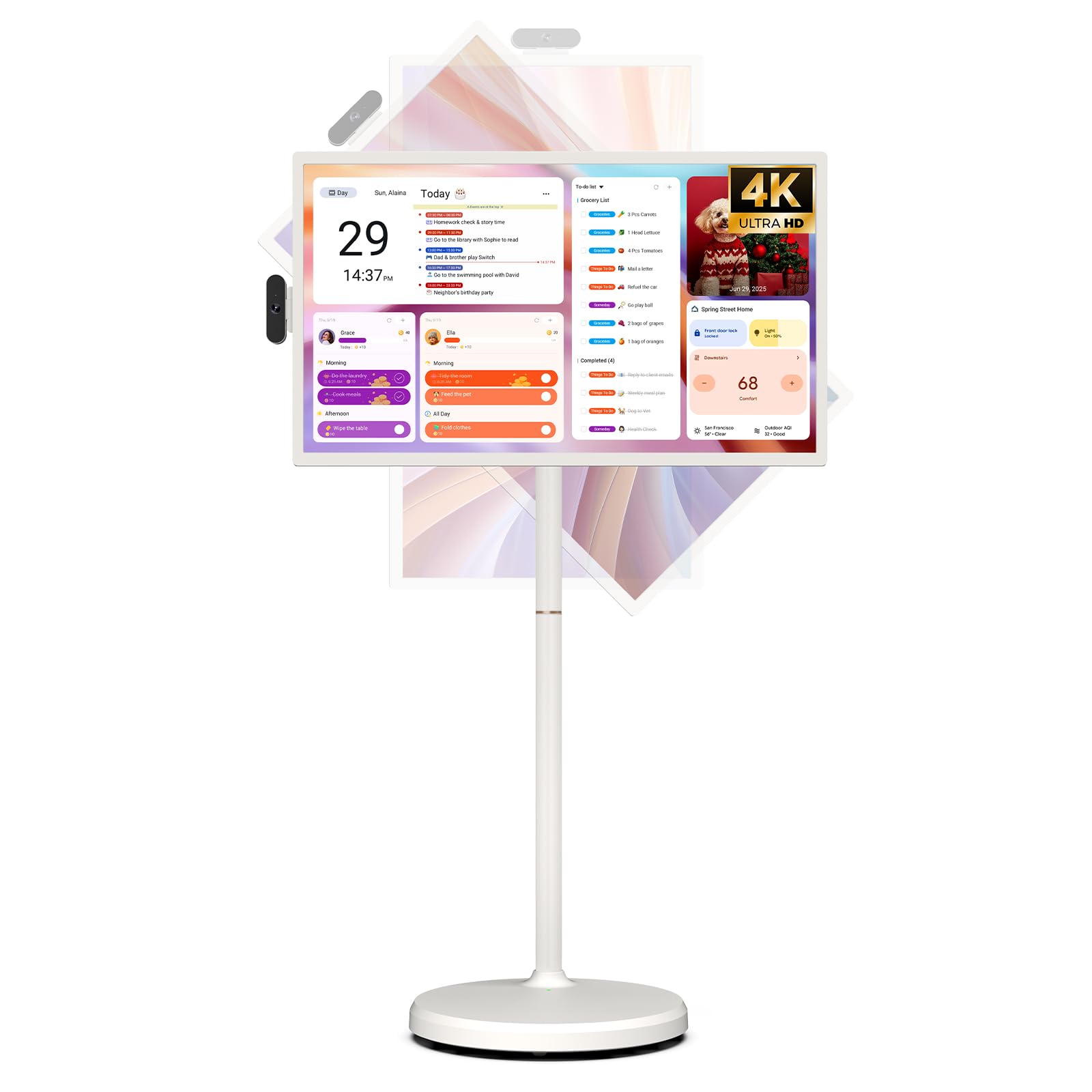
Image: The ApoloSign 32-inch UHD 4K Smart Portable TV Gen2, highlighting its large screen and mobile stand.
5. Opstelling
Vergadering
- Pak alle komponente uit die boks.
- Attach the stand pole sections to the rolling base using the provided screws.
- Carefully mount the TV display onto the top of the assembled stand pole, ensuring it clicks securely into place.
- Connect the internal power cable from the stand to the display.
- Attach the 8MP camera module to the designated slot on top of the display.
Aanvanklike aanskakeling en netwerkverbinding
- Connect the power adapter to the TV and a power outlet. The device will begin charging.
- Press the power button located on the back of the display to turn on the TV.
- Volg die aanwysings op die skerm om jou taal en streek te kies.
- Koppel aan jou Wi-Fi-netwerk deur dit uit die lys te kies en die wagwoord in te voer.
- Sign in with your Google account to access the Google Play Store and other services.
Afstandbeheer-paring
- Insert batteries into the voice remote control.
- On the TV screen, navigate to Settings > Remotes & Accessories > Add Accessory.
- Press and hold the specified pairing buttons on the remote (refer to remote's mini-guide) until the indicator light blinks.
- Select the remote control from the list on the TV screen to complete pairing.
6. Bedryfsinstruksies
Basiese navigasie
- Raakskerm: Tap, swipe, and pinch to navigate menus, open apps, and interact with content.
- Stemafstandbeheer: Use the directional pad and selection buttons for menu navigation. Press the voice button to activate voice commands for searching or launching apps.
Screen Rotation and Adjustment
The screen can be rotated 90 degrees between landscape and portrait modes. It also allows for height adjustment, left/right swivel, and tilting to achieve the desired viewing hoek.

Image: Illustrations demonstrating the various ways the ApoloSign TV screen can be adjusted: height, tilt, and rotation.
Apps and Google Play Store
Running on a customized Android 15 OS and Google certified, you can download and install any app available on the Google Play Store. Access streaming services, social media, productivity tools, and games.

Image: The ApoloSign TV screen showing the Android 15 interface with icons for popular apps like Netflix, YouTube, Spotify, and TikTok.
Wireless and Wired Casting
Share content from your mobile phone, tablet, or laptop to the TV screen.
- Draadlose gietwerk: Use the built-in MixCast feature or other compatible casting protocols. Ensure your device and the TV are on the same Wi-Fi network.
- Wired Casting: Connect external devices like gaming consoles or laptops via the HDMI port. The TV supports 4K HDMI output.
Video: A demonstration of how to screen mirror a mobile phone, tablet, or laptop to the ApoloSign Smart Portable TV.
Calendar Widget and Screensavers
The interactive desktop calendar widget syncs with Google Calendar, Outlook, and Google Tasks to help manage your schedule. Utilize dynamic screensavers to transform the TV into a digital clock, photo frame, or market billboard.

Image: The ApoloSign TV screen showcasing its digital calendar feature, displaying daily schedules and events.

Image: The ApoloSign TV screen demonstrating different digital screensaver options, including a photo display and a music player interface.
Kameragebruik
The integrated 8MP camera is ideal for video calls and conferences. Ensure the camera is correctly installed and facing the desired direction.
7. Onderhoud
Skoonmaak
- Ontkoppel altyd die toestel voordat dit skoongemaak word.
- Gebruik 'n sagte, pluisvrye lap effens dampmet water of 'n skermreiniger afgevee. Vermy harde chemikalieë.
- Wipe the body of the TV and stand with a dry, soft cloth.
Battery sorg
- Vir optimale batterylewe, vermy om die battery gereeld heeltemal te dreineer.
- Bêre die toestel op 'n koel, droë plek wanneer dit nie vir lang tye gebruik word nie.
- Laai die battery gereeld as dit vir lang tyd gestoor word om diep ontlading te voorkom.
Sagteware-opdaterings
Regularly check for and install software updates to ensure optimal performance and access to the latest features. Updates can usually be found in the device's settings menu.
8. Probleemoplossing
- Device not powering on or shutting off abruptly:
Ensure the power adapter is securely connected and the battery is charged. If the issue persists, perform a soft reset by holding the power button for 10-15 seconds. If problems continue, contact customer support. - Remote control not responding or selective functionality:
Check the remote's batteries and replace if necessary. Ensure the remote is paired correctly (refer to Section 5). If the remote is still unresponsive, try re-pairing it. - Wi-Fi-konnektiwiteitsprobleme:
Verify that your Wi-Fi router is working correctly. Restart the TV and your router. Ensure the TV is within range of your Wi-Fi signal. - Skermspieëling werk nie:
Confirm that both the TV and the source device (phone, tablet, laptop) are connected to the same Wi-Fi network. Ensure the casting feature is activated on both devices. - Poor picture or sound quality:
For streaming content, check your internet connection speed. For wired connections (HDMI), ensure cables are securely connected and undamaged. Adjust display settings (resolution, brightness) as needed.
9. Spesifikasies
| Kenmerk | Detail |
|---|---|
| Model Naam | SW3299T-4K |
| Skerm grootte | 32 duim |
| Resolusie | 4K UHD 2160p (3840x2160 Pixels) |
| Vertoon tegnologie | LCD |
| Herlaaitempo | 60 Hz |
| Bedryfstelsel | Android 15 |
| RAM | 16GB (8+8GB) |
| Interne berging | 256 GB |
| Battery kapasiteit | 15000mAh (up to 8 hours runtime) |
| Kamera | 8MP |
| Konnektiwiteit | Bluetooth 5.3, Wi-Fi |
| Hawens | 1x HDMI, 1x USB 2.0, 1x USB 3.0 |
| Luidsprekerbeskrywing | 2.1-kanaal luidsprekers |
| Beheer metode | Touch, Voice Remote |
| Produk afmetings | 16.14" D x 28.87" B x 60.26" H |
10. Waarborg en Ondersteuning
Vervaardiger se waarborg
This ApoloSign product is covered by a 1 Jaar Vervaardigerswaarborg vanaf die aankoopdatum. Hierdie waarborg dek defekte in materiaal en vakmanskap onder normale gebruik. Bewaar asseblief u bewys van aankoop vir waarborgeise.
Kliënte ondersteuning
For technical assistance, troubleshooting, or warranty inquiries, please contact ApoloSign Official customer support. They offer 24/7 fast support to address any issues you may encounter.
Vir meer inligting, besoek die ApoloSign Store on Amazon.