
1. Inleiding
This manual provides essential information for the installation, operation, and maintenance of your FSP VITA GM 650W ATX 3.1 PC Power Supply. Please read this manual thoroughly before installation to ensure proper and safe usage of the product. The FSP VITA GM 650W is designed to deliver stable and efficient power to your computer system, adhering to the ATX 3.1 and PCIe Gen 5.1 specifications.
2. Veiligheidsinligting
Volg altyd die volgende veiligheidsmaatreëls om beserings of skade aan u toerusting te voorkom:
- Moenie die kragtoevoereenheid oopmaak nie. Hoë volumetages are present inside, and opening the casing voids the warranty and poses a risk of electric shock.
- Install the power supply in a well-ventilated area, away from heat sources, direct sunlight, and moisture.
- Ensure the power supply is correctly installed and secured in your PC case.
- Use only the modular cables provided with the power supply. Using incompatible cables can cause damage.
- Koppel die kragtoevoer aan 'n geaarde elektriese aansluiting.
- Disconnect the AC power cord from the wall outlet before installing or removing the power supply or any other components.
- Vermy die plasing van swaar voorwerpe op die kragtoevoer of sy kabels.
- If the power supply is damaged or malfunctioning, discontinue use immediately and contact FSP support.
3. Pakketinhoud
Verifieer dat alle items in jou pakket teenwoordig is:
- FSP VITA GM 650W ATX 3.1 PC Power Supply
- Modular Cable Set (Motherboard, CPU, PCIe, SATA, Peripheral)
- AC kragkabel
- Monteer skroewe
- Gebruikershandleiding (hierdie dokument)
4. Produk verbyview
The FSP VITA GM 650W is a high-efficiency power supply designed for modern PC systems. It features:
- ATX 3.1 Compliance: Designed to meet the latest Intel Power Design Guide ATX 3.1 specifications, ensuring compatibility with future hardware.
- PCIe Gen 5.1 Support: Ready for next-generation graphics cards.
- 80 PLUS Gold Certification: Achieves high efficiency, reducing power dissipation, heat, and noise.
- Synchronous Rectifier LLC Resonance Converter Topology: Reduces switching loss and enhances efficiency.
- +5V & 3.3V DC to DC Circuit Design: Improves efficiency and stabilizes output voltage.
- 105°C Japanese Bulk Capacitor: Ensures reliability and extended lifespan.

Figuur 4.1: Voorkant view of the FSP VITA GM 650W Power Supply, showcasing its compact design and fan grille.
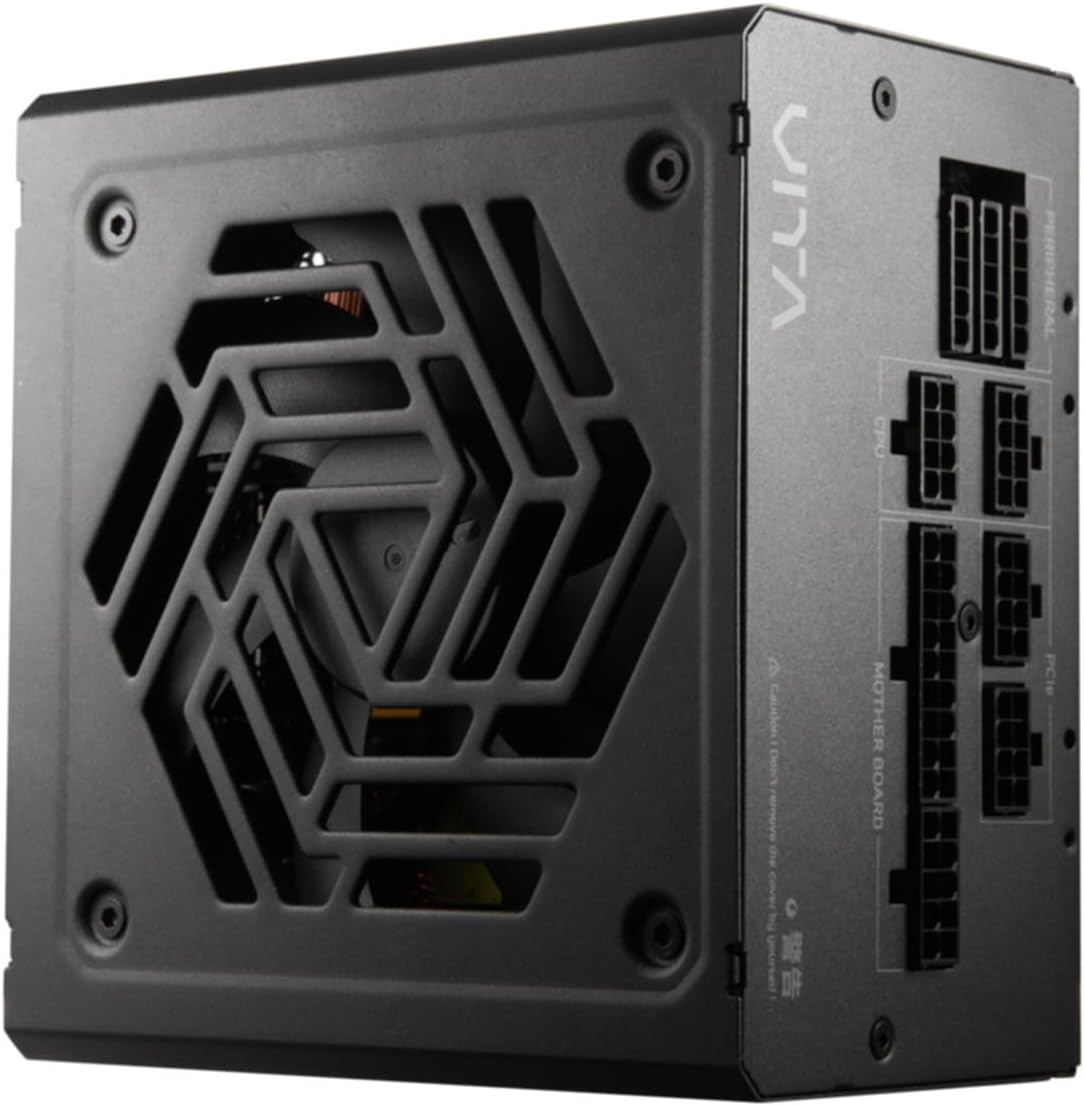
Figuur 4.2: Bo-na-onder view of the FSP VITA GM 650W Power Supply, highlighting the fan and ventilation design.

Figuur 4.3: Kant view of the FSP VITA GM 650W Power Supply, showing the FSP branding and VITA model name.
5. Opstelling en installering
Follow these steps to install your FSP VITA GM 650W power supply:
- Voorbereiding:
- Turn off your computer and disconnect the AC power cord from the wall outlet.
- Maak jou rekenaarkas oop.
- If replacing an existing power supply, disconnect all cables from the old PSU and remove it from the case.
- Montering van die PSU:
- Carefully place the FSP VITA GM 650W into the power supply bay of your PC case.
- Align the screw holes on the PSU with those on the case.
- Bevestig die kragtoevoer met behulp van die meegeleverde monteerskroewe.
- Modulêre kabels verbind:
The FSP VITA GM 650W is a modular power supply. Connect only the cables required for your system components.

Figure 5.1: Modular cable connection panel. Ensure cables are firmly seated.
- Motherboard Power: Sluit die 24-pen ATX-kabel aan op die moederbord.
- SVE Krag: Connect the 4+4-pin or 8-pin EPS/ATX12V cable(s) to the CPU power connector(s) on your motherboard.
- PCIe Power: Connect the 6+2-pin PCIe cables to your graphics card(s).
- SATA krag: Connect SATA power cables to SSDs, HDDs, and optical drives.
- Peripheral Power: Connect 4-pin Molex cables to other peripherals as needed.
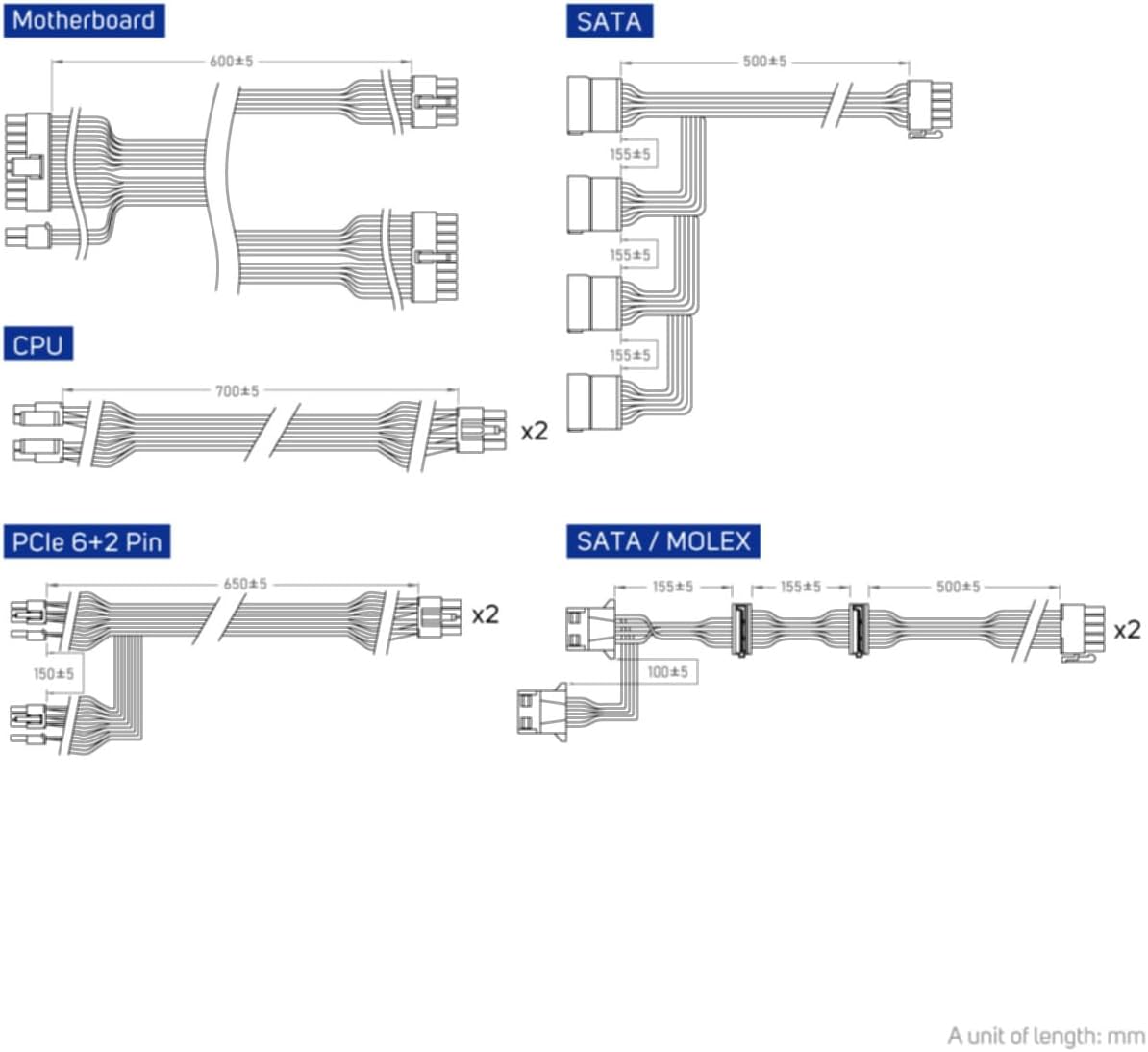
Figure 5.2: Diagram illustrating the various modular cables included and their approximate lengths (in mm).
- Finale tjeks:
- Ensure all cables are securely connected and routed to avoid obstructing airflow.
- Maak u rekenaarkas toe.
- Connect the AC power cord to the power supply and then to a grounded wall outlet.
6. Bedryfsinstruksies
After installation, you can power on your system:
- Ensure the power switch on the back of the power supply is in the "ON" (I) position.
- Druk die aan/af-knoppie op jou rekenaarkas.
- The power supply will provide stable power to your components.

Figuur 6.1: Agter view of the power supply, showing the AC power input and the main power switch.
Bridge Time Importance: The FSP VITA GM 650W adheres to the recommended ATX 3.1 bridge time values. This feature ensures the power supply can maintain a stable output voltage for a critical duration after a power interruption, preventing system instability or damage during sudden power fluctuations or outages.
7. Onderhoud
To ensure optimal performance and longevity of your power supply:
- Stof skoonmaak: Maak gereeld stof van die kragtoevoer se waaierrooster en ventilasieopeninge skoon met saamgeperste lug. Maak seker dat die stelsel afgeskakel en ontkoppel is voordat jy dit skoonmaak.
- Kabelbestuur: Maintain good cable management inside your PC case to ensure proper airflow and prevent overheating.
- Omgewingstoestande: Operate the power supply within recommended temperature and humidity ranges.
8. Probleemoplossing
If you encounter issues with your FSP VITA GM 650W power supply, refer to the following common problems and solutions:
| Probleem | Moontlike oorsaak | Oplossing |
|---|---|---|
| Stelsel skakel nie aan nie. |
|
|
| Stelsel skakel aan, maar skakel onmiddellik af. |
|
|
| Unusual noises from PSU. |
|
|
If the problem persists after trying these solutions, please contact FSP customer support for further assistance.
9. Spesifikasies
| Kenmerk | Detail |
|---|---|
| Modelnommer | 790980 |
| Handelsmerk | FDV |
| Wattage | 650 W |
| ATX weergawe | 3.1 |
| Doeltreffendheidsertifisering | 80 PLUS goud |
| Item gewig | 2.72 kilogram (5.98 pond) |
| Vervaardiger | FDV |
| Datum Eerste Beskikbaar | 15 Augustus 2024 |
10. Waarborg en Ondersteuning
For warranty information, technical support, or service inquiries, please refer to the official FSP webwebwerf of kontak hul kliëntediensafdeling. Bewaar u bewys van aankoop vir waarborgeise.
FSP Official Webwebwerf: www.fsp-group.com
11. Herwinning en wegdoening
Please dispose of this product responsibly. Electronic waste should not be disposed of with household waste. Contact your local authorities or recycling center for information on proper disposal methods for electronic components.