
SYSTEMTREFF 30242342-a
SYSTEMTREFF High-End Gaming PC
Gebruikershandleiding

Image: The SYSTEMTREFF High-End Gaming PC tower, showcasing its transparent side panel with vibrant internal RGB lighting and cooling fans.
1. Produk verbyview
The SYSTEMTREFF High-End Gaming PC is engineered for demanding gaming, streaming, and professional applications. It features an AMD Ryzen 7 9800X3D processor, AMD Radeon RX 9070 XT graphics, 32GB DDR5 RAM, and a fast 1TB M.2 NVMe SSD, ensuring exceptional performance and responsiveness. This system comes with Windows 11 Pro pre-installed, ready for immediate use.
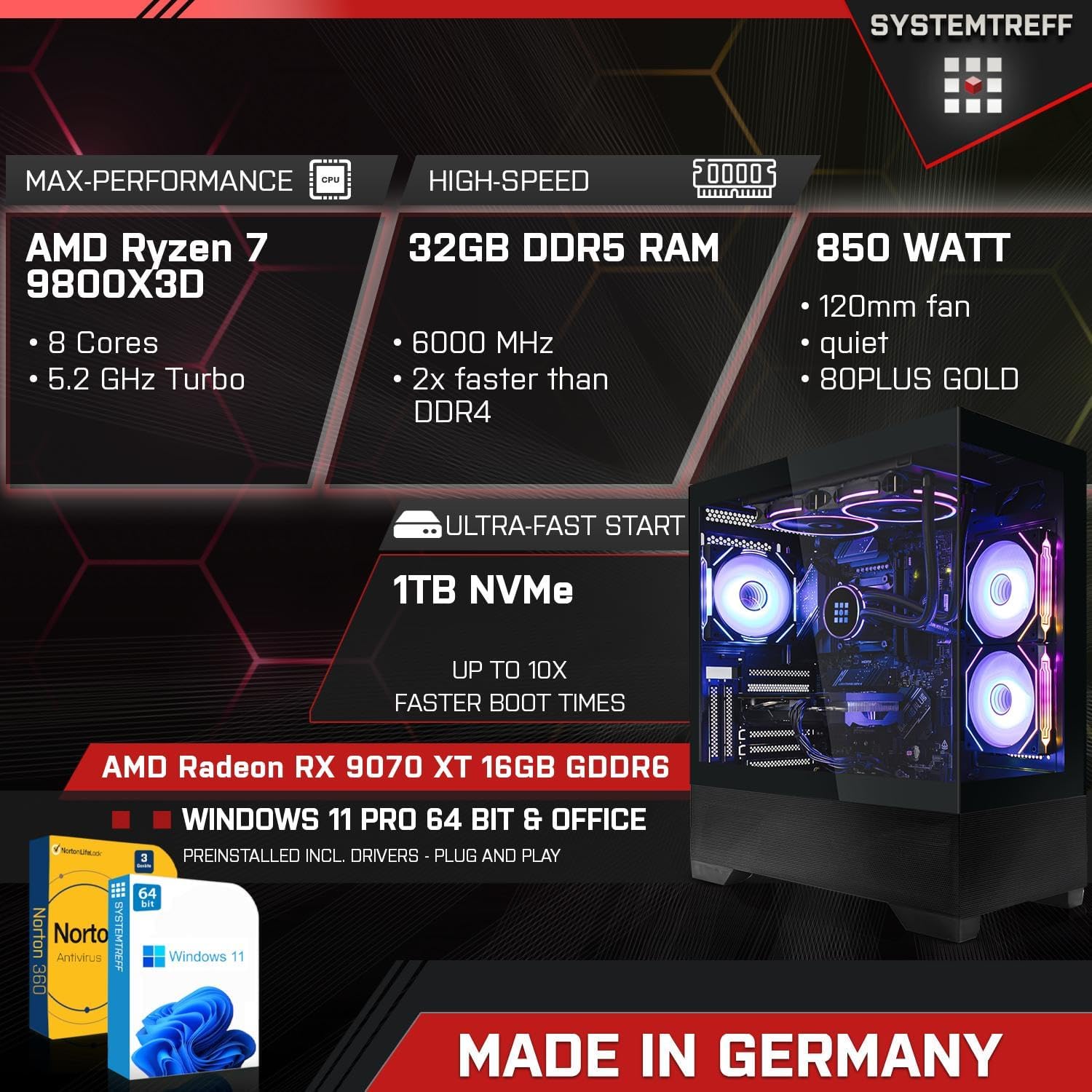
Image: An infographic highlighting the PC's core specifications: AMD Ryzen 7 9800X3D (8 Cores, 5.2GHz Turbo), 32GB DDR5 RAM (6000 MHz), 850 Watt PSU, 1TB NVMe SSD, AMD Radeon RX 9070 XT 16GB GDDR6, Windows 11 Pro, and Norton 360 Security.
2. Opstelgids
Follow these steps to set up your new SYSTEMTREFF Gaming PC:
- Uitpak: Verwyder die rekenaar versigtig uit sy verpakking. Bewaar alle verpakkingsmateriaal vir toekomstige vervoer of diens.
- Plasing: Place the PC on a stable, flat surface with adequate ventilation around the chassis. Ensure no vents are obstructed.
- Verbind randapparatuur:
- Koppel jou monitor(s) aan die grafiese kaart se DisplayPort- of HDMI-uitsette.
- Koppel jou sleutelbord en muis aan die beskikbare USB-poorte.
- Koppel enige ander randapparatuur soos luidsprekers, oorfone of eksterne skywe aan.
- Kragverbinding: Connect the power cable to the power supply unit (PSU) at the rear of the PC, then plug the other end into a grounded electrical outlet.
- Netwerk konneksie: For wired internet, connect an Ethernet cable to the LAN port. For wireless internet, the integrated WLAN module will allow connection after initial setup.

Image: A diagram illustrating the various connectivity options, including front ports (2x USB 3.0, 1x USB-C, Audio & Mic, Power button) and rear ports (DisplayPort 1.4, HDMI 4K HD, USB 3.2 Gen 1, USB 3.2 Gen 2 10Gbps, USB 3.2 Gen 2x2 20Gbps, 2x USB 2.0, Wi-Fi 6E, Gigabit 2.5G LAN, HD 7.1 Sound).
3. Bedryfsinstruksies
Your SYSTEMTREFF Gaming PC is designed for high performance and ease of use.
- Aanvanklike opstart: Press the power button located on the front of the chassis. The system will boot into Windows 11 Pro. Follow the on-screen prompts for initial Windows setup.
- Speletjies en multimedia: The AMD Radeon RX 9070 XT 16GB GDDR6 graphics card provides excellent performance for 4K gaming and video editing. The system supports up to three monitors simultaneously.
- Verbinding: Utilize the integrated WLAN and Bluetooth for wireless connections. The numerous USB 3.2 ports offer high-speed data transfer for external devices.
- Cooling and Airflow: The chassis features a top cooling system and optimized airflow, supporting up to 9 x 120mm fans for efficient heat dissipation. The RGB lighting can be controlled via a dedicated button on the case.

Image: An illustration showing the PC's capability for high-end gaming in 3D/4K, with examples of games like Elden Ring and Metro Exodus. It also highlights suitability for professional applications (Adobe Illustrator, InDesign, Photoshop, video editing, CAD software) and multimedia/office use (4K streaming, audiobooks, Word, Excel, Teams, AutoCAD).
4. Onderhoud
Regular maintenance ensures the longevity and optimal performance of your PC:
- Skoonmaak: Regularly clean the exterior of the PC with a soft, dry cloth. Use compressed air to clear dust from vents and fan grilles. Ensure the PC is powered off and unplugged before cleaning.
- Sagteware-opdaterings: Keep your Windows operating system and all drivers updated. Windows Update will handle OS updates, and graphics card drivers can be updated via AMD's official webwebwerf.
- Antivirusbeskerming: Your system includes Norton 360 Security with Game Optimizer for 1 year. Ensure it is active and performing regular scans to protect against malware.
- Kabelbestuur: While the internal cable management is intuitive, ensure external cables are tidy and not obstructing airflow or ports.

Beeld: 'n Interne view of the PC case, emphasizing the top cooling system, intuitive cable management, dual chamber design, and the power button with USB 3.0, USB-C, and mic/headset ports. It also shows the lower part made of mesh for improved airflow.
5. Probleemoplossing
If you encounter issues, try these basic troubleshooting steps:
- Geen krag:
- Check if the power cable is securely connected to both the PC and the wall outlet.
- Maak seker dat die kragskakelaar op die PSU (agter op die rekenaar) in die 'AAN'-posisie is.
- Probeer 'n ander kragpunt.
- Geen skerm:
- Verify that the monitor is powered on and the video cable is securely connected to the graphics card (not the motherboard's video outputs).
- Probeer 'n ander videokabel of monitor indien beskikbaar.
- Stelselvertraging:
- Check Task Manager (Ctrl+Shift+Esc) for high CPU, RAM, or disk usage by specific applications.
- Ensure all drivers and Windows are up to date.
- Voer 'n volledige stelselskandering met jou antivirusprogrammatuur uit.
- Randapparatuur werk nie:
- Probeer om die randapparatuur aan 'n ander USB-poort te koppel.
- Reinstall or update the peripheral's drivers.
Indien hierdie stappe nie die probleem oplos nie, verwys asseblief na die ondersteuningsafdeling.
6. Spesifikasies
Detailed technical specifications for your SYSTEMTREFF Gaming PC:
| Komponent | Spesifikasie |
| Verwerker | AMD Ryzen 7 9800X3D (8 Cores, 4.7 GHz base, up to 5.2 GHz Turbo) |
| SVE Verkoeler | Corsair Nautilus 240 RS ARGB 240mm (Black) |
| Moederbord | ASUS TUF GAMING B650-E WIFI - AM5 |
| RAM | 32GB DDR5-6000 CL30 Kingston FURY Beast (2x16GB), expandable up to 192GB (4 slots total, 2 free) |
| Grafiese kaart | AMD Radeon RX 9070 XT 16GB GDDR6 (4K, DX12, FSR 3, PCIe 5.0) |
| Berging | 1000GB M.2 SSD NVMe (5000 MB/s read, 4200 MB/s write) |
| Bedryfstelsel | Windows 11 Pro (pre-installed with drivers) |
| Antivirus | Norton 360 Security with Game Optimizer (1 year protection for 3 devices) |
| Netwerk | Realtek 2.5 Gigabit LAN Controller (2500Mbit/s), Integrated WLAN |
| Oudio | 7.1-Channel High Definition Audio with Audio Boost |
| Onderstel | Systemtreff Gaming Mid Tower AirForce GT1 Black (44.8cm x 21.5cm x 48.8cm), tempered glass window, RGB lighting |
| Kragtoevoer | 850W MSI MAG A850GL PCIE5, 120mm fan, 80 PLUS GOLD (90% efficiency) |
| Gewig | 12 kilogram |

Image: A visual representation of the PC case dimensions: 44.8 cm (depth), 21.5 cm (width), and 48.8 cm (height).
7. Waarborg en Ondersteuning
SYSTEMTREFF is committed to providing high-quality products and excellent customer service.
- Gehalteversekering: All SYSTEMTREFF systems are assembled and tested in Germany, ensuring rigorous quality control before delivery.
- Waarborg: Your SYSTEMTREFF Gaming PC comes with a 3 jaar waarborg on all components. Please retain your invoice as proof of purchase.
- Kliëntediens: For any technical assistance or inquiries, our customer support team is available 24 hours via email. Refer to the contact information provided in your purchase documentation or on the SYSTEMTREFF official webwebwerf.

Image: An infographic stating "Made in Germany - Assembly & Testing", "Since 2008 on the market", "70,000 satisfied customers", and "3 Years Warranty on all components". It also features a customer support representative and mentions 24-hour email support.
Ask a question about this manual
Ask about setup, troubleshooting, compatibility, parts, safety, or missing instructions. Manuals+ will review the question and use this page’s manual context to help answer it.