
Inleiding
This manual provides comprehensive instructions for the setup, operation, maintenance, and troubleshooting of your MASTER & DYNAMIC MH40 Wireless Over-Ear Headphones Gen II. Please read this manual carefully to ensure proper use and to maximize your listening experience.
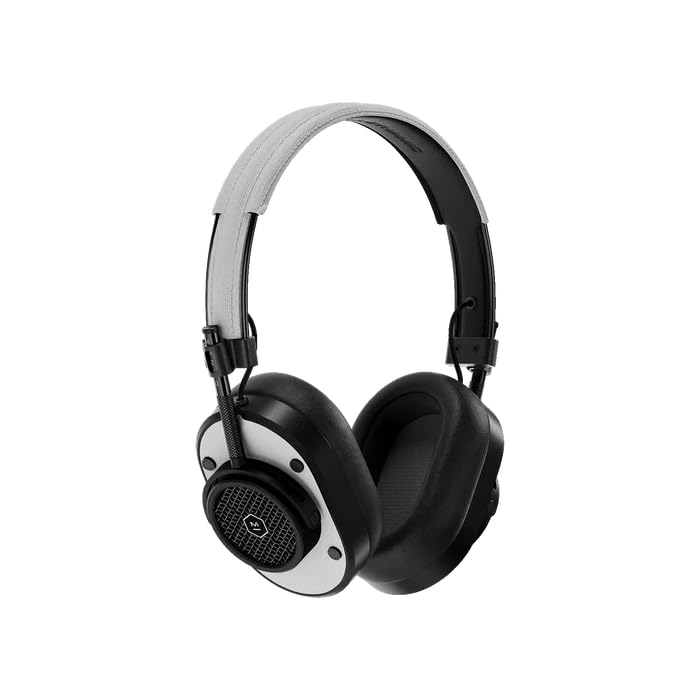
Voorkant view of the MH40 Wireless Over-Ear Headphones, showcasing the black metal frame and white leather earcups and headband.
Wat is in die boks
- MASTER & DYNAMIC MH40 Wireless Over-Ear Headphones Gen II
- USB-C-laaikabel
- USB-C tot 3.5 mm oudiokabel
- Drasak
- Gebruikershandleiding (hierdie dokument)
Produk verbyview
The MH40 Gen II headphones feature a timeless design with premium materials for durability and comfort. Key components include custom titanium drivers for enhanced sound, removable magnetic ear pads for superior noise isolation, and a lightweight anodized aluminum frame.
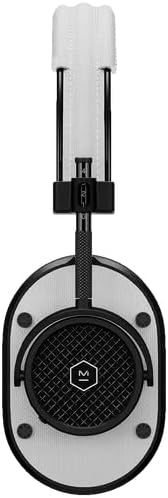
'n Nabyskoot-kant view of the MH40 headphones, highlighting the detailed earcup design and the adjustable headband.

'n Gedetailleerde view of the MH40's removable magnetic ear pads, showing the internal speaker grille and the 'Designed & Developed' inscription.

A close-up shot of the earcup, highlighting the control buttons and the metal mesh design.
Opstelling
1. Laai die oorfone
Before first use, fully charge your MH40 Gen II headphones. Connect the USB-C charging cable to the headphone's charging port and to a USB power source. The LED indicator will show charging status. A full charge provides up to 30 hours of listening time. A quick 15-minute charge provides approximately 6 hours of listening.
2. Bluetooth-koppeling
- Maak seker dat die oorfone afgeskakel is.
- Druk en hou die aan/af-knoppie in totdat die LED-aanwyser blou flikker, wat paringsmodus aandui.
- Aktiveer Bluetooth op jou toestel (slimfoon, tablet, rekenaar) en soek vir beskikbare toestelle.
- Select "MH40 Gen II" from the list of devices.
- Once connected, the LED indicator will turn solid white.
The MH40 Gen II uses Bluetooth 5.2 for a stable connection up to 30 meters (100 feet).
3. Bedrade verbinding (opsioneel)
For a wired audio experience, connect the provided USB-C to 3.5mm audio cable to the headphone's USB-C port and to your audio source's 3.5mm jack. Digital audio up to 24-bit/96kHz is supported via USB-C to USB-C connection (cable sold separately).
Bedryf
Krag aan/af
- Krag aan: Druk en hou die kragknoppie in totdat die LED-aanwyser oplig.
- Skakel af: Druk en hou die kragknoppie totdat die LED-aanwyser afskakel.
Musiek afspeel
- Speel/pouse: Druk die multifunksionele knoppie een keer.
- Volgende snit: Press the multi-function button twice.
- Vorige snit: Druk die multifunksieknoppie drie keer.
- Volume op: Druk die '+'-knoppie.
- Volume af: Druk die '-' knoppie.
Telefoonoproepe
The MH40 Gen II features a dual microphone array with wind noise reduction technology for clear calls.
- Beantwoord/beëindig oproep: Druk die multifunksionele knoppie een keer.
- Verwerp oproep: Druk en hou die multifunksieknoppie in.
Onderhoud
Skoonmaak
- Vee die oorfone af met 'n sagte, droë lap.
- Moenie harde chemikalieë of skuurmateriaal gebruik nie.
- The magnetic ear pads can be removed for separate cleaning if necessary.
Berging
- Store the headphones in the provided carrying pouch when not in use to protect them from dust and scratches.
- Vermy om die oorfone aan uiterste temperature of humiditeit bloot te stel.
Probleemoplossing
| Probleem | Oplossing |
|---|---|
| Oorfone skakel nie aan nie | Maak seker dat die oorfone gelaai is. Koppel aan 'n kragbron met die USB-C-kabel. |
| Geen klank nie | Check if the headphones are paired correctly. Increase volume on both the headphones and the connected device. Ensure the audio source is playing. |
| Kan nie via Bluetooth koppel nie | Ensure headphones are in pairing mode (flashing blue LED). Turn off and on Bluetooth on your device. Move closer to the device. Forget the device in your Bluetooth settings and try pairing again. |
| Swak klankgehalte | Ensure the headphones are within Bluetooth range. Check for interference from other wireless devices. For wired connection, ensure the cable is fully inserted. |
Spesifikasies
| Kenmerk | Detail |
|---|---|
| Handelsmerk | MASTER & DYNAMIC |
| Model Naam | MH40 |
| Oorplasing | Oor Oor |
| Geraasbeheer | Klankisolasie |
| Verbindingstegnologie | Draadloos (Bluetooth) |
| Draadlose Tegnologie | Bluetooth |
| Bluetooth weergawe | 5.2 |
| Bluetooth-reeks | 30 meter (100 voet) |
| Tipe oudiobestuurder | Custom Titanium Drivers |
| Battery Gemiddelde Lewe | 30 ure |
| Battery Laai Tyd | 15 minute vir 6 uur terugspeeltyd |
| Beheer metode | App, On-device buttons |
| Omhulselmateriaal | Aluminum, Leather, Canvas |
| Frekwensiereeks | 20 Hz - 20,000 XNUMX Hz |
| Bykomende kenmerke | Wind Noise Reduction Microphones |
| Versoenbare toestelle | Laptops, Desktops, Tablets, Telephones, Smart Speaker, Television, Gaming Consoles |
Waarborg inligting
MASTER & DYNAMIC products are designed and built to last. Your MH40 Wireless Over-Ear Headphones Gen II are covered by a manufacturer's limited warranty against defects in materials and workmanship. For specific warranty terms, conditions, and registration, please refer to the warranty card included with your product or visit the official MASTER & DYNAMIC webwebwerf.
Ondersteuning
If you encounter any issues not covered in this manual or require further assistance, please visit the official MASTER & DYNAMIC support website for FAQs, additional resources, and contact information for customer service. You can typically find support details at www.masterdynamic.com/support.