
1. Inleiding
Dankie vir die aankoopasing the COLSUR K8-WHITE Portable Bluetooth CD Player. This device is designed to provide versatile audio entertainment, combining CD playback with modern features like Bluetooth connectivity, FM radio, and a multi-level table lamp. Please read this manual thoroughly before use to ensure proper operation and to maximize your enjoyment of the product.
2. Veiligheidsinligting
- Moenie die toestel aan reën, vog of uiterste temperature blootstel nie.
- Vermy om die toestel naby hittebronne of in direkte sonlig te plaas.
- Moenie die toestel self uitmekaar haal of probeer herstel nie. Verwys alle diens na gekwalifiseerde personeel.
- Hou die toestel weg van sterk magnetiese velde.
- Use only the provided Type-C charging cable and a compatible power adapter (not included) for charging.
- Ensure proper ventilation when operating the device.
3. Pakketinhoud
Kontroleer asseblief die pakket vir die volgende items:
- COLSUR K8-WHITE Portable Bluetooth CD Player
- Type-C laaikabel
- Gebruikershandleiding
- Muurbevestigingstel (indien van toepassing)
- Tafelstaander (indien van toepassing)
4. Produk verbyview
The COLSUR K8-WHITE is a versatile audio device designed for various listening experiences. It features a compact design suitable for tabletop placement or wall mounting.
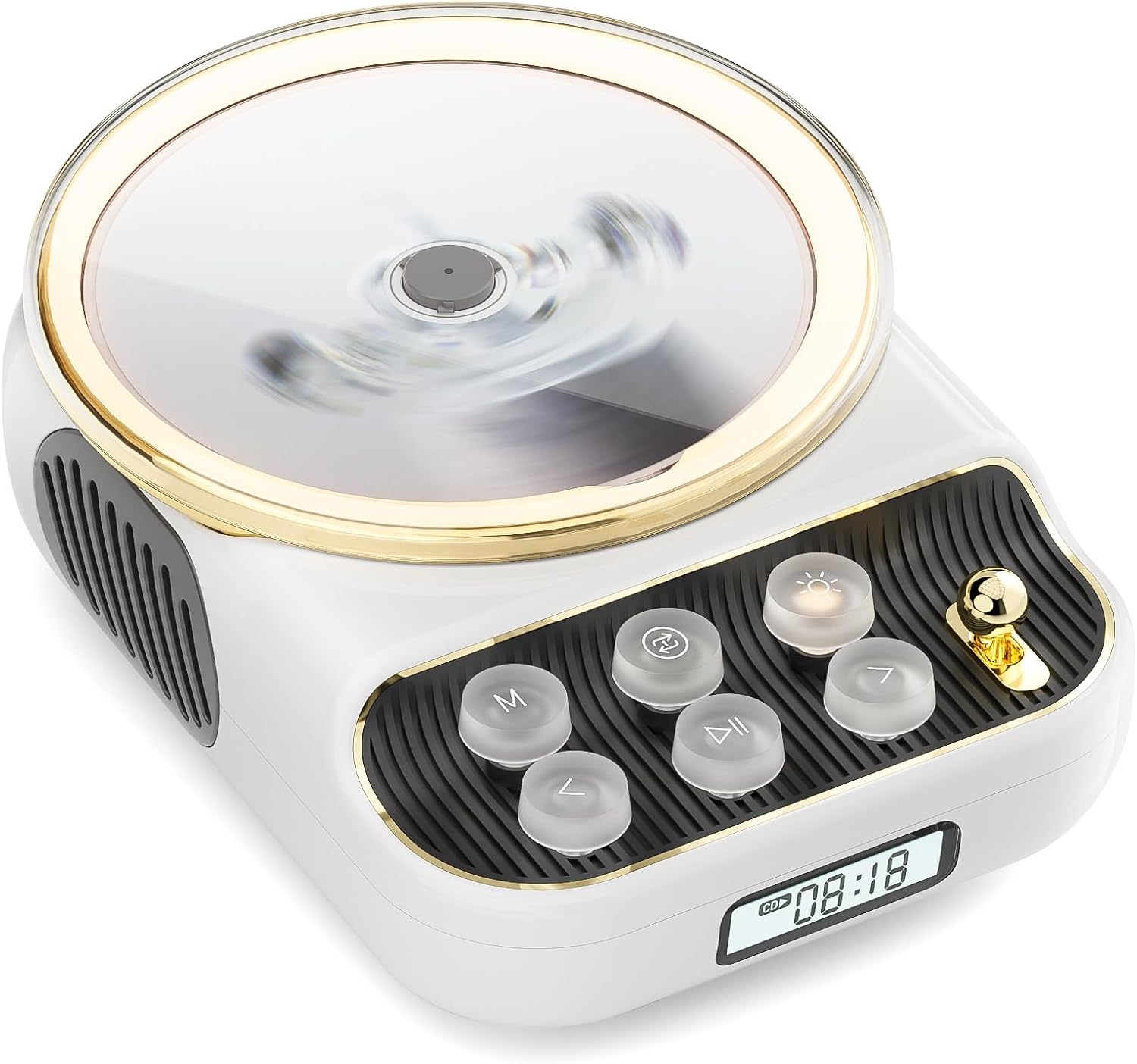
Voorkant view of the COLSUR K8-WHITE Portable Bluetooth CD Player, showcasing its circular CD compartment, control buttons, and digital display.

This image illustrates the multifunctionality of the COLSUR K8-WHITE, highlighting its capabilities for CD playback, Bluetooth mode, FM radio, TF card speaker, 3.5mm audio jack, and night light function.
Beheer uitleg

A detailed diagram showing the various buttons, ports, and features of the COLSUR K8-WHITE CD Player, including the CD cover, function buttons, display, Type-C charging port, TF card interface, and speaker.
- CD-kompartement: Vir die invoeging van oudio-CD's.
- Vertoon: Shows current mode, track number, time, or FM frequency.
- Funksie knoppies: (M) Mode, (Loop) Repeat, (Light) Light/Bluetooth Transmit, (Play/Pause), (Previous/Volume Down), (Next/Volume Up).
- Volumeknop: Verstel klankvolume.
- Tipe C-laaipoort: For power input and charging the internal battery.
- TF kaart koppelvlak: For playing music from a TF card.
- 3.5 mm oudio-uitvoer: Vir die koppeling van oorfone of eksterne luidsprekers.
5. Opstelling
5.1 Laai die toestel
The device has a built-in 4000mAh rechargeable Lithium-ion battery. Before first use, fully charge the device.
- Connect the provided Type-C charging cable to the Type-C port on the device.
- Connect the other end of the cable to a compatible USB power adapter (5V/2A recommended, not included).
- The charging indicator on the display will show charging status. It will turn off or change color when fully charged.
5.2 Aan-/afskakel
To power on the device, press and hold the Power button (often integrated with Play/Pause or a dedicated button, refer to the control layout diagram). To power off, press and hold the Power button again.
5.3 Plasingsopsies
The COLSUR K8-WHITE can be used as a tabletop device or mounted on a wall.
- Gebruik van tafelblad: Place the device on a stable, flat surface. Ensure the non-slip feet are securely positioned.
- Muurmontering: Use the provided wall mount kit (if included) to securely attach the device to a wall. Follow the instructions provided with the wall mount kit for safe installation.
6. Bedryfsinstruksies
6.1 CD-weergawe

The image shows the COLSUR K8-WHITE CD Player on a wooden table, playing a CD, and a separate image illustrating its use as a Bluetooth speaker connected to a smartphone.
The player supports CD, CD-R, CD-RW, MP3, and WMA formats.
- Maak die deksel van die CD-kompartement oop.
- Carefully place a CD onto the spindle, ensuring it is seated correctly.
- Maak die deksel van die CD-kompartement toe.
- Druk die M (modus) button repeatedly until "CD" mode is displayed.
- Druk die Speel / Pouse knoppie om die afspeel te begin.
- Gebruik die Vorige/Volume af en Volgende / Volume op knoppies om snitte oor te slaan.
- Stel die volume aan met die Volumeknop.
- Druk die Lus button to cycle through repeat modes (e.g., repeat one, repeat all, random).
6.2 Bluetooth-ontvangermodus
Connect your smartphone, tablet, or other Bluetooth-enabled devices to stream audio wirelessly. The device features Bluetooth version 5.3 for stable connection.
- Druk die M (modus) button repeatedly until "BT" (Bluetooth) mode is displayed. The device will enter pairing mode, indicated by a flashing Bluetooth icon or specific sound.
- Aktiveer Bluetooth op jou eksterne toestel en soek vir beskikbare toestelle.
- Select "COLSUR K8-WHITE" (or similar name) from the list to pair.
- Once paired, you can play music from your external device, and the audio will output through the CD player's speakers.
6.3 FM-radiomodus

The COLSUR K8-WHITE CD Player is shown on a desk, with its display showing an FM radio frequency, indicating its radio function.
Enjoy your favorite radio stations with the built-in FM tuner (frequency range: 76 MHz to 108 MHz).
- Druk die M (modus) druk die knoppie herhaaldelik totdat "FM"-modus vertoon word.
- Druk en hou die Speel / Pouse button to initiate an automatic scan for FM stations. The device will save found stations.
- Gebruik die Vorige/Volume af en Volgende / Volume op knoppies om deur gestoorde stasies te navigeer.
- Stel die volume aan met die Volumeknop.
6.4 TF-kaartterugspeel
Speel musiek files directly from a TF (MicroSD) card.
- Insert a TF card (with MP3/WMA files) into the TF card slot.
- Druk die M (modus) button repeatedly until "TF" mode is displayed. The device should automatically start playing music from the card.
- Gebruik die Vorige/Volume af en Volgende / Volume op knoppies om snitte oor te slaan.
- Stel die volume aan met die Volumeknop.
6.5 AUX-invoer
Connect external audio devices (e.g., MP3 players, older phones) via the 3.5mm AUX jack.
- Connect one end of a 3.5mm audio cable (not included) to the AUX port on the CD player.
- Koppel die ander kant aan die klankuitset van jou eksterne toestel.
- Druk die M (modus) button repeatedly until "AUX" mode is displayed.
- Control playback from your external device. Adjust volume using the Volumeknop op die CD-speler.
6.6 Koptelefoonuitset
For private listening, connect headphones to the 3.5mm audio output jack.
- Plug your headphones into the 3.5mm audio output jack.
- The internal speakers will automatically mute.
- Verstel die volume met die Volumeknop.
6.7 Tabel Lamp Function and Bluetooth Transmission

The COLSUR K8-WHITE CD Player is shown on a bedside table, emitting a soft glow, functioning as a night light while a person sleeps in the background.
The device includes a table lamp with three brightness levels and a Bluetooth transmission mode.
- Short Press the Light Button:
- First press: Activates a warm light (low brightness).
- Second press: Activates a flashing light (medium brightness).
- Third press: Turns off the light. The lights will cycle through these states.
- Long Press the Light Button: Activates the device's Bluetooth transmission mode. In this mode, the CD player can transmit audio to wireless headphones or other Bluetooth speakers.
7. Onderhoud
- Skoonmaak: Gebruik 'n sagte, droë lap om die buitekant van die toestel skoon te maak. Moenie vloeibare skoonmaakmiddels of skuurmiddels gebruik nie.
- CD sorg: Handle CDs by their edges. Clean CDs with a soft, lint-free cloth, wiping from the center outwards.
- Berging: Wanneer dit nie vir lang tye gebruik word nie, bêre die toestel op 'n koel, droë plek.
8. Probleemoplossing
| Probleem | Moontlike oorsaak | Oplossing |
|---|---|---|
| Toestel skakel nie aan nie. | Battery is leeg. | Connect the device to a power source using the Type-C cable and charge it. |
| Geen klank van luidsprekers nie. | Volume is too low or muted. Headphones are connected. Incorrect mode selected. | Increase volume. Disconnect headphones. Ensure correct mode (CD, BT, FM, TF, AUX) is selected. |
| CD speel nie of spring oor. | CD is dirty, scratched, or inserted incorrectly. CD format not supported. | Clean the CD. Ensure the CD is inserted correctly. Try a different CD. Verify CD format compatibility. |
| Bluetooth-saambinding misluk. | Device is not in pairing mode. External device Bluetooth is off or out of range. | Ensure the CD player is in Bluetooth mode and flashing. Move external device closer. Restart both devices. |
| FM-radio-ontvangs is swak. | Swak sein. Steuring. | Reposition the device. Extend any external antenna if available. Try scanning again. |
9. Spesifikasies
- Handelsmerk: COLSUR
- Model: K8-WHITE
- Kleur: Wit
- Verbindingstegnologie: Bluetooth 5.3, AUX (3.5mm jack), Type-C (charging)
- Ondersteunde mediaformate: Audio CD, CD-R, CD-RW, MP3, WMA (from CD or TF card)
- FM-radiofrekwensie: 76 MHz - 108 MHz
- Battery: 4000mAh Litium-ioon (Herlaaibaar)
- Spesiale kenmerke: Built-in speaker, Table lamp with 3 brightness levels, TF card slot, Headphone output
- Versoenbare toestelle: Headphones, Bluetooth speakers, Amplifiers, Bluetooth audio receivers
10. Waarborg en Ondersteuning
For warranty information or technical support, please refer to the documentation included with your purchase or contact the retailer/manufacturer directly. Keep your proof of purchase for warranty claims.