
1. Inleiding
The Raddy VP7 Wireless Weather Station provides comprehensive weather monitoring for your home and surroundings. This manual details the setup, operation, and maintenance of your device, ensuring accurate and reliable weather data.
2. Wat is in die boks
Pak alle komponente versigtig uit en maak seker dat die volgende items teenwoordig is:
- Instruksie Handleiding
- Buitensensor
- Windvaan
- Sonpaneel
- Binne-skermkonsole
3. Produkkenmerke
- 7.4-duim kleurskerm: Provides detailed weather information including indoor/outdoor temperature and humidity, precipitation, 12-hour weather forecasts, atomic clock, RCC calendar, wind direction and speed, dew point, felt temperature, atmospheric pressure, and daily maximum/minimum temperatures.
- High-Precision Outdoor Sensors: Includes a rain funnel, wind vane, speed sensor, thermo-hygrometer with anti-radiation shield, and a solar panel. Designed for accurate data with a communication range of up to 100 meters and resistance to harsh weather.
- Aanpasbare waarskuwings: Configure alerts for maximum/minimum temperature and humidity, wind speed, and precipitation. Features two alarms for weekdays and weekends.
- Scalable Monitoring: Connect up to three additional Raddy R5 remote sensors to monitor up to five different areas (e.g., baby's room, garden, living room, kitchen).
4. Opstelling
4.1 Outdoor Sensor Installation
Proper placement of the outdoor sensor is crucial for accurate readings. Choose an open location, free from obstructions, that allows for accurate wind, rain, and temperature measurements.
- Assemble the wind cups and wind vane onto the sensor unit.
- Mount the sensor using the provided hardware. Ensure it is level using a spirit level for accurate rain and wind measurements.
- Insert 3 AA batteries (not included) into the outdoor sensor's battery compartment.

Image: The Raddy VP7 outdoor sensor showing its main components: Wind Cups, Rain Funnel, Thermo-Hygrometer Radiation Shield, Solar Panel, and Wind Vane.

Image: Various mounting options for the outdoor sensor, including top, side, and pole mounting, along with a detailed view of the sensor's battery compartment and reset button.
4.2 Indoor Display Console Setup
- Place the indoor display console in a central location within range of the outdoor sensor (up to 100 meters).
- Connect the power adapter to the console and a power outlet. Alternatively, insert 3 AA batteries (not included) for backup power. Note that continuous backlight requires AC power.
- The console will automatically search for the outdoor sensor and synchronize data. This may take a few minutes.

Image: Illustration showing the wireless data transmission between the indoor display console and the outdoor sensor, highlighting the 330ft (100m) range.
5. Bedryfsinstruksies
5.1 Vertoon oorview
The 7.4-inch color display presents various weather parameters. Familiarize yourself with the layout:
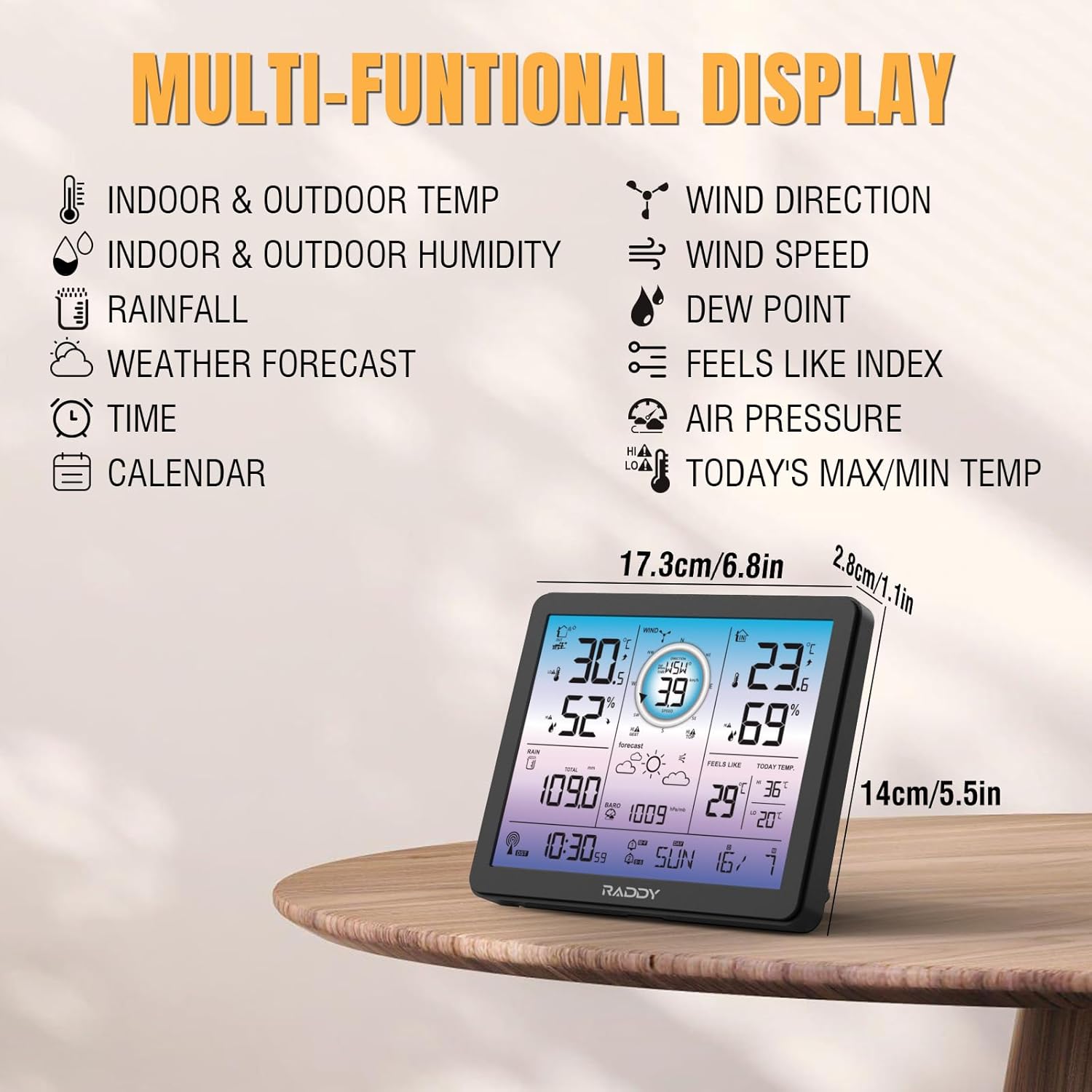
Image: The Raddy VP7 indoor display console showing its multi-functional display with various weather data points and dimensions.
- Links bo: Indoor & Outdoor Temperature, Indoor & Outdoor Humidity
- Regs bo: Wind Direction, Wind Speed, Dew Point, Feels Like Index
- Middel: Rainfall, Weather Forecast, Air Pressure
- Onder: Time, Calendar, Today's Max/Min Temperature
5.2 Stel tyd en datum in
The Raddy VP7 features an atomic clock with DCF functionality for automatic time synchronization. If manual adjustment is needed:
- Druk die 'SET'-knoppie om die tydinstellingsmodus te betree.
- Use the '+' and '-' buttons to adjust values.
- Press 'SET' again to confirm and move to the next setting (e.g., year, month, day).

Image: The Raddy VP7 display console highlighting the atomic clock with DCF feature for precise timekeeping.
5.3 Verstaan van Weerdata
The display provides real-time and forecasted weather information:
- Temperatuur/Humiditeit: Displays current indoor and outdoor readings.
- Winddata: Shows current wind speed and direction.
- Reënval: Tracks daily, weekly, and monthly precipitation.
- Weervoorspelling: Provides a 12-hour forecast based on barometric pressure changes.
- Barometriese druk: Displays current atmospheric pressure.
5.4 waarskuwings
Set custom alerts for various weather conditions:
- Press the 'ALERT' button to cycle through alert settings (temperature, humidity, wind, rain).
- Use '+' and '-' to set desired high/low thresholds.
- Press 'ALERT' again to activate or deactivate the alert.
5.5 Agterligverstelling
The display features 4 adjustable backlight levels (LV0 to LV3) for optimal visibility in different lighting conditions.

Beeld: Vier eksamples of the Raddy VP7 display showing different backlight levels from LV0 (off) to LV3 (brightest).
6. Onderhoud
- Skoonmaak: Vee die skermkonsole en buitesensor af met 'n sagte, damp lap. Moenie skuur skoonmaakmiddels of oplosmiddels gebruik nie.
- Battery vervanging: Replace batteries in both the outdoor sensor and indoor console when the low battery indicator appears on the display.
- Outdoor Sensor Check: Periodically check the outdoor sensor for debris (leaves, dirt) that might obstruct the rain funnel or wind sensors.
7. Probleemoplossing
| Probleem | Moontlike oorsaak | Oplossing |
|---|---|---|
| Geen buitelugdata word vertoon nie | Outdoor sensor out of range or low battery. | Relocate sensor closer to console. Replace sensor batteries. |
| Onakkurate temperatuur/humiditeit | Sensor blootgestel aan direkte sonlig of hittebronne. | Ensure sensor is in a shaded, well-ventilated area. |
| Verkeerde tyd/datum | DCF signal interference or manual setting error. | Ensure console is away from electronic interference. Manually set time/date if automatic sync fails. |
| Reënval registreer nie | Rain funnel blocked by debris. | Clear any obstructions from the rain funnel. |
8. Spesifikasies
| Kenmerk | Detail |
|---|---|
| Model | VP7 |
| Vervaardiger | Raddy |
| Vertoon styl | Digital Color Display |
| Skerm grootte | 7.4 duim |
| Kragbron (Konsole) | WS-adapter (ingesluit), 3x AA-batterye (nie ingesluit nie) |
| Kragbron (Sensor) | 3x AA Batteries (not included), Solar Panel |
| Verbindingstegnologie | Draadloos |
| Wireless Range | Tot 100 meter (330 voet) |
| Temperatuur Akkuraatheid | ±1 °C |
| Ingesluit komponente | Instruction Manual, Outdoor Sensor, Wind Vane, Solar Panel, Indoor Display Console |
| Afmetings (Pakket) | 38.1 x 29.7 x 14.8 cm |
| Gewig (Pakket) | 1.7 kilogram |
9. Waarborg en Ondersteuning
Raddy provides lifetime technical support for the VP7 Wireless Weather Station. For any questions, issues, or assistance with installation and setup, please contact Raddy customer service. Refer to the product packaging or Raddy's official webwebwerf vir kontakbesonderhede.