
1. Produk verbyview
The Hisense 65E7Q QLED Smart TV offers a premium viewing experience with its 65-inch QLED display. This television integrates advanced technologies such as Dolby Vision and Dolby Atmos for immersive audio-visuals, AI Smooth Motion for fluid images, and dedicated modes for gaming and sports. Powered by the VIDAA operating system, it provides easy access to a wide range of streaming content and smart features, including voice control.

Voorkant view of the Hisense 65E7Q QLED Smart TV.
Sleutel kenmerke:
- QLED Colour: Experience rich, vibrant, and realistic colors.
- KI Gladde Beweging: Advanced MEMC and 3D Noise Reduction for fluid, blur-free images.
- Dolby Vision en Dolby Atmos: Cinematic picture and immersive sound for an enhanced entertainment experience.
- Spelmodus Plus: Reduces input lag to 16ms, with 60Hz VRR and ALLM for ultra-fluid gaming.
- KI-sportmodus: Optimizes picture and sound for sports content, reducing motion blur and enhancing stadium-like audio.
- KI 4K Opskaler: Enhances blurry images to near-4K quality.
- VIDAA Smart TV OS: Fast, secure, and intuitive operating system with access to popular streaming applications.
- Stembeheer: Integrated Alexa and VIDAA Voice for convenient operation.
2. Veiligheidsinligting
Please read all safety instructions carefully before using your TV. Keep this manual for future reference. Always ensure the TV is placed on a stable surface to prevent tipping. Do not expose the TV to rain or moisture. Refer to the full safety guidelines in the included safety manual.
3. Pakketinhoud
Verifieer dat alle items in die boks teenwoordig is:
- Hisense 65E7Q QLED Smart TV
- Kragkabel
- Remote Control (with 1 AAAA battery included)
- TV-staander (2 stukke)
- Skroewe vir Staanmontering
- Gebruikershandleiding (hierdie dokument)
- Waarborgkaart
4. Opstelling
4.1 Montering van die Staanplek
- Plaas die TV-skerm versigtig met die skerm na onder op 'n sagte, plat oppervlak om skade te voorkom.
- Rig die staanderstukke met die ooreenstemmende gleuwe aan die onderkant van die TV.
- Maak die staanderstukke vas met die meegeleverde skroewe. Maak seker dat hulle stewig vasgedraai is.

Diagram illustrating TV dimensions and stand installation points.
4.2 Muurmontering
If you plan to wall mount your TV, ensure you use a VESA-compatible wall mount kit (not included). The Hisense 65E7Q supports a VESA mounting standard of 600 x 400 mm. Follow the instructions provided with your wall mount kit for safe installation.
4.3 Aansluiting van randapparatuur
Connect your external devices to the TV's ports as needed. Refer to the port diagram below:

Agter view showing available ports and connections.
- HDMI-poorte (x3): Connect Blu-ray players, game consoles, and other HDMI devices. One port supports eARC for enhanced audio return.
- USB-poorte (x2): Connect USB flash drives for media playback. (1x USB 3.0, 1x USB 2.0)
- Antenna Inputs (x2): Connect your terrestrial or cable antenna.
- Ethernet (LAN): Vir bedrade netwerkverbinding.
- Optiese oudio-uit: Connect to a soundbar or audio receiver for digital audio.
- Koptelefoonaansluiting: Vir privaat luister.
- AV-insette: Vir die koppeling van ouer toestelle met behulp van saamgestelde video- en stereo-klankkabels.
4.4 Aanvanklike aanskakeling
- Koppel die kragkabel aan die TV en dan aan 'n kragpunt.
- Druk die aan/uit-knoppie op die afstandbeheerder of die TV.
- Volg die instruksies op die skerm om die aanvanklike opstelling te voltooi, insluitend taalkeuse, netwerkverbinding en kanaalskandering.
5. Gebruik u TV
5.1 afstandbeheer
The included remote control allows you to navigate the TV's features. Insert the provided AAAA battery into the remote. The remote supports voice control for convenient operation.
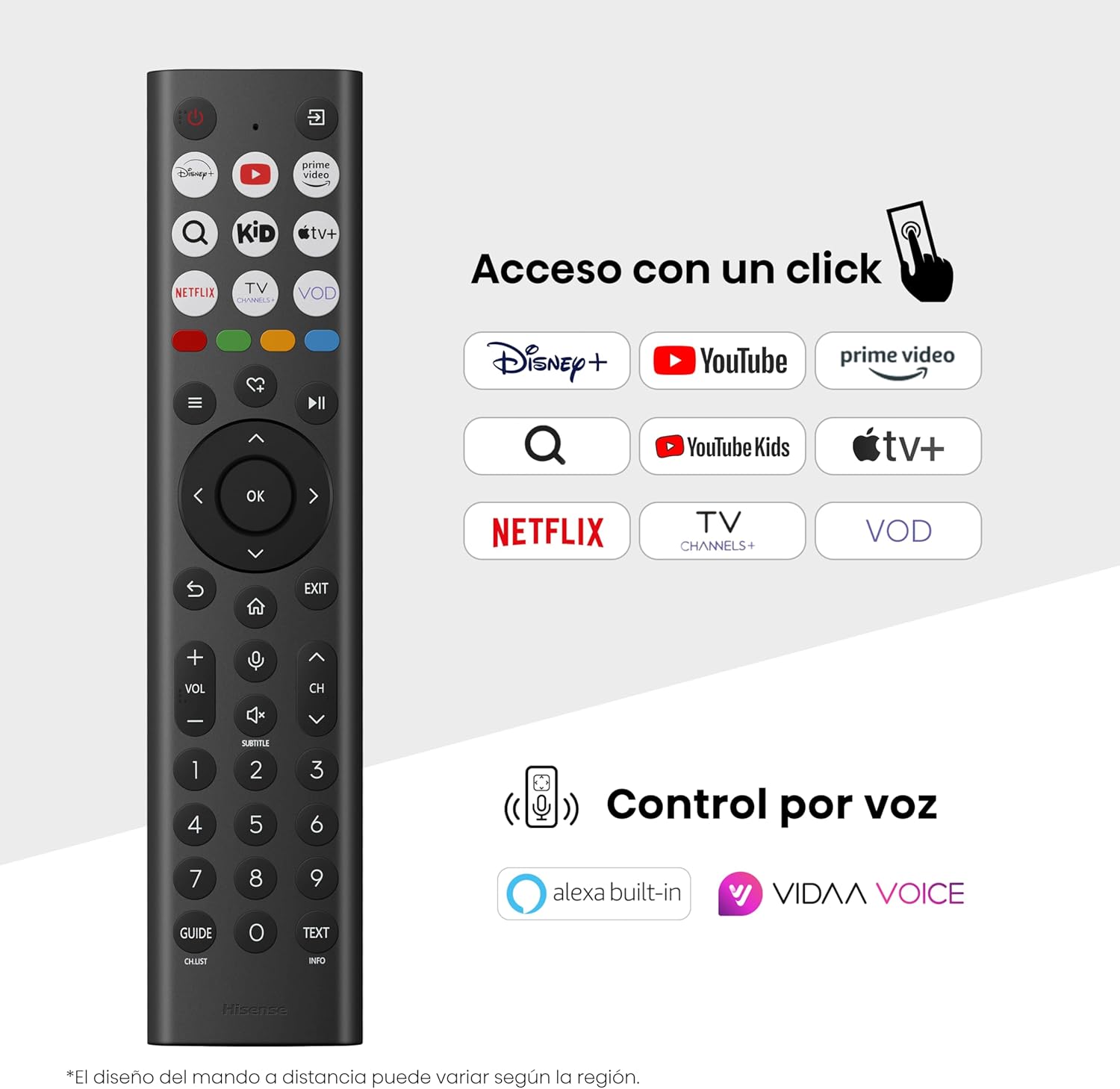
Hisense Smart TV remote control with dedicated app buttons and voice control.
5.2 Smart TV-kenmerke (VIDAA OS)
Your Hisense TV runs on the VIDAA operating system, offering a user-friendly interface for accessing various applications and services.

The VIDAA Smart TV interface with popular streaming applications.
- Aansoeke: Access pre-installed apps like Netflix, YouTube, Prime Video, and more.
- Stembeheer: Use the remote's voice function to search for content, adjust settings, or interact with Alexa built-in and VIDAA Voice.
- Screen Mirroring (AirPlay): Share content from your Apple devices directly to the TV.
- Deel op TV: Easily send content from your mobile devices to the TV.
5.3 Beeldinstellings
Optimaliseer jou viewing experience with various picture enhancement technologies:
- QLED Colour: Delivers over a billion shades of vibrant, lifelike colors.
- KI 4K Opskaler: Automatically enhances lower-resolution content to near-4K quality.
- KI Gladde Beweging: Reduces motion blur in fast-paced scenes, ensuring clear and fluid visuals.
- Dolby Vision: Provides stunning brightness, contrast, and color for a dramatic visual experience.
- Filmmaker-modus: Preserves the original aspect ratio, colors, and frame rates to display movies as intended by the director.
- AI Light Sensor: Intelligently adjusts screen brightness based on ambient light for optimal viewing and energy efficiency.
- Eye Care Mode: Verminder blou lig-emissie om oogspanning te verminder.
- Energiebesparingsmodus: Optimizes power consumption without significantly compromising picture quality.

QLED technology delivers over a billion vibrant color tones.

AI 4K Upscaler enhances lower resolution content to near 4K clarity.

AI Smooth Motion ensures fluid images without blur, especially in fast-moving scenes.

Filmmaker Mode presents content exactly as the director intended.
5.4 Klankinstellings
Enhance your audio experience with:
- Dolby Atmos: Immersive, multi-dimensional sound that fills your room.
- Geïntegreerde luidspreker: Built-in speakers with a maximum output of 1 Watt per channel.
- EzPlay: Seamlessly control compatible Hisense soundbars directly from your TV screen.

Dolby Vision and Dolby Atmos combine for a spectacular audio-visual experience.
5.5 Speletjie-kenmerke
For gamers, the TV offers:
- Spelmodus Plus: Reduces input lag to 16ms, ensuring responsive gameplay.
- 60Hz VRR (Veranderlike Verversingstempo): Synchronizes the TV's refresh rate with the game console's output to prevent screen tearing.
- ALLM (outo lae vertragingsmodus): Automatically switches the TV to low-latency mode when a game is detected.
- Spelbalk: An integrated control center for quick access to game settings and real-time performance monitoring.

Game Mode Plus provides ultra-fluid, lag-free gaming.

The Game Bar offers centralized control for game settings.
5.6 Sports Features
- KI-sportmodus: Automatically detects sports content and optimizes picture and sound settings for a stadium-like experience, enhancing clarity and audio effects.
6. Onderhoud
6.1 Skoonmaak van die TV
- Ontkoppel altyd die TV voordat u skoonmaak.
- Gebruik 'n sagte, droë, pluisvrye lap om die skerm en TV-liggaam saggies af te vee.
- Vir hardnekkige merke, liggiesampMaak die lap skoon met water of 'n gespesialiseerde skermreiniger (moenie direk op die skerm spuit nie).
- Vermy die gebruik van skuurmiddels, alkohol, benseen of verdunner, aangesien dit die TV se oppervlak kan beskadig.
6.2 Sagteware-opdaterings
Jou TV kan periodiek sagteware-opdaterings ontvang om werkverrigting te verbeter en nuwe funksies by te voeg. Maak seker dat jou TV aan die internet gekoppel is om hierdie opdaterings te ontvang. Jy kan gewoonlik handmatig in die TV se instellingskieslys vir opdaterings kyk.
7. Probleemoplossing
As jy probleme met jou TV ondervind, raadpleeg die volgende algemene oplossings:
- Geen krag: Check if the power cable is securely connected and the power outlet is working. Try a different outlet.
- Geen Beeld/Klank: Maak seker dat die korrekte invoerbron gekies is. Kontroleer alle kabelverbindings (HDMI, antenna).
- Afstandbeheer werk nie: Check the battery (1 AAAA battery). Ensure there are no obstructions between the remote and the TV.
- Netwerkverbindingsprobleme: Verifieer jou Wi-Fi-wagwoord of Ethernet-kabelverbinding. Herbegin jou router.
- Swak beeldkwaliteit: Pas beeldinstellings aan (helderheid, kontras, skerpte). Maak seker dat die invoerbron 'n hoëgehalte-sein verskaf.
- Klankvervorming: Check audio settings. If using external speakers, ensure they are connected correctly.
For more detailed troubleshooting, consult the full electronic user manual or contact Hisense customer support.
8. Spesifikasies
Detailed technical specifications for the Hisense 65E7Q QLED Smart TV:
| Kenmerk | Spesifikasie |
|---|---|
| Modelnommer | 65E7V |
| Skerm grootte | 65 duim |
| Vertoon tegnologie | QLED |
| Resolusie | 4K (3840 x 2160) |
| Herlaaitempo | 60 Hz |
| Ondersteuning vir HDR-formaat | Dolby Vision |
| Motion Enhancement Technology | KI Gladde Beweging |
| Beeldkwaliteitverbetering | AI 4K Upscaler, AI Smooth Motion, QLED Colour |
| Reaksie Tyd | 100 millisekondes |
| Agterligkonfigurasie | Direct Illumination, Dimming |
| Luidsprekerbeskrywing | Integrated speaker with Dolby Atmos |
| Maksimum luidspreker-uitsetkrag | 1 watt |
| Oudio kanale | Multikanaal |
| Surround Sound Format | Dolby Atmos |
| Bedryfstelsel | VIDAA |
| Geheue berging kapasiteit | 1 GB |
| Beheer metode | Stem |
| Verbindingstegnologie | Bluetooth, HDMI, Wi-Fi |
| Internet Applications | Netflix, YouTube, Prime Video, AirPlay 2 |
| HDMI-poorte | 3 (including HDMI 2.1 with eARC) |
| USB-poorte | 2 (1x USB 3.0, 1x USB 2.0) |
| Draadlose Tegnologie | Wi-Fi |
| Screen Mirroring Technology | AirPlay |
| VESA Montage Standaard | 600 x 400 mm |
| Produkafmetings (DxWxH) | 7.6 x 145.3 x 83.8 cm |
| Produk Gewig | 15.2 kg (met staander) |
| Energiedoeltreffendheidklas | E |
| Jaarlikse Energieverbruik | 84 kWh/1000h (SDR), 160 kWh/1000h (HDR) |
| Krag | 1 Watt (bystand) |
| Voltage | 100-240 VCA 50-60 Hz |
| Ingesluit komponente | Kragkabel, afstandbeheer, staander |
| Modeljaar | 2025 |
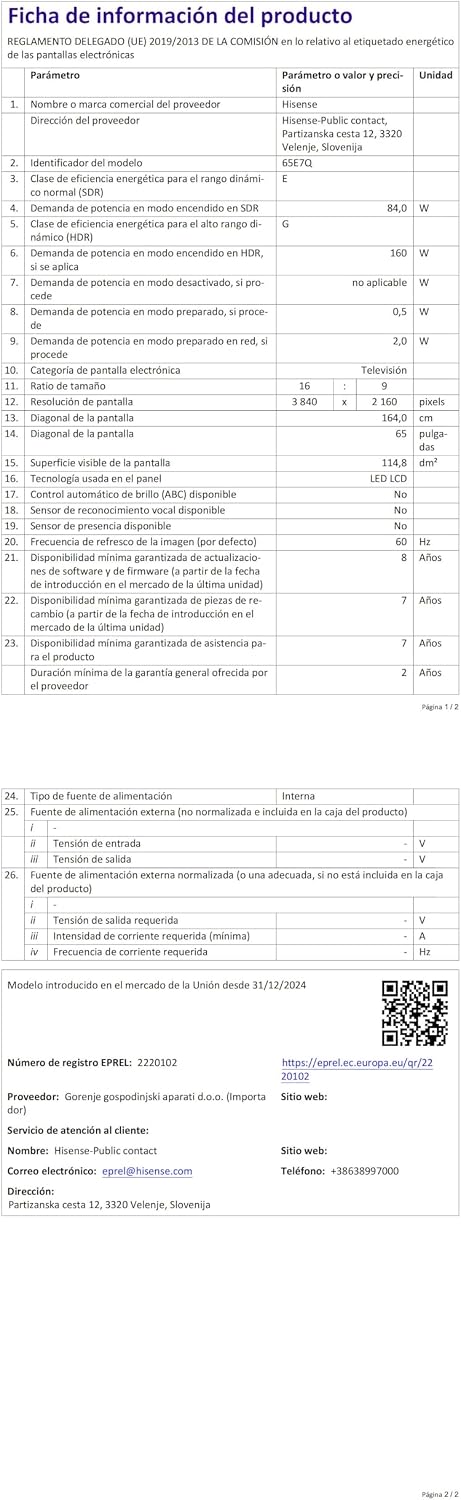
Energy label for the Hisense 65E7Q TV.
For more detailed product information, please refer to the EPREL database: https://eprel.ec.europa.eu/qr/2220102
9. Waarborg en Ondersteuning
9.1 Produkwaarborg
This Hisense TV comes with a 3 jaar produkwaarborgBewaar asseblief u bewys van aankoop vir waarborgeise.
9.2 Beskikbaarheid van onderdele
Spare parts for this model are guaranteed to be available in the EU for a duration of 10 jaar from the product's market introduction.
9.3 Kliëntediens
For technical assistance, troubleshooting, or warranty service, please contact Hisense customer support. Refer to the contact information provided in your warranty card or visit the official Hisense webwebwerf vir jou streek.