
FUWANG A3354 A3355 A3356 A2696 A2757 A2777
FUWANG Keyboard Case for iPad A16 11th/10th Generation User Manual
Model: A3354, A3355, A3356, A2696, A2757, A2777
1. Produk verbyview
The FUWANG Keyboard Case is designed to enhance your iPad experience, transforming it into a versatile laptop-like device. It features a detachable wireless Bluetooth keyboard with 7-color backlighting, multiple viewing angles, and a protective case with an integrated pencil holder. The case is crafted from durable synthetic leather with a unique marble pattern and a soft TPU inner shell for comprehensive protection.
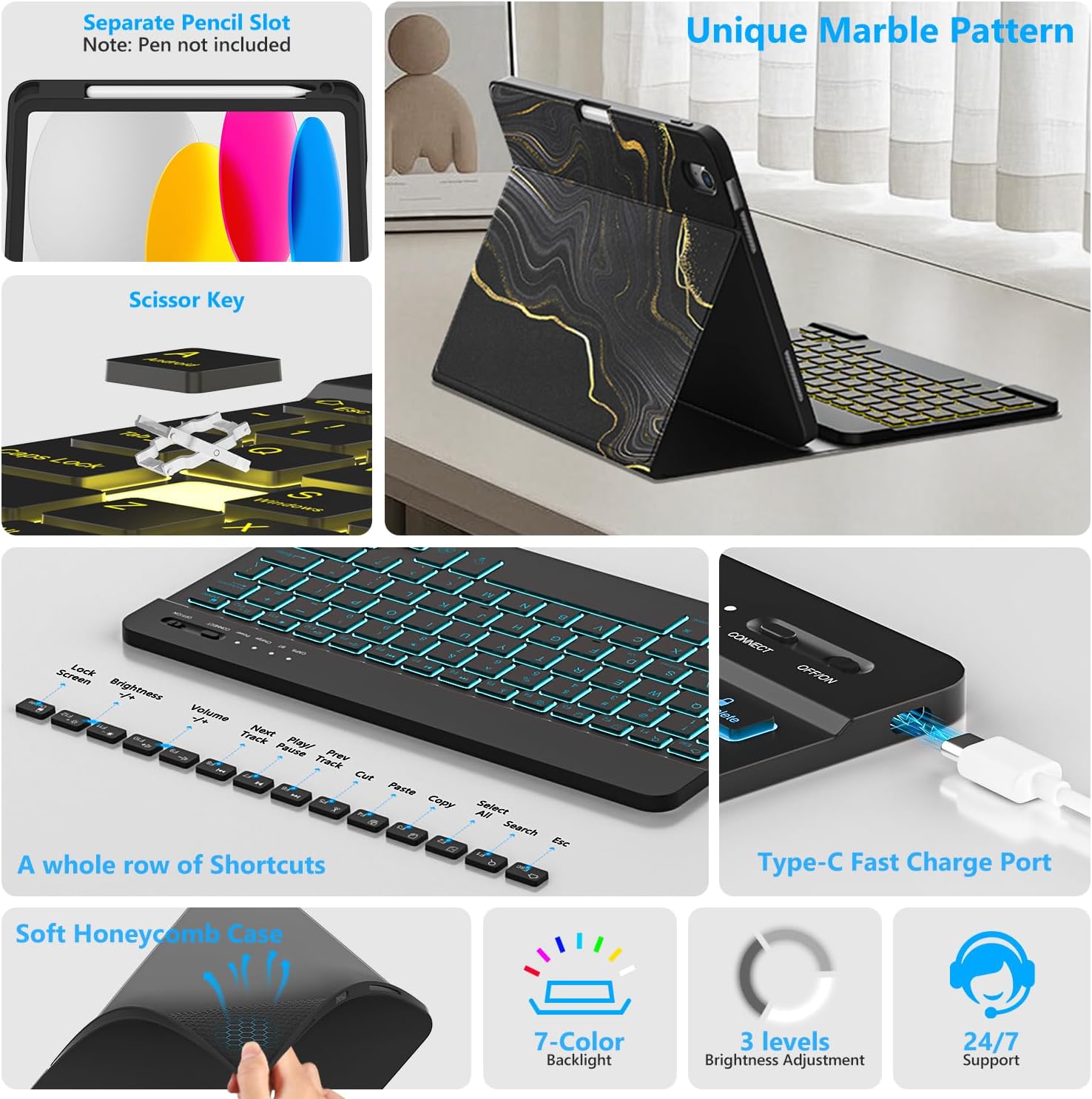
Prent 1.1: verbyview of FUWANG Keyboard Case features, highlighting the pencil slot, scissor-key mechanism, keyboard shortcuts, Type-C charging port, and the soft honeycomb case for heat dissipation.
2. Pakketinhoud
- 1 x FUWANG iPad Case (for A16 11th/10th Generation)
- 1 x Wireless Backlit Bluetooth Keyboard
- 1 x Tipe-C-laaikabel
- 1 x Gebruikershandleiding
Note: iPad tablet and stylus are not included.
3. Verenigbaarheid
Hierdie sleutelbordkas is spesifiek ontwerp vir die volgende iPad-modelle:
- iPad A16 11th Generation 11" 2025: Model Numbers A3354, A3355, A3356
- iPad 10th Generation 10.9" 2022: Model Numbers A2696, A2757, A2777, A3162
To verify your iPad model, please check the back of your tablet for a model number starting with "A". This case is not compatible with other iPad models.
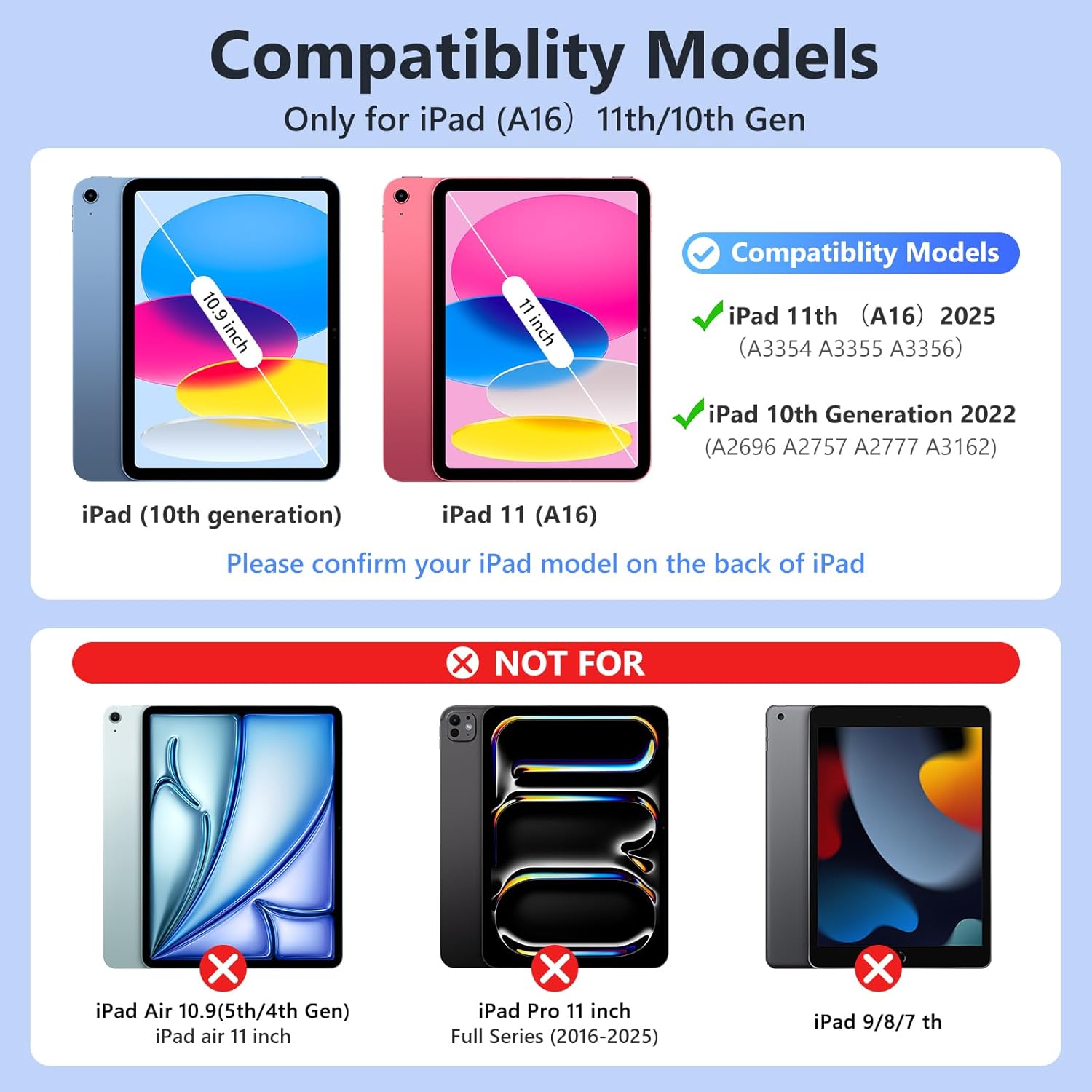
Prent 3.1: Visual guide for iPad model compatibility. Please confirm your iPad model number on the back of your device.
4. Opstelinstruksies
4.1 Initial Charging of the Keyboard
Before first use, fully charge the keyboard for 2 to 3 hours using the provided Type-C charging cable. Connect the cable to the keyboard's Type-C port and a USB power source. The power indicator light will flash during charging and turn off when fully charged.

Prent 4.1: Keyboard charging via Type-C port. Initial charge takes 2-3 hours.
4.2 Koppel die Bluetooth-sleutelbord
- Maak seker dat die sleutelbord gelaai is.
- Turn on the keyboard by sliding the power switch to the "ON" position. The power indicator will flash for approximately 3 seconds and then turn off.
- Op jou iPad, gaan na Instellings > Bluetooth en skakel Bluetooth AAN.
- The iPad will search for available devices. Select "Bluetooth Keyboard" (or similar name) from the list.
- If prompted, enter the pairing code displayed on your iPad onto the keyboard and press Voer in.
- Once paired, the keyboard's indicator light will turn off, and your iPad will show the keyboard as "Connected".
For subsequent uses, simply turn on your iPad's Bluetooth and the keyboard's power. Press any key on the keyboard, and it should automatically reconnect.
4.3 Die iPad in die omhulsel installeer
Gently insert your iPad into the soft TPU inner shell of the case. Ensure all cutouts for the camera, speakers, and volume buttons align perfectly. The case provides full protection against drops and scratches.
5. Bedryfsinstruksies
5.1 Gebruik van die agterbeligte sleutelbord
The keyboard features 7-color backlighting with 3 adjustable brightness levels.
- To change backlight colors: Press the Gloeilamp-ikoon key (often next to the Spacebar or Function keys).
- To adjust brightness: Press the Gloeilamp-ikoon sleutel + Op/af pyltjie sleutels or a dedicated brightness key (if available).

Prent 5.1: Demonstrating the 7-color backlit keyboard with adjustable brightness settings.
5.2 Aanpassing Viewing Hoeke
The case is designed with three anti-slip grooves, allowing you to adjust your iPad to multiple viewing angles (e.g., 110°, 120°, 130°) for comfortable typing, viewing, or drawing.
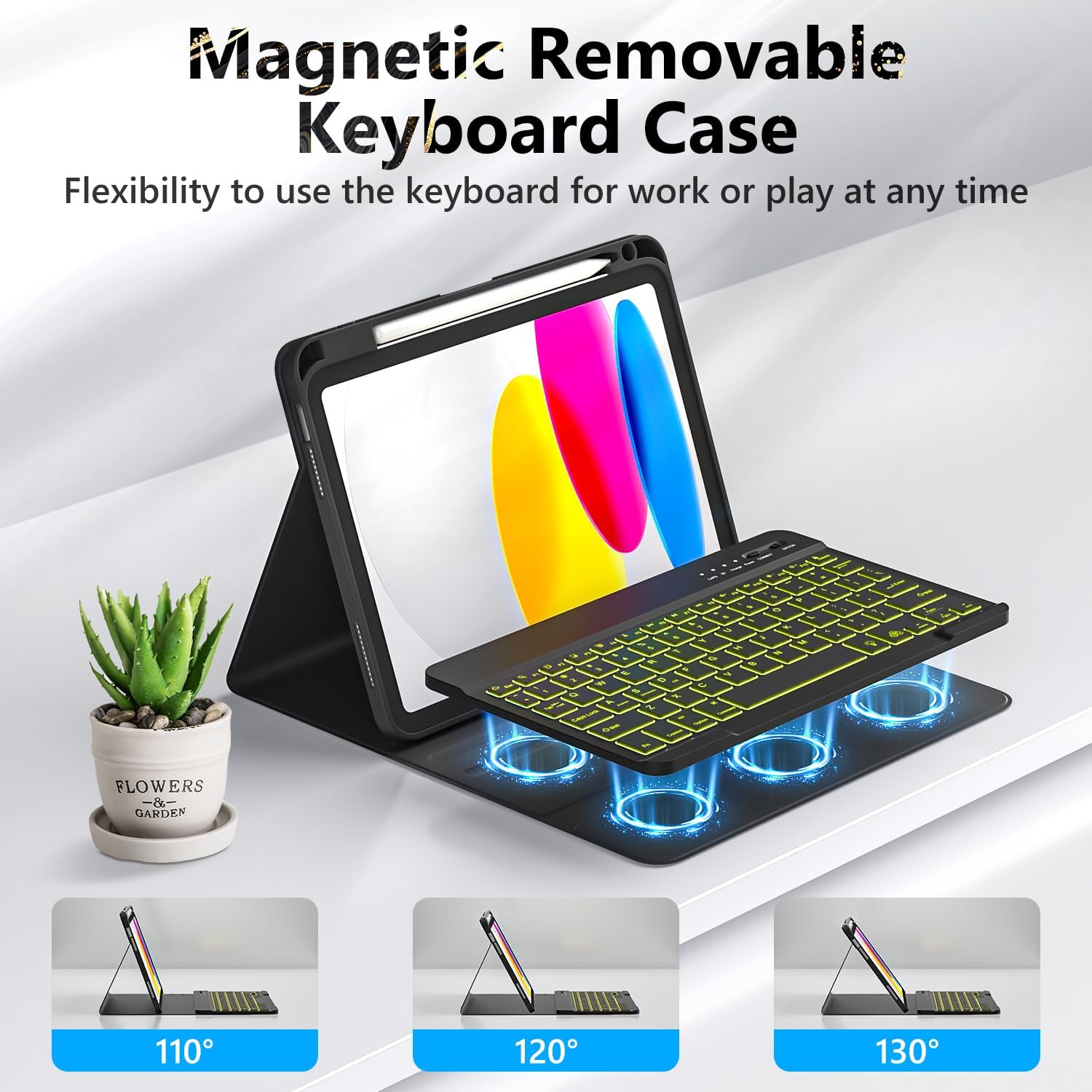
Prent 5.2: The magnetic removable keyboard case offers flexible viewing angles for various tasks.
5.3 Sleutelbordkortpaaie
The keyboard includes a row of dedicated function keys and shortcuts for quick access to iPad features:
- Sluit skerm
- Helderheid aanpassing
- Volumebeheer
- Mediaterugspeelkontroles (Previous Track, Play/Pause, Next Track)
- Copy, Cut, Paste
- Kies Alles
- Soek
- Tuis
5.4 Auto Sleep/Wake Function
The case supports the iPad's automatic sleep/wake function, preserving battery life. When closing the case, the iPad will go to sleep; opening it will wake the iPad. For optimal performance of this feature, it is recommended to remove the wireless Bluetooth keyboard from the case, as the keyboard's magnetic components can interfere with the iPad's magnets.
5.5 Using the Pencil Holder
The integrated pencil holder securely stores your stylus, keeping it accessible and preventing loss. Simply slide your stylus into the designated slot.
6. Onderhoud
- Maak die saak skoon: Wipe the synthetic leather case with a soft, damp lap. Vermy harde chemikalieë of skuurmiddels.
- Maak die sleutelbord skoon: Use a soft, dry cloth to clean the keyboard keys. For stubborn dirt, a slightly damp 'n Lap kan gebruik word om te verseker dat geen vog die sleutelbord binnedring nie.
- Batterysorg: To prolong battery life, avoid fully discharging the keyboard frequently. Charge it regularly, especially if not used for extended periods.
7. Probleemoplossing
- Sleutelbord Koppel Nie:
- Maak seker dat die sleutelbord volledig gelaai is.
- Make sure the keyboard's power switch is ON.
- Verifieer dat Bluetooth op jou iPad geaktiveer is.
- Vergeet die toestel in jou iPad se Bluetooth-instellings en probeer om weer te koppel.
- Herbegin beide jou iPad en die sleutelbord.
- Backlight Not Working/Changing:
- Maak seker dat die sleutelbord aangeskakel is.
- Press the backlight control key (light bulb icon) to cycle through colors and brightness levels.
- If the battery is low, backlighting may be disabled to conserve power. Charge the keyboard.
- Sleutels reageer nie:
- Kontroleer of die sleutelbord via Bluetooth gekoppel is.
- Maak seker dat die sleutelbord gelaai is.
- Clean any debris from around the keys.
- Auto Sleep/Wake Function Issues:
- Maak seker dat die iPad korrek in die omhulsel geplaas is.
- Remove the detachable keyboard from the case when closing the cover, as its magnets can interfere with the auto sleep/wake feature.
8. Spesifikasies
| Handelsmerk | FUWANG |
| Modelnommers | A3354, A3355, A3356, A2696, A2757, A2777 |
| Konnektiwiteit | Bluetooth |
| Tipe sleutelbord | Detachable, Backlit (7 colors, 3 brightness levels) |
| Battery kapasiteit | 500 mAh Lithium-ion (rechargeable) |
| Laai tyd | 2-3 uur |
| Werkstyd | Approx. 120 hours (without backlight) |
| Bystandtyd | > 130 dae |
| Bedryfsafstand | Tot 3 meter |
| Materiaal | Premium Synthetic Leather, Thermoplastic Polyurethane (TPU) |
| Spesiale kenmerke | Pencil holder, Full protection, Multiple viewing angles, Auto sleep/wake function |
9. Waarborg en Ondersteuning
For any questions or issues regarding your FUWANG Keyboard Case, please refer to the contact information provided with your purchase or reach out to the seller directly. Specific warranty details may vary by region and retailer.
Ask a question about this manual
Ask about setup, troubleshooting, compatibility, parts, safety, or missing instructions. Manuals+ will review the question and use this page’s manual context to help answer it.