
1. Inleiding
The Ankilo Bluetooth 5.3 2-in-1 Transmitter Receiver is a versatile audio adapter designed to enhance your audio experience. It functions as both a Bluetooth transmitter (TX mode) and a Bluetooth receiver (RX mode), allowing you to connect various audio devices wirelessly. Featuring Bluetooth 5.3 technology, it offers stable connectivity, low latency, and dual-device pairing capabilities. The integrated LCD screen provides real-time information, and the device includes a BASS boost function for enhanced sound quality and dual microphones for clear hands-free calls.

Figure 1: Ankilo Bluetooth 5.3 2-in-1 Transmitter Receiver
2. Pakketinhoud
Kontroleer asseblief die pakket vir die volgende items:
- Ankilo Bluetooth 5.3 2-in-1 Transmitter Receiver (Model BR08)
- USB-C-laaikabel
- 3.5 mm AUX -audiokabel
- Airplane Dual-Plug Audio Converter
- Gebruikershandleiding

Figuur 2: Pakketinhoud
3. Produk verbyview
Familiarize yourself with the device's components and controls:

Figuur 3: Toestelkomponente
- Vertoon skerm: Shows battery level, volume, and connection status.
- mic: Vir handvrye oproepe.
- BASS-knoppie: One-touch activation for enhanced bass sound.
- TX/RX Button: Slide switch to select Transmitter (TX) or Receiver (RX) mode.
- Aan / uit-knoppie: Druk en hou om aan of af te skakel.
- Speel/Pause-knoppie: Controls audio playback. Double-click to pair a second device or clear pairing.
- Answer/Hang Up Button: For managing phone calls.
- Next Song/Volume + Button: Druk kort vir die volgende snit, druk lank vir volume hoër.
- Previous Song/Volume - Button: Kort druk vir vorige snit, lank druk vir volume af.
- Tipe C-laaipoort: Vir die laai van die toestel.
- AUX Audio Cable Port: For connecting to audio sources/receivers via 3.5mm jack.
4. Spesifikasies
| Kenmerk | Detail |
|---|---|
| Bluetooth weergawe | 5.3 |
| Transmissie afstand | Tot 10 meter (hindernisvry) |
| Battery kapasiteit | 400 mAh |
| Laai tyd | Ongeveer 2 uur |
| Batterylewe (RX-modus) | Tot 15 uur |
| Batterylewe (TX-modus) | Tot 18 uur |
| Afmetings | 3.86 x 3.66 x 1.02 duim |
| Item gewig | 1.76 onse |
| Spesiale kenmerk | Low Latency, Dual Mics, HiFi Bass Sound, Smart Display |
5. Opstelgids
Follow these steps to set up your Ankilo Bluetooth adapter:

Figure 4: Convenient Operation Steps
- Krag aan: Press and hold the Power On/Off button for approximately 3 seconds until the display screen illuminates.
- Choose the Mode (TX/RX): Slide the TX/RX button on the side of the device to select your desired mode:
- TX (Sender) Modus: For sending audio from non-Bluetooth devices (e.g., TV, PC, MP3 player) to Bluetooth headphones or speakers.
- RX (Ontvanger) Modus: For receiving audio from Bluetooth-enabled devices (e.g., smartphone, tablet) and playing it through non-Bluetooth audio systems (e.g., car stereo, home speakers).
- Koppel die klankkabel: Plug the 3.5mm AUX audio cable into the device's AUX port and connect the other end to your audio source (in TX mode) or audio receiver (in RX mode).
- Pairing (First Device):
- Ensure your Bluetooth headphones/speakers (TX mode) or smartphone/tablet (RX mode) are in pairing mode.
- The Ankilo adapter will automatically enter pairing mode when powered on in either TX or RX mode. The display will show a blinking Bluetooth icon.
- On your external device, search for "BR08" in the Bluetooth settings and select it to connect. The display will show a steady Bluetooth icon upon successful connection.
- Dubbele toestelparing: To connect a second device simultaneously (supported in both TX and RX modes):
- After the first device is successfully paired, ensure the second device is in pairing mode.
- Double-click the Play/Pause button on the Ankilo adapter. The device will search for the second device.
- Select "BR08" on your second device's Bluetooth list to connect.
6. Bedryfsinstruksies
6.1 Basiese kontroles
- Speel/pouse: Druk die Speel/Pause-knoppie een keer.
- Volgende snit: Short press the 'Next Song/Volume +' button.
- Vorige snit: Short press the 'Previous Song/Volume -' button.
- Volume op: Long press the 'Next Song/Volume +' button.
- Volume af: Long press the 'Previous Song/Volume -' button.
- BASS-versterking: Press the BASS button once to activate/deactivate the bass enhancement.
6.2 Hands-Free Calling (RX Mode Only)
When connected to your smartphone in RX mode:
- Beantwoord oproep: Press the Answer/Hang Up button once.
- Beëindig oproep: Press the Answer/Hang Up button once during a call.
- Verwerp oproep: Press and hold the Answer/Hang Up button for 2 seconds.
6.3 Using in TX Mode
Connect the adapter to devices like TVs, PCs, or in-flight entertainment systems to transmit audio wirelessly to your Bluetooth headphones or speakers.
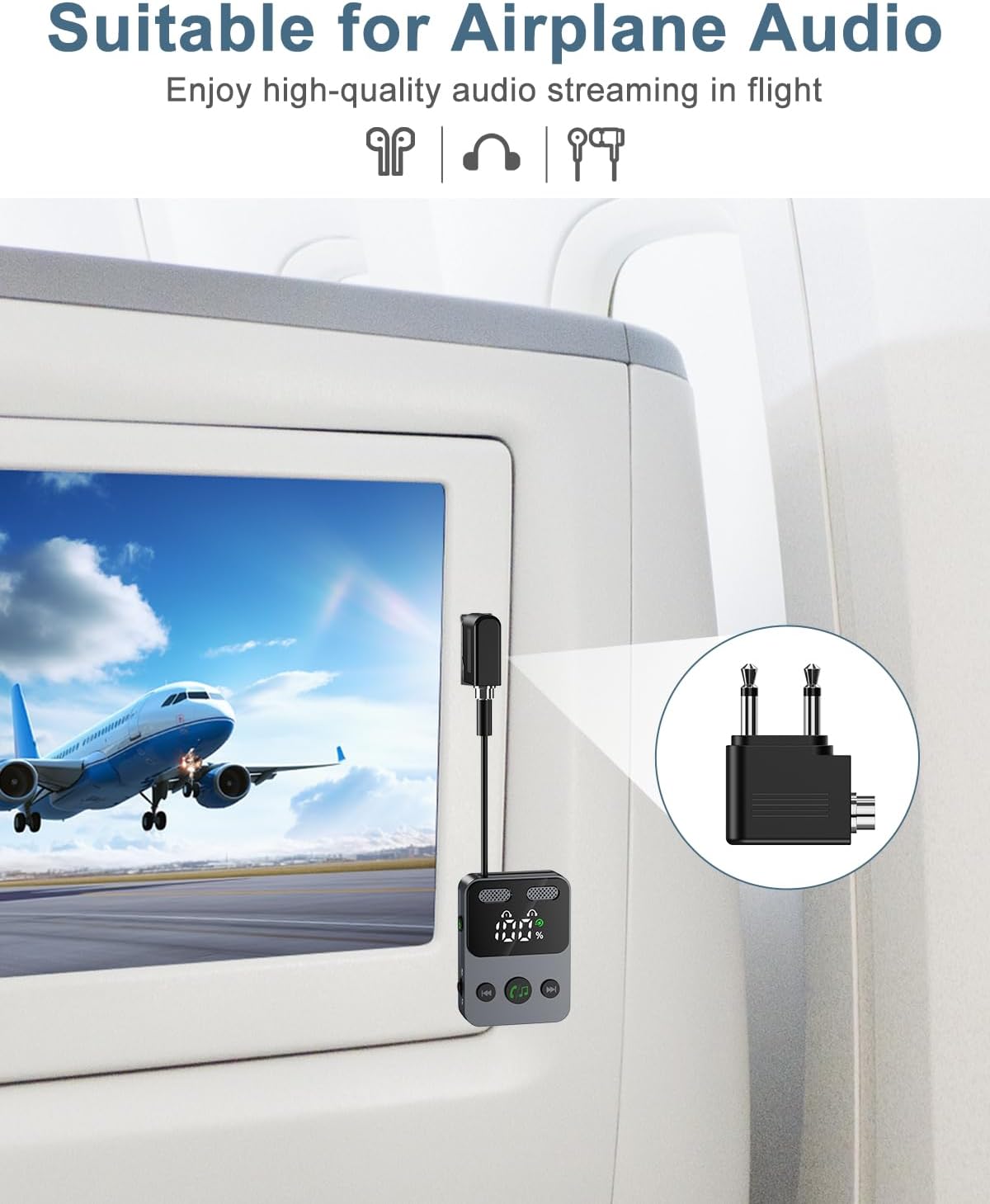
Figure 5: Using the adapter for airplane audio (TX Mode)
6.4 Using in RX Mode
Connect the adapter to your car stereo, home speaker system, or other non-Bluetooth audio input to receive audio wirelessly from your smartphone or tablet.

Figure 6: Wide Compatibility and Mode Usage

Figuur 7: Example Use Cases (TX and RX Modes)
7. Battery en Laai
The Ankilo adapter features a 400 mAh battery, providing up to 18 hours of use in TX mode and 15 hours in RX mode. To charge the device, connect the included USB-C cable to the Type-C charge port and a standard USB power source. A full charge takes approximately 2 hours. The display screen will show the battery level.
8. Veiligheidsinligting
Neem asseblief die volgende veiligheidsriglyne in ag:
- Avoid using the device near other wireless devices to prevent potential interference.
- Handle the battery with care. Do not expose the device to extreme temperatures (high or low).
- Do not drop the product, as this may cause surface damage or internal malfunction.
- Do not disassemble the unit without authorization. For any issues, contact customer support.
9. Onderhoud
To ensure optimal performance and longevity of your Ankilo Bluetooth adapter:
- Keep the device clean and dry. Avoid exposure to dust and humid environments.
- Berg die toestel op 'n koel, droë plek wanneer dit nie gebruik word nie.
- Gebruik slegs die meegeleverde laaikabel of 'n gesertifiseerde USB-C-kabel vir laai.
- The product will automatically shut down after 10 minutes of inactivity (no device connection or key operation). If connected to a device, it will not auto-shutdown; manual shutdown is required.
10. Probleemoplossing
If you encounter issues with your Ankilo Bluetooth adapter, refer to the following common problems and solutions:
- Toestel skakel nie aan nie:
- Maak seker dat die toestel volledig gelaai is. Koppel dit aan 'n kragbron met die USB-C-kabel.
- Press and hold the Power On/Off button for at least 3 seconds.
- Kan nie met 'n toestel koppel nie:
- Ensure the Ankilo adapter is in the correct TX or RX mode.
- Make sure the external device (headphones, speaker, phone) is in pairing mode and within 10 meters of the adapter.
- Check if the adapter's display shows a blinking Bluetooth icon, indicating it's searching.
- Try restarting both the Ankilo adapter and the external device.
- Double-click the Play/Pause button to clear previous pairings and try again.
- Geen klank of swak klankgehalte:
- Verify that the 3.5mm AUX audio cable is securely connected to both the adapter and the audio source/receiver.
- Check the volume levels on both the Ankilo adapter and the connected audio device.
- Ensure there are no obstructions or excessive distance between the adapter and the paired Bluetooth device.
- Confirm that the correct input/output is selected on your audio source/receiver.
- Volume control issues (e.g., skips track instead of changing volume):
- Remember that a kort druk on the +/- buttons changes tracks, while a lang druk adjusts the volume. Ensure you are performing a long press for volume adjustments.
- Device automatically shuts down:
- This is normal behavior if the device is powered on for 10 minutes without any device connection or other key operation. Re-power on the device to use it.
- If the device is connected to an audio source/receiver, it will not automatically shut down. You must manually power it off.
11. Waarborg en Ondersteuning
Ankilo is committed to providing high-quality audio experiences. Your Ankilo Bluetooth 5.3 2-in-1 Transmitter Receiver comes with:
- 12-Month Quality Protection: Ensuring your product is free from defects in materials and workmanship under normal use.
- 60 Days Free Replacement: For any manufacturing defects within the first 60 days of purchase.
- 7*24h Customer Service: Our dedicated support team is available around the clock to assist you with any questions or concerns.
For support, please refer to the contact information provided with your purchase or visit the official Ankilo webwebwerf.