
1. Inleiding
This manual provides detailed instructions for the proper use and maintenance of your Oakcastle HIFI500 Remote Control. This remote is designed as a replacement or spare for the Oakcastle HIFI500 audio system, ensuring seamless control over its functions. Please read this manual thoroughly before use to ensure optimal performance and longevity of your remote control.
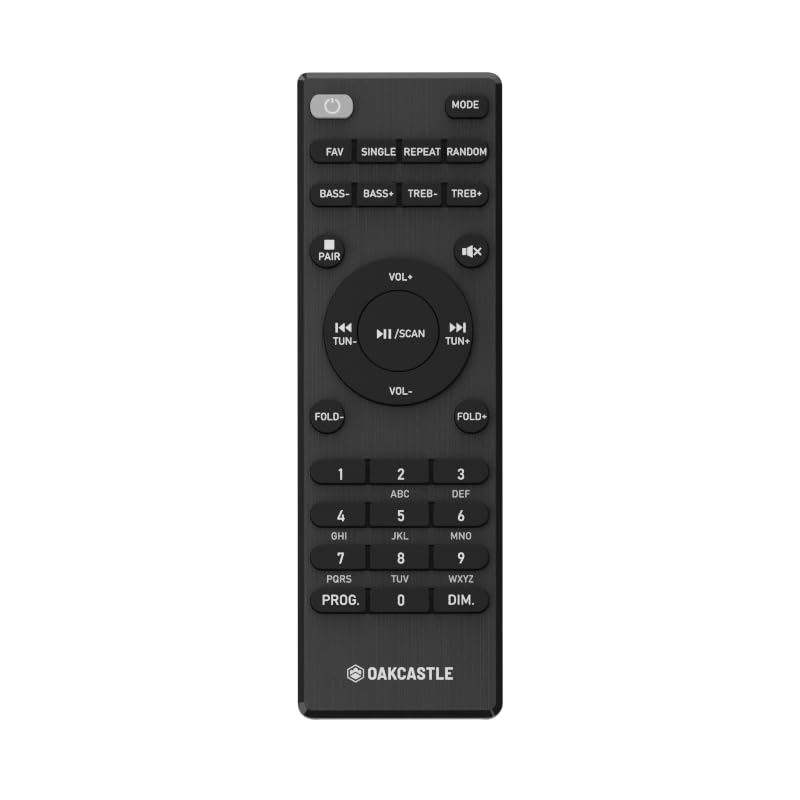
Figuur 1.1: Voorkant view of the Oakcastle HIFI500 Remote Control. This image displays the compact design and button layout, including power, volume, source selection, and playback controls, typical for operating the HIFI500 audio system.
2. Opstelling
2.1. Battery Installasie
The Oakcastle HIFI500 Remote Control requires two AAA batteries (not included) for operation. Follow these steps to install the batteries:
- Vind die batterykompartement aan die agterkant van die afstandbeheer.
- Druk die oortjie af en skuif die batteryklep afwaarts om dit oop te maak.
- Plaas twee AAA-batterye in en maak seker dat die positiewe (+) en negatiewe (-) terminale korrek in lyn is met die merke binne-in die kompartement.
- Skuif die batterydeksel terug in plek totdat dit stewig klik.
Let wel: Always use new batteries and dispose of old batteries responsibly. Do not mix old and new batteries, or different types of batteries.
2.2. Aanvanklike gebruik
Once batteries are installed, the remote control is ready for use with your Oakcastle HIFI500 audio system. Point the remote directly at the infrared (IR) receiver on your HIFI500 system. No additional pairing is typically required for this replacement remote.
3. Bedien die afstandbeheer
The Oakcastle HIFI500 Remote Control provides full functionality for your HIFI500 audio system. Below is a general guide to common button functions:
- Kragknoppie (⏻): Turns the HIFI500 system on or off.
- Volume op/af (Vol+ / Vol-): Pas die klank-uitsetvlak aan.
- Demp (🔇): Maak die klankuitvoer tydelik stil.
- Bron/Invoer (Bron): Cycles through available audio inputs (e.g., CD, FM, Bluetooth, AUX).
- Playback Controls (▶ / ⏸ / ⏹ / ⏪ / ⏩): Controls media playback (Play, Pause, Stop, Rewind, Fast Forward) for compatible sources like CD or USB.
- Navigasie knoppies (▲ / ▼ / ◀ / ▶): Used to navigate menus and selections on the HIFI500 system display.
- OK/Enter-knoppie: Bevestig keuses.
- Numeriese sleutelbord (0-9): Vir direkte invoer van radiofrekwensies, snitnommers of ander numeriese data.
Refer to your Oakcastle HIFI500 audio system's main user manual for specific functions and advanced operations.
4. Onderhoud
4.1. Skoonmaak
To clean your remote control, gently wipe the surface with a soft, dry cloth. For stubborn dirt, slightly dampen the cloth with water or a mild, non-abrasive cleaner. Avoid using harsh chemicals, solvents, or abrasive materials, as these can damage the remote's finish or internal components.
4.2. Battery vervanging
Replace batteries when the remote's response becomes sluggish or stops working. Follow the battery installation steps outlined in Section 2.1. Always replace both batteries simultaneously with new ones.
4.3. Berging
When not in use for extended periods, it is recommended to remove the batteries from the remote control to prevent leakage, which can cause damage. Store the remote in a cool, dry place away from direct sunlight and extreme temperatures.
5. Probleemoplossing
If you encounter issues with your Oakcastle HIFI500 Remote Control, please refer to the following common problems and solutions:
- Afstandsbediening reageer nie:
- Kontroleer of die batterye korrek met die korrekte polariteit geïnstalleer is.
- Vervang die batterye met nuwes.
- Ensure there are no obstructions between the remote control and the HIFI500 system's IR receiver.
- Make sure you are within the effective range and pointing the remote directly at the HIFI500 system.
- Intermittent function:
- Dit dui dikwels op lae batterykrag. Vervang die batterye.
- Ensure the remote's IR emitter is clean and free from dirt or smudges.
If the problem persists after trying these solutions, please contact Oakcastle customer support.
6. Spesifikasies
| Kenmerk | Spesifikasie |
|---|---|
| Model | HIFI500 Remote Control |
| Handelsmerk | Oakcastle |
| Verbindingstegnologie | Infrarooi (IR) |
| Kragbron | 2 x AAA-batterye (nie ingesluit nie) |
| Maksimum aantal ondersteunde toestelle | 1 (Oakcastle HIFI500 Audio System) |
| Spesiale kenmerk | Liggewig |
| Item gewig | 2.82 onse (ongeveer 80 gram) |
| Pakket afmetings | 8 x 3.2 x 2.5 duim (ongeveer 20.3 x 8.1 x 6.3 cm) |
| Vervaardiger | MEERDERHEID |
7. Waarborg en Ondersteuning
7.1. Waarborginligting
This Oakcastle HIFI500 Remote Control is covered by a manufacturer's warranty. Please refer to the warranty card included with your original Oakcastle HIFI500 audio system or visit the official Oakcastle webwebwerf vir gedetailleerde waarborgbepalings en -voorwaardes. Bewaar u bewys van aankoop vir waarborgeise.
7.2. Kliëntediens
For technical assistance, troubleshooting beyond this manual, or warranty inquiries, please contact Oakcastle customer support. You can typically find contact information, including phone numbers, email addresses, and support portals, on the official Oakcastle webwebwerf.
Please have your product model (HIFI500 Remote Control) and purchase details ready when contacting support.