
PGST PGST A107F
PGST A107F Home Security Alarm System (16 Piece Kits) Instruction Manual
Model: PGST A107F
1. Stelsel verbyview
The PGST A107F Home Security Alarm System is designed to provide comprehensive protection for your property. This 16-piece kit includes a central control panel, various sensors, and accessories to monitor entry points and detect motion. The system offers real-time alerts via a smartphone application and supports integration with smart home platforms.
Sleutel kenmerke sluit in:
- Real-time notifications to your smartphone.
- No recurring monthly fees for basic operation.
- Customizable and expandable with additional sensors.
- One-click SOS function for emergency alerts.
- Simplified DIY installation process.
2. Pakketinhoud
The 16-piece kit typically includes the following components:
- 1x PGST A107F Alarm System Control Panel
- 2x RFID Tags
- 2x afstandbeheerders
- 4x PIR Motion Sensors
- 1x Siren
- 1x SOS Button
- 6x Deur/Venster Sensors

Figure 2.1: PGST Home Security Alarm System 16-piece kit components, including the main control panel, RFID tags, remote controls, PIR motion sensors, a siren, an SOS button, and door/window sensors.
3. Opstelgids
3.1 Fisiese installasie
The PGST A107F system is designed for easy DIY installation. The main control panel and sensors can be mounted using screws in key areas of your home, such as near doors, windows, or in rooms requiring motion detection.
- Beheerpaneel: Mount the control panel in a central location, preferably near a power outlet and within Wi-Fi range.
- Deur/Venster Sensors: Install these sensors on doors and windows. Ensure the two parts of the sensor are aligned and close to each other when the door/window is closed.
- PIR-bewegingsensors: Position motion sensors in areas where intruders are likely to pass, avoiding direct sunlight or heat sources that could cause false alarms.
- Sirene: Place the siren in a location where its sound can be heard effectively throughout the property.
- SOS-knoppie: Keep the SOS button in an easily accessible location for emergencies.
3.2 Netwerkkonfigurasie
The system supports 2.4GHz Wi-Fi networks only. It does not support 5G Wi-Fi. A 4G GSM card can also be used for cellular communication.
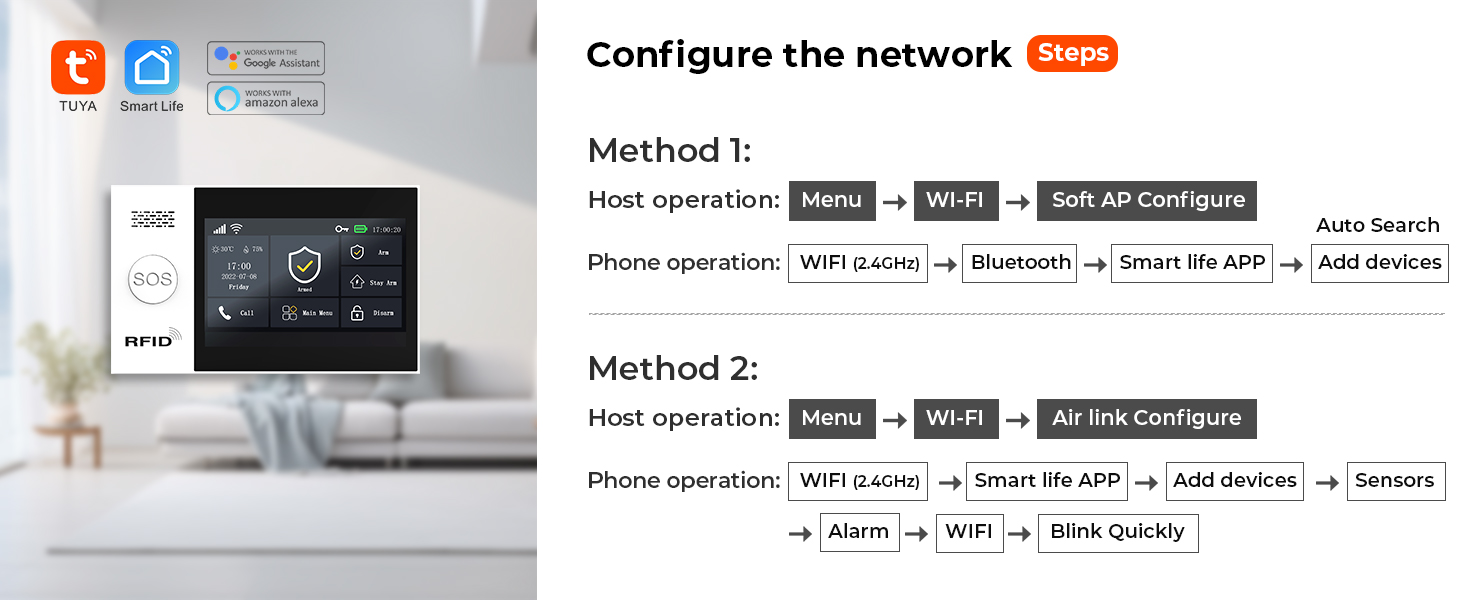
Figure 3.1: Diagram outlining two methods for configuring the network connection for the PGST alarm system, involving host and phone operations for Wi-Fi and app setup.
Metode 1 (Sagte AP-konfigurasie):
- On the host: Navigate to Spyskaart > Wi-Fi > Sagte AP-konfigurasie.
- On your phone: Connect to the system's Wi-Fi (2.4GHz), then open the Smart Life APP, select Voeg toestelle by.
Method 2 (Air Link Configure):
- On the host: Navigate to Spyskaart > Wi-Fi > Lugverbinding Konfigureer.
- On your phone: Connect to the system's Wi-Fi (2.4GHz), open the Smart Life APP, select Voeg toestelle by > Sensors > Alarm > Wi-Fi, and confirm the indicator is blinking quickly.
3.3 App-installasie
Download the free companion application (e.g., Tuya Smart or Smart Life) to your smartphone. Follow the in-app instructions to pair your alarm system with your device and configure settings.

Figure 3.2: User interacting with the 4.3-inch TFT colorful display screen of the PGST alarm system control panel.
4. Bedryf die stelsel
4.1 Aan- en ontwapen
The system can be armed or disarmed manually via the control panel, remote controls, or the smartphone application. You can also set schedules for automatic arming and disarming.

Figure 4.1: Four panels showing scheduled arming and disarming scenarios: automatic disarm upon waking up (7:00), automatic arm when leaving out (8:00), automatic disarm upon returning home (18:00), and automatic arm when sleeping (22:00).
4.2 Real-time Notifications
When motion is detected or a sensor is triggered, the system sends real-time notifications directly to your smartphone via the connected application. This allows you to monitor your home's security status remotely.
4.3 SOS-funksie
Activating the SOS button immediately sends a distress signal. This signal is transmitted to pre-designated emergency contacts, such as family members or local authorities, ensuring a rapid response.
4.4 Stembeheer
The system supports voice control through Amazon Alexa and Google Assistant. You can arm or disarm your system using voice commands.

Figure 4.2: A user and a dog in a living room, demonstrating voice control compatibility with Amazon Alexa and Google Assistant for arming or disarming the system.
4.5 Vooraf ingestelde alarmoproepe
The system allows you to preset up to five alarm call numbers. If an alarm is triggered, the system will dial these numbers in sequence until a connection is made, ensuring that alarm notifications are not missed.

Figure 4.3: Illustration of the 5 preset alarm call function, showing the alarm system dialing a sequence of contacts when an alarm is triggered.
4.6 Meertalige ondersteuning
The system supports 10 languages for menu display, voice operation prompts, and alarm SMS settings, allowing users to select their preferred language.

Figure 4.4: Illustration showing the PGST alarm system supporting 10 languages for menu display, voice operation prompts, and alarm SMS settings.
4.7 Anti-Demolition Alarm
The control panel features an anti-demolition alarm. If the device is removed from its mounting point, it will trigger an alarm and send a notification to the configured contacts.

Figure 4.5: Image demonstrating the anti-demolition alarm function, where removing the device from its mounting point triggers an alarm and sends a notification to the user's phone.
5. Onderhoud
5.1 Vervanging van sensorbattery
The wireless sensors are powered by batteries. The system is designed to alert you when a sensor's battery is low. Upon receiving a low battery notification, replace the battery in the affected sensor promptly to ensure continuous protection.

Figure 5.1: Illustration demonstrating the wireless sensor low battery alert system, showing a door sensor, PIR motion sensor, and a smartphone displaying a low battery notification.
6. Probleemoplossing
- Wi-Fi-verbindingskwessies: Ensure your Wi-Fi network is 2.4GHz. The system does not support 5G Wi-Fi. Verify the Wi-Fi signal strength at the control panel's location.
- SIM Card Not Working: If using a 4G GSM card, ensure it is properly inserted and activated with a compatible carrier. Some carriers may have specific requirements or limitations.
- No Alerts During Power Outage: The system relies on a continuous power supply and Wi-Fi for full functionality. For continued operation during a power outage, a 4G GSM card can provide cellular backup for alerts, though this may incur carrier fees.
- Opstellingsprobleme: If you encounter difficulties during setup, refer to the detailed instructions in the app or contact customer support for additional operational videos.
- Sensor reageer nie: Check the battery level of the sensor. Ensure the sensor is within range of the control panel and that there are no obstructions interfering with the wireless signal.
7. Spesifikasies
| Handelsmerk | PGST |
| Modelnommer | PGST A107F |
| Kleur | Wit |
| Kragbron | Elektries met koord |
| Versoenbare toestelle | Slimfoon |
| Itemafmetings (L x B x H) | 6 x 8 x 4 duim |
| Verbindingstegnologie | Draadloos |
| Installasie tipe | Inskroef |
| Alerttipe | Oudio en Beweging |
| Beheer metode | Toep |
| Battery sel samestelling | Alkalies |
| Ingesluit komponente | 1x PGST107 ALARM SYSTEM (main unit) |
| Eenheidtelling | 16.0 Count (for the kit) |
| sensor Tegnologie | Bewegingsensor |
| Connector Tipe | USB Tipe C |
| Item gewig | 2.05 pond |
| UPC | 704444502556 |
8. Waarborginligting
The PGST A107F Home Security Alarm System comes with a 1 jaar waarborg vanaf die aankoopdatum. Hierdie waarborg dek vervaardigingsdefekte en wanfunksies onder normale gebruik. Bewaar asseblief u bewys van aankoop vir waarborgeise.
9. Kliëntediens
For any questions, technical assistance, or further operational videos, please feel free to contact PGST customer support. We are committed to providing assistance to ensure your satisfaction with the product.
Additional resources and support may be available through the official PGST website or the product's dedicated support channels.