
Inleiding
This manual provides essential information for the proper use and maintenance of your Maxcom MM835 4G VoLTE Flip Phone. Please read these instructions carefully before using your device to ensure optimal performance and longevity. This phone is designed for ease of use, featuring large displays and a simplified interface.
Produk verbyview
The Maxcom MM835 is a 4G VoLTE flip phone designed for clear communication and user convenience. It features a dual-screen design, large backlit keys, and essential functions like an SOS button and HAC (Hearing Aid Compatibility).
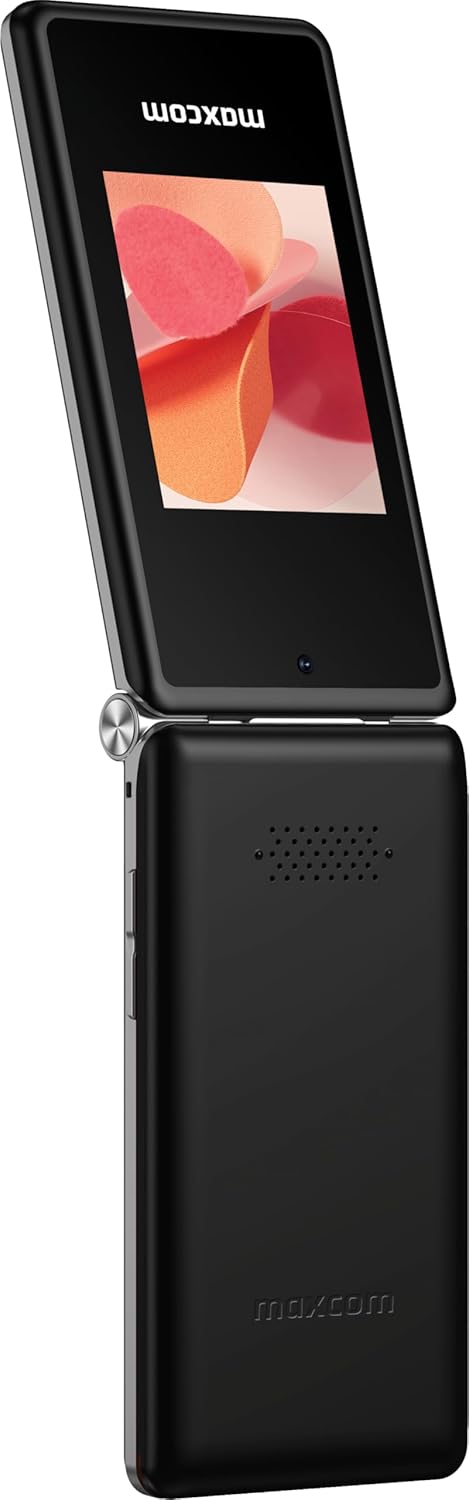
Figuur 1: Maxcom MM835 Flip Phone (Closed View). The external 2.4-inch screen displays time, date, battery status, and missed calls without opening the phone.
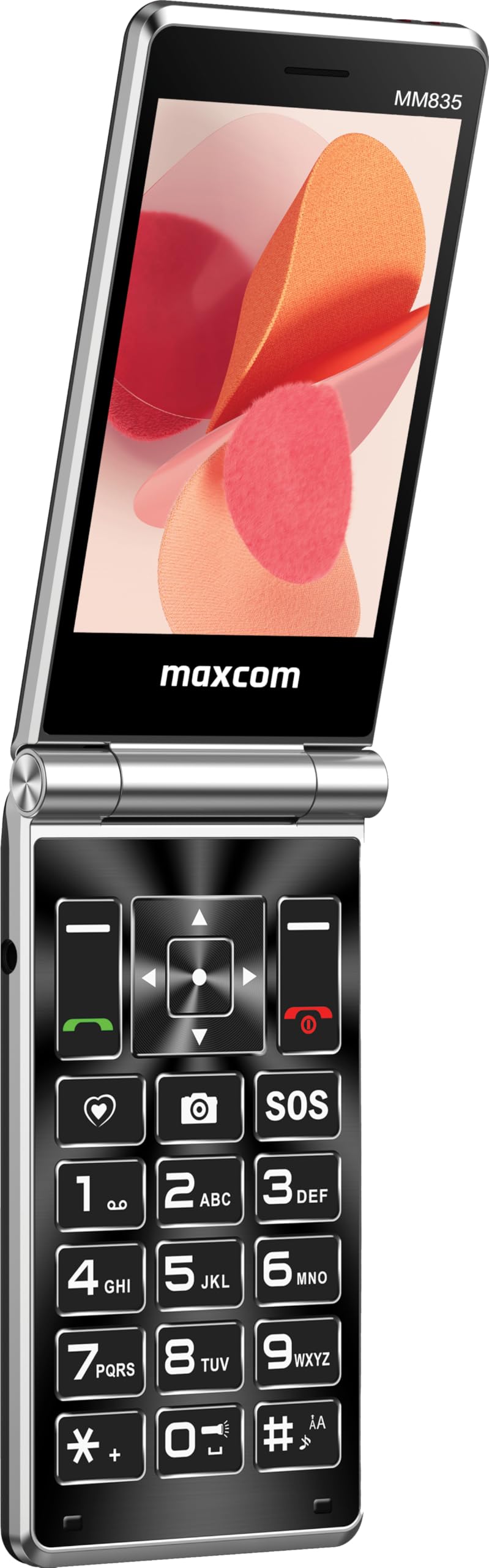
Figuur 2: Maxcom MM835 Flip Phone (Open View). The internal 3.5-inch screen provides a clear interface for contacts and messages, complemented by large, comfortable keys.

Figuur 3: Kant view of the Maxcom MM835, illustrating the volume control buttons for easy audio adjustment.

Figuur 4: Onderkant view of the Maxcom MM835, highlighting the USB-C charging port for convenient power connection.

Figuur 5: Detail of the Maxcom MM835 keyboard, featuring the prominent SOS button for emergency contacts.

Figuur 6: The Maxcom MM835 is Hearing Aid Compatible (HAC), ensuring clear audio for users with hearing aids.
Opstelling
1. Battery installasie en laai
- Maak die agterblad oop: Verwyder die agterkant van die foon versigtig.
- Plaas die battery: Place the included Lithium-ion battery into its compartment, ensuring the contacts align correctly.
- Vervang die agterste deksel: Heg die agterblad stewig vas.
- Laai die foon: Connect the provided USB-C cable to the phone's charging port (Figure 4) and to a compatible USB power adapter (not included). Allow the phone to charge fully before first use. The external screen will indicate charging status.
2. SIM-kaart installasie
The Maxcom MM835 supports dual SIM cards.
- Verwyder die agterste deksel en battery: Follow the steps above to access the SIM card slots.
- Plaas SIM-kaarte in: Carefully slide your SIM card(s) into the designated slot(s). Ensure the gold contacts face downwards and the notched corner aligns with the slot.
- Reinstall battery and cover: Vervang die battery en agterblad.
3. Skakel aan/af
- Om aan te skakel: Druk en hou die Aan/Aan/Beëindig Oproep-knoppie (rooi knoppie) in totdat die skerm aanskakel.
- Om af te skakel: Druk en hou die Aan/Aan-oproep-knoppie in totdat die afskakelopsies verskyn, en kies dan "Skakel af".
Bedryfsinstruksies
1. Basiese navigasie
- Internal Display: The 3.5-inch internal screen is your primary interface for menus and content.
- Eksterne vertoning: The 2.4-inch external screen shows essential information like time, date, battery, and caller ID when the phone is closed.
- Navigasiesleutels: Use the directional keys (up, down, left, right) and the central OK button to navigate through menus.
- Sagte sleutels: The keys directly below the screen perform functions indicated on the display (e.g., "Menu", "Back").
- Call Keys: The green button initiates calls, and the red button ends calls or powers the phone on/off.
2. Maak en Ontvang Oproepe
- Om 'n oproep te maak:
- Open the phone.
- Skakel die nommer met die sleutelbord.
- Press the green Call button to initiate the call.
- Om 'n oproep te beantwoord:
- When the phone rings, open the flip or press the green Call button.
- Om 'n oproep te beëindig: Druk die rooi Beëindig oproep-knoppie.
3. Stuur en ontvang van boodskappe
- Navigeer na die "Boodskappe"-kieslys.
- Select "New Message" to compose a text.
- Voer die ontvanger se nommer in of kies uit kontakte.
- Tik jou boodskap met die sleutelbord.
- Druk "Stuur".
4. SOS Button Functionality
The SOS button (Figure 5) is located on the main keypad and is designed for emergency situations.
- Opstelling: Before use, configure emergency contacts in the phone's settings. Refer to the "SOS Settings" section in the phone's menu.
- Aktivering: In an emergency, press and hold the SOS button. The phone will automatically send pre-defined notifications to your emergency contacts and may initiate calls to them.
5. Kamera
The phone includes a basic camera for capturing photos.
- Kry toegang tot die kamera vanaf die hoofkieslys.
- Raam jou skoot met behulp van die interne skerm.
- Press the central OK button to take a picture.
6. FM Radio
Enjoy listening to FM radio stations on your device.
- Navigate to the "FM Radio" application in the menu.
- Connect headphones (not included) to act as an antenna for optimal reception.
- Use the navigation keys to scan for stations or tune manually.
Onderhoud
- Skoonmaak: Use a soft, dry cloth to clean the phone's exterior. Avoid liquid cleaners or abrasive materials.
- Batterysorg: To prolong battery life, avoid extreme temperatures. Charge the phone regularly, but do not leave it fully discharged for extended periods.
- Berging: Store the phone in a cool, dry place away from direct sunlight and moisture when not in use.
- Sagteware: While software updates are not explicitly guaranteed, ensure your phone's settings are optimized for performance.
Probleemoplossing
If you encounter issues with your Maxcom MM835, refer to the following common solutions:
| Probleem | Moontlike Oplossing |
|---|---|
| Foon skakel nie aan nie | Ensure the battery is correctly installed and fully charged. Connect the charger and try again. |
| Kan nie oproepe maak of ontvang nie | Check if the SIM card is properly inserted. Verify that you have network signal. Contact your service provider if the issue persists. |
| Swak batterylewe | Ensure the phone is fully charged. Reduce screen brightness or close unused applications. Battery performance can degrade over time. |
| "Emergency Call Only" message | This indicates a lack of network signal or an issue with your SIM card/service. Try moving to an area with better reception or reinserting your SIM card. |
| Sleutels reageer nie | Restart the phone. If the issue continues, ensure no debris is obstructing the keys. |
Spesifikasies
| Kenmerk | Detail |
|---|---|
| Handelsmerk | Maxcom |
| Model Naam | MM835 |
| Produk Tipe | Flip foon |
| Kleur | Swart |
| Bedryfstelsel | Maxcom OS |
| Internal Screen Size | 3.5 duim |
| Eksterne skermgrootte | 2.4 duim |
| Konnektiwiteit | 4G, VoLTE |
| Spesiale kenmerke | Dual SIM, SOS Button, HAC (Hearing Aid Compatible), Large Keys |
| Battery samestelling | Litium-ioon |
| Battery kapasiteit | 1400 mAh |
| Laaipoort | USB Tipe C |
| Geheue berging kapasiteit | 32 GB |
| SVE Model | ARMv7 |
| Skermresolusie | 640 x 360 |
| Draadlose draer | Alle diensverskaffers (Ontsluit) |
Waarborg en Ondersteuning
For warranty information and customer support, please refer to the documentation provided with your purchase or contact the seller directly. Maxcom strives to provide reliable products, and support is available for any manufacturing defects or operational queries.
- Vervaardiger: Maxcom
- Verkoper: You Get - Innovation & Technology
- Retourbeleid: Typically 30 days for refund/replacement (check with seller for specifics).