
1. Inleiding
This manual provides detailed instructions for the safe and effective use of your TOTAL TMT57026 Laser Distance Meter. Please read this manual thoroughly before operating the device and keep it for future reference. This device is designed for accurate distance measurements up to 70 meters, suitable for various professional and DIY applications.
2. Veiligheidsinstruksies
- Laserbestraling: This device emits Class 2 laser radiation. Do not stare into the laser beam or direct it at other people or animals.
- Oogbeskerming: Vermy direkte oogblootstelling aan die laserstraal.
- Bedryfsomgewing: Moenie die toestel in plofbare atmosfere of naby vlambare materiale gebruik nie.
- Waterweerstand: Hierdie toestel is nie waterbestand nieVermy blootstelling aan water of hoë humiditeit.
- Onderhoud: Only qualified personnel should repair the device.
- Batterye: Use only specified AAA batteries. Do not mix old and new batteries or different types of batteries.
3. Produk verbyview
Familiarize yourself with the components of your TOTAL TMT57026 Laser Distance Meter.
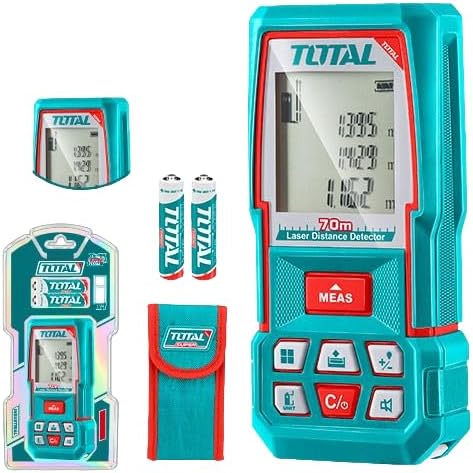
Figure 1: The TOTAL TMT57026 Laser Distance Meter, showing the device itself, two AAA batteries, a carrying pouch, and retail packaging. The device features a digital display and multiple function buttons.
Sleutelkomponente:
- Laser-emitter/-ontvanger: Geleë aan die bokant van die toestel.
- Vertoon skerm: Shows measurements, units, and mode indicators.
- MEAS-knoppie: Initiates single or continuous measurement.
- EENHEID-knoppie: Verander meeteenhede (bv. meter, voet, duim).
- C/O Button: Clears the last measurement or turns the device off.
- Funksie knoppies: For area, volume, addition, subtraction, and other calculations.
- Battery kompartement: Located at the rear of the device.
4. Opstelling
4.1 Battery installasie
- Vind die batteryklepdeksel aan die agterkant van die toestel.
- Skuif of knip die deksel los om dit oop te maak.
- Insert two (2) AAA 1.5V disposable batteries, ensuring correct polarity (+/-). The device includes two AAA batteries.
- Maak die batterykompartement se deksel stewig toe.
4.2 Aan-/afskakel
- Om aan te skakel: Druk die MEAS button briefly. The display will light up.
- Om af te skakel: Druk en hou die C/O button for approximately 3 seconds. The device will also automatically power off after a period of inactivity to conserve battery life.
5. Bedryfsinstruksies
5.1 Basiese Afstandsmeting
- Maak seker dat die toestel aangeskakel is.
- Rig die laserstraal op die teikenoppervlak.
- Druk die MEAS button once. The laser will activate, and the measurement will appear on the display.
- The measurement will be held on the screen until a new measurement is taken or the device is turned off.
5.2 Deurlopende Meting (Spooring)
- Druk en hou die MEAS knoppie vir ongeveer 2 sekondes.
- The device will enter continuous measurement mode, displaying real-time distance as you move the device.
- Druk die MEAS button again to stop continuous measurement and hold the last value.
5.3 Verandering van meeteenhede
- Druk die EENHEID button repeatedly to cycle through available units: meters (m), feet (ft), and inches (in).
- The selected unit will be indicated on the display.
5.4 Oppervlakte- en Volumemeting
The device supports calculation of area and volume. Refer to the icons on the function buttons for specific modes.
- Press the appropriate function button (e.g., the button with the square icon for area, or cube icon for volume).
- Follow the on-screen prompts to take the required measurements (e.g., length, width for area; length, width, height for volume).
- The calculated result will be displayed.
5.5 Optelling en Aftrekking
Gebruik die +/- button to add or subtract measurements.
- Take the first measurement.
- Druk die +/- button to select addition or subtraction mode.
- Take the second measurement. The device will automatically perform the calculation and display the result.
6. Onderhoud
6.1 Skoonmaak
- Vee die toestel af met 'n sagte, damp lap. Moenie skuur skoonmaakmiddels of oplosmiddels gebruik nie.
- Clean the laser lens carefully with a soft, lint-free cloth, similar to cleaning camera lenses.
6.2 Berging
- Bêre die toestel op 'n droë, koel plek, weg van direkte sonlig en uiterste temperature.
- Indien dit vir 'n lang tydperk gestoor word, verwyder die batterye om lekkasie te voorkom.
6.3 Batteryvervanging
- When the battery indicator on the display shows low power, replace both AAA batteries following the instructions in Section 4.1.
7. Probleemoplossing
| Probleem | Moontlike oorsaak | Oplossing |
|---|---|---|
| Toestel skakel nie aan nie. | Batterye is leeg of verkeerd geïnstalleer. | Kontroleer die polariteit van die batterye of vervang dit met nuwe AAA-batterye. |
| Onakkurate metings. | Laser lens is dirty; target surface is too reflective/non-reflective; device is unstable. | Clean the laser lens. Measure against a suitable, stable surface. Ensure device is held steady. |
| Die laserstraal is nie sigbaar nie. | Helder omgewingslig; laser is af. | Operate in lower light conditions. Ensure device is powered on and MEAS button is pressed. |
| Die skerm wys 'n foutkode. | Meting buite bereik; interne fout. | Ensure target is within 0.05m to 70m range. Try restarting the device. If error persists, contact support. |
8. Spesifikasies
- Model: TMT57026
- Handelsmerk: TOTAAL
- Meetreeks: 0.05 tot 70 XNUMX meter
- Meeteenhede: Meter (m), Voet (vt), Duim (in)
- Laser klas: Klas 2
- Batterye: 2 x AAA, 1.5V (included)
- Battery tipe: Weggooibaar
- Automatic Laser Shut-off: Yes (after inactivity)
- Automatic Device Shut-off: Yes (after inactivity)
- Produk afmetings: Ongeveer 17 x 5 x 0.1 cm
- Item gewig: Ongeveer 160 g (0.16 kilogram)
- Materiaal: Plastiek
- Kleur: Turkoois
- Waterweerstandvlak: Nie waterbestand nie
- Vervaardiger: Totaal
- Land van oorsprong: China
9. Waarborg en Ondersteuning
For warranty information and technical support, please contact TOTAL customer service. Keep your purchase receipt as proof of purchase.
For further assistance, please refer to the official TOTAL webwebwerf of kontak u plaaslike verspreider.