
1. Produk verbyview
The atomberg Studio Nexus 1200mm BLDC Ceiling Fan is designed for efficient air circulation and modern aesthetics. It features a Brushless Direct Current (BLDC) motor for energy savings, a BEE 5-star rating, and quiet operation. This fan includes a remote control for convenient adjustments and a unique Moonbeam Light function.
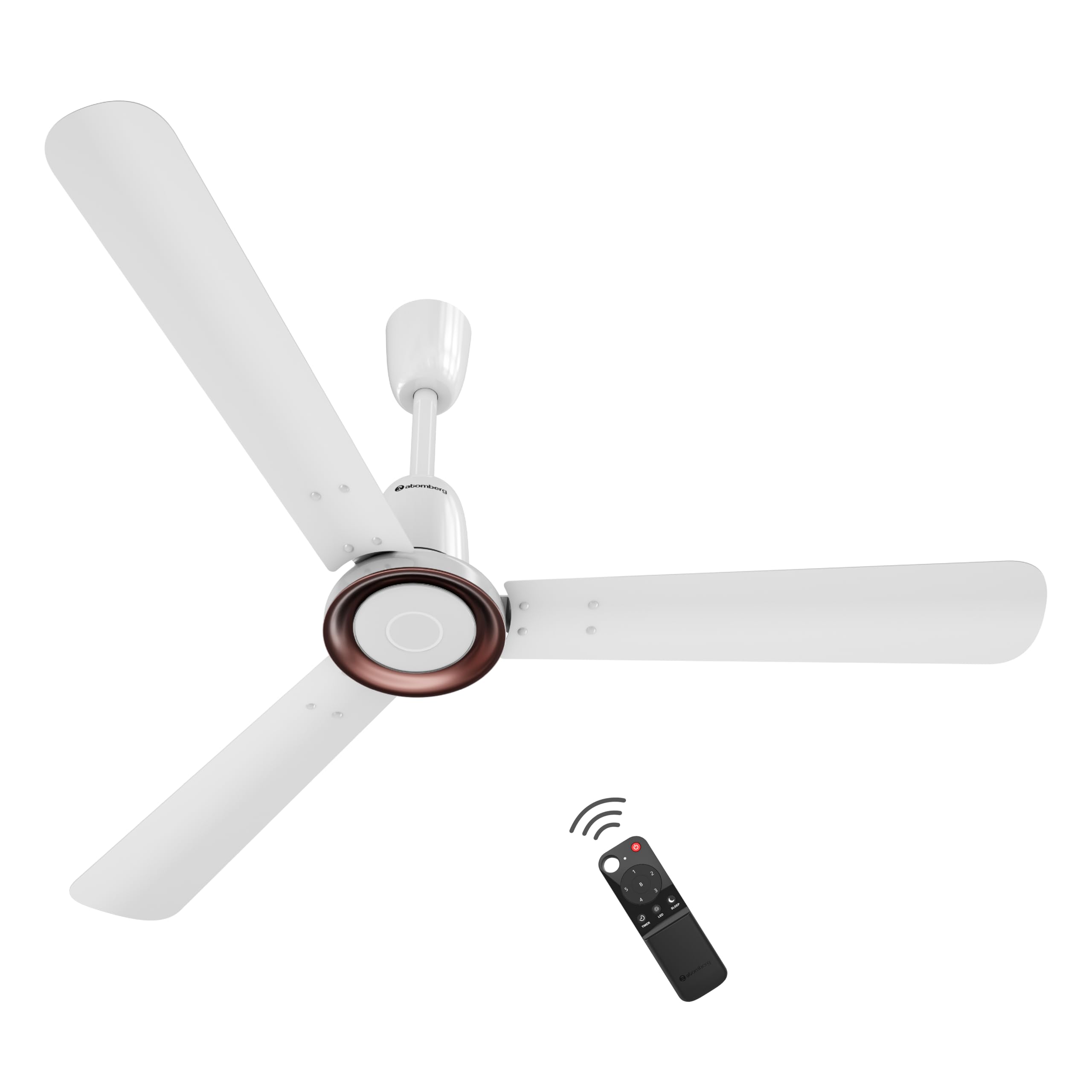
Figure 1: atomberg Studio Nexus 1200mm BLDC Ceiling Fan (Gloss White)
Sleutel kenmerke:
- Energy-Efficient BLDC Motor: Consumes only 35W at top speed, saving up to 65% electricity compared to unrated fans.
- BEE 5-Star Rated: Certified for high energy efficiency.
- High Air Delivery: Provides 230 CMM (Cubic Meters Per Minute) for optimal airflow.
- Lae geraas werking: Operates at less than 57 dB, ensuring a quiet environment.
- Smart IR Remote Control: Allows adjustment of speed, Boost Mode, Timer, and Sleep Mode.
- Moonbeam Light: Integrated night light with two intensity levels, providing visual feedback for remote commands.
- IoT-verbinding: Supports smart control (details for app control are typically provided in a separate IoT guide).
- Moderne minimalistiese ontwerp: Features a premium metallic body trim and wide designer curved blades.

Figure 2: Advanced Air+ Technology for enhanced air delivery and comfort.

Figuur 3: oorview of best-in-class performance, including remote operation, high air delivery, and low noise.
2. Veiligheidsinligting
Please read all safety instructions carefully before installation and use. Retain this manual for future reference.
- Maak seker dat die kragtoevoer afgeskakel is voor installasie, skoonmaak of onderhoud.
- Installasie moet deur 'n gekwalifiseerde elektrisiën uitgevoer word in ooreenstemming met plaaslike elektriese kodes.
- Mount the fan securely to a ceiling structure capable of supporting its weight.
- Hou hande, hare en klere weg van die waaierlemme tydens werking.
- Moenie probeer om die waaier self te herstel of te wysig nie. Kontak kliëntediens vir hulp.
3. Pakketinhoud
Verifieer dat alle komponente in die pakket teenwoordig is voordat u met die installasie voortgaan:
- Blade set (1 Unit)
- Remote (1 Unit)
- Motor box (1 Unit)
- Canopy set (1 Unit)
- Downrod (1 Unit)
- Shackle kit (1 Unit)
- Manual Leaflet & Warranty card (1 Unit)
4. Installasie
The atomberg Studio Nexus fan is designed for versatile installation, accommodating both standard and false/low ceilings.
Plafonversoenbaarheid:
- For Standard Ceilings: Use both the bottom and top canopy for a complete finish.
- For Low Height or False Ceilings: An additional ceiling plate is provided. Use this ceiling plate with the bottom canopy for a flush installation.
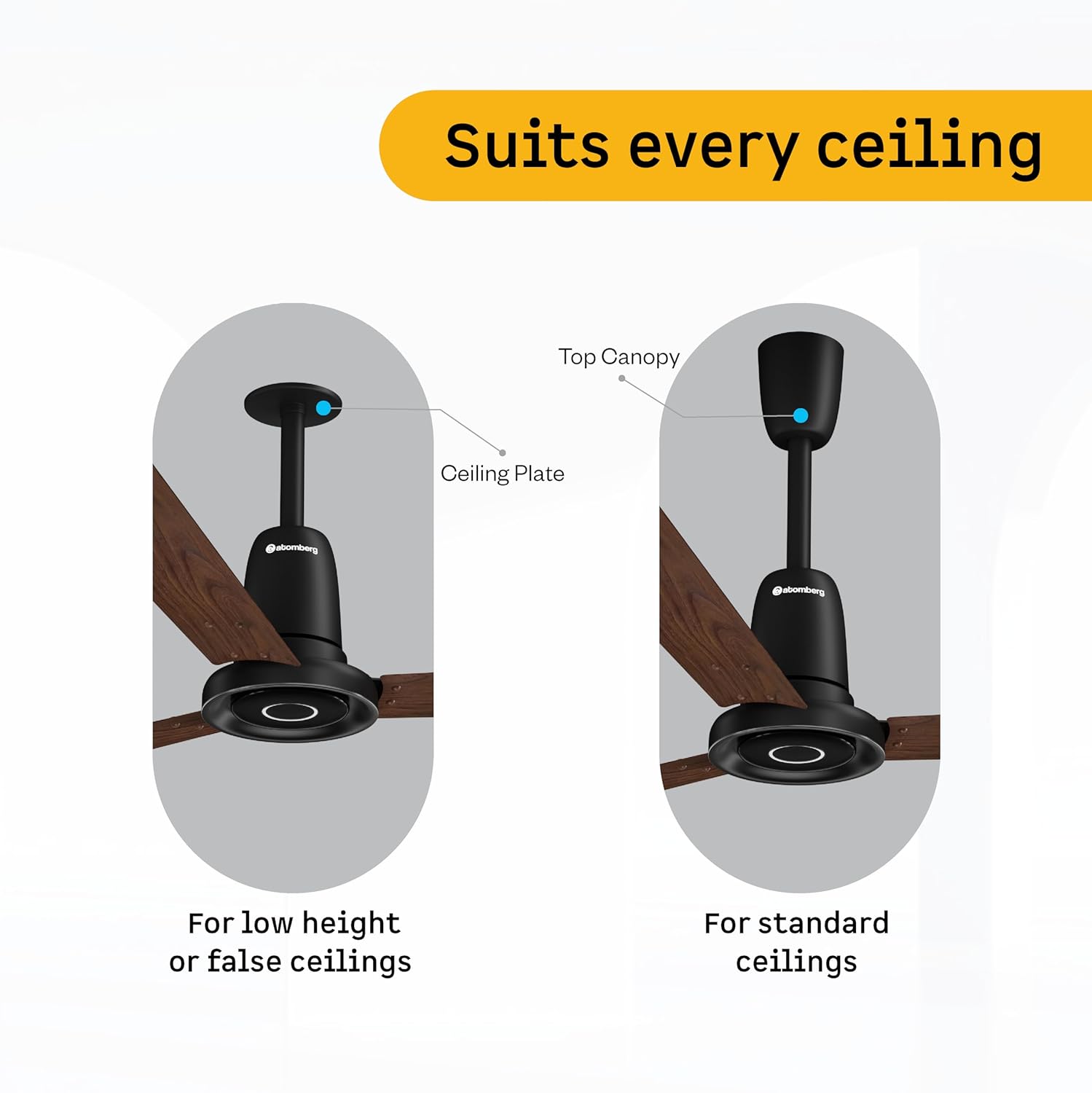
Figure 4: Illustration of ceiling fan installation for different ceiling types.
Detailed installation steps are provided in the included manual leaflet. It is recommended to have the fan installed by a professional.
5. Operasie
Control your atomberg Studio Nexus fan using the included Smart IR Remote or through IoT connectivity.
Gebruik die afstandbeheer:
The universal IR remote allows for easy control of various fan functions. No pairing is required.

Figure 5: Smart IR Remote Control for the Studio Nexus fan.
- Krag aan/af: Druk die aan/af-knoppie om die waaier aan of af te skakel.
- Spoedverstelling: Use the numbered buttons (1-6) to select your desired fan speed.
- Boostmodus: Activates the highest fan speed for rapid cooling.
- Timermodus: Set the fan to switch off automatically after a pre-set number of hours.
- Slaap stelling: Gradually decreases the fan's speed every two hours for comfortable sleep.
- LED lig beheer: Turn the Moonbeam Light ON or OFF.
Moonbeam Light Function:
The integrated Moonbeam Light serves as a night light and provides visual feedback.
- It has two intensity levels, adjustable via the remote.
- The light blinks in response to remote commands (e.g., power on/off, speed change, timer, sleep mode) to confirm action.
IoT and App Control:
For advanced control and smart home integration, refer to the dedicated IoT setup guide or the atomberg app for instructions on connecting and controlling your fan via a smart device.
6. Onderhoud
Gereelde onderhoud verseker optimale werkverrigting en lang lewensduur van jou waaier.
- Skoonmaak: Vee die waaierblaaie en motorbehuising gereeld af met 'n sagte, damp lap. Moenie skuur skoonmaakmiddels of oplosmiddels gebruik nie.
- Bladinspeksie: Check blades for any damage or warping. Damaged blades can cause imbalance and noise.
- Veilige montering: Ensure all mounting hardware remains tight and secure.
- Smering: The BLDC motor is designed for maintenance-free operation and does not require lubrication.
Ontkoppel altyd krag voordat enige skoonmaak of instandhouding uitgevoer word.
7. Probleemoplossing
If you encounter issues with your atomberg Studio Nexus fan, refer to the following common troubleshooting tips:
- Fan skakel nie aan nie:
- Check if the main power supply to the fan is on.
- Maak seker dat die afstandbeheerder se batterye nie leeg is nie.
- Verify that the remote control is pointed directly at the fan's receiver.
- Waaier-wobbels:
- Ensure all blade screws are tightened securely.
- Check that the downrod and mounting bracket are firmly attached to the ceiling.
- Verify that the blades are not bent or damaged.
- Afstandbeheer reageer nie:
- Vervang die afstandbeheerbatterye.
- Maak seker dat daar geen obstruksies tussen die afstandbeheer en die waaier is nie.
- Moonbeam Light Not Working:
- Check if the light function is enabled via the remote.
- As die probleem voortduur, kontak kliëntediens.
For issues not covered here, please contact atomberg customer support.
8. Spesifikasies
Detailed technical specifications for the atomberg Studio Nexus 1200mm BLDC Ceiling Fan:
| Kenmerk | Spesifikasie |
|---|---|
| Handelsmerk | atoomberg |
| Model Naam | Studio Nexus |
| Kleur | Glans Wit |
| Elektriese waaierontwerp | Plafonventilator |
| Kragbron | Elektries met koord |
| Produk Afmetings (D x B x H) | 57D x 29B x 25.5H Sentimeter |
| Soort kamer | Bedroom, Dining Room, Home Office, Living Room, Study Room |
| Spesiale kenmerke | BLDC Motor with Remote, Low noise, Boost Mode, Timer, Moonbeam Light |
| Montage tipe | Plafon Mount |
| Tipe beheerder | Button Control, Remote Control, App |
| Aantal snelhede | 6 |
| Geraasvlak | 57 Desibel |
| Wattage | 35 Watt |
| Aantal lemme | 3 |
| Lugvloeikapasiteit | 230 Cubic Meters Per Minute |
| Spoed | 360 RPM |
| Voltage | 220 Volt |
| Binne-buiteluggebruik | Binneshuise |
| Materiaal tipe | Aluminium |
| Bladmateriaal | Aluminium |
| Spesifikasie Met | BEE 5 Star |
| Bladlengte | 1200 millimeter |
| Item gewig | 4.2 kilogram |
| Land van oorsprong | Indië |
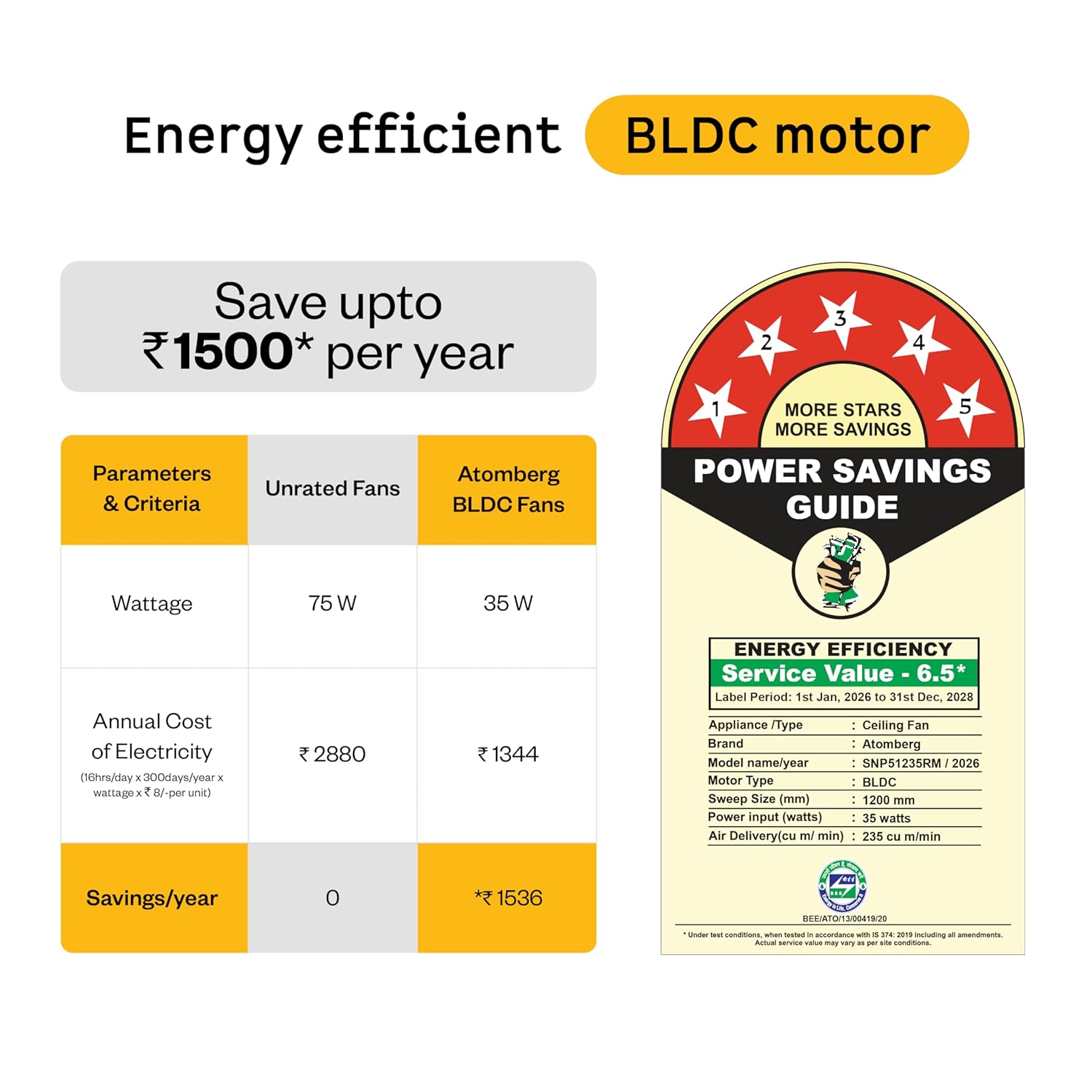
Figure 6: Energy Efficiency Guide for atomberg BLDC motor, highlighting 5-star rating and electricity savings.
9. Waarborg en Ondersteuning
Your atomberg Studio Nexus ceiling fan comes with comprehensive warranty coverage and dedicated customer support.
Waarborginligting:
- Standaard waarborg: A 3-year warranty is included with your purchase.
- Uitgebreide waarborg: An additional 2-year warranty can be availed by registering your product on the official atomberg website. This extends the total warranty period to 5 years.

Figure 7: Warranty details and registration process for extended coverage.
Kliëntediens:
For any queries, technical assistance, or warranty claims, please contact atomberg customer support:
- E-pos: support@atomberg.com
- Telefoon: 08448449442
- Webwebwerf: Visit the official atomberg website for product registration and further information.