
1. Inleiding
The Dynasty ProAudio PX2 is a high-definition multi-source home audio preamplifier designed to provide exceptional audio clarity and extensive connectivity. Featuring optimized low-noise circuitry, a 3-band EQ, and a low-cut crossover, the PX2 ensures a superior listening experience with wide frequency response and minimal distortion. Its versatile design includes Bluetooth 5.3 with Qualcomm® aptX™ Lossless technology for wireless streaming, a USB DAC interface for digital audio, and multiple analog and digital inputs to accommodate various audio sources.
2. Veiligheidsinligting
- Lees alle instruksies noukeurig deur voordat u die toestel gebruik.
- Hou die handleiding vir toekomstige verwysing.
- Moenie die eenheid aan vog, reën of uiterste temperature blootstel nie.
- Verseker behoorlike ventilasie om oorverhitting te voorkom.
- Ontkoppel die krag tydens weerligstorms of wanneer dit vir lang tye nie gebruik word nie.
- Verwys alle diens na gekwalifiseerde dienspersoneel.
3. Pakketinhoud
- Dynasty ProAudio PX2 Preamplewendiger
4. Produk verbyview
4.1 Voorpaneel
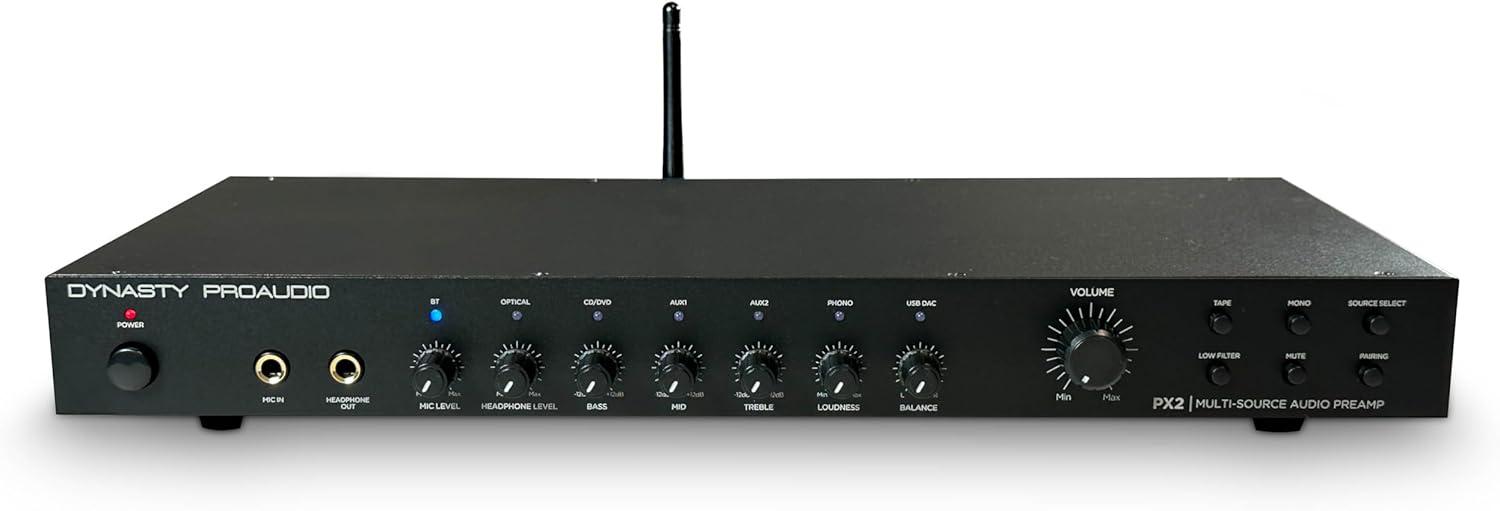
Beeld: Voorkant view of the Dynasty ProAudio PX2 Preamplifier, showing various controls and inputs.
The front panel provides access to power, microphone input, headphone output, various input selectors, tone controls (Bass, Mid, Treble), Loudness, Balance, and Master Volume. Dedicated buttons for Tape, Phono, Mono, Mute, and Pairing are also present.
4.2 Agterpaneel
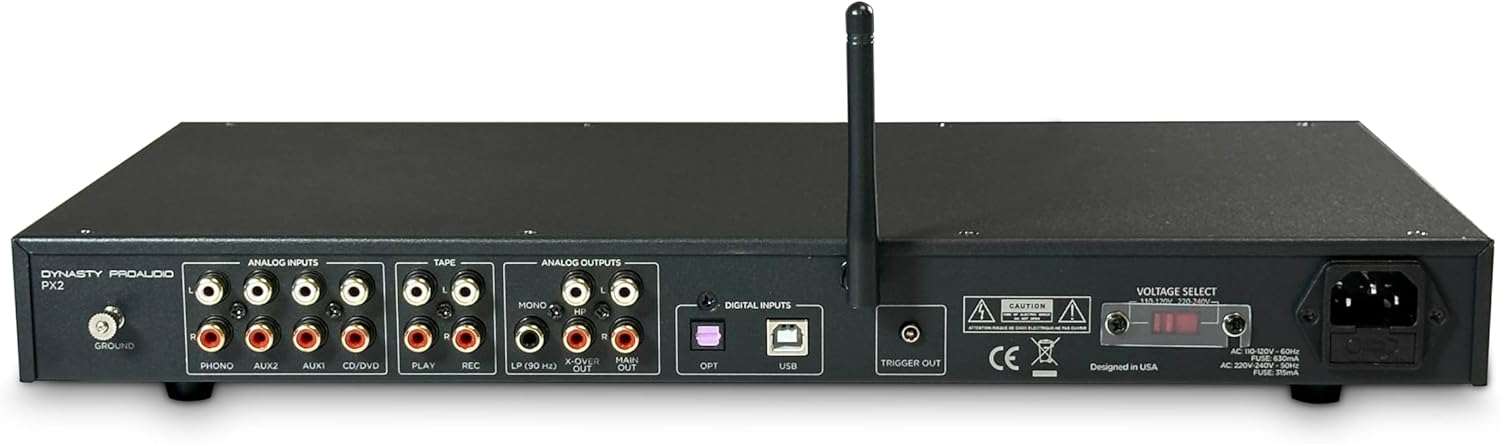
Beeld: Agter view of the Dynasty ProAudio PX2 Preamplifier, displaying analog and digital input/output ports.
The rear panel features a comprehensive array of analog inputs (Phono, Aux1, Aux2, CD/DVD, Tape Play), analog outputs (Tape Rec, Main Out, X-Over, Sub Mono), digital inputs (Optical, USB), a ground terminal, and a trigger output. The power input with voltage selector is also located here.
5. Opstelling
5.1 Verbindings
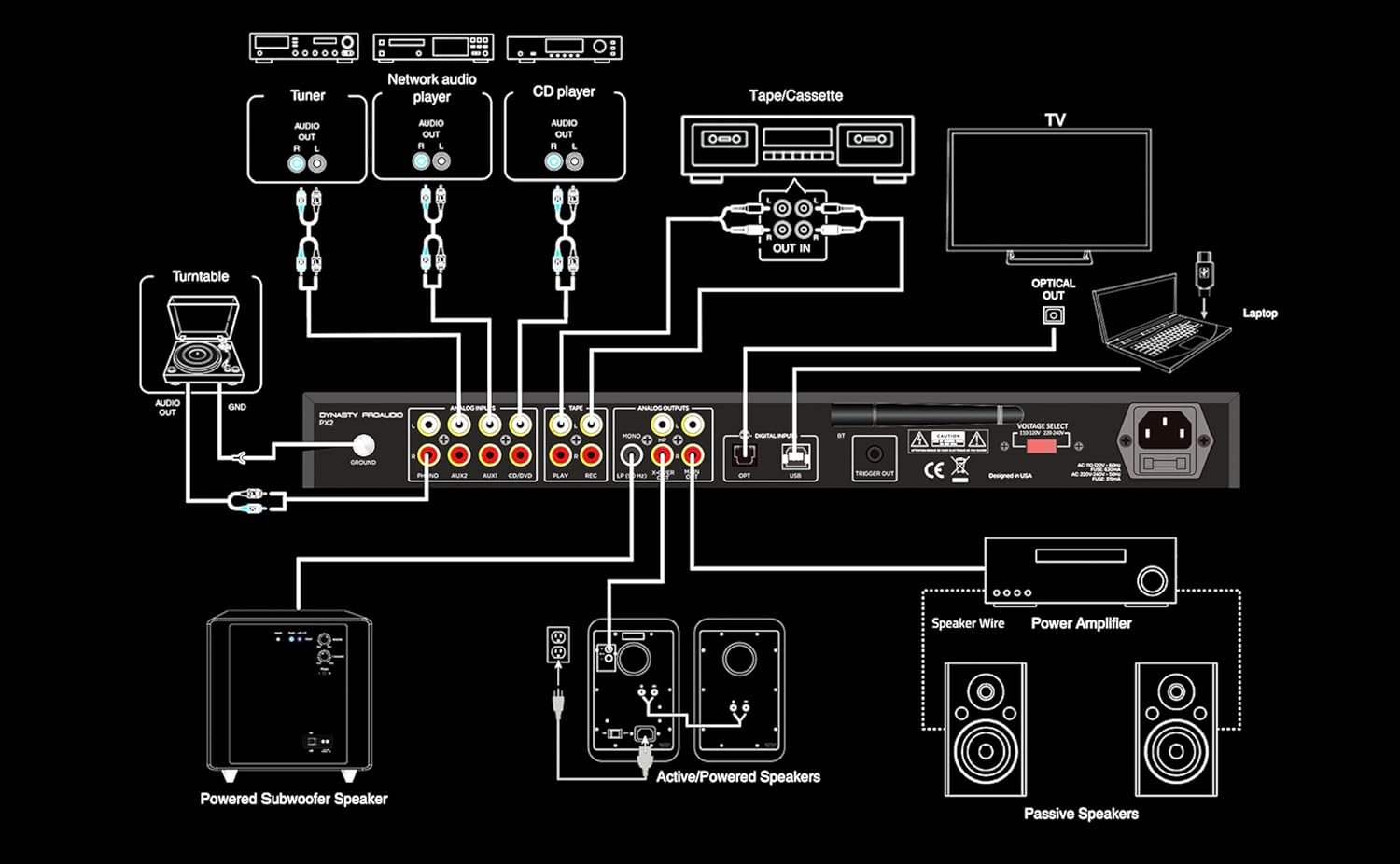
Image: A detailed connection diagram illustrating how to connect various audio sources and outputs to the PX2 preamplewendiger.
The PX2 offers extensive connectivity options:
- Analoog insette: Connect up to 4 RCA line inputs for devices like CD players, tuners, or network audio players. A dedicated RCA Phono input with RIAA preamp and ground terminal is available for turntables.
- Digitale insette: Use the S/PDIF (Optical) input for connecting TVs or other digital audio devices. The USB DAC accepts digital audio from a computer or other USB-supported digital audio source, supporting standard stereo PCM digital audio.
- Mikrofooninvoer: A front-panel 1/4” phone jack supports microphone input with a low-noise mic preamp.
- Koptelefoon uitset: A front-panel 1/4” phone jack provides a stereo headphone output.
- Uitsette: The PX2 provides Full Range Stereo, X-Over, Sub Mono, and Stereo Headphone outputs for flexible system integration.
5.2 Rekmontering
The PX2 features a 1U rack-mountable design with removable feet. It can be used in a standard audio rack, on a table, or on a shelf, providing flexible placement options for any audio system.
6. Bedryfsinstruksies
6.1 Krag aan/af
Press the Power button on the front panel to turn the unit on or off.
6.2 Bronkeuse
Use the Source Select buttons on the front panel to choose between connected inputs (Bluetooth, Optical, USB DAC, Aux1, Aux2, CD/DVD, Phono, Tape).
6.3 Volumebeheer
Adjust the Master Volume knob to control the overall output level. Individual input levels can be fine-tuned using the respective level controls.
6.4 Toonkontroles
Utilize the Bass, Mid, and Treble knobs to adjust the frequency response to your preference. The Loudness control can be engaged for enhanced low-frequency response at lower volumes. The Low Filter button activates a low-cut crossover to optimize sound when using a subwoofer.
6.5 Bluetooth-werking

Image: A diagram highlighting the features of the Qualcomm Bluetooth 5.3 chip, including improved transmission speed, effective distance, and connection stability.
To pair a Bluetooth device, select the Bluetooth input and press the Pairing button. Soek vir 'Dynasty ProAudio PX2' on your device and connect. The PX2 features a Qualcomm® aptX™ Lossless Bluetooth 5.3 chipset for high-speed transmission, stable connections, and RF anti-interference.
6.6 USB DAC Operation
Connect your computer or other digital audio source to the USB DAC input. The PX2 supports standard stereo PCM digital audio, allowing you to access audio stored on a thumb drive or stream from your computer.
6.7 Gebruik van mikrofoon
Plug a 1/4” microphone into the front panel Mic In jack. Adjust the Mic Level knob to control the microphone's volume. The low-noise microphone preamp ensures clear sound.
7. Onderhoud
- Clean the unit with a soft, dry cloth. Do not use liquid cleaners.
- Hou die eenheid vry van stof en puin.
- Maak seker dat alle verbindings veilig en vry van korrosie is.
8. Probleemoplossing
- Geen klank: Check all cable connections, ensure the correct input source is selected, and verify that the volume is not muted or set too low.
- Verwronge klank: Check input levels for clipping, ensure cables are securely connected, and try adjusting tone controls.
- Bluetooth-verbindingskwessies: Ensure the PX2 is in pairing mode, your device's Bluetooth is on, and there are no obstructions between the devices. Try unpairing and re-pairing.
- Humming/Noise: Ensure proper grounding for turntables. Check for loose connections or interference from other electronic devices.
9. Spesifikasies
| Kenmerk | Waarde |
|---|---|
| Produk afmetings | 17 x 8.8 x 1.12 duim |
| Item gewig | 6.4 pond |
| Item Modelnommer | PX2 |
| Bluetooth weergawe | 5.3 with Qualcomm® aptX™ Lossless |
| Insette | 4 RCA Line, 1 RCA Phono, 1 S/PDIF (Optical), 1 USB DAC, 1/4” Mic In |
| Uitsette | Full Range Stereo, X-Over, Sub Mono, 1/4” Stereo Headphone |
| Gelykmaking | 3-band EQ (Bass, Mid, Treble), Loudness, Low-cut Crossover |
| Ontwerp | 1U Rack-mountable with removable feet |
10. Waarborg en Ondersteuning
For warranty information and technical support, please refer to the documentation included with your product or visit the official DYNASTY PROAUDIO webwebwerf. Bewaar u aankoopbewys as bewys van aankoop vir enige waarborgeise.
11. Related Product Videos (Seller Content)
AIYIMA T1 PRO Tube Preamplifier Oorview
Hierdie video bied 'n oorview of the AIYIMA T1 PRO Tube Preampverligter, wysasing its features and design. While not the exact PX2 model, it demonstrates a similar product type from a seller, offering insights into preamp funksionaliteite.
Fosi Audio P4 Mini Preamp verbyview
'n verbyview of the Fosi Audio P4 Mini Preamp, highlighting its features and connectivity. This video from a seller offers a look at a comparable preampverligter produk.
Gebalanseerde Preamp for Home Audio Setup
This video demonstrates a balanced preamp for home audio, suitable for 2-channel stereo and 2.1 setups. It provides context on how preamps integrate into a home audio system.
Douk Audio T8 Multi-Band EQ Tube Preamp
A brief look at the Douk Audio T8 Multi-Band EQ Tube Preamp, an XLR equalizer. This video showcases a preamp with equalization features, relevant to the PX2's capabilities.
Fosi Audio LC30 VU-meter Amplifier Introduction
This video introduces the Fosi Audio LC30 VU Meter Amplifier, providing a detailed look at its design and functionality. It offers a comprehensive view of a related audio component.
Nobsound EQ9 HiFi 9-Band Stereo EQ Preamp
'n verbyview of the Nobsound EQ9 HiFi 9-Band Stereo EQ Preamp, an analog equalizer. This video highlights equalization capabilities found in preamplewendes.