
1. Inleiding
Welcome to the Hot Pepper K82A Smartphone User Manual. This guide provides essential information to help you set up, operate, maintain, and troubleshoot your new device. The Hot Pepper K82A is an advanced Android smartphone featuring a 6.67-inch AMOLED display, a powerful Octa-Core processor, 256GB of storage, 8GB of RAM, and a long-lasting 5000mAh battery. It also boasts a versatile triple camera system with a 50MP main sensor and a 24MP selfie camera.
2. Wat is in die boks
Upon unboxing your Hot Pepper K82A, please ensure all the following items are present:
- Hot Pepper KR10 Smartphone
- USB-adapter
- USB-C-laaikabel
- Gebruikershandleiding
- SIM -uitwerperhulpmiddel

Image: Contents of the Hot Pepper K82A retail box.
3. Toestel oorview
Familiarize yourself with the physical components and ports of your Hot Pepper K82A smartphone.

Image: Hot Pepper K82A device overview, showing camera modules, side-mounted fingerprint sensor, and bottom ports.
- Hoofkamera: High-resolution rear camera.
- Wyehoekkamera: For broader landscape shots.
- Diepte kamera: Enhances portrait mode effects.
- KI-gesigontsluiting: Front-facing camera for secure facial recognition.
- Vingerafdruksensor: Side-mounted for quick and secure unlocking.
- Ingeboude mikrofoon: Vir oproepe en stemopnames.
- Type-C 2.0 Charger Port: Vir laai en data-oordrag.
4. Opstelling
4.1. SIM-kaart(e) insit
- Vind die SIM-kaartlaai aan die kant van jou foon.
- Plaas die SIM-uitwerpgereedskap in die klein gaatjie langs die laai en druk liggies totdat die laai uitspring.
- Place your Nano-SIM card(s) and/or microSD card (if applicable) into the tray with the gold contacts facing down. Ensure they are correctly seated.
- Druk die laai versigtig terug in die foon totdat dit vasklik.
4.2. Skakel aan/af
- Om aan te skakel: Press and hold the Power button (usually on the right side) until the Hot Pepper logo appears.
- Om af te skakel: Press and hold the Power button until the power options appear on the screen, then tap "Power off".
- Om weer te begin: Press and hold the Power button, then tap "Restart".
4.3. Aanvanklike Opstelling
The first time you power on your phone, you will be guided through an initial setup process:
- Kies jou voorkeurtaal.
- Koppel aan 'n Wi-Fi-netwerk.
- Review en aanvaar die bepalings en voorwaardes.
- Meld aan met jou Google-rekening of skep 'n nuwe een.
- Stel skermslot op (PIN, patroon, wagwoord, vingerafdruk of gesigsontsluiting).
- Herstel data vanaf 'n vorige toestel (opsioneel).
5. Bediening van jou slimfoon
5.1. Basiese navigasie
- Tik: Om 'n item te kies of 'n toepassing oop te maak.
- Swiep: Om deur skerms of lyste te blaai.
- Knyp: Om in of uit te zoem op foto's en web bladsye.
- Lang pers: Om toegang tot kontekstuele kieslyste te verkry of ikone te skuif.
5.2. Oproepe maak en boodskappe stuur
- Maak die oop Telefoon toepassing om nommers te skakel of toegang tot kontakte te verkry.
- Maak die oop Boodskappe app to send and receive SMS/MMS.
5.3. Koppel aan netwerke
- Wi-Fi: Gaan na Instellings > Netwerk en internet > Wi-Fi om aan beskikbare netwerke te koppel.
- Bluetooth: Gaan na Instellings > Verbonde toestelle > Bluetooth om met ander Bluetooth-toestelle te koppel.
- Mobiele data: Maak seker dat jou SIM-kaart aktief is en mobiele data geaktiveer is in Instellings > Netwerk en internet > Mobiele netwerk.
6. Kameragebruik
Capture every moment with the Hot Pepper K82A's versatile AI Triple Camera system.
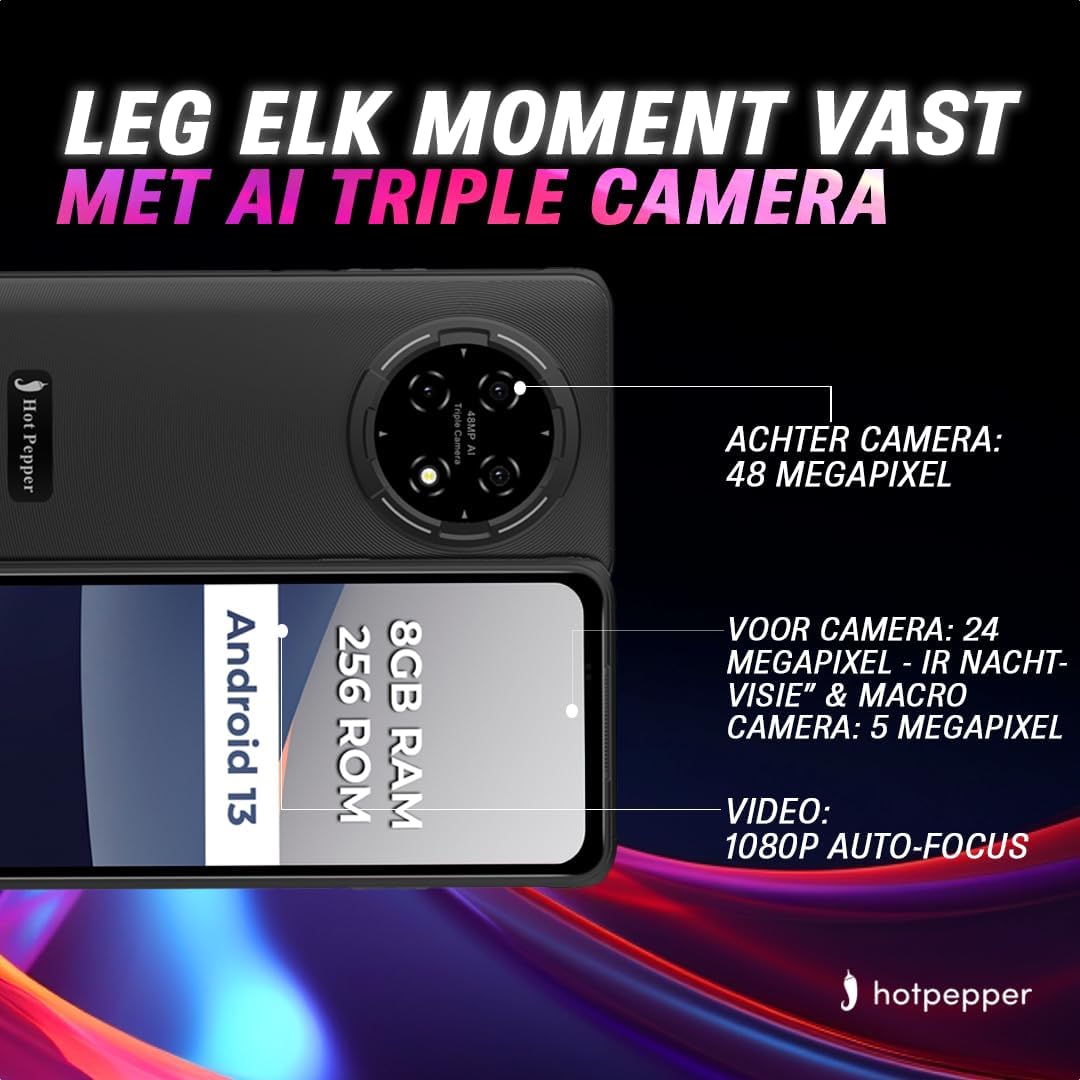
Image: Hot Pepper K82A camera specifications.
- Agterste kamera: 48 Megapixels for high-resolution photos.
- Voorste kamera: 24 Megapixels, featuring IR Night Vision and Macro capabilities for detailed selfies and close-up shots.
- Makro kamera: 5 Megapixels for extreme close-up photography.
- Video-opname: Supports 1080p video with auto-focus.
Om die kamera te gebruik, maak die Kamera app. You can switch between photo and video modes, adjust settings, and select different lenses (e.g., wide-angle, macro) as available.
7. Batterybestuur
The Hot Pepper K82A is equipped with a 5000mAh battery designed for extended use. To optimize battery life and ensure proper charging:

Image: Hot Pepper K82A battery life and charging details.
- Laai: Use the provided 18W fast charger and USB-C cable for optimal charging speed.
- Verwagte gebruik: Up to 24 hours call time, 14 hours web usage, 8 hours video playback, 7 hours gaming, and 660 hours standby time.
- Wenke vir batterybesparing: Reduce screen brightness, disable unused features like Bluetooth or GPS, close background apps, and enable battery saver mode in settings.
8. Outdoor Features
The Hot Pepper K82A is built to withstand various outdoor conditions, making it an ideal companion for your adventures.

Image: Hot Pepper K82A outdoor durability features.
- Robuuste ontwerp: Engineered for durability, suitable for various environments.
- GPS sein: Geïntegreerde GPS vir navigasie- en liggingsdienste.
- IP68 Water- en Stofbestandheid: Protects against immersion in water and ingress of dust.
- Valweerstand: Ontwerp om val van tot 1.5 meter te weerstaan.
9. Spesifikasies
Detailed technical specifications for the Hot Pepper K82A smartphone:
| Kenmerk | Spesifikasie |
|---|---|
| Handelsmerk | Warm Russie |
| Model Naam | Hot Pepper K82A |
| Modelnommer | KR10 |
| Bedryfstelsel | Android 13.0 |
| Skerm grootte | 6.78 duim |
| Resolusie | 1080 x 2400 |
| RAM grootte | 8 GB |
| Berging kapasiteit | 256 GB |
| SVE Model | MediaTek Helio (Octa-Core) |
| Agterkamera-resolusie | 48 Megapixels (Effective) |
| Voorkamera-resolusie | 24 megapixels |
| Battery samestelling | Litium-ioon (5000 XNUMX mAh) |
| Konnektiwiteit | USB, 3.5 mm-aansluiting |
| Sellulêre Tegnologie | 5G |
| Spesiale kenmerke | Robust Body, Dual SIM, Expandable Memory, Water Resistant (IP68) |
| Kleur | Blou |
10. Onderhoud
To ensure the longevity and optimal performance of your Hot Pepper K82A smartphone, follow these maintenance guidelines:
- Skoonmaak: Gebruik 'n sagte, pluisvrye lap om die skerm en liggaam skoon te maak. Vermy skuurmiddels of harde chemikalieë.
- Sagteware-opdaterings: Kontroleer gereeld vir stelselopdaterings en installeer dit om te verseker dat jou toestel die nuutste kenmerke, sekuriteitsopdaterings en werkverrigtingverbeterings het. Gaan na Instellings > Stelsel > Stelselopdatering.
- Bergingbestuur: Maak gereeld onnodige dinge skoon files, deïnstalleer ongebruikte programme en dra groot media oor files to cloud storage or a computer to free up internal storage.
- Batterysorg: Vermy uiterste temperature. Moenie die foon vir lang tye volledig gelaai of volledig ontlaai laat nie.
11. Probleemoplossing
Hier is oplossings vir 'n paar algemene probleme wat jy dalk teëkom:
11.1. Toestel skakel nie aan nie
- Ensure the battery is charged. Connect the phone to the charger for at least 15-30 minutes.
- Druk en hou die aan/af-knoppie vir 10-15 sekondes in om 'n herbegin te forseer.
11.2. Skerm reageer nie
- Forceer herbegin van die toestel (sien hierbo).
- If the issue persists, consider a factory reset (data will be lost, back up first).
11.3. Netwerkprobleme (Geen sein/Wi-Fi)
- Skakel vliegtuigmodus aan en af.
- Herbegin die foon.
- Gaan die SIM-kaart in.
- Vir Wi-Fi, herbegin jou router.
11.4. Battery dreineer vinnig
- Kontroleer batteryverbruik in Instellings > Battery om kraghongerige toepassings te identifiseer.
- Verminder die skermhelderheid en deaktiveer onnodige funksies.
- Maak agtergrondprogramme toe.
11.5. Fabrieksherstel (Laaste uitweg)
As jou toestel aanhoudende sagtewareprobleme ondervind, mag 'n fabrieksherstel nodig wees. Waarskuwing: Dit sal alle data op jou foon uitvee. Rugsteun belangrike data voordat jy voortgaan.
- Gaan na Instellings > Stelsel > Herstelopsies.
- Tik Vee alle data uit (fabriekterugstelling).
- Bevestig jou besluit en voer jou PIN/wagwoord in indien gevra.
12. Waarborg en Ondersteuning
Your Hot Pepper K82A smartphone comes with a standard manufacturer's warranty. Please refer to the warranty card included in your product packaging for specific terms and conditions, including coverage duration and limitations.
For technical support, warranty claims, or further assistance, please visit the official Hot Pepper website or contact their customer service through the contact information provided in your product documentation.