
1. Produk verbyview
The KUAIQU SPPS-K3010 is a high-precision variable DC power supply designed for laboratory, R&D, and industrial applications. It features a 5-digit TFT color display, offering both numerical and graphical (curve) representations of output voltage and current. This unit provides precise control over voltage (0-30V) and current (0-10A) with microampere-level resolution (0.01mA), ensuring accurate power delivery for sensitive electronic equipment.
Key features include advanced safety protections (Over-Voltage Protection - OVP, Over-Current Protection - OCP, Short-Circuit Protection - SCP), a memory function for storing and recalling up to four sets of parameters, and a user-friendly lock function to prevent accidental adjustments. It also incorporates USB-A and USB-C charging ports for convenience and an intelligent temperature-controlled cooling fan for stable, quiet operation.

Figuur 1.1: Voorkant view of the KUAIQU SPPS-K3010 DC Power Supply, showcasing sy kompakte ontwerp en duidelike skerm.
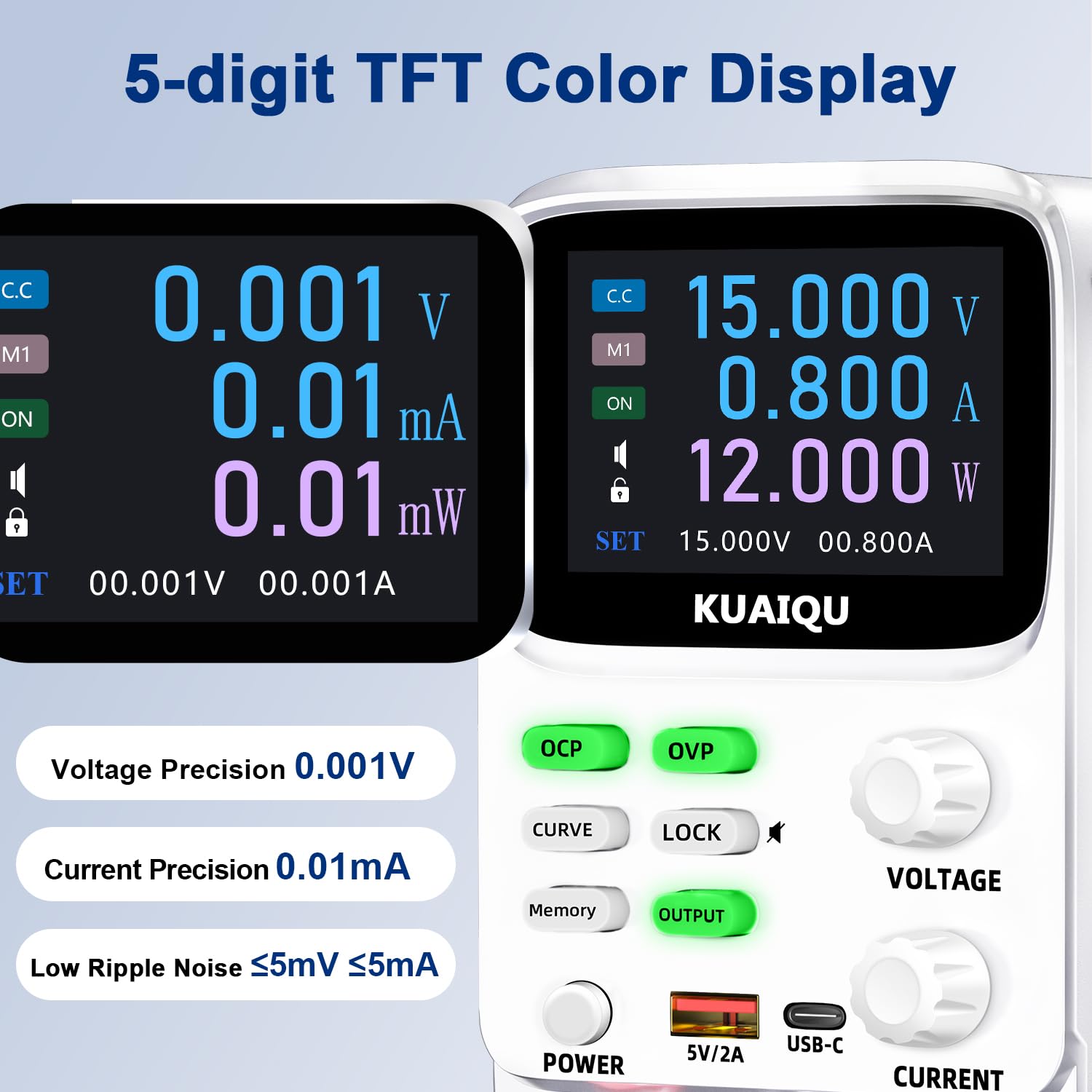
Figure 1.2: The 5-digit TFT color display provides high-precision readings, including 0.001V voltage precision and 0.01mA current precision.
2. Veiligheidsinstruksies
To ensure safe operation and prolong the lifespan of your device, please read and adhere to the following safety guidelines:
- Always connect the power supply to a grounded electrical outlet.
- Moenie die toestel in nat of damp voorwaardes.
- Verseker behoorlike ventilasie rondom die eenheid om oorverhitting te voorkom. Moenie ventilasie-openinge blokkeer nie.
- Vermy die toepassing van voltage or current exceeding the specified maximum ratings.
- Before making any connections or disconnections, ensure the output is turned off and the power supply is disconnected from the main power source.
- Moenie die c oopmaak nieasing of the power supply. There are no user-serviceable parts inside. Refer all servicing to qualified personnel.
- Keep the device away from flammable materials and explosive gases.
- Use only the provided power cable and output cables.
3. Produkkomponente
Familiarize yourself with the various components and controls of your KUAIQU SPPS-K3010 DC Power Supply.

Figuur 3.1: Voorpaneel oorview. This image displays the front panel of the power supply, highlighting the TFT display, control buttons (OCP, OVP, CURVE, LOCK, Memory, OUTPUT), rotary encoder knobs for Voltage and Current, Power button, USB-A and USB-C charging ports, and output terminals (+, -, GND).
3.1 Voorpaneelkontroles en aanwysers
- TFT Color Display: Vertonings voltage, current, power, and curve displays.
- OCP-knoppie: Over-Current Protection setting and activation.
- OVP-knoppie: Oor-Voltage Protection setting and activation.
- CURVE Button: Toggles the real-time voltage and current curve display.
- LOCK -knoppie: Sluit/ontsluit die beheerpaneel om toevallige veranderinge te voorkom.
- Geheue-knoppie: Accesses and saves preset voltage/current values (M1-M4).
- OUTPUT Button: Enables or disables the power output.
- VOLTAGE Knob: Rotary encoder for adjusting output voltage. Press to switch digit selection.
- CURRENT Knob: Rotary encoder for adjusting output current. Press to switch digit selection.
- Kragknoppie: Hoofkragskakelaar vir die eenheid.
- USB-A / USB-C Ports: Vir die laai van eksterne elektroniese toestelle.
- Output Terminals (+, -, GND): Connect positive, negative, and ground leads to the load.
3.2 Agterpaneel
The rear panel typically includes the AC power input socket, a fuse holder, and the cooling fan exhaust.
4. Opstelling
4.1 Uitpak en inspeksie
- Carefully remove the power supply and all accessories from the packaging.
- Verify that all items listed in the "What's in the Box" section are present: 1x DC power supply, 1x output power cord, 1x power cord, 1x user manual.
- Inspect the unit for any signs of physical damage. If damage is found, contact your supplier immediately.
4.2 Kragverbinding
- Ensure the power supply's main power switch is in the OFF position.
- Connect the provided AC power cord to the power input socket on the rear panel of the power supply.
- Plug the other end of the AC power cord into a grounded electrical outlet (110V AC).
4.3 Koppel die las
- Ensure the power supply's output is OFF (the OUTPUT button LED should be off).
- Connect the red output cable to the positive (+) terminal and the black output cable to the negative (-) terminal on the front panel.
- Connect the other ends of the output cables to your load device, ensuring correct polarity. For safety, connect the green ground (GND) terminal to the chassis of your load if required.
5. Bedryfsinstruksies
5.1 Aan- en afskakel
- Om aan te skakel, druk die KRAG knoppie. Die skerm sal verlig.
- Om af te skakel, druk die KRAG knoppie weer.
5.2 Aanpassing van volumetage en huidige

Figure 5.1: Precision adjustment using encoder knobs. This image illustrates how to use the rotary encoder knobs for precise voltage and current adjustments, showing the process of pressing the knob to select digits and rotating to change values.
- Kies Parameter: Draai die VOLTAGE or HUIDIGE knob to highlight the desired parameter on the display.
- Select Digit: Druk die VOLTAGE or HUIDIGE knob to move the cursor to the digit you wish to adjust. Repeated presses cycle through the digits.
- Pas Waarde aan: Rotate the knob to increase or decrease the value of the selected digit.
- Bevestig: Once the desired value is set, stop rotating. The value will be applied.
5.3 Enabling/Disabling Output
After setting the desired voltage and current, press the UITSET button to enable the power output to your load. The LED on the button will illuminate. Press it again to disable the output.
5.4 Memory Function (4 Groups of Storage)

Figure 5.2: Intelligent 4-group data storage. This image details the steps for using the memory function to store and recall up to four sets of voltage and current parameters (M1-M4).
- Voer instellings in: Druk die Geheue knoppie.
- Select Memory Slot: Draai die VOLTAGE knob to select a memory slot (M1-M4).
- Set Values: Druk lank op die VOLTAGE knob to enter setting mode. Short press and rotate the VOLTAGE/HUIDIGE knobs to set the desired voltage and current values for the selected slot.
- Stoor instellings: Druk lank op die VOLTAGE knob again to save the settings to the chosen memory slot.
- Recall Settings: To use a saved setting, rotate and short press the VOLTAGE knob to select the desired memory group (M1-M4) and then short press it again to apply.
5.5 Curve Display and Battery Simulation

Figure 5.3: Curve display and battery simulation. This image shows the real-time voltage and current curve display, useful for observing output stability and for applications like battery simulation and testing standby power consumption.
Druk die KROMME button to toggle the real-time voltage and current curve display. This feature allows for visual monitoring of output stability and transient behavior, which is particularly useful for tasks such as battery simulation and testing standby power consumption.
5.6 Intelligent A/mA Conversion
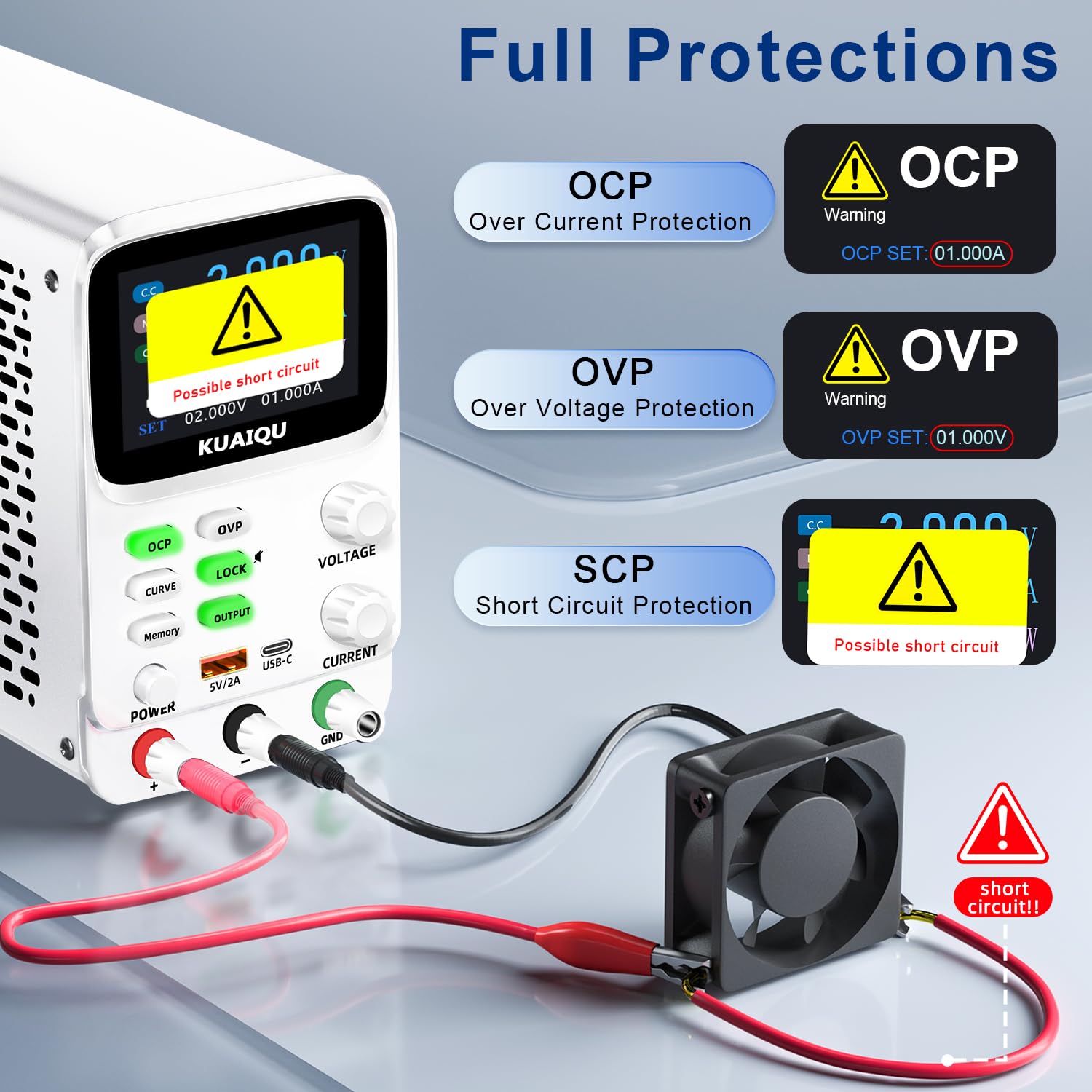
Figure 5.4: Intelligent A/mA Conversion. The display automatically switches to milliampere (mA) readings when the current value drops below 0.1A, providing enhanced precision for low-current applications.
The power supply automatically switches its current display from Amperes (A) to milliamperes (mA) when the output current drops below 0.1A. This intelligent conversion ensures optimal readability and precision for microampere-level measurements.
5.7 Protection Functions (OVP, OCP, SCP)
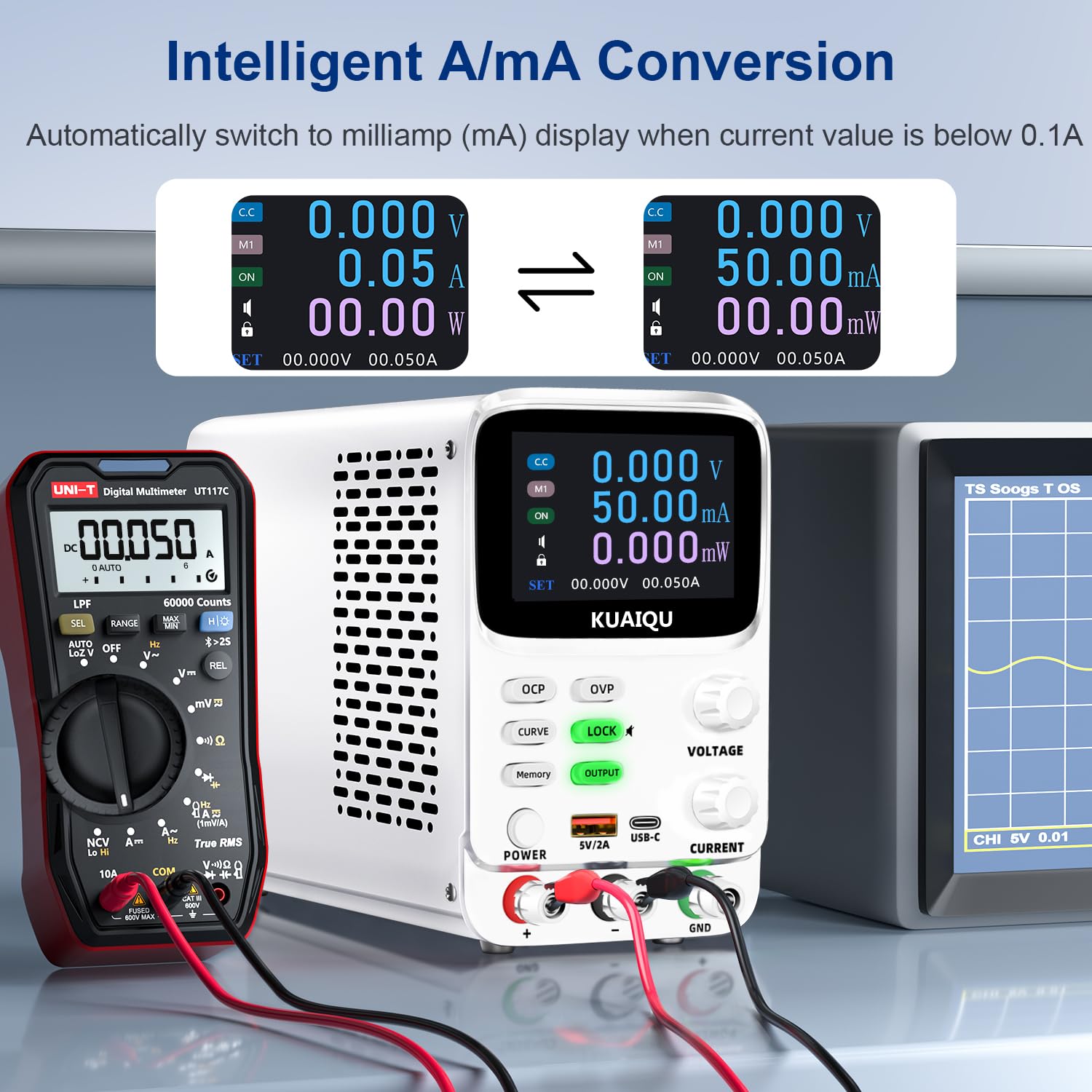
Figure 5.5: Full protection alarms. This image illustrates the Over-Current Protection (OCP), Over-Voltage Protection (OVP), and Short-Circuit Protection (SCP) features, showing how the device alerts and cuts off power when limits are exceeded or a short circuit is detected.
The power supply includes built-in protection mechanisms:
- Oor-Voltage Beskerming (OVP): Prevents output voltage from exceeding a preset limit.
- Over-Current Protection (OCP): Prevents output current from exceeding a preset limit.
- Short-Circuit Protection (SCP): Automatically cuts off output in case of a short circuit.
To set OVP/OCP limits:
- Druk lank op die OVP or OCP knoppie om die instellingsmodus te betree.
- Gebruik die VOLTAGE or HUIDIGE knob to adjust the protection limit.
- Druk kort op die OVP or OCP knoppie weer om die instelling te stoor.
If a protection is triggered, the output will be cut off, and an alarm will be displayed (e.g., "OVP", "OCP", or "Possible short circuit"). Address the issue and then press the UITSET button to re-enable output.
5.8 Sluitfunksie
Druk die SLOT button to lock the control panel, preventing accidental changes to settings. The lock icon will appear on the display. Press it again to unlock. Long pressing the SLOT button will toggle the encoder knob adjustment beeping sound.
5.9 USB-laaipoorte
The front panel includes USB-A and USB-C ports (5V/2A) for convenient charging of compatible electronic devices. These ports operate independently of the main power output settings.
6. Onderhoud
6.1 Skoonmaak
- Before cleaning, ensure the power supply is turned off and disconnected from the main power source.
- Gebruik 'n sagte, droë lap om die buitekant van die eenheid af te vee.
- Moenie skuurmiddels, oplosmiddels of harde chemikalieë gebruik nie.
- Periodically check the ventilation openings for dust accumulation and clean gently with a soft brush or compressed air.
6.2 Berging
- Bêre die kragtoevoer in 'n koel, droë omgewing, weg van direkte sonlig en uiterste temperature.
- Hou dit weg van stof en vog.
- If storing for an extended period, it is recommended to place it back in its original packaging.
7. Probleemoplossing
Hierdie afdeling spreek algemene probleme aan wat u mag teëkom. Indien die probleem voortduur, kontak asseblief kliëntediens.
7.1 No Power / Display Off
- Gaan kragkabel na: Maak seker dat die wisselstroomkabel stewig aan beide die kragtoevoer en die muuraansluiting gekoppel is.
- Check Wall Outlet: Verifieer dat die muursok funksioneel is deur 'n ander toestel in te prop.
- Gaan kragskakelaar na: Ensure the main KRAG button on the front panel is pressed.
- Kontroleer lont: The fuse located on the rear panel might be blown. Replace it with a fuse of the same type and rating (refer to specifications).
7.2 No Output Voltage/Stroom
- Check OUTPUT Button: Verseker die UITSET button is pressed and its LED is illuminated.
- Gaan verbindings na: Verify that the output cables are correctly and securely connected to both the power supply and the load.
- Check OVP/OCP: If OVP or OCP is triggered, the output will be disabled. Check the display for "OVP" or "OCP" warnings. Adjust the voltage/current settings or protection limits as needed, then press UITSET to re-enable.
- Check Short Circuit: If "Possible short circuit" is displayed, disconnect the load and check for any short circuits in your circuit.
- Voltage/Current Settings: Verseker die stel voltage and current values are not zero.
7.3 Vertoon kwessies
- Geen skerm: Refer to "No Power / Display Off" section.
- Verkeerde lesings: Ensure proper connections and calibration. If readings are consistently inaccurate, contact support.
8. Spesifikasies
| Kenmerk | Spesifikasie |
|---|---|
| Model Naam | SPPS-K3010 |
| Handelsmerk | KUAIQU |
| Uitset Voltage Reeks | 0-30V |
| Uitset huidige reeks | 0-10A |
| Uitset Wattage | 300 Watt |
| Voltage Resolusie | 0.001V (1mV) |
| Huidige resolusie | 0.01mA (10µA) |
| Vertoon | 2.8-inch TFT Color LCD (5-digit) |
| Beskermingskenmerke | OVP (Oor-Voltage Protection), OCP (Over-Current Protection), SCP (Short-Circuit Protection) |
| Geheue berging | 4 groups of editable parameters |
| USB-laaipoorte | USB-A, USB-C (5V/2A) |
| Verkoelingsmetode | Intelligent temperature-controlled cooling fan |
| Produkafmetings (L x B x H) | 7.6 x 3.4 x 5.5 duim |
| Item gewig | 2.5 pond |
| UPC | 768351108799 |
9. Waarborg en Kliëntediens
KUAIQU is committed to providing high-quality products and excellent customer service. This product undergoes thorough inspection before shipment to ensure its quality.
- Gehalteversekering: All KUAIQU lab power supplies and accessories are inspected to ensure good quality upon receipt.
- Tegniese ondersteuning: If you have any questions regarding the operation, troubleshooting, or any other aspect of your KUAIQU SPPS-K3010 DC Power Supply, please do not hesitate to contact our customer service team.
- Kontakinligting: Refer to the contact details provided with your purchase or visit the official KUAIQU webwebwerf vir ondersteuning.