
Inleiding
Thank you for choosing the Mibro Smartwatch Lite 3. This manual provides essential information for setting up, operating, and maintaining your device. Please read it carefully to ensure proper use and to maximize the performance of your smartwatch.
Pakketinhoud
Maak seker dat alle items in die pakket teenwoordig is:
- Mibro Smartwatch Lite 3 (with strap)
- Magnetiese laaikabel
- Gebruikershandleiding
Produk verbyview
The Mibro Smartwatch Lite 3 features a 1.3-inch AMOLED display, designed for clear visuals and intuitive interaction. It integrates various sensors for health monitoring and supports Bluetooth calling.
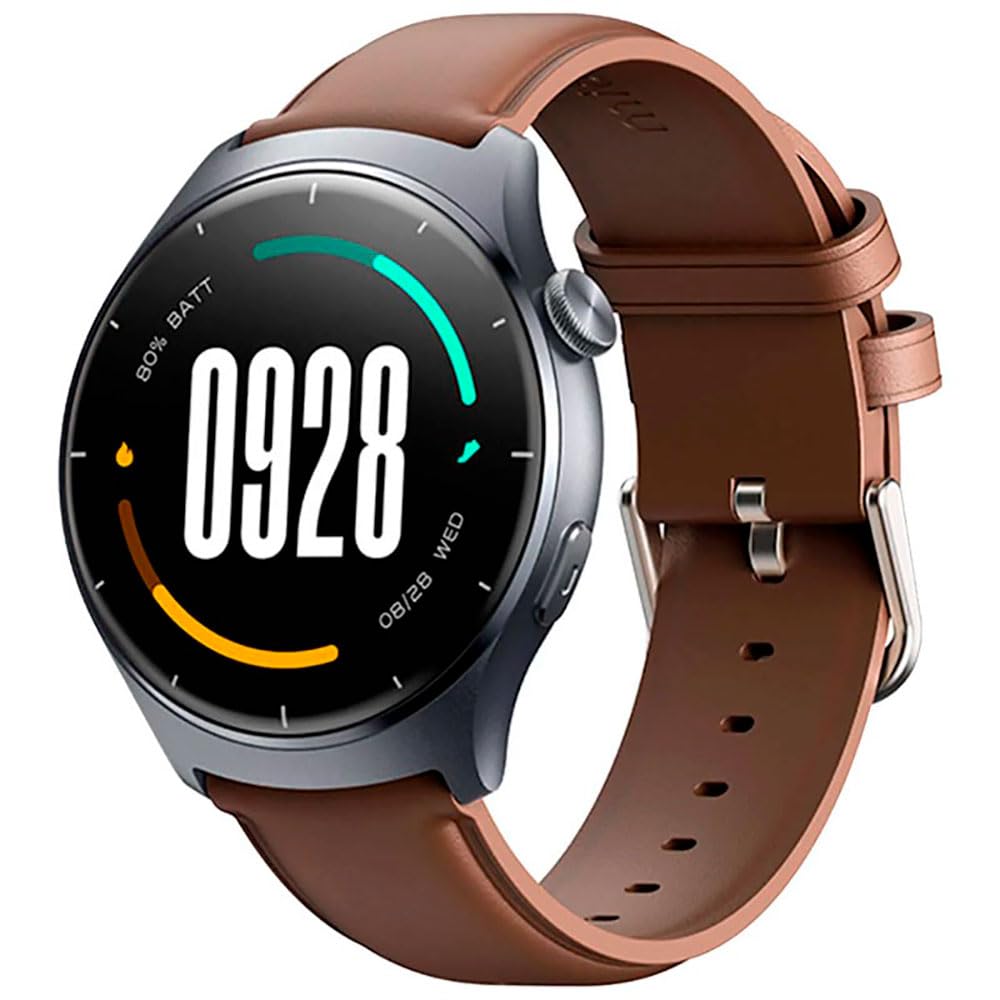
Beeld: Voorkant view of the Mibro Smartwatch Lite 3, showcasing sy ronde vertoon en bandjie.
Opstelling
1. Laai die slimhorlosie
- Koppel die magnetiese laaikabel aan die laaikontakte aan die agterkant van die slimhorlosie.
- Steek die USB-punt van die kabel in 'n standaard USB-kragadapter (5V/1A aanbeveel) of 'n rekenaar se USB-poort.
- The watch display will show a charging indicator. Ensure the watch is fully charged before first use.
2. App-installasie en -paring
- Download the official Mibro Fit application from your smartphone's app store (App Store for iOS, Google Play Store for Android).
- Open the Mibro Fit app and create an account or log in.
- Maak seker dat Bluetooth op jou slimfoon geaktiveer is.
- In the Mibro Fit app, navigate to 'Device' or 'Add Device' and select 'Mibro Lite 3' from the list of available devices.
- Confirm the pairing request on both your smartphone and the smartwatch. A successful connection will be indicated on the watch display.
Bedryf
1. Basiese navigasie
- Swiep af: Access quick settings (e.g., brightness, do not disturb, battery saver).
- Swiep op: View kennisgewings.
- Swiep links/regs: Navigate through widgets (e.g., heart rate, weather, activity data).
- Druk die syknoppie: Return to the watch face or access the main menu.
- Langdruk syknoppie: Power on/off or restart the device.
2. Sportmodusse
The Mibro Lite 3 supports over 100 sports modes. To start a workout:
- From the main menu, select the 'Workout' or 'Sports' icon.
- Choose your desired activity (e.g., running, cycling, swimming).
- Tap 'Start' to begin tracking. The watch will display real-time data such as duration, heart rate, and calories burned.
- To pause or end a workout, press the side button or swipe on the screen as prompted.
3. Bluetooth-oproepe
Once paired with your smartphone, the Mibro Lite 3 allows you to make and receive calls directly from your wrist.
- Ontvang oproepe: Wanneer 'n oproep inkom, sal die horlosie die oproeper-ID wys. Tik die groen ikoon om te antwoord of die rooi ikoon om te verwerp.
- Maak oproepe: Access the 'Phone' or 'Dialer' function on the watch, then select a contact or dial a number.
4. Gesondheidsmonitering
- Hartklop: Die horlosie monitor jou hartklop voortdurend. View real-time data by swiping to the heart rate widget or accessing the 'Heart Rate' app.
- SpO2 (bloedsuurstof): Measure your blood oxygen levels through the 'SpO2' app on the watch. Ensure the watch is snug on your wrist for accurate readings.
- Slaap dop: Wear the watch to bed for automatic sleep monitoring. Data on sleep stages and duration can be viewed in the Mibro Fit app.
- Stresmonitering en asemhalingsoefening: Utilize these features to manage stress and improve relaxation.
5. Ander kenmerke
- Musiekbeheer: Beheer musiekweergawe op jou slimfoon direk vanaf die horlosie.
- App Message Reminders: Receive notifications from various apps on your watch.
- Weer: Kry intydse weeropdaterings.
- Alarm, Timer, Stopwatch: Standard utility functions.
- Vind jou foon: Vind jou gekoppelde slimfoon deur 'n waarskuwingsklank te aktiveer.
- Vrouegesondheid: Volg menstruele siklusse en verwante data.
Onderhoud
1. Skoonmaak
- Maak die horlosie se liggaam en band gereeld skoon met 'n sagte, damp lap.
- Ensure the charging contacts are free from dust and debris to maintain efficient charging.
- Vermy die gebruik van harde chemikalieë of skuurmateriaal vir skoonmaak.
2. Waterweerstand
The Mibro Lite 3 is 2ATM waterproof, meaning it can withstand splashes, rain, and brief immersion in shallow water. It is suitable for activities like swimming in pools. However, it is not recommended for hot showers, saunas, or diving, as steam and high-pressure water jets may compromise the seal.
Probleemoplossing
- Horlosie skakel nie aan nie: Maak seker dat die horlosie volledig gelaai is. Koppel dit vir ten minste 30 minute aan die laaier.
- Kan nie met foon koppel nie:
- Kyk of Bluetooth op jou foon geaktiveer is.
- Maak seker dat die horlosie binne die Bluetooth-bereik van jou foon is.
- Herbegin beide die horlosie en jou foon, en probeer dan weer om te koppel.
- Make sure the Mibro Fit app is updated to the latest version.
- Onakkurate gesondheidsdata: Ensure the watch is worn snugly on your wrist, about one finger's width from the wrist bone. Avoid excessive movement during measurements.
- Kennisgewings nie ontvang nie:
- Check notification permissions for the Mibro Fit app in your phone settings.
- Ensure 'Do Not Disturb' mode is not active on either the watch or the phone.
- Verify that the app is running in the background on your phone.
- Kort batterylewe: Reduce screen brightness, disable continuous heart rate monitoring if not needed, and limit background app refresh.
Spesifikasies
| Kenmerk | Spesifikasie |
|---|---|
| Model Naam | Mibro Watch Lite 3 |
| Afmetings | φ44.8mm, T=11.2mm (Without HR protrusion) |
| Gewig | 53.2g (with leather strap), 56g (with rubber strap) |
| Vertoon | 1.3-inch AMOLED, 360*360 resolution, AOD, PPI 277 |
| Konnektiwiteit | Bluetooth V5.3 |
| Sensors | PPG Heart Rate/SpO2 Sensor/Accelerometer |
| Waterdigte gradering | 2 OTM |
| Batterylewe (Daaglikse Modus) | Tot 12 dae |
| Battery Life (Standby Mode) | Tot 50 dae |
| Batterylewe (Musiekmodus) | Tot 5 uur |
| Battery Life (BT-Calling Mode) | Tot 6 uur |
| Bedryfstemperatuur | 0°C ~ 45°C |
Waarborg en Ondersteuning
The Mibro Smartwatch Lite 3 comes with a 12-month warranty from the date of purchase. This warranty covers manufacturing defects under normal use. It does not cover damage caused by misuse, accidents, unauthorized modifications, or normal wear and tear.
For technical support, warranty claims, or further assistance, please contact Mibro customer service through the official Mibro webwebwerf of die kontakinligting wat in u aankoopdokumentasie verskaf word.