
1. Inleiding
This user manual provides essential information for the safe and efficient operation of your iFFALCON 65U85 4K Mini LED Google TV. Please read this manual thoroughly before using the product and retain it for future reference.
2. Veiligheidsinligting
Volg altyd basiese veiligheidsmaatreëls wanneer u hierdie televisie gebruik om die risiko van brand, elektriese skok en besering te verminder.
- Moenie die TV aan reën of vog blootstel nie.
- Moenie die TV oopmaak nieasing; verwys alle diens na gekwalifiseerde personeel.
- Verseker behoorlike ventilasie en moenie ventilasie-openinge blokkeer nie.
- Gebruik slegs die kragkabel en bykomstighede wat deur die vervaardiger gespesifiseer is.
- Hou die TV weg van hittebronne en direkte sonlig.
3. Pakketinhoud
Verifieer dat alle items in die pakket teenwoordig is:
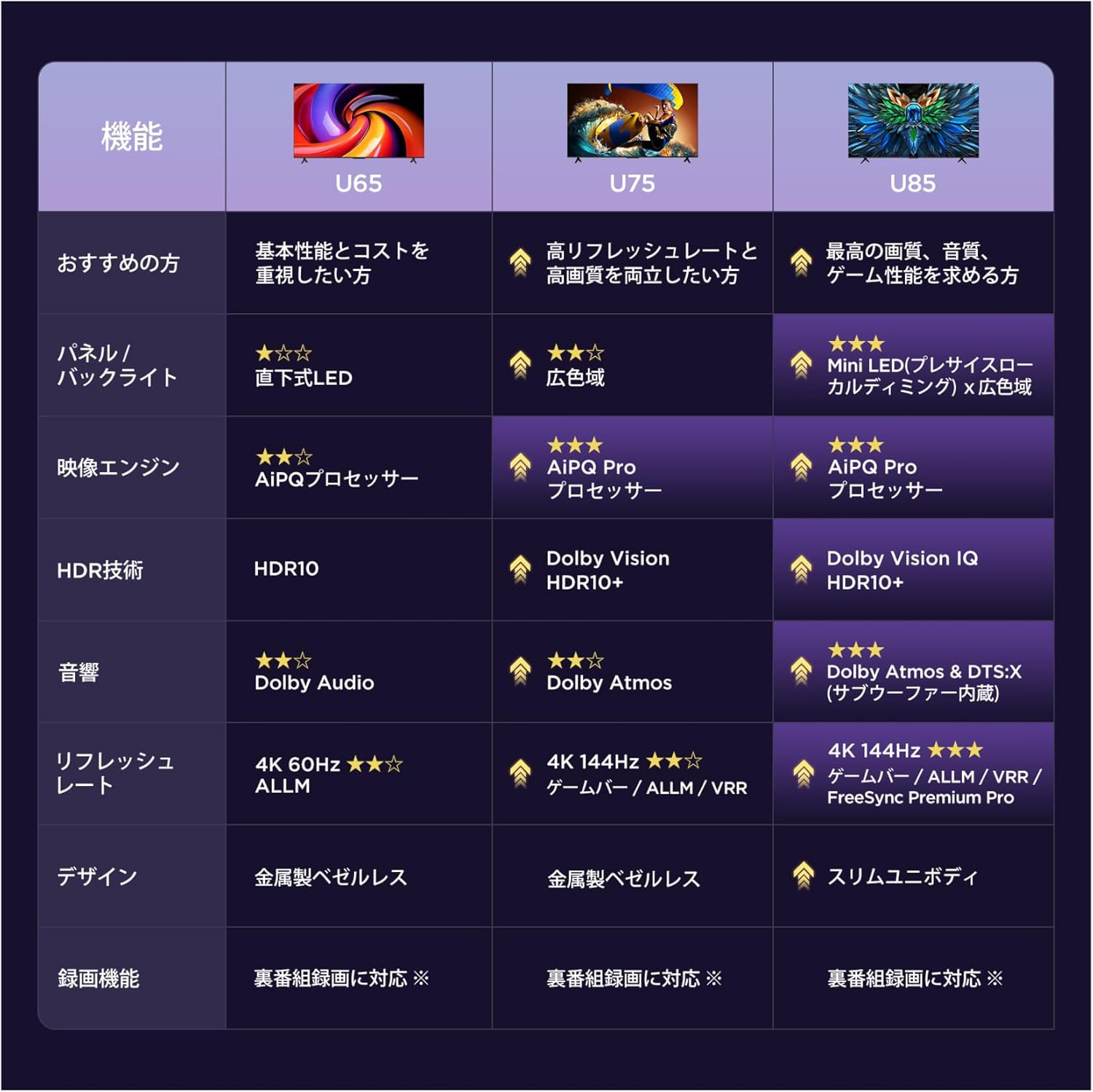
- iFFALCON 65U85 4K Mini LED Google TV
- Afstandbeheer
- Kragkabel
- Gebruikershandleiding (hierdie dokument)
- Waarborgkaart
- Wall Bracket (if included)
4. Opstelling
4.1 Uitpak en plasing
Carefully remove the TV from its packaging. Place the TV on a stable, flat surface or mount it on a wall using a VESA-compatible bracket. Ensure adequate space around the TV for ventilation.
4.2 Aansluiting van krag en toestelle
- Koppel die kragkabel aan die TV en dan aan 'n kragpunt.
- Connect external devices (e.g., gaming consoles, Blu-ray players) to the HDMI 2.1 ports.
- For internet access, connect an Ethernet cable to the LAN port or prepare for Wi-Fi setup.
4.3 Aanvanklike opstelling en afstandkoppeling
Upon first power-on, the TV will guide you through the initial setup process. This includes language selection, network connection, and Google account login.
To pair the Bluetooth remote control:
- Rig die afstandbeheerder na die TV.
- Druk en hou die Instellings knoppie en die Tuis knoppie gelyktydig vir 4 sekondes.
- The TV will display a pairing confirmation message once successful.
4.4 Netwerkverbinding
Connect your TV to the internet via Wi-Fi or Ethernet to access Google TV features and streaming services.
- Wi-Fi: Select your network from the list and enter the password.
- Ethernet: Koppel 'n Ethernet-kabel vanaf jou router aan die TV se LAN-poort.
5. Gebruik u TV
5.1 Google TV-koppelvlak
Your iFFALCON 65U85 features Google TV, providing a personalized experience with access to a vast library of content and apps.

5.2 Stembeheer met Google Assistent
Use the built-in Google Assistant for hands-free control. Press the Google Assistant button on your remote and speak your commands.
- Soek vir flieks en programme.
- Beheer slimhuistoestelle.
- Kry antwoorde op vrae.

5.3 Casting Content (AirPlay2 & Chromecast)
Easily share content from your smartphone or tablet to the TV screen.
- AirPlay2: For Apple devices, use AirPlay2 to stream videos, photos, and music.
- Chromecast: For Android devices and Chrome browser, use Chromecast built-in to cast content.

6. Sleutel kenmerke
6.1 Display Technology: Mini LED & 4K HDR
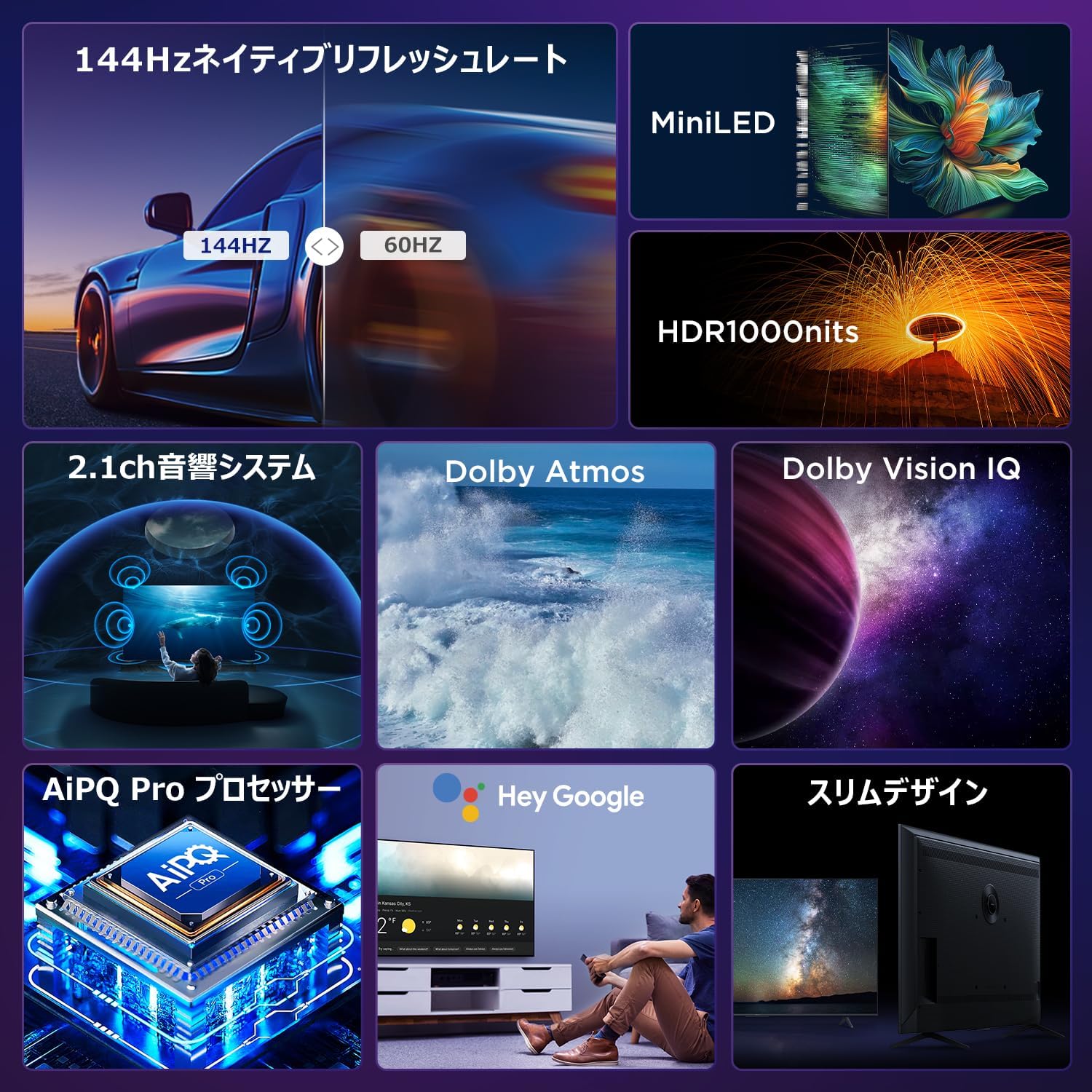
Experience stunning visuals with Mini LED backlight technology, delivering 1000 nits peak brightness and enhanced contrast. Combined with 4K resolution, Dolby Vision IQ, and HDR10+, you get precise brightness, vibrant colors, and deep blacks.


6.2 Immersive Audio: Dolby Atmos & DTS Virtual:X
Enjoy a captivating audio experience with Dolby Atmos and DTS Virtual:X, delivering multi-dimensional sound that fills your room. The 2.1ch speaker system provides powerful bass and clear audio.


6.3 Gaming Features: 144Hz VRR & Game Master
Designed for gamers, the 65U85 offers a native 144Hz refresh rate, Variable Refresh Rate (VRR), Auto Low Latency Mode (ALLM), and FreeSync Premium Pro for smooth, tear-free gameplay.


6.4 AiPQ Pro Processor
The AiPQ Pro processor intelligently optimizes color, contrast, and motion for every scene, delivering a visually stunning and immersive viewondervinding.

6.5 Slim Metal Bezel-less Design
The TV features a sleek, metal bezel-less design that blends seamlessly into any living space, offering a premium aesthetic.

7. Spesifikasies
| Kenmerk | Beskrywing |
|---|---|
| Skerm grootte | 65 duim |
| Tipe vertoon | VA Panel, Mini LED |
| Resolusie | 4K (3840 x 2160) |
| Herlaaitempo | 144 Hz (Inheems) |
| HDR Ondersteuning | Dolby Vision IQ, HDR10+ |
| Oudio | 2.1ch Speaker System, Dolby Atmos, DTS Virtual:X |
| Slim TV-platform | Google TV |
| Stemassistent | Google Assistent |
| Konnektiwiteit | 3x HDMI 2.1, 2x USB, Wi-Fi, Bluetooth |
| Afmetings (B x D x H) | 144.8 x 32.4 x 89.5 cm (met staander) |
| Gewig | 19 kg |
| VESA-versoenbaarheid | Ja |

8. Probleemoplossing
As jy probleme met jou TV ondervind, raadpleeg die volgende algemene oplossings:
- Geen krag: Maak seker dat die kragkabel stewig gekoppel is en dat die kragaansluiting funksioneel is.
- Geen Beeld/Klank: Check all cable connections (HDMI, audio). Verify the correct input source is selected.
- Afstandsbediening werk nie: Replace batteries. Re-pair the remote control as described in Section 4.3.
- Geen internetverbinding nie: Check your router and modem. Reconnect to the Wi-Fi network or ensure the Ethernet cable is properly connected.
- Probleme met beeldkwaliteit: Adjust picture settings (brightness, contrast, color). Ensure content source is high quality.
Vir aanhoudende probleme, kontak kliëntediens.
9. Onderhoud
Proper maintenance ensures the longevity of your iFFALCON TV:
- Skoonmaak van die skerm: Gently wipe the screen with a soft, dry, lint-free cloth. Do not use harsh chemicals or abrasive cleaners.
- Maak die C skoonasing: Gebruik 'n sagte, damp cloth to wipe the TV casing.
- Ventilasie: Hou die ventilasie-openinge vry van stof en obstruksies.
- Skakel af: Ontkoppel die TV van die kragtoevoer tydens weerligstorms of wanneer dit vir lang tye sonder toesig gelaat word.
10. Waarborg en Ondersteuning
Your iFFALCON 65U85 TV comes with a manufacturer's warranty. Please refer to the included warranty card for details on coverage, terms, and conditions.
For technical support, service inquiries, or further assistance, please visit the official iFFALCON website or contact their customer service hotline. Contact information can be found on the warranty card or the official product page.
11. Produkvideo's
11.1 Mini LED Quantum Dot 144Hz 65-inch TV
This video showcases the Mini LED and Quantum Dot display technology of the 65-inch iFFALCON TV, highlighting its 144Hz refresh rate for smooth visuals.