
1. Inleiding
The Wingtech Celero 5G smartphone is designed to provide reliable performance and connectivity. This manual offers comprehensive guidance on its features, setup, operation, and maintenance to ensure optimal use of your device.
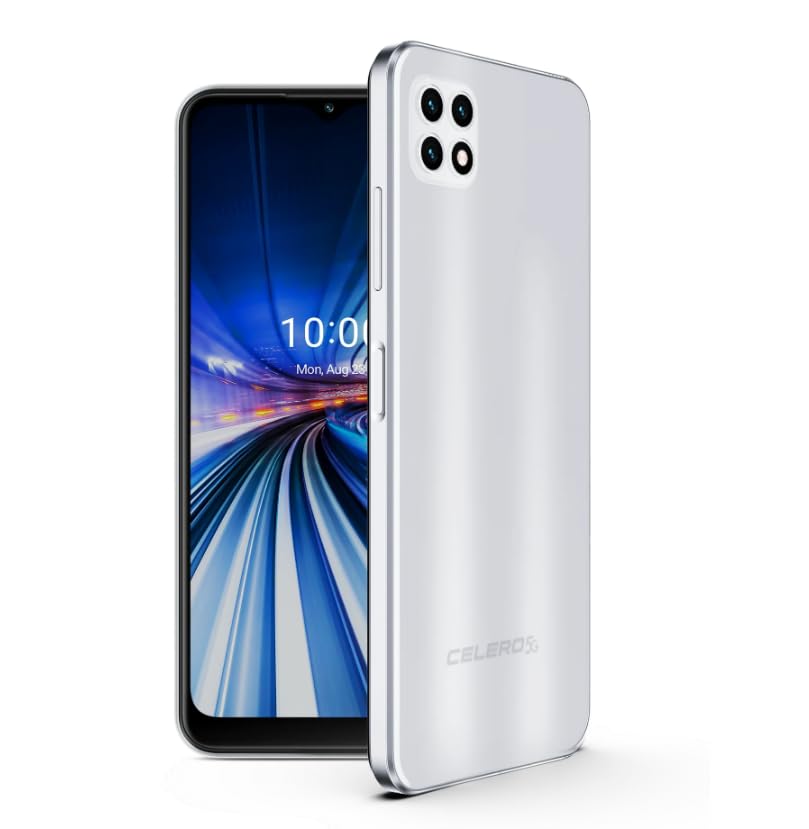
Figure 1: Wingtech Celero 5G Smartphone (Silver)
2. Wat is in die boks
Verifieer dat alle items in die produkverpakking teenwoordig is:
- Wingtech Celero 5G Smartphone
- USB kabel
- SIM Skinkbord Ejector
- Vinnige Begingids (kan apart ingesluit word)
3. Opstelling
3.1. Plaas die SIM-kaart
- Vind die SIM-kaartlaai aan die kant van jou toestel.
- Plaas die SIM-laai se uitwerpgereedskap in die klein gaatjie langs die laai en druk liggies totdat die laai uitspring.
- Plaas jou Nano-SIM-kaart(e) en/of microSD-kaart in die laai met die goue kontakte na onder.
- Plaas die skinkbord versigtig in die toestel.
3.2. Aanvanklike aanskakeling en opstelling
- Druk en hou die aan/af-knoppie in totdat die toestel vibreer en die skerm aanskakel.
- Volg die aanwysings op die skerm om jou taal te kies, aan 'n Wi-Fi-netwerk te koppel en jou Google-rekening op te stel.
- Voltooi die opstelassistent om jou toestelinstellings te personaliseer.
4. Bedryf
4.1. Basiese navigasie
- Tuisskerm: Swiep links of regs om toegang tot verskillende tuisskermpanele te verkry.
- App-laai: Swiep op vanaf die tuisskerm na view alle geïnstalleerde toepassings.
- Kennisgewingspaneel: Vee van die bokant van die skerm af om toegang tot kennisgewings en kitsinstellings te verkry.
4.2. Oproepe maak en boodskappe stuur
- Tik die Telefoon icon to open the dialer and make calls.
- Tik die Boodskappe icon to send and receive text messages.
4.3. Kameragebruik
- Tik die Kamera icon to launch the camera application.
- Select different modes (Photo, Video, Portrait, etc.) by swiping across the screen.
- Tik die sluiterknoppie om foto's te neem of video-opname te begin/stop.
5. Spesifikasies
| Kenmerk | Detail |
|---|---|
| Model Naam | Celero 5G |
| Item Modelnommer | DSH98123 |
| Bedryfstelsel | Android 11.0 |
| Skerm grootte | 6.52 duim |
| Resolusie | 1920 x 1080 |
| Geheue berging kapasiteit | 4 GB (RAM) |
| Interne berging | 64GB (as per product title, though description mentions 64GB built-in memory) |
| Battery kapasiteit | 4000 miljoenamp Ure |
| Verbindingstegnologie | 5G |
| Kleur | Silwer |
| Vervaardiger | Wingtech |
6. Onderhoud
- Keep your device clean using a soft, dry cloth.
- Vermy die blootstelling van die toestel aan uiterste temperature, direkte sonlig of vloeistowwe.
- Rugsteun jou data gereeld om verlies te voorkom.
- Install software updates as they become available to ensure optimal performance and security.
7. Probleemoplossing
7.1. Toestel skakel nie aan nie
- Maak seker dat die battery gelaai is. Koppel die toestel aan 'n laaier en wag 'n paar minute voordat jy probeer om dit aan te skakel.
- Druk en hou die aan/af-knoppie vir ten minste 10-15 sekondes in om 'n geforseerde herbegin uit te voer.
7.2. Swak netwerkkonnektiwiteit
- Kontroleer of jou SIM-kaart behoorlik ingesit is.
- Verify that mobile data is enabled in your device settings.
- Restart your device or toggle Airplane Mode on and off.
- Contact your wireless carrier to confirm service availability in your area.
7.3. Programme wat vasval of vries
- Clear the cache and data for the problematic app via Settings > Apps.
- Deïnstalleer en installeer die toepassing weer.
- Maak seker dat jou toestel se sagteware op datum is.
8. Waarborg en Ondersteuning
This product is offered as an Amazon Renewed device. Amazon Renewed products are inspected, tested, and refurbished as necessary to be fully functional. Your purchase is eligible for Amazon Renewed coverage in conjunction with Amazon's Return Policy and the A-to-z Guarantee.
For specific warranty details, return policies, or technical support, please refer to the documentation provided with your purchase or visit the Amazon Renewed support page.