
Inleiding
This manual provides detailed instructions for the use and maintenance of your Generic Aerbes AB-D461 Wireless Bluetooth 5.0 Headset. This headset is designed to deliver a high-quality audio experience with advanced noise cancellation and deep bass, ensuring clear sound for music and calls. It features Bluetooth 5.0 for stable connectivity and a portable design for convenience. Please read this manual thoroughly before using the product to ensure proper operation and longevity.
Pakketinhoud
Kontroleer asseblief die inhoud van die verpakking wanneer u dit uitpak. Kontak u kleinhandelaar indien enige items ontbreek of beskadig is.
- Wireless Bluetooth Earbuds (Left and Right)
- Draagbare laaikas
- USB-laaikabel
- Verskeie groottes van oorpunte
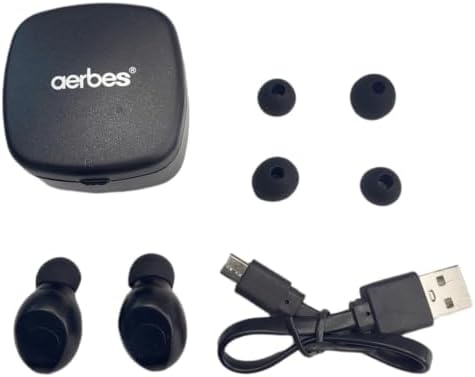
Figure 1: Contents of the Aerbes AB-D461 package, including earbuds, charging case, USB cable, and ear tips.
Opstelling
1. Aanvanklike laai
Laai die oordopjes en die laaikassie volledig voor die eerste gebruik.
- Plaas albei oorfone in die laaikas. Maak seker dat hulle korrek in hul onderskeie gleuwe geplaas is.
- Koppel die USB-laaikabel aan die laaipoort op die kas en steek die ander kant in 'n USB-kragbron (bv. rekenaar, muuradapter).
- The indicator lights on the earbuds and/or case will illuminate to show charging status. Once fully charged, the lights may change color or turn off.
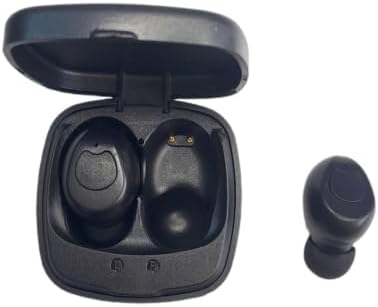
Figure 2: Earbuds placed in the charging case, showing charging contacts.
2. Koppel met 'n Toestel
The earbuds are designed for automatic connection.
- Maak die laaikas oop. Die oorfone sal outomaties aanskakel en in paringsmodus gaan.
- Aktiveer Bluetooth op jou toestel (slimfoon, tablet, ens.) en soek vir beskikbare toestelle.
- Select "Aerbes AB-D461" (or similar name) from the list of found devices.
- Once connected, you will hear a confirmation tone, and the indicator lights on the earbuds may change.
- After the initial pairing, the earbuds will automatically connect to the last paired device when removed from the case.
Bedryfsinstruksies
Krag aan/af
- Krag aan: Open the charging case, and the earbuds will power on automatically. Alternatively, press and hold the touch control area on both earbuds for approximately 3 seconds.
- Skakel af: Place the earbuds back into the charging case and close the lid. They will power off automatically. Alternatively, press and hold the touch control area on both earbuds for approximately 5 seconds.
Musiek afspeel
- Speel/pouse: Tik een keer op die aanraakbeheerarea op enige oordopjes.
- Volgende snit: Dubbeltik op die aanraakbeheerarea op die regteroorfoon.
- Vorige snit: Dubbeltik op die aanraakbeheerarea op die linkeroorfoon.
- Volume op: Triple-tap the touch control area on the right earbud.
- Volume af: Triple-tap the touch control area on the left earbud.
Belbestuur
- Beantwoord/beëindig oproep: Tik een keer op die aanraakbeheerarea op enige oordopjes.
- Verwerp oproep: Druk en hou die aanraakbeheerarea op enige oordopjes vir 2 sekondes in.
Stemassistent
- Aktiveer stemassistent: Press and hold the touch control area on either earbud for 3 seconds (when not on a call).
Onderhoud
Skoonmaak
- Gebruik 'n sagte, droë, pluisvrye lap om die oordopjes en laaikas skoon te maak.
- Moenie skuurmiddels, oplosmiddels of aërosolspuitmiddels gebruik nie.
- Regularly clean the ear tips and charging contacts to ensure optimal performance.
Berging
- Wanneer dit nie gebruik word nie, bêre die oordopjes in hul laaikassie om hulle te beskerm en gelaai te hou.
- Bêre die toestel op 'n koel, droë plek, weg van uiterste temperature en direkte sonlig.
Battery sorg
- Om die batterylewe te verleng, vermy om die battery gereeld heeltemal te ontlaai.
- Laai die toestel gereeld, selfs al word dit nie gereeld gebruik nie.
Probleemoplossing
| Probleem | Moontlike oorsaak | Oplossing |
|---|---|---|
| Oordopjes koppel nie met toestel nie. | Bluetooth is off on device; earbuds are out of range; earbuds not in pairing mode; previously paired device interfering. | Ensure Bluetooth is enabled on your device. Place earbuds closer to the device. Ensure earbuds are removed from the case to enter pairing mode. Turn off Bluetooth on other nearby devices. Try forgetting the device in your phone's Bluetooth settings and re-pairing. |
| Geen geluid uit oorfone nie. | Volume too low; earbuds not connected; media paused; earbud battery low. | Increase volume on both your device and the earbuds. Check Bluetooth connection. Ensure media is playing. Charge the earbuds. |
| Oorfone laai nie. | Charging cable faulty; charging port dirty; earbuds not seated correctly in case; case battery empty. | Try a different USB cable and power source. Clean charging contacts on earbuds and case. Ensure earbuds are properly placed in the case. Charge the charging case. |
| Swak klankgehalte of onderbroke verbinding. | Interferensie; toestel te ver; lae battery. | Move closer to your device. Avoid environments with strong Wi-Fi or other Bluetooth signals. Ensure earbuds are fully charged. |
Spesifikasies
| Modelnommer | AB-D461 |
| Bluetooth weergawe | 5.0 |
| Wireless Range | Tot 10 meter (33 voet) |
| Praat Tyd | Ongeveer 4 uur |
| Bystandtyd | Ongeveer 40 uur |
| Laaikas batterykapasiteit | 300mAh |
| Noise Control Type | Hibriede geraasonderdrukking |
| Vormfaktor | In Oor |
| Materiaal | Plastiek |
| Kleur | Wit |
| Vervaardiger | Generies |
| Land van oorsprong | Suid-Afrika |
Waarborg en Ondersteuning
Waarborg inligting
Hierdie produk kom met 'n 6 maande beperkte waarborg from the date of purchase. This warranty covers manufacturing defects and workmanship. It does not cover damage caused by misuse, accidents, unauthorized modifications, or normal wear and tear. Please retain your proof of purchase for warranty claims.
Kliënte ondersteuning
For technical assistance, warranty claims, or any questions regarding your Aerbes AB-D461 Wireless Bluetooth Headset, please contact your retailer or the manufacturer's customer service department. Refer to your purchase documentation for specific contact details.


