
1. Inleiding
This manual provides instructions for the Keychron Custom Coiled Aviator USB-C Cable, designed for reliable connectivity with mechanical keyboards and other USB-C devices. The cable features a durable braided design, a 5-pin (GX12) detachable metal aviator connector, and includes a USB-A adapter for broad compatibility. It supports both fast charging and stable data transfer.
2. Opstelinstruksies
Follow these steps to connect your Keychron Custom Coiled Aviator USB-C Cable to your device.
2.1 Cable Components
The cable consists of a coiled section, a straight section, a detachable aviator connector, and USB-C connectors on both ends. A USB-A adapter is also included for devices requiring a USB-A connection.

Image 1: Keychron Coiled Aviator USB-C Cable with the GX12 aviator connector detached, showing the USB-C end and the coiled section.
2.2 Koppel die kabel
- Connect the Aviator Connector: Align the 5-pin (GX12) aviator connector sections and push them together firmly. Twist the locking ring to secure the connection.
- Koppel aan sleutelbord: Plug the USB-C end of the coiled section into the USB-C port on your mechanical keyboard.
- Connect to Computer/Device: Plug the USB-C end of the straight section into a USB-C port on your computer or host device.
- Using the USB-A Adapter (Optional): If your computer or device only has USB-A ports, attach the included USB-A adapter to the USB-C end of the straight section, then plug it into a USB-A port.

Image 2: Keychron Coiled Aviator USB-C Cable with the GX12 aviator connector securely attached.
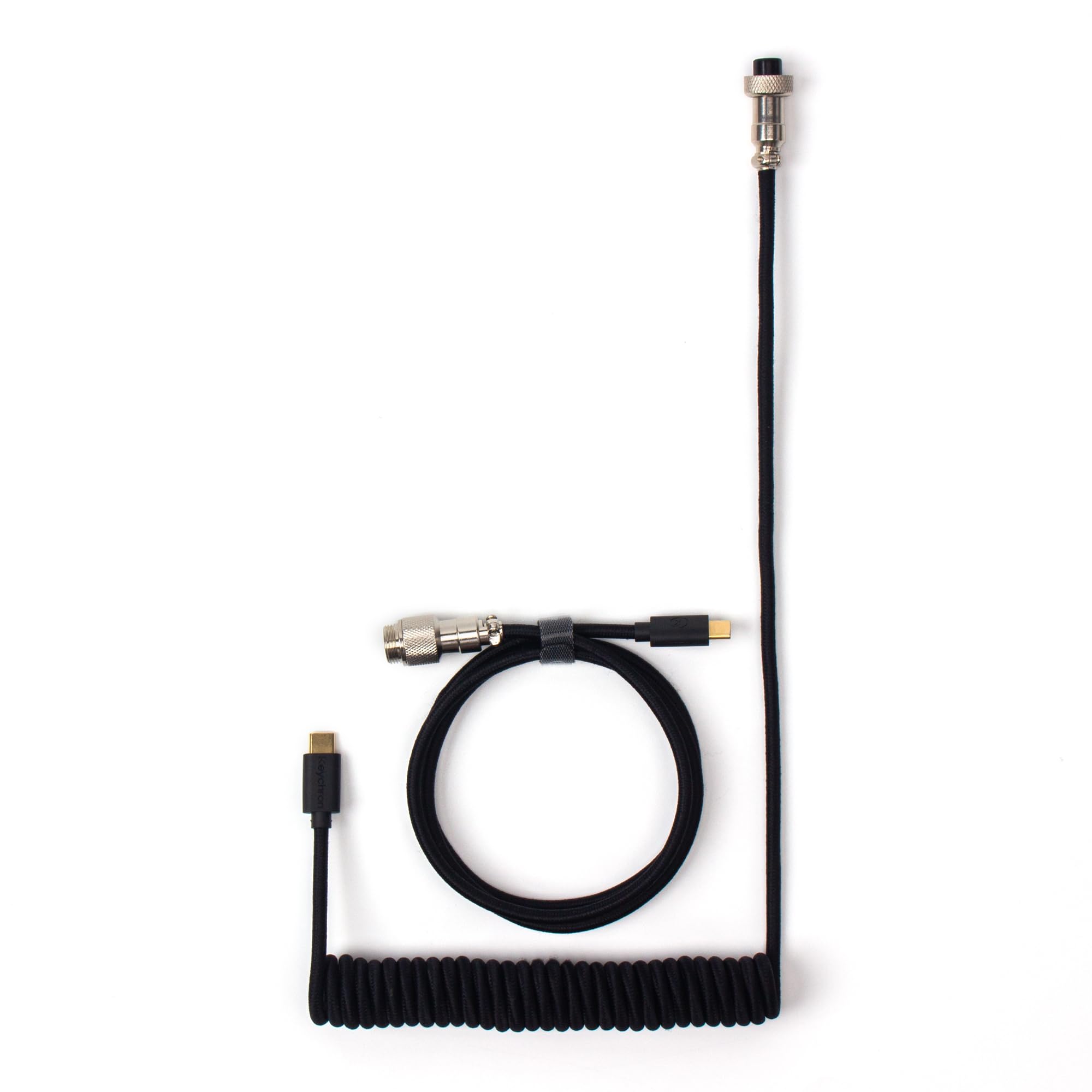
Image 3: Keychron Coiled Aviator USB-C Cable displaying both USB-C connectors, one on the coiled section and one on the straight section.
3. Bedryfsinstruksies
Once connected, the Keychron Custom Coiled Aviator USB-C Cable facilitates both power delivery and data communication between your keyboard and the host device.
3.1 Data Transfer and Charging
- The cable ensures stable data transfer for keyboard input and firmware updates.
- It supports efficient charging for compatible devices, including mechanical keyboards with rechargeable batteries.
3.2 Wye Verenigbaarheid
This cable is compatible with a broad range of devices, including:
- Keychron Q, Q Pro, Q Max, V, V Max series keyboards.
- Keychron 81 Pro, K4 Pro, K10 Pro keyboards.
- Keychron low-profile keyboards (e.g., Q6, Q6 Max, Q6 HE, Q1, Q1 HE, Q3 Max, Q3 HE, Q5, Q5 Max, V1, V1 Max, V3, V3 Max, V5, V5 Max, V6, V6 Max, K3, K3 Max).
- Most other USB-C mechanical keyboards.
- Other USB-C peripherals requiring data transfer or charging.
4. Onderhoud
Proper care will extend the lifespan and maintain the performance of your cable.
- Hantering: Avoid excessive pulling or bending, especially at the connector points, to prevent internal wire damage.
- Coil Care: To maintain the coiled shape, avoid overstretching the coil frequently. Allow it to naturally retract when not in use.
- Skoonmaak: Gebruik 'n sagte, droë lap om die kabel en verbindings af te vee. Moenie harde chemikalieë of skuurmiddels gebruik nie.
- Berging: Bêre die kabel op 'n skoon, droë plek weg van direkte sonlig en uiterste temperature.
- Aviator Connector: Ensure the aviator connector is clean and free of debris before connecting. Avoid forcing the connection if it does not align easily.
5. Probleemoplossing
If you encounter issues with your cable, try the following troubleshooting steps:
- Geen verbinding/toestel nie herken nie:
- Ensure all connectors (USB-C, aviator, USB-A adapter if used) are fully and securely plugged in.
- Probeer om die kabel aan 'n ander USB-poort op jou rekenaar te koppel.
- Test the cable with another compatible device to determine if the issue is with the cable or the original device.
- If using the USB-A adapter, ensure it is firmly attached to the USB-C end.
- Stadige laai:
- Verify that the power source (e.g., USB port, wall adapter) provides sufficient power for your device.
- Ensure the cable is directly connected and not through a non-powered USB hub.
- Intermitterende verbinding:
- Kontroleer vir enige sigbare skade aan die kabel of verbindings.
- Ensure the aviator connector's locking ring is fully tightened.
- Avoid placing heavy objects on the cable or bending it sharply.
6. Spesifikasies
| Kenmerk | Detail |
|---|---|
| Handelsmerk | Keychron |
| Model | Cab-B |
| Connector Tipe | USB Type C (with USB-A adapter included) |
| Kabel tipe | USB |
| Spesiale kenmerk | Braided, Coiled Design, Detachable Aviator Connector (5-Pin GX12), Data Transfer |
| Versoenbare toestelle | Keychron Q, Q Pro, Q Max, V, V Max, 81 Pro, K4 Pro, K10 Pro, low-profile keyboards, and most USB-C mechanical keyboards. |
| Number of Pins (Aviator) | 5 |
| Verbindingstegnologie | USB |
| Kleur | Swart |
7. Waarborg en Ondersteuning
Vir waarborginligting en tegniese ondersteuning, verwys asseblief na die amptelike Keychron-webwerf. webwebwerf of kontak Keychron kliëntediens direk. Bewaar u aankoopbewys vir waarborgeise.
Sleutelwoord Amptelik Webwebwerf: www.keychron.com