
1. Inleiding
This manual provides instructions for the proper setup, operation, and maintenance of your Happybuy 110 LBS Refrigerant Scale. This high-precision digital scale is designed for accurate weighing of refrigerants during HVAC charging and recovery processes. It features a wired remote control for convenient operation and a robust design for durability.

Figuur 1.1: The Happybuy Refrigerant Scale highlighting its 110 LBS maximum capacity, 2g accuracy, 0.05% resolution, and KG/OZ/LBS unit conversion capabilities.
2. Veiligheidsinligting
Please read and understand all safety instructions before operating the scale. Failure to do so may result in injury or damage to the product.
- The scale is certified with FCC and CE marks, ensuring compliance with quality and safety standards.
- Always place the scale on a flat, stable, and level surface to ensure accurate readings and prevent tipping.
- The scale is equipped with non-slip rubber pads to provide a secure platform and minimize the risk of items sliding.
- An overload warning, indicated by "FULL" on the display, will appear if the weight exceeds the maximum capacity. Do not exceed the 110 lbs (50 kg) capacity to prevent sensor damage.
- Keep the scale away from extreme temperatures, moisture, and direct sunlight.

Figuur 2.1: The scale's safety design, including FCC and CE certifications, and the durable storage case.
3. Wat is in die boks
Verifieer dat alle komponente teenwoordig is tydens uitpak:
- 1 x Refrigerant Scale Platform
- 1 x Bedrade afstandbeheer
- 1 x 9V Dry Battery
- 1 x Beskermende Dratas
- 1 x Gebruikershandleiding (hierdie dokument)
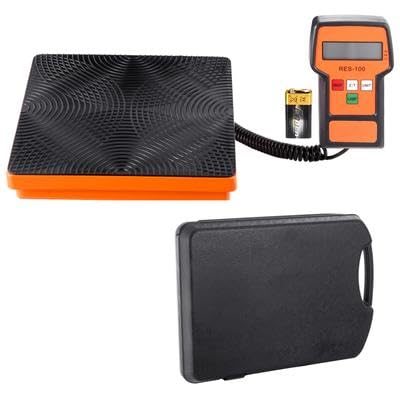
Figuur 3.1: The complete package including the scale platform, wired remote, 9V battery, and carrying case.
4. Opstelling
4.1 Battery installasie
- Locate the battery compartment on the back of the wired remote control.
- Maak die batteryvakdeksel oop.
- Insert the included 9V dry battery, ensuring correct polarity (+/-).
- Maak die batterykompartement se deksel stewig toe.

Figuur 4.1: The wired remote control, showing the display, control buttons, and the 9V battery for power.
4.2 Skaalplasing
- Choose a flat, stable, and level surface for the scale platform. Uneven surfaces can affect measurement accuracy.
- Ensure the anti-slip rubber surface of the scale is clean and free of debris.
- Connect the wired remote control to the scale platform.
- The remote control features a 120° adjustable stand, allowing you to position the LCD display for optimal viewing without holding it.
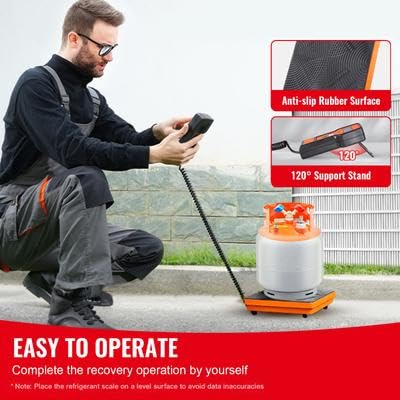
Figuur 4.2: Proper setup of the refrigerant scale on a level surface, demonstrating the anti-slip rubber surface and the adjustable stand on the remote control.
5. Bedryfsinstruksies
The remote control features a 4-button interface for easy operation:
- AAN/UIT: Press to power the scale on or off.
- ZERO (Z/T): Press to zero the display or tare the current weight. This is essential before placing a refrigerant tank to measure only the added or removed refrigerant.
- EENHEID: Press to cycle through the available measurement units: Kilograms (KG), Pounds (LB), and Ounces (OZ).
- LAMP (Backlight): Press to turn the LCD display backlight on or off for improved visibility in various lighting conditions.
5.1 Outomatiese Funksies
- Outo-afskakel: The scale will automatically power off after 10 minutes of inactivity to conserve battery life.
- Backlight Auto Off: The backlight will automatically turn off after 3 minutes of inactivity.

Figuur 5.1: Illustration of the automatic shut-off (10 minutes) and backlight off (3 minutes) features designed to extend battery life.
6. Onderhoud en berging
6.1 Batterysorg
- For prolonged periods of non-use, remove the 9V battery from the remote control to prevent potential leakage and damage to the device.
- Replace the battery when the display indicates low power or becomes dim.
6.2 Skoonmaak
- Wipe the scale platform and remote control with a soft, damp lap.
- Moenie skuur skoonmaakmiddels gebruik of die eenheid in water dompel nie.
6.3 Berging
- Store the scale and its components in the included waterproof and dustproof plastic carrying case.
- Ensure the robust buckle design of the case is securely fastened to prevent accidental opening during transport.
- Berg in 'n koel, droë plek weg van direkte sonlig en uiterste temperature.
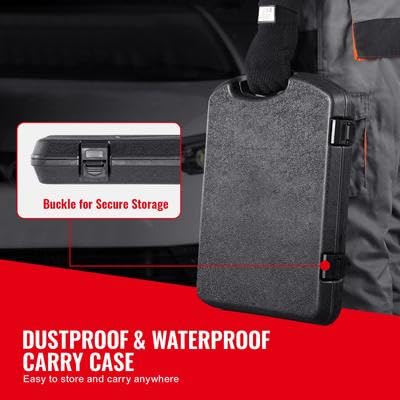
Figuur 6.1: The secure buckle mechanism of the dustproof and waterproof carrying case, ensuring safe storage and transport.
7. Probleemoplossing
| Probleem | Moontlike oorsaak | Oplossing |
|---|---|---|
| Skaal skakel nie aan nie. | Die battery is pap of verkeerd geïnstalleer. | Kontroleer die polariteit van die battery. Vervang dit met 'n nuwe 9V-battery. |
| Onakkurate lesings. | Scale is on an uneven surface; not zeroed; overloaded. | Place scale on a flat, level surface. Press ZERO before weighing. Ensure weight does not exceed 110 lbs. |
| Display shows "FULL". | Weight on the scale exceeds its maximum capacity. | Remove excess weight immediately to prevent sensor damage. The maximum capacity is 110 lbs (50 kg). |
| Die skerm is dof of flikker. | Lae battery. | Vervang die 9V-battery. |
8. Spesifikasies
| Kenmerk | Spesifikasie |
|---|---|
| Weegkapasiteit | 50 kg / 110 lbs |
| Akkuraatheid | 2 g |
| Resolusie | 0.05% |
| Product Dimensions (Scale) | 425 x 310 x 66 mm / 16.7 x 12.2 x 2.6 duim |
| Netto gewig | 3.25 kg / 7.2 lbs |
| Voltage | DC 9V (1 x 9V dry battery) |
| Afstandbeheer | Wired, 4-button control with backlit LCD |
| Modelnommer | LX-36575A |
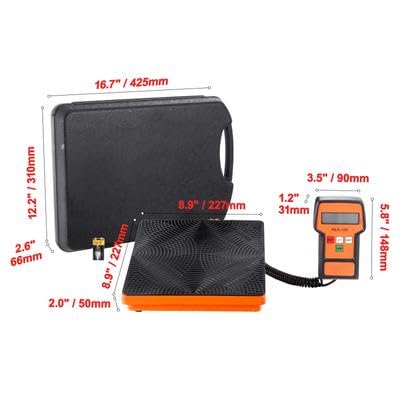
Figuur 8.1: Detailed dimensions of the scale platform, remote control, and carrying case.