
1. Inleiding
Thank you for choosing the XLEADER SoundAngel Mate Pro (2nd Gen) Shower Speaker. This manual provides essential information for the safe and efficient operation of your new device. This certified IPX7 waterproof Bluetooth speaker delivers 8W crystal sound with rich bass, offering up to 12 hours of playtime. It features a strong suction cup and a silicone lanyard for versatile placement, making it ideal for use in showers, by the pool, at the beach, or during kayaking activities.

Image 1: XLEADER SoundAngel Mate Pro speaker in a bathtub.
2. Pakketinhoud
Kontroleer asseblief die pakket vir die volgende items:
- 1x XLEADER SoundAngel Mate Shower Speaker
- 1x Suction Cup (pre-attached or separate)
- 1x USB-C-laaikabel
- 1x Hook Clip
- 1x Meertalige gebruikershandleiding
- 1x Waarborgkaart

Image 2: Contents of the XLEADER SoundAngel Mate Pro package.
3. Produk verbyview
The XLEADER SoundAngel Mate Pro features an intuitive control panel and a robust design for various environments.
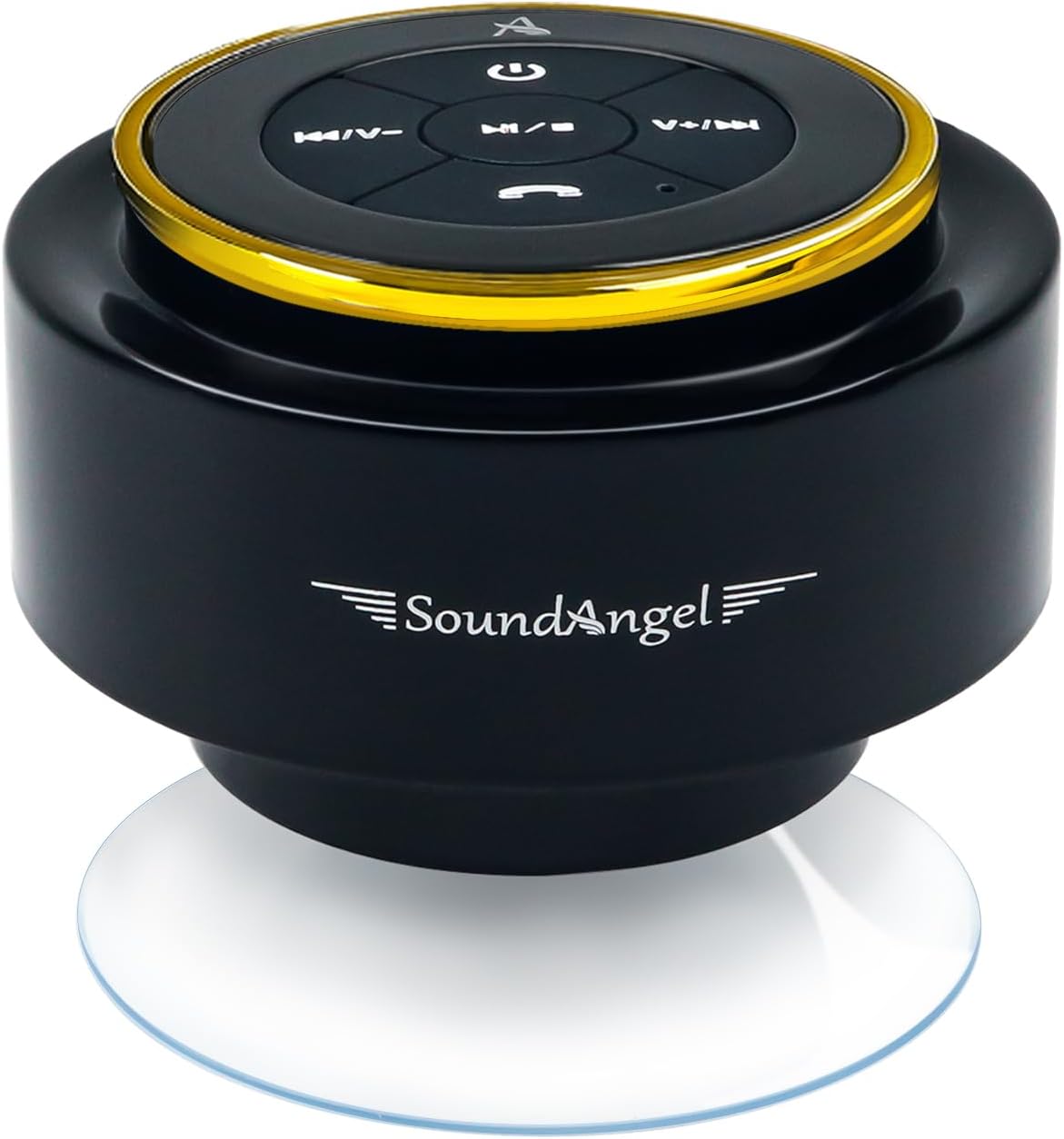
Image 3: XLEADER SoundAngel Mate Pro speaker with control buttons.
Beheerknoppies:
- Kragknoppie (
 ): Druk en hou om aan/af te skakel.
 - Speel/Pause-knoppie (
 ): Druk om musiek te speel of te onderbreek.
 - Volume op / Volgende snit-knoppie (
 ): Druk kort vir die volgende snit, druk lank vir volume hoër.
 - Volume Verlaag / Vorige Liedjie Knoppie (
 ): Kort druk vir vorige snit, lank druk vir volume af.
 - Call Button (
 ): Druk om oproepe te beantwoord/beëindig, druk en hou in om oproepe te verwerp.
Poorte:
- USB-C-laaipoort: Located under a waterproof flap.

Beeld 4: Sykant view with charging port and dimensions.
4. Opstelling
4.1 Laai die luidspreker
Before first use, fully charge the speaker. Open the waterproof flap on the side of the speaker and connect the provided USB-C charging cable to the charging port. Connect the other end to a USB power adapter (not included). The charging indicator light will illuminate. A full charge takes approximately 3 hours and provides 8-12 hours of playtime at 50-80% volume.
4.2 Monteer die luidspreker
The speaker comes with a strong suction cup and a silicone lanyard for flexible mounting options.
- Using the Suction Cup: Ensure the surface (e.g., shower wall, glass, tile) is clean and smooth. Press the suction cup firmly against the surface until it adheres securely.
- Using the Silicone Lanyard: Attach the silicone lanyard to the designated loop on the speaker. Use the lanyard to hang the speaker from a hook or secure it to other objects like a kayak or backpack.

Image 5: Silicone lanyard for hanging the speaker.

Image 6: Speaker mounted in a shower using the suction cup.
4.3 Bluetooth -koppeling
- Krag aan: Press and hold the Power Button until you hear an audible prompt and the LED indicator flashes blue, indicating it's in pairing mode.
- Aktiveer Bluetooth: Gaan na die Bluetooth-instellings op jou slimfoon of ander Bluetooth-geaktiveerde toestel en skakel Bluetooth aan.
- Kies Toestel: Look for "SoundAngel Mate Pro" in the list of available devices and select it.
- Bevestig verbinding: Once successfully paired, you will hear a confirmation sound, and the LED indicator will turn solid blue. The speaker will automatically reconnect to the last paired device when powered on.

Image 7: Bluetooth 5.3 connectivity and features.
Video 1: Demonstration of XLEADER SoundAngel Mate Pro speaker features and pairing.
5. Bedryfsinstruksies
5.1 Krag aan/af
- Om aan te skakel: Druk en hou die Power-knoppie vir 2-3 sekondes.
- Om af te skakel: Druk en hou die Power-knoppie vir 2-3 sekondes.
5.2 Musiekweergawe
- Speel/pouse: Druk die Speel/Pause-knoppie.
- Volgende snit: Short press the Volume Up / Next Track Button.
- Vorige snit: Short press the Volume Down / Previous Track Button.
- Volume op: Long press the Volume Up / Next Track Button.
- Volume af: Long press the Volume Down / Previous Track Button.
5.3 Oproepbestuur
Die ingeboude mikrofoon maak handvrye oproepe moontlik.
- Beantwoord/beëindig oproep: Druk die Belknoppie.
- Verwerp oproep: Press and hold the Call Button.
Video 2: Demonstration of the speaker's waterproof capabilities and call management.
5.4 Ware Draadlose Stereo (TWS) Paring
For an enhanced audio experience, you can pair two XLEADER SoundAngel Mate Pro speakers together for True Wireless Stereo sound.
- Ensure both speakers are powered off and not connected to any other Bluetooth devices.
- Skakel albei luidsprekers aan. Hulle sal outomaties in paringsmodus gaan.
- On one of the speakers (this will be your primary speaker), double-press the Play/Pause button. The speakers will attempt to pair with each other.
- Once successfully paired, you will hear a confirmation tone, and the LED indicator on the primary speaker will flash blue, while the secondary speaker's LED will remain solid blue.
- Now, connect your device to the primary speaker via Bluetooth as described in section 4.3. Both speakers will play music synchronously.
6. Sorg en Onderhoud
- After use in saltwater or chlorinated water, rinse the speaker with fresh water to prevent corrosion.
- Ensure the charging port's waterproof flap is securely closed before exposing the speaker to water.
- Maak die luidspreker skoon met 'n sagte, damp lap. Moenie harde chemikalieë of skuur skoonmaakmiddels gebruik nie.
- Berg die luidspreker op 'n koel, droë plek wanneer dit nie gebruik word nie.
- Vermy uiterste temperature en direkte sonlig vir lang tydperke.

Image 8: Speaker demonstrating IPX7 waterproof capability.
7. Probleemoplossing
| Probleem | Moontlike oorsaak | Oplossing |
|---|---|---|
| Luidspreker skakel nie aan nie. | Lae battery. | Laai die luidspreker volledig. |
| Kan nie met toestel koppel nie. | Bluetooth not enabled on device, speaker not in pairing mode, or too far from device. | Ensure Bluetooth is on, speaker is in pairing mode (flashing blue LED), and device is within 66ft. Try restarting both devices. |
| Geen geluid of lae volume nie. | Volume too low on speaker or device, or speaker not connected. | Increase volume on both speaker and device. Re-pair the speaker if necessary. |
| Klank is vervorm. | Volume too high, or device is too far from speaker. | Lower the volume. Move the device closer to the speaker. |
8. Spesifikasies
| Kenmerk | Detail |
|---|---|
| Model Naam | USMATEG-A |
| Tipe luidspreker | Stort Luidspreker |
| Waterdigte gradering | IPX7 (fully immersible up to 1 meter for 30 minutes) |
| Bluetooth weergawe | 5.3 |
| Wireless Range | Tot 66 voet |
| Luidspreker uitset krag | 8 Watt |
| Battery kapasiteit | 1200mAh polimeerbattery |
| Speeltyd | 8-12 hours (at 50-80% volume) |
| Laai tyd | 3 uur |
| Laaipoort | USB-C |
| Spesiale kenmerke | Built-in Microphone, True Wireless Stereo (TWS) support |
| Montage tipe | Suction Cup, Silicone Lanyard |
| Produk afmetings | 3.15" D x 3.15" B x 2.76" H |
| Item gewig | 4.9 onse (138 gram) |

Image 9: Speaker dimensions and available colors.
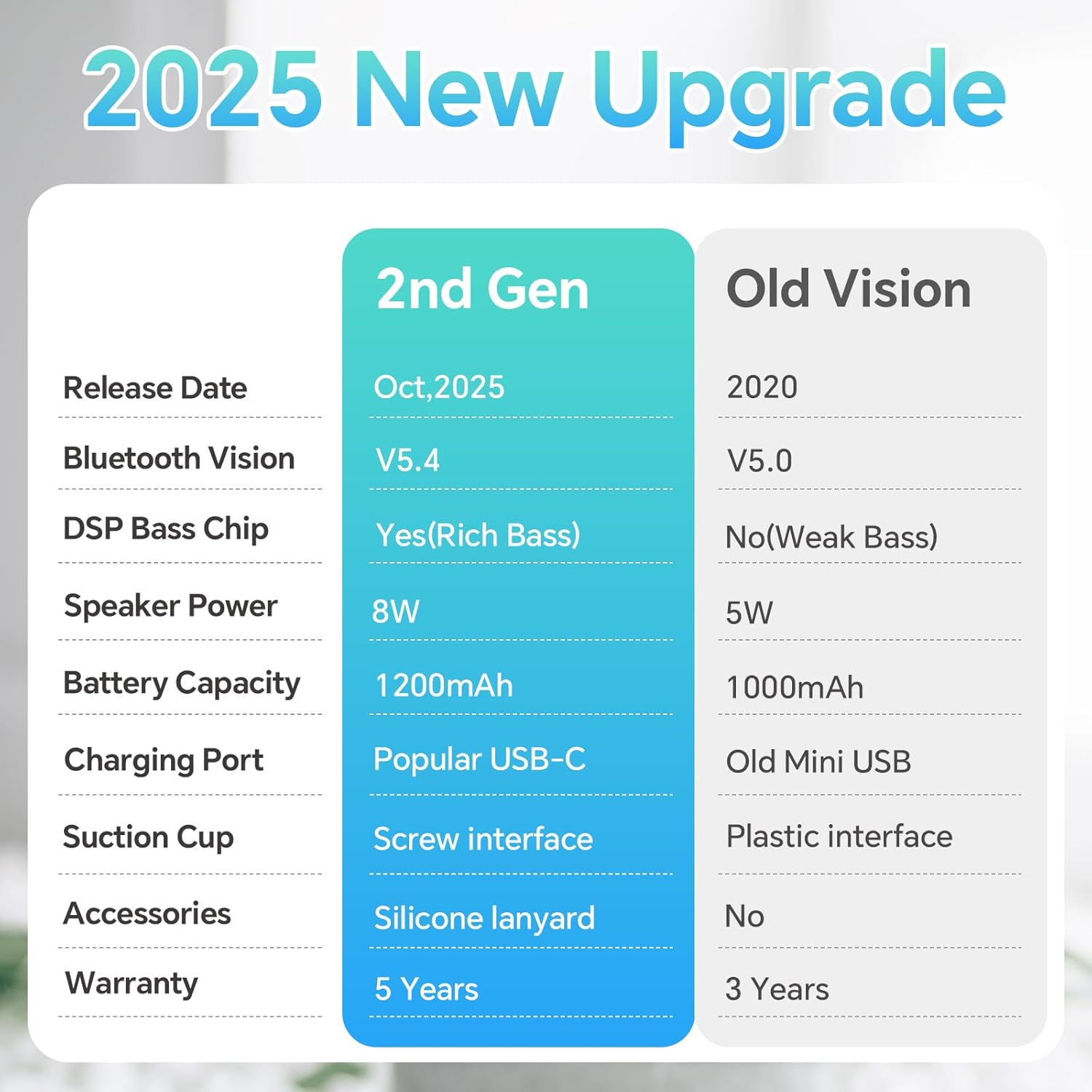
Image 10: Feature comparison: 2nd Gen vs. Old Version.
9. Waarborg en Ondersteuning
The XLEADER SoundAngel Mate Pro (2nd Gen) Shower Speaker comes with a 3 jaar waarborg. For any support inquiries, troubleshooting assistance, or warranty claims, please refer to the contact information provided on the warranty card included in your package or visit the official XLEADER webwebwerf.