
1. Inleiding
This user manual provides comprehensive instructions for the Callsky 10-inch Wi-Fi Tablet, Model Ctab 10. Please read this manual carefully before using your device to ensure proper operation and to maximize its features. Keep this manual for future reference.
2. Produk verbyview
2.1 Pakketinhoud
Nadat u die pakkie oopgemaak het, maak seker dat al die items wat hieronder gelys word, teenwoordig is:
- Callsky Ctab 10 Tablet
- USB Type-C laaikabel
- Kragadapter
- Gebruikershandleiding (Japannees)

Image: Package contents including the tablet, charging cable, power adapter, and user manual.
2.2 Toestelkomponente
Familiarize yourself with the physical layout and ports of your tablet:
- Voorste kamera: 5MP vir video-oproepe en selfies.
- Agterste kamera: 8MP with autofocus for high-resolution photos.
- Kragknoppie: Located on the side for turning the device on/off and screen lock.
- Volume knoppies: Pas klankvlakke aan.
- USB Tipe C-poort: Vir laai en data-oordrag.
- 3.5 mm koptelefoonaansluiting: Vir oudio-uitvoer.
- Dubbele luidsprekers: Vir verbeterde klankervaring.
- MicroSD -kaartgleuf: For storage expansion up to 2TB.

Beeld: Oorview of tablet features including face recognition, wireless projection, and physical dimensions.
2.3 Sleutelkenmerke
- Liggewig ontwerp: Ultra-thin at 8.7mm and weighing 425g for easy portability.
- Android 14 OS: Enhanced privacy, personalized settings, and improved user experience.
- Hoë prestasie: 1.8GHz Allwinner A523 Octa-core processor and Mali-G57 GPU for smooth multitasking, gaming, and HD video.
- Geheue en berging: 3GB RAM + 9GB virtual memory, 128GB internal storage, expandable up to 2TB via MicroSD.
- Helder vertoon: 10.1-inch 1280x800 Incell IPS display with eye protection mode and Widevine L1 support for high-quality streaming.
- Verbinding: Wi-Fi 6 and Bluetooth 5.4 for stable and high-speed connections.
- Gevorderde kenmerke: Wireless projection, face recognition, and split-screen functionality.
- Langdurige battery: 6000mAh battery vir langdurige gebruik.

Image: Visual summary of the tablet's core specifications and features.
3. Opstelling
3.1 Aanvanklike aanskakeling en basiese instellings
- Press and hold the Power button until the Callsky logo appears.
- Follow the on-screen prompts to select your language (e.g., English).
- Connect to a Wi-Fi network. Select your network from the list and enter the password if required.
- Review and accept the Google Services terms.
- Set up a screen lock (PIN, pattern, or password) for security. You can skip this step and set it up later.
- Complete the remaining setup steps as guided by the Android 14 interface.
3.2 Invoeging van 'n MicroSD-kaart
To expand your tablet's storage:
- Vind die MicroSD-kaartgleuf aan die kant van die tablet.
- Steek die MicroSD-kaart versigtig in die gleuf totdat dit in plek klik. Maak seker dat die kaart korrek georiënteer is.
- The tablet will detect the new storage. You may be prompted to format the card for optimal use with the device.
4. Bedryfsinstruksies
4.1 Basiese navigasie
- Raakgebare: Tik om te kies, swiep om te blaai, knyp om te zoem.
- Tuisskerm: Kry toegang tot programme, widgets en kennisgewings.
- Kennisgewings: Swiep af vanaf die bokant van die skerm na view kennisgewings en vinnige instellings.
4.2 Memory and Storage Management
The tablet comes with 3GB of physical RAM and 9GB of virtual memory, totaling 12GB, along with 128GB of internal storage. You can expand storage up to 2TB using a MicroSD card.
- Om berging na te gaan: Gaan na Instellings > Berging.
- To manage apps: Go to Instellings > Programme.

Image: Details on memory and storage, including RAM, internal storage, and MicroSD expansion.
4.3 Vertoning en Visuele Ervaring
The 10.1-inch 1280x800 Incell IPS display provides clear and vibrant visuals. It supports Widevine L1 for high-definition streaming from platforms like Netflix and YouTube.
- Oogbeskermingsmodus: Activate this mode in settings to reduce blue light and eye strain during prolonged use.
- Verdeel skerm: Use two applications simultaneously for enhanced productivity.

Image: Tablet demonstrating Widevine L1 support for streaming services.
4.4 Konnektiwiteit
The tablet supports Wi-Fi 6 and Bluetooth 5.4 for reliable and fast wireless connections.
- Wi-Fi: Connect to 2.4G or 5G networks. Go to Instellings > Netwerk en internet > Wi-Fi om verbindings te bestuur.
- Bluetooth: Pair with wireless devices like headphones or keyboards. Go to Instellings > Verbonde toestelle > Bluetooth.
- Draadlose projeksie: Share your screen with compatible displays. Access this feature from the quick settings panel.
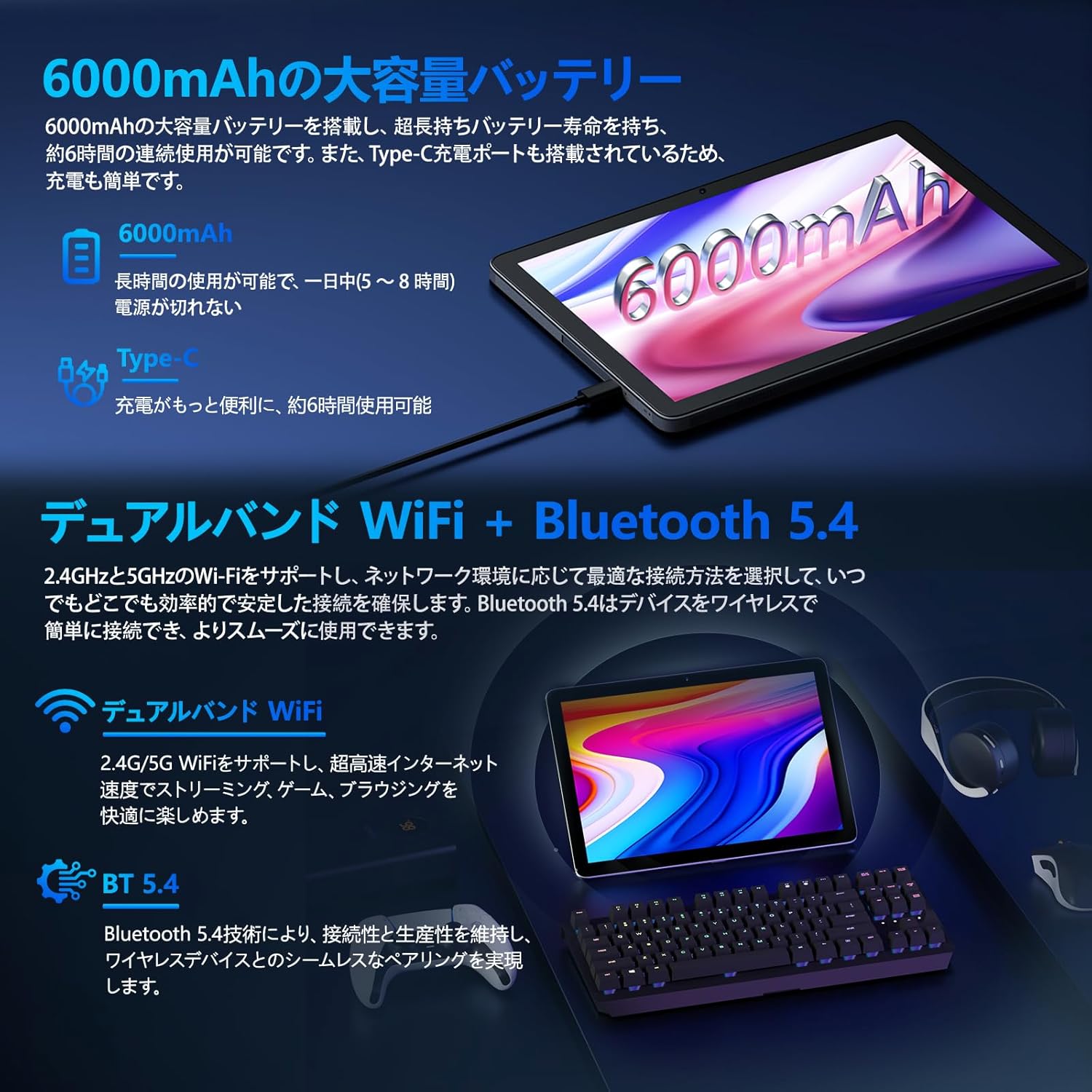
Image: Tablet highlighting battery capacity, Type-C charging, Wi-Fi, and Bluetooth features.
4.5 Kameras
The tablet features a 5MP front camera and an 8MP rear camera with autofocus, suitable for video calls and capturing photos.
- Maak die Kamera-app oop om foto's te neem of video's op te neem.
- Gesigsherkenning: Use the front camera for quick and secure unlocking. Set this up in Settings > Security & privacy > Face unlock.

Image: Illustration of the tablet's front and rear cameras and their resolutions.
4.6 Kids Mode (Parental Controls)
The tablet includes a dedicated Kids Mode and parental control features to ensure a safe and controlled environment for children.
- Access Kids Mode to provide curated content and limit screen time.
- Parents can manage app usage and content access through parental control settings.
4.7 sensors
The tablet is equipped with various sensors for enhanced functionality:
- GPS: Vir liggingsdienste en navigasie.
- Geomagnetic Sensor: Functions as a compass.
- Nabyheidsensor: Prevents unintended screen operations.
- Omringende ligsensor: Automatically adjusts screen brightness.
- Gyroscoop: For tilt operations and AR applications.
- Versnellingsmeter: Detects tilt, shock, and movement.
5. Onderhoud
5.1 Batterysorg
The 6000mAh battery provides long usage times. To prolong battery life:
- Vermy uiterste temperature.
- Moenie die battery gereeld heeltemal laat leegloop nie.
- Use the provided charger and cable.
- Optimaliseer batteryverbruik in Instellings > Battery.

Image: Tablet connected to a Type-C charger, highlighting the 6000mAh battery.
5.2 Skoonmaak
Gebruik 'n sagte, pluisvrye lap om die skerm en liggaam van die tablet skoon te maak. Vermy die gebruik van harde chemikalieë of skuurmiddels.
6. Probleemoplossing
If you encounter issues with your tablet, refer to the following common problems and solutions:
| Probleem | Moontlike oorsaak/oplossing |
|---|---|
| Tablet skakel nie aan nie | Maak seker dat die battery gelaai is. Koppel die laaier aan en wag 'n paar minute voordat jy weer probeer aanskakel. |
| Skerm reageer nie | Restart the tablet by holding the power button. If unresponsive, force restart by holding the power button for a longer duration (e.g., 10-15 seconds). |
| Wi-Fi-verbindingskwessies | Kontroleer of Wi-Fi in instellings geaktiveer is. Herbegin jou router. Vergeet die netwerk en koppel weer aan. |
| Device overheating / unexpected shutdowns | Close background applications. Avoid using the tablet in direct sunlight or hot environments. If the issue persists, contact customer support. |
| Programme wat vasval of vries | Clear the app's cache (Settings > Apps > [App Name] > Storage & cache > Clear cache). Update the app. Reinstall the app. |
| Stadige prestasie | Maak onnodige agtergrondprogramme toe. Maak kasgeheue en tydelike programme skoon. files. Ensure sufficient storage space. |
If the problem persists after trying these solutions, please contact Callsky customer support.
7. Spesifikasies
| Kenmerk | Detail |
|---|---|
| Handelsmerk | Callsky |
| Model Naam | Ctab 10 |
| Bedryfstelsel | Android 14 |
| Skerm grootte | 10.1 duim |
| Vertoon resolusie | 1280x800 pixels (Incell IPS) |
| SVE | Allwinner A523 Octa-core (1.8 GHz) |
| GPU | Mali-G57 (Integrated) |
| RAM | 3GB Physical + 9GB Virtual (Total 12GB) |
| Interne berging | 128 GB |
| Uitbreidbare berging | Tot 2 TB via MicroSD-kaart |
| Agterste kamera | 8 MP |
| Voorste kamera | 5 MP |
| Wi-Fi | Wi-Fi 6 (802.11ac, 802.11b, 802.11g, 802.11n) |
| Bluetooth | Bluetooth 5.4 |
| Battery kapasiteit | 6000mAh (22.8 Watt-hours, 1 Lithium Polymer cell) |
| Laaipoort | Tipe-C |
| Afmetings | 32.4 x 20.3 x 3.4 cm |
| Gewig | 425 g |
| Sertifiserings | GMS Certified, PSE Certified |
8. Waarborg en Ondersteuning
The Callsky Ctab 10 tablet comes with a 2 jaar waarborg. This warranty covers manufacturing defects and ensures long-term reliability.
8.1 Kliëntediens
If you encounter any issues or have questions regarding your Callsky tablet, please contact our customer support team. We are committed to providing prompt assistance.
- Kontakmetode: Refer to your purchase platform (e.g., Amazon) for specific contact details. Typically, you can find seller contact information through your order history.
- Reaksie Tyd: We aim to respond to inquiries within 24 hours on weekdays and within 48-72 hours on weekends or holidays.
Please have your product model (Ctab 10) and purchase details ready when contacting support.


