
JONR VC08 PRO
JONR VC08 Pro Cordless Vacuum Cleaner User Manual
Model: VC08 PRO
Handelsmerk: JONR
Belangrike veiligheidsinstruksies
Please read this manual carefully before using the appliance. Keep it for future reference.
- Moenie die stofsuier buite of op nat oppervlaktes gebruik nie.
- Moenie toelaat dat kinders die stofsuier gebruik nie. Noukeurige toesig is nodig wanneer dit naby kinders gebruik word.
- Moenie vlambare of brandbare vloeistowwe, soos petrol, optel of in gebiede gebruik waar hulle teenwoordig kan wees nie.
- Moenie iets optel wat brand of rook nie, soos sigarette, vuurhoutjies of warm as.
- Moet nie sonder stofsak en/of filters in plek gebruik nie.
- Turn off the appliance before connecting or disconnecting the battery pack, or before performing any maintenance.
- Gebruik slegs soos beskryf in hierdie handleiding. Gebruik slegs die vervaardiger se aanbevole aanhegsels.
- As die toestel nie werk soos dit moet nie, laat val, beskadig is, buite gelaat is of in die water geval het, moet dit na 'n dienssentrum gestuur word.
Produk verbyview
Familiarize yourself with the components of your JONR VC08 Pro Cordless Vacuum Cleaner and its Auto-Empty Station.
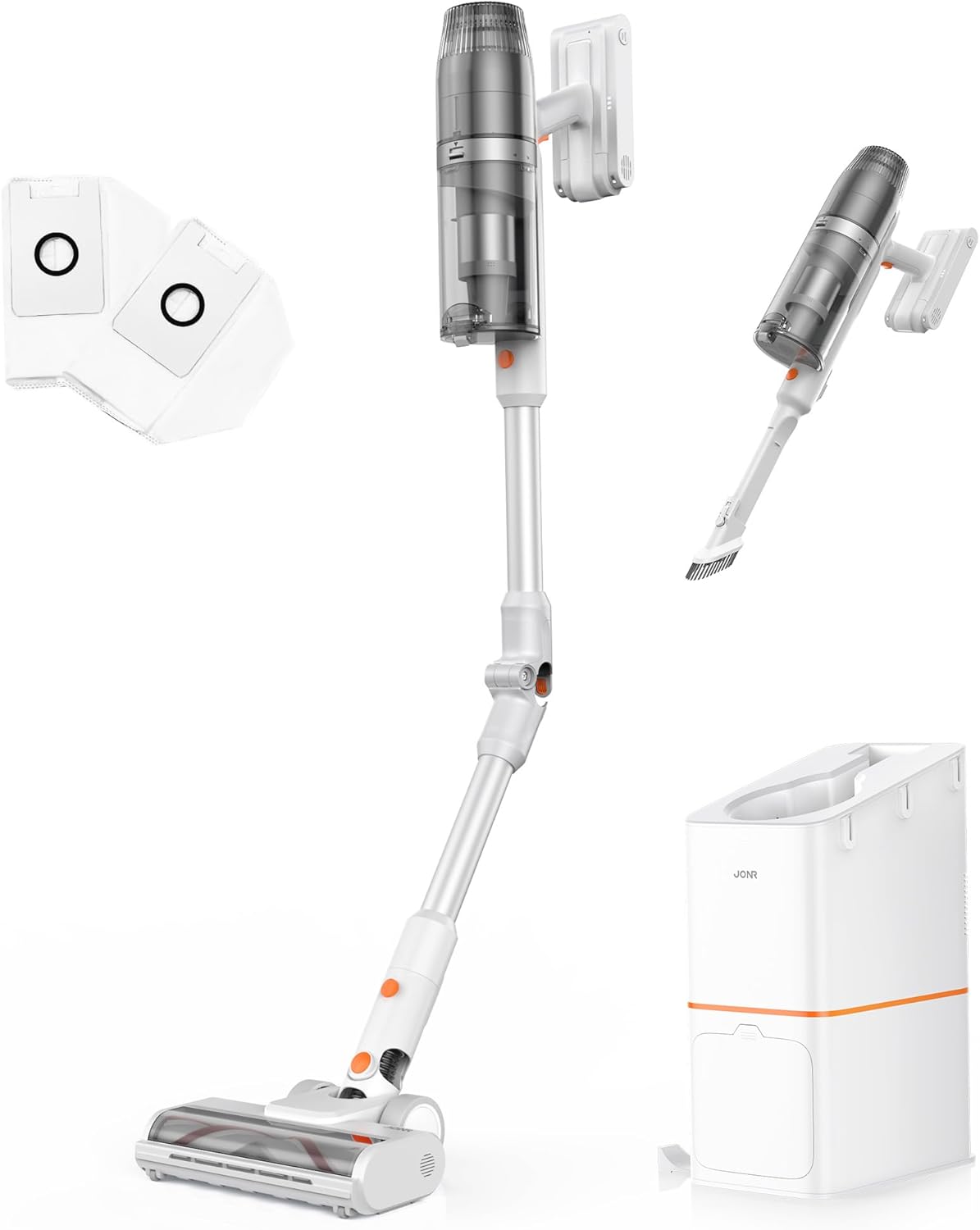
Figuur 1: oorview of the JONR VC08 Pro Cordless Vacuum Cleaner, including the main unit, extension wand, floor brush, and the auto-empty docking station with additional dust bags and filters.
Hoofkomponente:
- Vacuum Main Unit: Contains the motor, dust cup, and battery.
- Verlengstaf: Connects the main unit to the floor brush for upright cleaning. Features a 180° bendable joint for reaching under furniture.
- Vloer Borsel: Equipped with a tangle-free design for effective cleaning on carpets and hard floors.
- Auto-Empty Station: A 3-in-1 clean station that automatically empties the vacuum's dust cup, charges the vacuum, and provides storage.
- Dust Bags: 2.5L capacity disposable bags for the auto-empty station, designed for hygienic dust disposal.
- HEPA -filter: Gevorderde filtreerstelsel om fyn stof en allergene op te vang.
- 2-in-1 Mini Handheld Brush: For cleaning smaller areas, upholstery, and tight spaces.

Figure 2: The All-in-one Docking Station provides fast dust emptying, automatic charging, and convenient one-stop storage for the vacuum cleaner.
Opstelling en aanvanklike gebruik
1. Vergadering
- Heg die verlengstuk aan: Steek die verlengstuk in die hoofstofsuiereenheid totdat dit stewig vasklik.
- Connect the Floor Brush: Attach the floor brush to the other end of the extension wand, ensuring it locks firmly.
- Prepare the Auto-Empty Station:
- Open the dust bag compartment on the auto-empty station.
- Insert one of the provided 2.5L dust bags into the compartment, ensuring it is properly seated.
- Maak die kompartement veilig toe.
- Posisioneer die stasie: Place the auto-empty station on a flat, stable surface near a power outlet. Ensure there is enough space around it for the vacuum cleaner.
2. Aanvanklike laai
Laai die stofsuier volledig voor die eerste gebruik.
- Plug the auto-empty station into a power outlet.
- Place the assembled vacuum cleaner onto the auto-empty station. The vacuum will automatically begin charging.
- The charging indicator lights on the vacuum or station will illuminate. A full charge typically takes approximately 4 hours.

Figure 3: The vacuum automatically charges when docked in the auto-empty station, ensuring it's always ready for the next cleaning session.
Bedryfsinstruksies
1. Aan/Af skakel en moduskeuse
- To turn on, press the power button on the main unit. The vacuum will start in Standard Mode.
- To switch to Powerful Mode, press the mode selection button. This provides increased suction for tougher messes.
- Om af te skakel, druk weer die kragknoppie.
2. Skoonmaak van verskillende oppervlaktes
The JONR VC08 Pro is designed for versatile cleaning across various floor types and surfaces.

Figure 4: The JONR VC08 Pro is suitable for cleaning short pile carpets, hardwood floors, and can be used as a handheld vacuum for furniture like sofas.
- Harde vloere: Use Standard Mode for daily cleaning. The soft roller brush is gentle on delicate surfaces.
- Matte: Switch to Powerful Mode for deeper cleaning on short pile carpets. The brush roll effectively agitates dirt and pet hair.
- Onder Meubels: Utilize the 180° bendable rod to easily reach under beds, tables, and sofas without excessive bending.

Figure 5: The flexible 180° bendable tube allows for easy cleaning in hard-to-reach areas like under sofas and beds.
- Handskoonmaak: Detach the main unit from the extension wand and attach the 2-in-1 mini handheld brush for cleaning upholstery, car interiors, or tight corners.
3. Auto-Empty Function
When you return the vacuum cleaner to the auto-empty station after cleaning, it will automatically initiate the dust emptying process.
- Place the vacuum firmly into the docking port of the station.
- The station will automatically activate its suction to transfer dust and debris from the vacuum's dust cup into the sealed 2.5L dust bag. This process typically takes about 20 seconds.
- Once emptying is complete, the station will automatically begin charging the vacuum.

Figure 6: The auto-empty station quickly transfers dust from the vacuum's bin into a sealed bag, offering a hygienic disposal solution compared to manual emptying.
Onderhoud
Regular maintenance ensures optimal performance and extends the lifespan of your JONR VC08 Pro.
1. Replacing the Dust Bag
The 2.5L dust bags in the auto-empty station can hold dust for up to 3 months, depending on usage.
- When the dust bag indicator on the station illuminates or you notice reduced emptying efficiency, it's time to replace the bag.
- Open the dust bag compartment on the auto-empty station.
- Carefully pull out the full dust bag. The bag is designed to seal automatically upon removal to prevent dust leakage.
- Dispose of the full dust bag in a trash bin.
- Insert a new 2.5L dust bag into the compartment, ensuring it is fully seated.
- Maak die kompartement veilig toe.

Figure 7: Easily replace the large capacity dust bags in the auto-empty station for hygienic disposal of collected dust and debris.
2. Skoonmaak van filters
The HEPA filter and other filters in the vacuum unit should be cleaned regularly to maintain suction power.
- Turn off the vacuum cleaner and remove it from the charging station.
- Verwyder die stofhouer van die hoofeenheid.
- Remove the HEPA filter and foam filter from the dust cup.
- Tik die filters liggies oor 'n asblik om los stof te verwyder.
- If necessary, rinse the filters under cold running water. Ensure they are completely dry (allow 24-48 hours) before reinserting them. Do not use a dryer or direct heat.
- Reassemble the filters and dust cup onto the main unit.

Figure 8: The sealed dust collection system and HEPA filter in the auto-empty station help to lock away dust and allergens, promoting a cleaner home environment.
3. Skoonmaak van die Borselrol
Periodically check the floor brush for tangled hair or debris.
- Skakel die stofsuier af en verwyder die vloerborsel.
- Use scissors or a cleaning tool to cut and remove any tangled hair or fibers from the brush roll.
- Maak seker dat die borselrol vrylik draai voordat dit weer vasgemaak word.
Probleemoplossing
Verwys na hierdie afdeling vir algemene probleme en hul oplossings.
| Probleem | Moontlike oorsaak | Oplossing |
|---|---|---|
| Stofsuier skakel nie aan nie. | Battery is laag of uitgeput. | Place the vacuum on the auto-empty station to charge. Ensure the station is plugged in. |
| Verminderde suigkrag. | Dust cup full; Filters clogged; Brush roll tangled; Obstruction in nozzle/wand. | Empty the dust cup (via auto-empty station or manually). Clean or replace filters. Remove tangled hair/debris from brush roll. Check for and clear any obstructions. |
| Auto-empty station not emptying. | Dust bag full; Dust bag not installed correctly; Obstruction in station's suction path. | Replace the dust bag. Ensure the dust bag is correctly seated. Check the station's suction port for blockages. |
| Borselrol draai nie. | Tangled debris; Brush roll jammed; Incorrect mode. | Clear any tangled hair or debris from the brush roll. Ensure the brush roll is properly installed. Check if the vacuum is in a mode that activates the brush roll (e.g., not handheld mode without the brush attachment). |
Spesifikasies
| Kenmerk | Detail |
|---|---|
| Handelsmerk | JONR |
| Model Naam | VC08 PRO |
| Spesiale kenmerk | Auto-Empty, Cordless, Foldable, Headlight, Rechargeable |
| Filter tipe | HEPA-filter |
| Ingesluit komponente | VC08 Vacuum cleaner, Station, Dust Bag, User Manual, 2 in 1 Mini handheld brush |
| Is koordloos? | Ja |
| Stofbeker kapasiteit | 650 milliliter |
| Stofsakkapasiteit (stasie) | 2.5 Liters (x2 included) |
| Wattage | 200 watt |
| Laai tyd | 4 ure |
| Vormfaktor | Stok |
| Kleur | While/Orange |
| Produk afmetings | 7.1 cm L x 10.2 cm B x 44 cm H |
| Geraasvlak | 80 dB |
| Amperageer | 0.8 Amps |
| Item gewig | 7.04 pond |
| Aantal kragvlakke | 2 (Standard, Powerful) |
Waarborg en Ondersteuning
For warranty information, technical support, or to purchase replacement parts and accessories, please contact JONR customer service.
- Aanlyn ondersteuning: Visit the official JONR webwebwerf vir algemene vrae en ondersteuningsbronne.
- Kliëntediens: Refer to the contact information provided on the product packaging or the official JONR webwebwerf.
- Vervangingsonderdele: Genuine JONR dust bags and filters can be purchased from authorized retailers or the JONR official store.
Behou asseblief jou aankoopbewys vir waarborgeise.
Ask a question about this manual
Ask about setup, troubleshooting, compatibility, parts, safety, or missing instructions. Manuals+ will review the question and use this page’s manual context to help answer it.