
Inleiding
Thank you for choosing the Tineco iFloor Y2 Wet Dry Vacuum Cleaner. This manual provides essential information for the safe and efficient operation, maintenance, and troubleshooting of your device. Please read it thoroughly before first use and retain it for future reference.
Wat is ingesluit
Unpack your Tineco iFloor Y2 and ensure all components are present. The standard package includes:
- Hoofvakuumeenheid
- Herlaai-stasie
- Skoonmaak gereedskap
- Skoonmaak oplossing
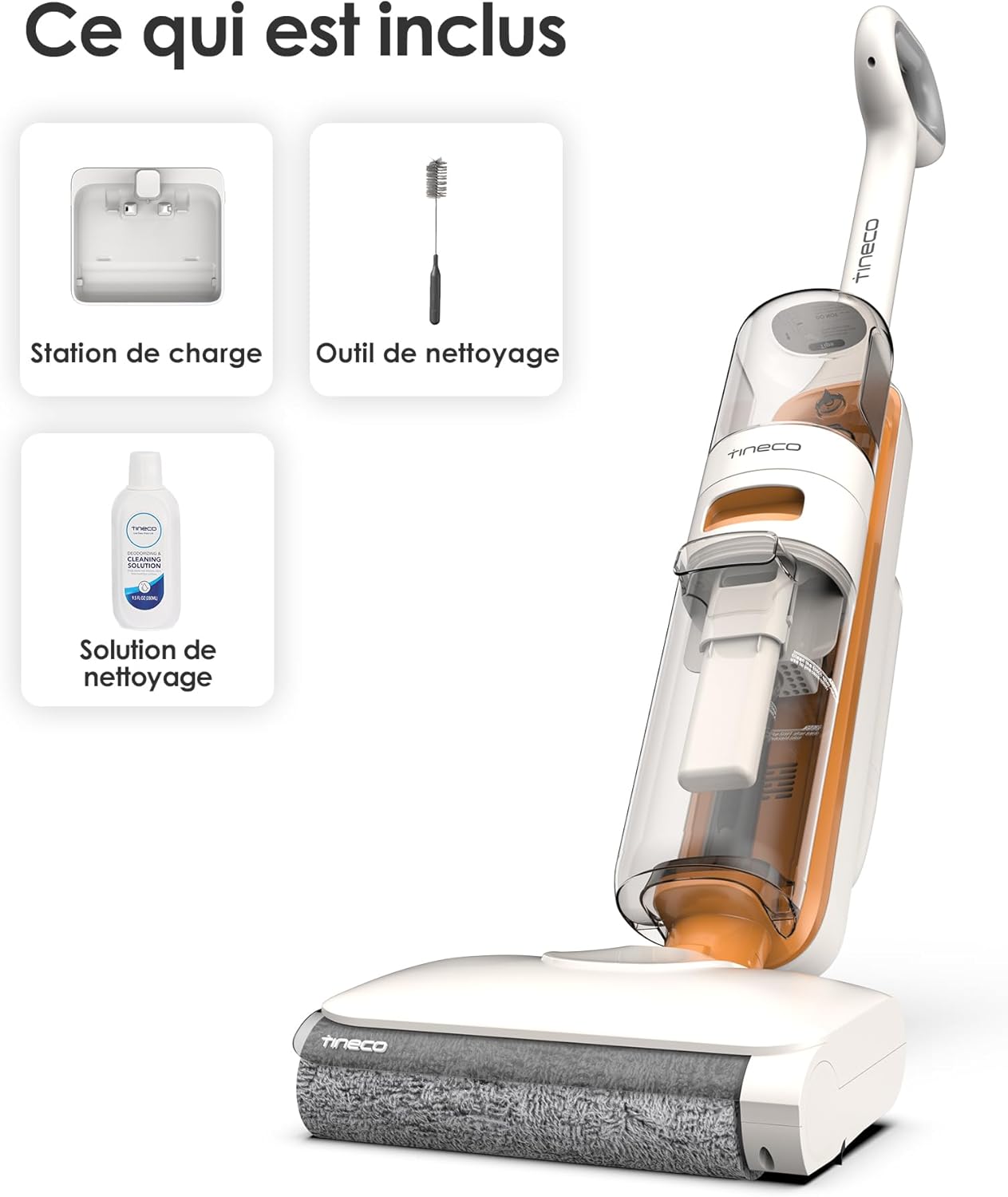
The Tineco iFloor Y2 package includes the main vacuum unit, a charging station for convenient storage and charging, a specialized cleaning tool for maintenance, and a bottle of cleaning solution to enhance floor cleaning results.
Opstelling
- Vergadering: Steek die handvatsel in die hoofliggaam totdat dit stewig in plek klik.
- Laai: Place the assembled unit onto the charging station. Connect the power adapter to the charging station and plug it into a wall outlet. The battery indicator will illuminate to show charging status. Fully charge the device before first use (approximately 3-4 hours).
- Vul skoonwatertenk: Press the clean water tank release button and remove the tank. Open the tank cap and fill with clean tap water, or a mixture of water and Tineco cleaning solution (do not exceed the MAX fill line). Reinsert the tank until it clicks.
Bedryfsinstruksies
Basiese werking
- Krag aan/af: Druk die kragknoppie om die toestel aan of af te skakel.
- Begin skoonmaak: Tilt the main body back to engage the brush roll and begin cleaning.
- Vacuum & Wash Function: The iFloor Y2 is designed to vacuum and wash hard floors simultaneously.

The Tineco iFloor Y2 performs both vacuuming and washing simultaneously, effectively cleaning dry debris, wet spills, and pet hair from hard floors in a single pass, saving time and effort.
Anti-verwarring ontwerp
The iFloor Y2 features a specialized 3D scraper design that prevents hair from tangling around the roller brush. This design ensures the brush remains clean and maintains optimal cleaning performance, especially useful for homes with pets.

The Tineco iFloor Y2 features an anti-tangle brush roll design, effectively preventing hair from wrapping around the brush and maintaining optimal cleaning performance. The integrated scraper helps keep the brush clean during operation.
Onderhoud
Selfreinigende funksie
After each use, it is recommended to run the self-cleaning cycle to maintain the device's hygiene and performance.
- Ensure the dirty water tank is not full and the clean water tank has sufficient water.
- Place the iFloor Y2 securely on its charging station.
- Press the Self-Clean button (often indicated by a circular arrow icon). The device will begin an automatic cleaning cycle.
- Once the cycle is complete, empty the dirty water tank and clean the filter.

Initiate the self-cleaning cycle with a single touch of a button. Place the iFloor Y2 on its charging base, press the self-clean button, and the device will automatically clean its brush roll and internal pathways, simplifying maintenance.
Brush Cleaning System
The iFloor Y2 employs an advanced system to keep its brush roll clean during operation. This involves continuous rinsing with clean water and scraping away dirty water and debris.
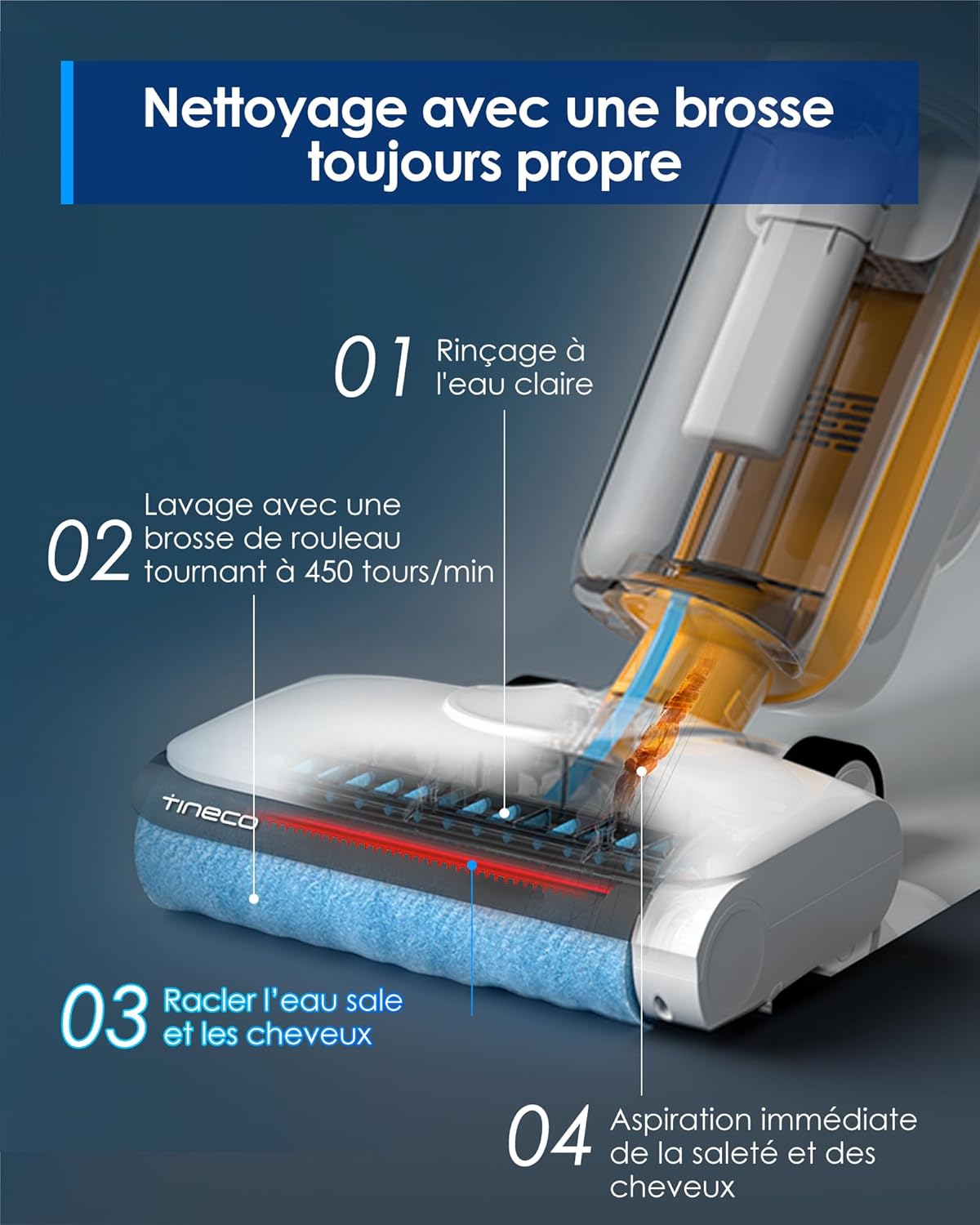
The innovative brush cleaning system ensures the roller brush is continuously cleaned with fresh water at 450 rotations per minute. A squeegee scrapes away dirty water and debris, which is then immediately suctioned into the dirty water tank, ensuring only clean water is used for floor washing.
Watertenkbestuur
Proper management of the clean and dirty water tanks is crucial for optimal performance.
- Skoon watertenk: Holds 1 liter of water. Refill when the indicator shows low water.
- Vuilwatertenk: Holds 0.8 liters of dirty water. Empty after each use or when the indicator shows full. Clean the tank and filter regularly to prevent odors and maintain suction.

The Tineco iFloor Y2 is equipped with a 1-liter clean water tank and a 0.8-liter dirty water tank, allowing for extended cleaning sessions without frequent refills or emptying. A full charge provides approximately 30 minutes of runtime in normal mode.
Probleemoplossing
| Probleem | Moontlike oorsaak | Oplossing |
|---|---|---|
| Toestel skakel nie aan nie | Battery is laag of uitgeput. | Laai die toestel ten volle. |
| Swak suiging of laat strepe agter | Dirty water tank is full, filter is clogged, or brush roll is dirty. | Empty and clean the dirty water tank. Clean or replace the filter. Run self-cleaning cycle or manually clean the brush roll. |
| Water gee nie uit nie | Clean water tank is empty or improperly installed. | Refill the clean water tank. Ensure the tank is securely in place. |
| Ongewone geraas | Obstruksie in borselrol of lugpad. | Turn off the device and check for any foreign objects in the brush roll area or air ducts. Remove any obstructions. |
Spesifikasies
- Model: iFloor Y2
- Handelsmerk: Tineco
- Produk afmetings: 27.1 x 27.6 x 108.65 cm
- Item gewig: 4.1 kg
- Skoonwatertenk kapasiteit: 1.0 liter
- Vuilwatertenk kapasiteit: 0.8 liter
- Krag / Wattage: 140 watt
- Voltage: 25.2 Volt (DC)
- Geraasvlak: 80 Desibel
Waarborg en Ondersteuning
For warranty information, technical support, or to purchase spare parts, please refer to the official Tineco website or contact Tineco customer service directly. Keep your purchase receipt as proof of purchase for warranty claims.