
Inleiding
Welcome to the LORELEI Q60 Wireless Bluetooth On-Ear Headphones user manual. This guide provides comprehensive instructions for setting up, operating, and maintaining your new headphones. Designed for comfort and superior sound, the Q60 headphones offer a seamless audio experience with advanced features.
Wat is in die boks
Upon unboxing your LORELEI Q60 headphones, you should find the following items:
- LORELEI Q60 Wireless On-Ear Headphones
- Carrying Headset Case
- Type-C laaikabel
- Gebruikershandleiding

Image: LORELEI Q60 headphones, carrying case, and charging cable as packaged.
Produk verbyview
The LORELEI Q60 headphones are engineered for both performance and comfort. Key design elements include:
- Liggewig Ergonomiese Ontwerp: Ensures a comfortable fit for extended use.
- Verstelbare kopband: Allows for a personalized and secure fit.
- Soft Memory Foam Ear Cushions: Provides comfort and helps with passive noise isolation.
- Swivel-Foldable Ear Cups: Designed for portability and easy storage in the included case.
- Intuïtiewe kontroles: Simple buttons and a control knob for easy operation.

Beeld: Gedetailleerd view of the LORELEI Q60 headphones, highlighting the ear cup design, headband, and control knob.
Opstelling
Laai die oorfone
- Locate the Type-C charging port on one of the ear cups.
- Connect the provided Type-C charging cable to the headphones and a compatible USB power source.
- The LED indicator will show charging status. A full charge typically takes approximately 1 hour.
- Once fully charged, the headphones offer up to 40 hours of battery life.

Image: The USB-C charging port located on the ear cup of the LORELEI Q60 headphones.
Bluetooth-koppeling
- Ensure your LORELEI Q60 headphones are fully charged.
- Press and hold the multi-function control knob for a few seconds until the LED indicator flashes, indicating pairing mode.
- Navigeer na die Bluetooth-instellings op jou toestel (slimfoon, tablet, skootrekenaar).
- Select "LORELEI Q60" from the list of available devices.
- Once connected, the LED indicator will show a steady light or change color, confirming successful pairing.
- The headphones utilize Advanced Bluetooth 5.4 connectivity for enhanced stability and range (up to 10 meters).
Video: A demonstration of the LORELEI Q60 headphones, highlighting their sleek design and ease of use, including the pairing process.
Bedryfsinstruksies
Krag aan/af en volumebeheer
- Krag aan/af: Press and hold the multi-function control knob for a few seconds.
- Volume aanpassing: Draai die beheerknop kloksgewys om die volume te verhoog en antikloksgewys om die volume te verlaag.
Musiek afspeel
- Speel/pouse: Press the multi-function control knob once.
- Volgende snit: Rotate the control knob clockwise and hold briefly.
- Vorige snit: Rotate the control knob counter-clockwise and hold briefly.
Belbestuur
- Beantwoord/beëindig oproep: Press the multi-function control knob once.
- Verwerp oproep: Press and hold the multi-function control knob for 2 seconds.
- Stemassistent (Siri/Google Assistent): Press the dedicated voice assistant button (refer to product diagrams for exact location) for 2 seconds.
Bass Mode Activation
- To activate or deactivate the Bass Mode for deep, powerful low frequencies, press the dedicated Bass Mode button (refer to product diagrams for exact location).
Video: 'n Gedetailleerde oorsigview of the LORELEI Q60 headphones, demonstrating the lightweight design and the powerful Bass Mode feature.
Gerief en Ontwerp
The LORELEI Q60 headphones are designed with user comfort in mind:
- Memory Foam Ear Cushions: Soft and durable, these cushions provide a secure and comfortable fit for all-day wear, preventing discomfort during long listening sessions.
- Verstelbare kopband: The headband can be adjusted to fit various head sizes, ensuring optimal comfort and stability.
- Liggewig konstruksie: The headphones are lightweight (11.2 ounces), reducing pressure on your head and ears.

Image: A user wearing the LORELEI Q60 headphones, showcasing their ergonomic and comfortable design.
Connectivity and Battery
Experience uninterrupted audio with reliable connectivity and extended battery life:
- Gevorderde Bluetooth 5.4: Provides a stable connection, expanded coverage range, and minimizes audio dropouts.
- Lang batterylewe: Enjoy up to 40 hours of music playback on a single charge, powering through a full week of typical use.
- Vinnige herlaai: The included Type-C cable allows for effortless and fast recharging.
Draagbaarheid
The LORELEI Q60 headphones are designed for convenience on the go:
- Swivel-Foldable Ear Cups: The ear cups can swivel and fold, making the headphones compact for easy storage.
- Complimentary Carrying Case: A durable carrying case is included to protect your headphones during travel and storage.
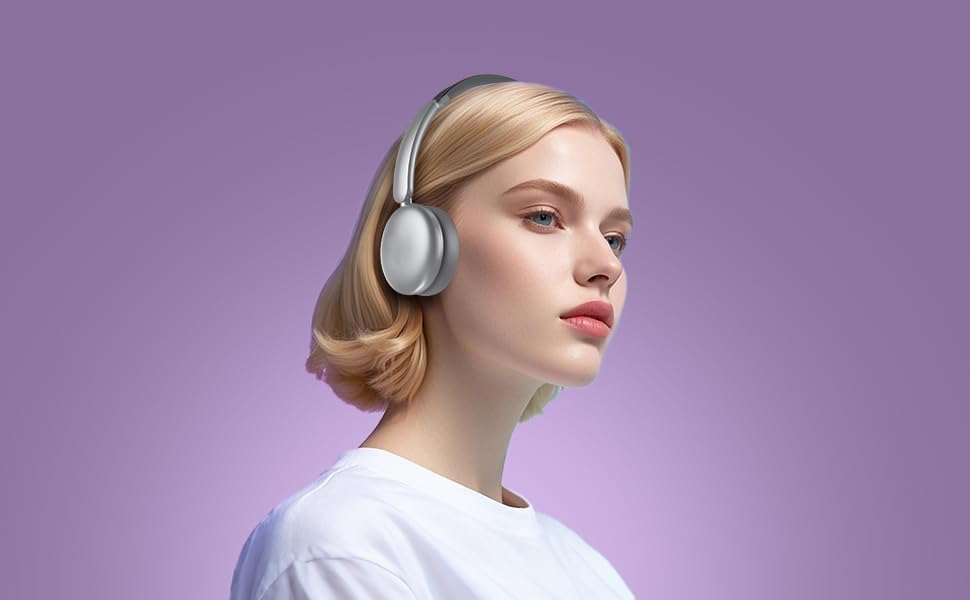
Image: The LORELEI Q60 headphones folded flat, ready for storage in their compact carrying case.
Klankkwaliteit
Experience rich and immersive audio with the LORELEI Q60 headphones:
- Custom-Tuned Acoustic Structure: Delivers a comfortable and immersive music experience with balanced sound.
- Basmodus: Activate this feature to enjoy deep, powerful low frequencies, enhancing your audio experience.
- Hoëdefinisie-mikrofoon: The built-in microphone ensures crystal-clear call quality for seamless communication.
Spesifikasies
| Kenmerk | Detail |
|---|---|
| Model Naam | V60 |
| Verbindingstegnologie | Draadloos (Bluetooth 5.4) |
| Oorplasing | Op Oor |
| Batterylewe | 40 ure |
| Laai tyd | 1 uur |
| Bluetooth-reeks | 10 meter |
| Oudiobestuurdergrootte | 40 millimeter |
| Frekwensierespons | 20 KHz |
| Sensitiwiteit | 110 dB |
| Impedansie | 32 ohm |
| Item gewig | 11.2 onse |
| Materiaal | Faux Leather, Metal, Plastic |
| Ingesluit komponente | Kabel, gebruikershandleiding |
Onderhoud
- Skoonmaak: Gebruik 'n sagte, droë lap om die oorkappe en kopband skoon te maak. Vermy die gebruik van harde chemikalieë of skuurmiddels.
- Berging: When not in use, store the headphones in the provided carrying case to protect them from dust, scratches, and damage.
- Batterysorg: Om die batterylewe te verleng, vermy om die oorfone gereeld heeltemal te ontlaai. Laai hulle gereeld, selfs al word hulle nie voortdurend gebruik nie.
Probleemoplossing
- Geen krag: Ensure the headphones are fully charged. Connect to a power source using the Type-C cable.
- Kan nie koppel nie: Make sure Bluetooth is enabled on your device and the headphones are in pairing mode (flashing LED). Move closer to your device and away from potential interference.
- Geen klank: Kontroleer die volumevlakke op beide jou oorfone en jou gekoppelde toestel. Maak seker dat die oorfone korrek gekoppel is.
- Swak klankgehalte: Ensure the headphones are within Bluetooth range. Check for any obstructions between the headphones and your device.
Waarborg en Ondersteuning
For warranty information, technical support, or further assistance, please refer to the contact details provided in the included user manual or visit the official LORELEI webwebwerf.