
1. Inleiding
Welcome to the user manual for your new XIAOMI Poco X7 Pro 5G smartphone. This guide provides essential information on setting up, operating, maintaining, and troubleshooting your device. Please read this manual thoroughly to ensure optimal performance and longevity of your smartphone.
The Poco X7 Pro is a high-performance 5G smartphone featuring the MediaTek Dimensity 8400-Ultra chipset, built with a 4nm process technology and ARM Cortex-A725 CPU architecture. It is designed for speed and efficiency.
2. Pakketinhoud
Upon unboxing your Poco X7 Pro, please verify that the following items are included:
- XIAOMI Poco X7 Pro 5G Smartphone
- Protective film (pre-applied or in box)
Note: Other accessories such as a power adapter, charging cable, or SIM ejector tool may be sold separately and are not always included in the standard package. Please check the product packaging for a complete list of included items.
3. Toestel oorview
Maak jouself vertroud met die fisiese komponente van jou Poco X7 Pro 5G.

Figuur 3.1: Voorkant view of the Poco X7 Pro 5G smartphone, highlighting its storage capacity.
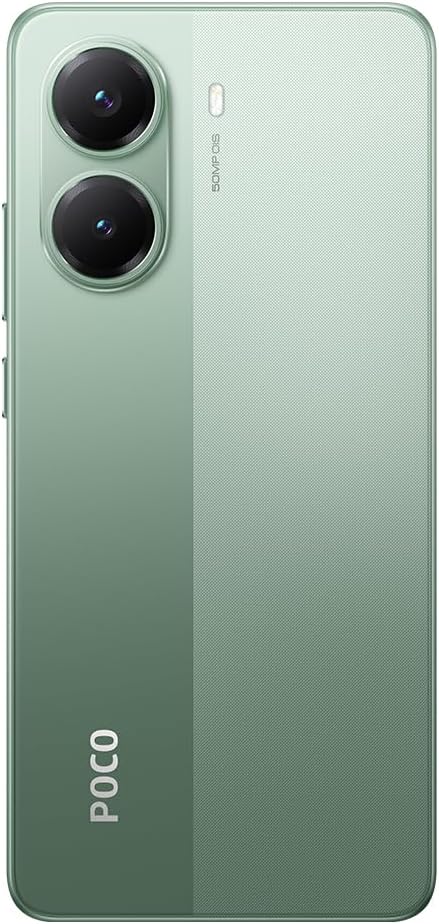
Figuur 3.2: Agter view of the Poco X7 Pro 5G, showcasing the camera setup and design.
3.1. Fisiese Komponente
- Vertoon: 6.67-inch AMOLED screen with 2712x1220 resolution and 120Hz refresh rate. Protected by Gorilla Glass 7i.
- Agterste kamera: 50 MP main camera with OIS (Optical Image Stabilization) and f/1.5 aperture, utilizing a Sony IMX882 sensor. Supports 4K video recording at 60fps with dual OIS and EIS stabilization.
- Voorste kamera: (Specific MP not detailed in features, but typically located at the top center of the display).
- Knoppies: Power button and volume rockers typically located on the side.
- Poorte: USB-C-poort vir laai en data-oordrag.
- SIM-laai: Slot for inserting SIM cards.
4. Aanvanklike Opstelling
4.1. Plaas die SIM-kaart
- Vind die SIM-kaartlaai aan die kant van jou toestel.
- Insert the SIM ejector tool (if available, otherwise a thin pin) into the small hole next to the tray to open it.
- Plaas jou Nano-SIM-kaart(e) in die laai met die goue kontakte na onder.
- Druk die skinkbord versigtig terug in die gleuf totdat dit gelyk met die toestel is.
4.2. Aanskakel van jou toestel
- Press and hold the Power button (usually on the right side) until the XIAOMI logo appears on the screen.
- Volg die instruksies op die skerm om die aanvanklike opstelling te voltooi, insluitend die keuse van jou taal, die verbinding met Wi-Fi en die aanmelding by jou Google-rekening.
4.3. Laai die battery
Your device comes with a 6,000 mAh battery. For optimal performance, fully charge the device before first use.

Figure 4.1: Illustration of the 6000 mAh battery and 90W HyperCharge capability, allowing a full charge in approximately 42 minutes.
- Connect a compatible USB-C charging cable to the device's charging port.
- Connect the other end of the cable to a compatible power adapter (sold separately) and plug it into a power outlet.
- The device supports 90W fast wired charging, capable of charging from 0% to 100% in approximately 42 minutes.
5. Basiese werking
5.1. Aanraakskermgebare
- Tik: Kies 'n item of aktiveer 'n funksie.
- Raak en hou: Kry toegang tot kontekstuele spyskaarte of skuif items.
- Swiep: Navigeer deur skerms of lyste.
- Knyp: Zoem in of uit op beelde en web bladsye.
5.2. Kamerafunksies
Your Poco X7 Pro features an advanced camera system.

Figure 5.1: Detail of the 50 MP main camera with OIS and the 20 MP front camera.
- Agterste kamera: The 50 MP main camera with OIS (Optical Image Stabilization) and f/1.5 aperture uses Sony's IMX882 sensor. It supports 4K video recording at 60fps with dual OIS and EIS stabilization for clear and steady footage.
- Voorste kamera: Capture high-quality selfies and video calls.
- Kameramodusse: Explore various modes such as Portrait, Night, Pro, and Panorama for diverse photographic experiences.
5.3. Vertoonkenmerke
The device's display offers exceptional visual quality.

Figure 5.2: Key display specifications including brightness, refresh rate, and resolution.
- Helderheid: Advertised to reach up to 3,200 nits of peak brightness for excellent visibility even in bright conditions.
- Herlaaitempo: Features a 120Hz refresh rate for smooth scrolling and fluid animations.
- Raak Sampling koers: Offers a 2,560 Hz touch sampling rate for highly responsive touch input.
- Resolusie: 2712 x 1220 pixels, providing sharp and detailed visuals.
6. Onderhoud
6.1. Skoonmaak van jou toestel
- Gebruik 'n sagte, pluisvrye lap om die skerm en liggaam van die foon saggies af te vee.
- Vermy die gebruik van harde chemikalieë, skuurmiddels of saamgeperste lug.
- The Poco X7 Pro has an IP68 dust and water resistance rating, meaning it can withstand immersion in up to 1.5 meters of fresh water for up to 30 minutes. However, it is not recommended for use in water and water damage is not covered under warranty.
6.2. Sagteware-opdaterings
Regularly check for and install software updates to ensure your device has the latest features, security patches, and performance improvements. Your device runs on Android 15.
- Gaan na Instellings > Oor telefoon > MIUI-weergawe (or similar) to check for updates.
- Maak seker dat jou toestel aan Wi-Fi gekoppel is en voldoende batterylading het voordat jy 'n opdatering begin.
7. Probleemoplossing
As jy probleme met jou toestel ondervind, probeer die volgende algemene oplossings:
- Toestel skakel nie aan nie: Maak seker dat die battery gelaai is. Koppel die toestel vir ten minste 15 minute aan 'n laaier en probeer dit dan weer aanskakel.
- Programme wat vasval of vries: Close the problematic app and reopen it. If the issue persists, restart your phone. You can also clear the app's cache or reinstall it.
- Swak netwerkverbinding: Check if your SIM card is properly inserted. Try toggling Airplane Mode on and off. If the issue persists, contact your network provider.
- Battery raak vinnig leeg: Reduce screen brightness, disable unnecessary background apps, and turn off features like Bluetooth or GPS when not in use. Check battery usage in settings to identify power-hungry apps.
- Raakskerm reageer nie: Restart your device. If the screen remains unresponsive, a factory reset might be necessary (back up your data first).
For more complex issues, refer to the official XIAOMI support webwebwerf of kontak kliëntediens.
8. Tegniese spesifikasies
Detailed specifications for the XIAOMI Poco X7 Pro 5G:
| Kenmerk | Spesifikasie |
|---|---|
| Handelsmerk | XIAOMI |
| Model Naam | POCO X7 PRO |
| Bedryfstelsel | Android 15 |
| Tipe verwerker | Snapdragon (MediaTek Dimensity 8400-Ultra) |
| Verwerker spoed | 3.25 GHz |
| RAM grootte | 8 GB |
| Berging kapasiteit | 256 GB |
| Skerm grootte | 6.67 duim |
| Tipe vertoon | AMOLED |
| Resolusie | 2712 x 1220 |
| Herlaaitempo | 120 Hz |
| Battery kapasiteit | 6000 mAh (Litium-ioon) |
| Laai | 90W Fast Wired Charging |
| Agterste kamera | 50 MP with OIS, f/1.5 aperture, Sony IMX882 sensor |
| Video-resolusie | 4K at 60fps (with dual OIS and EIS stabilization) |
| Konnektiwiteit | 5G, Bluetooth, NFC, USB, Wi-Fi |
| Water/Stof weerstand | IP68 |
| Gewig | 400 g |
| Jaarmodel | 2025 |
9. Veiligheidsinligting
Neem asseblief die volgende veiligheidsmaatreëls in ag om beserings of skade aan u toestel te voorkom:
- Do not expose the device to extreme temperatures, direct sunlight, or open flames.
- Vermy om die toestel te laat val of aan ernstige impakte bloot te stel.
- Gebruik slegs goedgekeurde laaiers en bykomstighede.
- Moenie probeer om die toestel self uitmekaar te haal of te herstel nie. Raadpleeg gemagtigde dienspersoneel.
- Hou die toestel weg van mediese toestelle, aangesien dit hul werking kan belemmer.
- Gooi die toestel en sy battery verantwoordelik weg volgens plaaslike regulasies.
10. Waarborg en Ondersteuning
Your XIAOMI Poco X7 Pro 5G is covered by a limited warranty. For specific warranty terms and conditions, please refer to the warranty card included with your product or visit the official XIAOMI webwebwerf.
For technical support, service, or further assistance, please contact XIAOMI customer service or visit their official support channels. You can find contact information on the XIAOMI webwebwerf.