
1. Inleiding
Welcome to the user manual for your new XIAOMI Redmi Note 14 Pro+ 5G Smartphone. This guide provides essential information on setting up, operating, and maintaining your device. Please read it carefully to ensure optimal performance and longevity of your smartphone.
2. Pakketinhoud
Verifieer dat jou pakket die volgende items bevat:
- XIAOMI Redmi Note 14 Pro+ 5G-slimfoon
- USB kabel
- Vinnige Begingids (kan per streek verskil)
- SIM-uitwerphulpmiddel (kan per streek verskil)
Note: A charger is not included in the package. Please use a compatible 120W HyperCharge adapter for optimal charging.
3. Toestel oorview
Familiarize yourself with the physical components of your Redmi Note 14 Pro+ 5G.
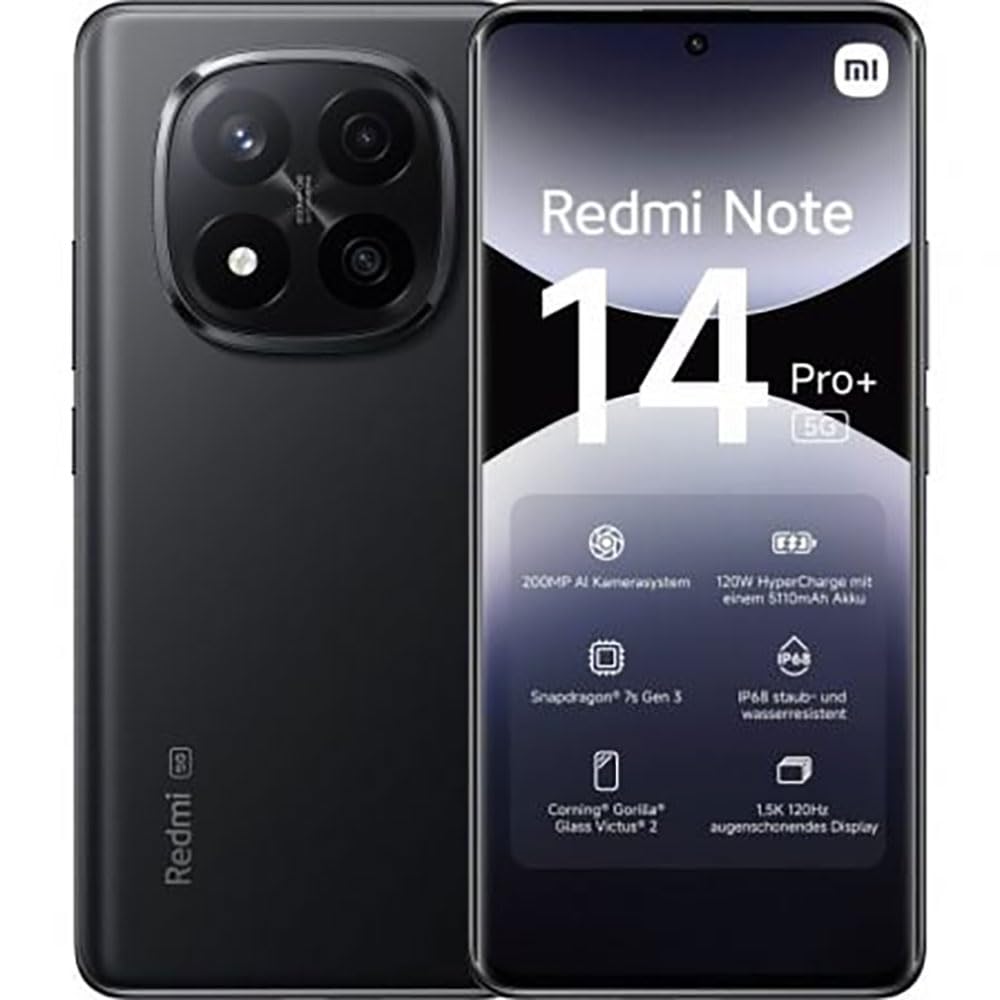
The image displays the front and back of the XIAOMI Redmi Note 14 Pro+ 5G smartphone. The front shows the display with 'Redmi Note 14 Pro+ 5G', '200 Megapixels', and '256 GB' text. The back features a prominent camera module with multiple lenses and the 'Redmi 5G' branding.
Sleutelkomponente:
- Voorskerm: 6.67-inch 1.5K 120Hz AMOLED display with Corning Gorilla Glass Victus 2.
- Agterkamera-module: Houses the 200MP Pro-Grade AI Camera system.
- Kragknoppie: Located on the side, used to power on/off and wake/sleep the device.
- Volume knoppies: Geleë aan die kant, word gebruik om media- en oproepvolume aan te pas.
- USB Tipe C-poort: Vir laai en data-oordrag.
- SIM-kaartgleuf: Supports Dual SIM Nano SIM cards.
- Luidsprekers: Stereoluidsprekers vir klankuitset.
4. Opstelling
4.1. Plaas die SIM-kaart
- Vind die SIM-kaartlaai aan die kant van jou toestel.
- Plaas die SIM-uitwerpgereedskap in die klein gaatjie langs die laai en druk stewig totdat die laai uitspring.
- Place your Nano SIM card(s) into the tray with the gold contacts facing down. Ensure proper orientation.
- Druk die skinkbord versigtig terug in die gleuf totdat dit in plek klik.
4.2. Aanskakel van jou toestel
Druk en hou die Kragknoppie on the side of the phone until the XIAOMI logo appears on the screen. Follow the on-screen instructions to complete the initial setup, including connecting to Wi-Fi, setting up your Google account, and configuring security features like fingerprint recognition.
4.3. Aanvanklike betaling
It is recommended to fully charge your device before first use. Connect the USB Type-C cable to the phone and a compatible 120W HyperCharge adapter (not included) to a power outlet.
5. Bediening van jou slimfoon
5.1. Basiese navigasie
- Raakskerm: Tik om te kies, swiep om te blaai, knyp om te zoem.
- Tuisskerm: Jou sentrale spilpunt vir programme en widgets.
- Kennisgewingpaneel: Vee van die bokant van die skerm af om toegang tot kennisgewings en kitsinstellings te verkry.
- App-laai: Swipe up from the bottom of the screen (or tap the app drawer icon) to view alle geïnstalleerde toepassings.
5.2. Aanskakel/Afskakel en Herbegin
- Om Skakel af: Press and hold the Power Button until the power menu appears, then select "Power off."
- Om Herbegin: Press and hold the Power Button until the power menu appears, then select "Restart."
5.3. Sekuriteitskenmerke
Your device supports various security options:
- Vingerafdrukherkenning: Registreer jou vingerafdrukke vir vinnige en veilige ontsluiting.
- Gesigslot: Use your face to unlock the device.
- PIN/Patroon/Wagwoord: Standard security methods.
Access these settings via Instellings > Sekuriteit en privaatheid.
6. Kamera-kenmerke
The Redmi Note 14 Pro+ 5G features a powerful 200MP Pro-Grade AI Camera system designed to enhance your photography experience.
- 200MP Hoofkamera: Capture highly detailed images with optical image stabilization (OIS).
- Multiple Camera Modes: Includes automatic, scene, portrait, and manual modes for versatile shooting.
- Dual LED Flash: Provides enhanced lighting in low-light conditions.
- Voorste kamera: A 20MP front sensor for high-quality selfies and video calls.
- Video-opname: Supports up to 8K video capture at 120 fps.
7. KI-kenmerke
Leverage the integrated AI functionalities for a smarter user experience:
- KI Erase Pro: Intelligently remove unwanted objects or people from your photos.
- AI Image Expansion: Expand the boundaries of your images using AI.
- AI Notes: Smart note-taking capabilities.
- AI Subtitles: Generate subtitles for videos or audio in real-time.
- AI Recorder: Enhanced voice recording with AI features.
- KI-tolk: Real-time language translation.
- Tweeling: Integrated AI assistant.
- Circle to Search by Google: Soek vinnig vir inligting deur voorwerpe op jou skerm te omkring.
8. Laai
Your Redmi Note 14 Pro+ 5G supports 120W HyperCharge technology for rapid charging.
- Battery kapasiteit: 5110mAh Lithium-polymer battery.
- Laai: Use the provided USB Type-C cable with a compatible 120W power adapter (sold separately) for optimal charging speeds.
- Batterylewe: Expect up to 20 hours of talk time. Actual battery life may vary based on usage.
Always use certified charging accessories to prevent damage to your device.
9. Onderhoud
9.1. Water- en stofbestandheid
Die toestel beskik oor 'n IP68-gradering for dust and water resistance. This means it is protected against dust ingress and can withstand immersion in water up to 1.5 meters for 30 minutes. However, this resistance is not permanent and may decrease over time with normal wear. Avoid exposing the device to hot water, saltwater, or other liquids.
9.2. Skoonmaak van jou toestel
- Gebruik 'n sagte, pluisvrye lap om die skerm en liggaam skoon te maak.
- Vermy die gebruik van skuurmiddels, oplosmiddels of aërosolspuitmiddels.
- If the device gets wet, wipe it thoroughly with a clean, dry cloth before charging or using ports.
9.3. Sagteware-opdaterings
Kontroleer gereeld vir sagteware-opdaterings en installeer dit om te verseker dat jou toestel die nuutste kenmerke, sekuriteitsopdaterings en werkverrigtingverbeterings het. Gaan na Instellings > Meer oor foon > MIUI-weergawe om te kyk vir opdaterings.
10. Probleemoplossing
As jy probleme met jou toestel ondervind, probeer die volgende algemene oplossings:
- Toestel skakel nie aan nie: Maak seker dat die battery gelaai is. Koppel dit vir ten minste 15 minute aan 'n laaier en probeer dan om dit aan te skakel.
- Programme wat vasval of vries: Maak die problematiese toepassing toe en heropen dit. As die probleem voortduur, herbegin jou foon.
- Swak netwerkverbinding: Check your SIM card is correctly inserted. Try toggling Airplane Mode on and off. If the issue persists, contact your network provider.
- Battery raak vinnig leeg: Verminder die skermhelderheid, maak ongebruikte programme toe en deaktiveer onnodige funksies soos GPS of Bluetooth wanneer dit nie gebruik word nie.
- Skerm reageer nie: Force restart your device by holding the Power Button for approximately 10-15 seconds.
For more complex issues, refer to the official XIAOMI support webwebwerf of kontak kliëntediens.
11. Spesifikasies
| Kenmerk | Spesifikasie |
|---|---|
| Handelsmerk | XIAOMI |
| Model Naam | Redmi Note 14 Pro+ 5G |
| Bedryfstelsel | Android 14 |
| SVE Model | Snapdragon 7 Gen 3 |
| RAM | 8 GB |
| Berging kapasiteit | 256 GB |
| Skerm grootte | 6.67 duim |
| Vertoon resolusie | 2712 x 1220 piksels |
| Herlaaitempo | 120 Hz |
| Agterkamera-resolusie | 200 Megapixels (with OIS) |
| Voorkamera-resolusie | 20 megapixels |
| Battery kapasiteit | 5110 mAh |
| Laai Tegnologie | 120W Hiperlaai |
| Waterweerstand | IP68 |
| Sellulêre Tegnologie | 5G |
| SIM-kaart tipe | Nano SIM (Dubbele SIM) |
| Konnektiwiteit | USB Tipe-C |
12. Waarborg en Ondersteuning
12.1. Vervaardiger se waarborg
Your XIAOMI Redmi Note 14 Pro+ 5G Smartphone comes with a 2 jaar vervaardiger se waarborgHierdie waarborg dek defekte in materiaal en vakmanskap onder normale gebruik. Bewaar asseblief u bewys van aankoop vir waarborgeise.
The warranty does not cover damage caused by accidents, misuse, unauthorized modifications, or normal wear and tear.
12.2. Kliëntediens
For technical assistance, warranty claims, or further information, please visit the official XIAOMI support website or contact their customer service department. Contact details can typically be found on the XIAOMI webwebwerf of in die waarborgkaart wat by u produk ingesluit is.