
1. Inleiding
This manual provides essential instructions for the proper setup, operation, and maintenance of your OnePlus Nord N30 5G smartphone. Please read this guide thoroughly before using your device to ensure optimal performance and longevity.
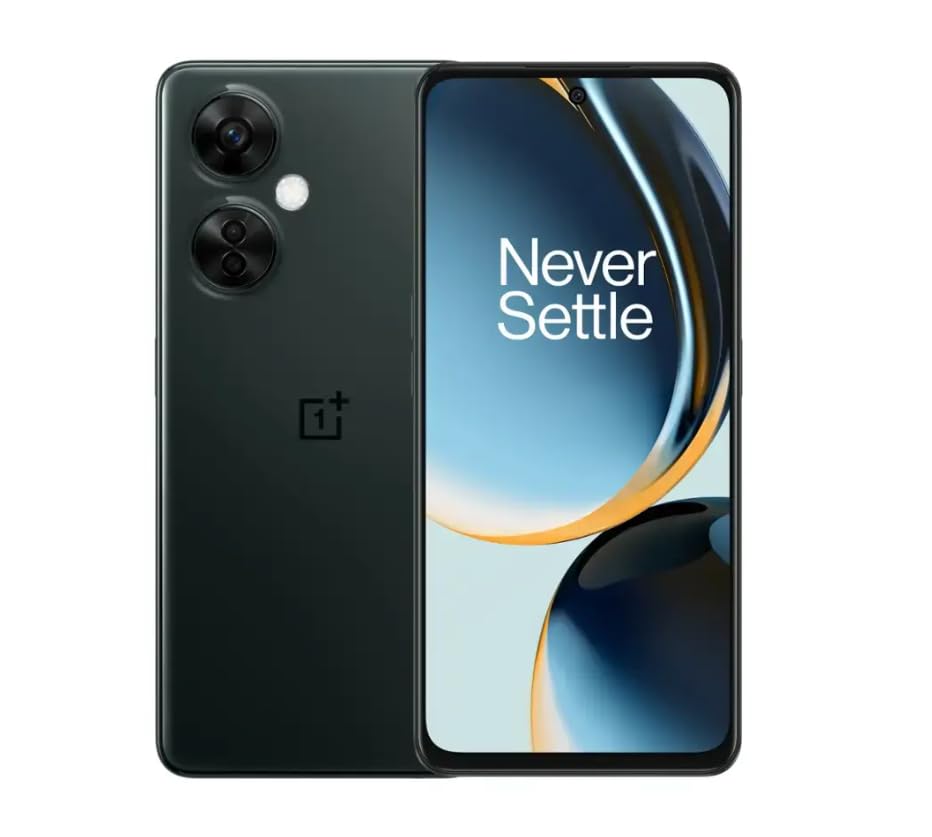
Image 1.1: OnePlus Nord N30 5G smartphone. This image displays the overall design of the device, highlighting its screen and camera module.
2. Wat is in die boks
Verifieer dat alle items in die pakket teenwoordig is:
- OnePlus Nord N30 5G Smartphone
- Kragadapter
- USB kabel
Let wel: Bykomstighede kan volgens streek verskil.
3. Opstelling
3.1. Plaas die SIM-kaart
- Vind die SIM-kaartlaai aan die kant van die toestel.
- Insert the SIM ejector tool (not included, use a paperclip if necessary) into the small hole next to the tray to open it.
- Place your Nano-SIM card(s) into the tray with the gold contacts facing down. The device supports a single SIM card and a microSDXC card for expandable storage.
- Druk die laai versigtig terug in die gleuf totdat dit gelyk is met die foon se liggaam.
3.2. Aanvanklike laai en aanskakeling
Voor die eerste gebruik word dit aanbeveel om die toestel volledig te laai.
- Connect the USB cable to the power adapter and then to the phone's USB-C port.
- Plug the power adapter into a wall outlet. The device supports 50W SUPERVOOC fast charging.
- Once sufficiently charged, press and hold the Power button (located on the side) until the OnePlus logo appears.
3.3. Aanvanklike Toestelkonfigurasie
Volg die aanwysings op die skerm om die aanvanklike opstelling te voltooi:
- Kies jou voorkeurtaal.
- Koppel aan 'n Wi-Fi-netwerk.
- Review en aanvaar die bepalings en voorwaardes.
- Meld aan met jou Google-rekening of skep 'n nuwe een.
- Set up security features such as fingerprint unlock or face unlock.
4. Bedryfsinstruksies
4.1. Vertoon en Navigasie
The OnePlus Nord N30 5G features a 6.72-inch LCD display with a 120Hz refresh rate for smooth visuals. Navigate the OxygenOS interface using gestures or traditional navigation buttons.
- Swiep op: Kry toegang tot die toepassingslaai.
- Swiep af: Access notifications and quick settings.
- Tik: Kies items.
- Knyp: Zoem in of uit.
4.2. Kameragebruik
The device is equipped with a triple rear camera system and a front camera.
- Hoofkamera: 108 MP, f/1.7 (wide) for high-resolution photos.
- Makro kamera: 2 MP, f/2.4 for close-up shots.
- Diepte kamera: 2 MP, f/2.4 for portrait mode effects.
- Voorste kamera: 16 MP, f/2.4 for selfies and video calls.
Open the Camera app and select your desired mode (Photo, Video, Portrait, Macro, etc.) from the interface. Tap the shutter button to capture images or start/stop video recording.
4.3. Bergingbestuur
The phone comes with 128GB of internal storage. You can expand this up to 1TB using a microSDXC card inserted into the SIM tray.
- Om stoorplekgebruik na te gaan: Gaan na Instellings > Berging.
- Om te beweeg files to microSD: Use the File Bestuurder-toepassing.
4.4. Konnektiwiteit
The device supports 5G cellular technology, Wi-Fi, and Bluetooth 5.1.
- 5G: Ensure your SIM card and plan support 5G for faster mobile data speeds.
- Wi-Fi: Koppel aan draadlose netwerke via Instellings > Wi-Fi.
- Bluetooth: Pair with wireless headphones or other devices via Instellings > Bluetooth.
4.5. Sekuriteitskenmerke
Secure your device using the side-mounted fingerprint sensor or face unlock.
- To set up fingerprint unlock: Go to Instellings > Sekuriteit en privaatheid > Vingerafdruk ontsluit.
- To set up face unlock: Go to Instellings > Sekuriteit en privaatheid > Gesigslot.
4.6. Klank
The device features dual stereo speakers for enhanced audio experience. It also includes a 3.5 mm audio jack for wired headphones.
5. Onderhoud
5.1. Batteryversorging
Die 5000mAh-battery bied langer gebruik. Om die batterylewe te verleng:
- Vermy uiterste temperature.
- Use the provided 50W SUPERVOOC charger for optimal charging speed and battery health.
- Vermy om die battery gereeld heeltemal te dreineer.
5.2. Sagteware-opdaterings
Keep your OxygenOS (based on Android 13) updated to ensure optimal performance, security, and access to new features.
- Om vir opdaterings te kyk: Gaan na Instellings > Oor toestel > OxygenOS version.
5.3. Maak die toestel skoon
Gebruik 'n sagte, pluisvrye lap om die skerm en liggaam van die foon skoon te maak. Vermy die gebruik van harde chemikalieë of skuurmiddels.
6. Probleemoplossing
Hierdie afdeling spreek algemene probleme aan wat jy mag teëkom.
6.1. Toestel skakel nie aan nie
- Maak seker dat die battery gelaai is. Koppel die toestel vir ten minste 15 minute aan die laaier.
- Druk en hou die aan/af-knoppie vir 10-15 sekondes in om 'n herbegin te forseer.
6.2. Netwerkverbindingsprobleme
- Kontroleer of die SIM-kaart korrek ingesit is.
- Verifieer dat mobiele data geaktiveer is in Instellings > Mobiele netwerk.
- Herbegin die toestel.
- Contact your carrier (T-Mobile) to confirm service availability in your area.
6.3. Programme wat vasval of vries
- Maak die toepassing toe en heropen.
- Maak die toepassing se kasgeheue skoon: Instellings > Toepassings > [Programnaam] > Stoorplekgebruik > Vee kas uit.
- Ensure the app and OxygenOS are updated to the latest versions.
6.4. Battery dreineer vinnig
- Verminder die helderheid van die skerm.
- Disable unused features like Bluetooth, GPS, or Wi-Fi when not needed.
- Kontroleer batteryverbruik in Instellings > Battery om kraghongerige toepassings te identifiseer.
- Ensure background app refresh is limited for non-essential apps.
7. Spesifikasies
| Model Naam | OnePlus Nord N30 5G |
| Bedryfstelsel | OxygenOS (based on Android 13) |
| Verwerker | Qualcomm Snapdragon 695 Octa-kern |
| RAM | 8 GB |
| Interne berging | 128GB (Expandable up to 1TB via microSDXC) |
| Vertoon | 6.72 inches LCD, 2400 x 1080 resolution, 120Hz Refresh Rate |
| Agterste kamera | 108 MP (wyd), 2 MP (makro), 2 MP (diepte) |
| Voorste kamera | 16 MP |
| Battery kapasiteit | 5000 mAh |
| Laai | 50W SUPERVOOC Vinnige Laai (ongeveer 47 minute vir volle lading) |
| Konnektiwiteit | 5G, Wi-Fi, Bluetooth 5.1, USB-C |
| Klankaansluiting | 3.5 mm |
| Afmetings | 6 x 4 x 4 duim |
| Gewig | 10.8 onse |
| Spesiale kenmerke | Dual SIM, Side-mounted Fingerprint Sensor, Face Unlock, Dual Stereo Speakers |
8. Hernude Produkinligting
This OnePlus Nord N30 5G is an Amazon Renewed product. Renewed products are pre-owned and professionally inspected, tested, and cleaned to work like new. They come with generic or original accessories and packaging.
8.1. Amazon Hernude Voorwaardes
Amazon Renewed products are categorized based on their cosmetic condition and battery life. All renewed products are fully functional and have a battery life greater than 80% of a new equivalent.

Image 8.1: Amazon Renewed conditions overview. This image illustrates the criteria for Excellent, Good, and Acceptable cosmetic conditions for renewed products.

Beeld 8.2: Visuele voorbeeldamples of renewed product cosmetic conditions. This image provides visual examples of what 'Excellent', 'Good', and 'Acceptable' cosmetic conditions might look like on a phone's back.

Image 8.3: Customer feedback on Amazon Renewed. This image presents testimonials from customers regarding their positive experiences with Amazon Renewed products.
9. Waarborg en Ondersteuning
9.1. Waarborginligting
As an Amazon Renewed product, this device is backed by the Amazon Renewed Guarantee. Please refer to the Amazon Renewed program terms and conditions for specific warranty details and coverage. This typically includes a limited warranty for a specified period from the date of purchase, covering defects in materials and workmanship.
9.2. Kliëntediens
For technical assistance, troubleshooting, or warranty claims, please contact Amazon Customer Service or refer to the official OnePlus support webwebwerf vir bykomende hulpbronne en algemene vrae.
- Amazon Kliëntediens: Besoek amazon.com/kontak-ons
- OnePlus Support: Visit the official OnePlus support webwebwerf vir jou streek.