
1. Inleiding
The MT-VIKI 16X16 4K HDMI Matrix Switch is designed to route up to 16 4K HDR HDMI sources to 16 4K HDR display devices. This versatile device allows all outputs to mirror the same signal or independently route unique input signals to each display, creating a fully customized HDMI routing matrix. It supports resolutions up to 4K (3840x2160) at 30Hz and features 8KV ESD protection. Control options include buttons, IR remote, RS232, LAN port, and a WEB GUI.
Video: Verbyview of MT-VIKI HDMI Matrix Switch Series, including 4x4, 8x8, and 16x16 models, highlighting their functionality as both splitters and switchers for multiple audio and video sources.
2. Pakketinhoud
Verifieer asseblief dat alle items in u pakket teenwoordig is:
- 1x HDMI Matrix Switch 16X16
- 1x RS232 kabel
- 1x IR afstandbeheer
- 1x Pair of Rack Ears & Screws
- 1x Power Cable & Adapter
- 1x Gebruikershandleiding

Image: Visual representation of the MT-VIKI 16X16 HDMI Matrix Switch and its included accessories, such as the power adapter, RS232 cable, IR remote, and user manual.
3. Produk verbyview
The MT-VIKI 16X16 HDMI Matrix Switch is a professional-grade device designed for robust audio and video distribution. It features a durable metal chassis suitable for 2U 19-inch rack mounting, with an acrylic crystal button and LED backlit display for clear status indication.
Sleutel kenmerke:
- 4K-resolusie: Supports up to 4K (3840x2160) at 30Hz.
- Oudio-ondersteuning: Supports PCM, Dolby AC3, DTS5.1, DTS7.1, and DSD audio formats. Features 3.5mm stereo audio extraction (switch to OUT16 for this function).
- Beheeropsies: Front panel buttons, IR remote control, RS232, LAN port, and WEB GUI.
- EDID Bestuur: Advanced EDID settings for optimal display compatibility.
- Rak monteerbaar: Designed for standard 2U 19-inch cabinets/racks.

Beeld: Voorkant view of the MT-VIKI 16X16 4K HDMI Matrix Switch, showing the system monitor, power button, input/output selection buttons, and control buttons.
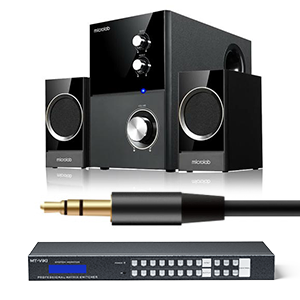
Image: The MT-VIKI HDMI Matrix Switch connected to a 3.5mm speaker system, illustrating its stereo audio extraction capability.
4. Opstelling
Follow these steps to set up your MT-VIKI 16X16 HDMI Matrix Switch:
- Kragverbinding: Connect the provided power adapter to the DC 12V port on the rear panel of the matrix switch and then to a power outlet.
- Invoertoestelle: Connect your HDMI source devices (e.g., gaming console, laptop, Blu-ray player, PC) to the HDMI INPUT ports (IN1-IN16) on the rear panel using high-quality HDMI 1.4 cables.
- Output Displays: Connect your HDMI display devices (e.g., TV, monitor, projector, LED screen) to the HDMI OUTPUT ports (OUT1-OUT16) on the rear panel.
- Oudio-uitvoer (opsioneel): For 3.5mm stereo audio extraction, ensure your audio device is connected to the 3.5mm audio output port and switch to OUT16 on the matrix.
- Control Connections (Optional):
- RS232: Connect the RS232 cable to the RS232 IN port for serial control.
- LAN: Connect an Ethernet cable to the LAN port for network control via WEB GUI or MatrixController software.
- IR-afstandsbediening: Ensure the IR remote has batteries and is pointed towards the IR sensor on the front panel.
- Krag aan: Turn on the matrix switch using the power button on the front panel.

Image: A detailed diagram illustrating how to connect various input devices (set-top box, PC, laptop, Blu-ray, decoder) to the HDMI input ports and output devices (TV, monitor, projector, LED screen) to the HDMI output ports of the MT-VIKI 16X16 HDMI Matrix Switch, including audio and LAN connections.
5. Bedryfsinstruksies
The MT-VIKI 16X16 HDMI Matrix Switch offers multiple ways to control your video and audio routing.
5.1 Skakelmodusse
The matrix switch supports various display configurations:
- Splittermodus: All display outputs share the same input source.
- Matrix & Splitter Mode: A portion of the displays share a common input source, while others can be independently assigned.
- Matriksmodus: Each display can select a standalone input source.
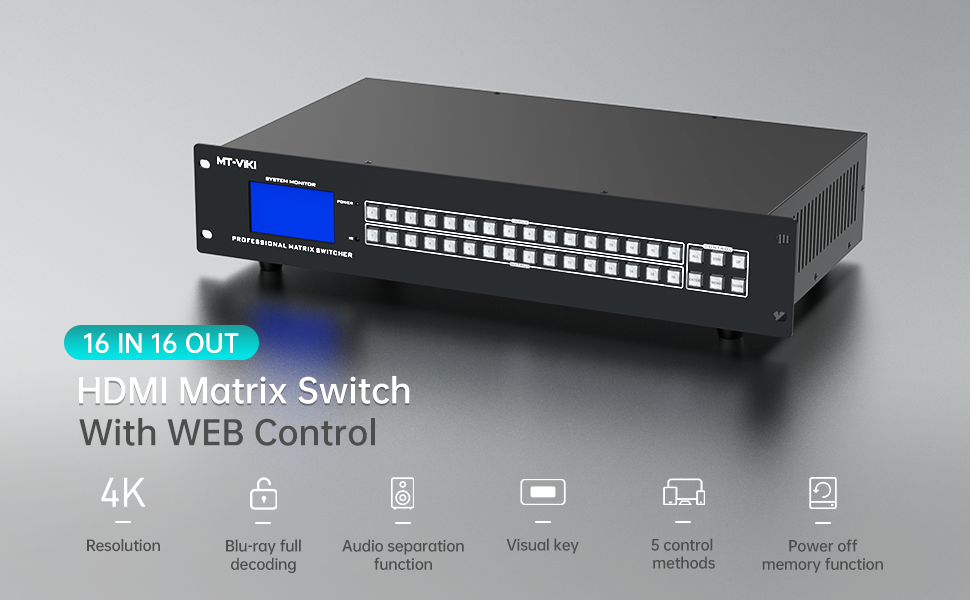
Image: Illustrates three display modes: splitter mode (all displays show the same input), matrix & splitter mode (some displays share an input, others are independent), and matrix mode (each display has a unique input).
Video: Demonstrates the multiple display modes available for the 16x16 HDMI matrix switch, including one-to-all, one-to-one, and mixed switching configurations.
5.2 Beheermetodes
You can control the matrix switch using the following methods:
- Knoppies op die voorpaneel: Directly select inputs and outputs using the physical buttons on the device.
- IR afstandbeheer: Use the included IR remote for convenient wireless control.
- RS232 beheer: Connect to a computer via RS232 for command-line control.
- LAN Port / WEB GUI: Toegang tot die toestel s'n web-based graphical user interface via the LAN port for remote control from any computer on the network.

Image: Displays the five control methods for the MT-VIKI HDMI Matrix Switch: IR remote control, front panel buttons, LAN control, RS232, and Web beheer.
5.3 EDID-instellings
EDID (Extended Display Identification Data) settings are crucial for ensuring optimal display compatibility and resolution. The matrix switch allows you to adjust EDID modes to match your display's capabilities.
Video: Instructions on how to set EDID for the MT-VIKI HDMI Matrix Switch to achieve the best display output.
5.4 Beep Sound Control
You can enable or disable the beep sound that occurs when pressing buttons on the matrix switch.
Video: A short guide on how to turn the beep sound on or off on the MT-VIKI HDMI Matrix Switch.
5.5 Setting 1080p Resolution
For specific scenarios, you may need to manually set the output resolution to 1080p, especially with 8x8 and 16x16 HDMI matrix switches.
Video: Tutorial on how to set the 1080p resolution for 8x8 and 16x16 HDMI matrix switches.
6. Onderhoud
To ensure the longevity and optimal performance of your MT-VIKI 16X16 HDMI Matrix Switch, follow these maintenance guidelines:
- Hou die toestel in 'n koel, droë en goed geventileerde area.
- Avoid exposing the device to direct sunlight, high temperatures, or excessive humidity.
- Clean the exterior of the device with a soft, dry cloth. Do not use liquid or aerosol cleaners.
- Maak seker dat alle kabelverbindings stewig en vry van skade is.
- Kontroleer gereeld vir firmware-opdaterings van die vervaardiger se website to ensure the best performance and compatibility.
7. Probleemoplossing
If you encounter issues with your MT-VIKI 16X16 HDMI Matrix Switch, refer to the following common troubleshooting tips:
- No Display / Signal Loss:
- Check all HDMI cable connections. Ensure they are securely plugged in.
- Verify that the input source is powered on and outputting a signal.
- Adjust EDID settings to match the display's capabilities (refer to Section 5.3).
- Ensure HDMI cables are of high quality and appropriate length for 4K signals. Long or low-quality cables can cause signal degradation.
- Snowflake / Moire / Flickering:
- These issues often indicate signal interference or degradation. Try using shorter, higher-quality HDMI cables.
- Check for proper grounding of all connected equipment.
- Adjust the PE (Pre-Emphasis) setting on the matrix switch if available, as suggested in the video below, to compensate for long cable runs.
- Geen oudio nie:
- Ensure the audio output is correctly selected (e.g., OUT16 for 3.5mm stereo).
- Check audio settings on both the source device and the display/audio receiver.
- Network Control Issues:
- Verify the LAN cable connection.
- Ensure the matrix switch and your control device are on the same network.
- Check the IP address configuration of the matrix switch.
Video: Provides solutions for common display issues such as no display, long cable problems, snowflake effects, and moire patterns.
8. Spesifikasies
| Kenmerk | Detail |
|---|---|
| Handelsmerk | MT-VIKI |
| Model | 16X16 4K30Hz |
| Resolusie Ondersteuning | Up to 4K (3840x2160) @30Hz |
| ESD beskerming | 8KV |
| Oudioformate | PCM, Dolby AC3, DTS5.1, DTS7.1, DSD |
| Beheer Metodes | Buttons, IR Remote, RS232, LAN Port, WEB GUI |
| Rack Mount | 2U 19-inch standard rack |
| Item gewig | 11.73 pond |
| Pakket afmetings | 22 x 14 x 8 duim |
| Kleur | Swart |
| Connector Tipe | HDMI |
| Versoenbare toestelle | Gaming Console, Laptop, Monitor, Personal Computer, Projector, Tablet, Television |
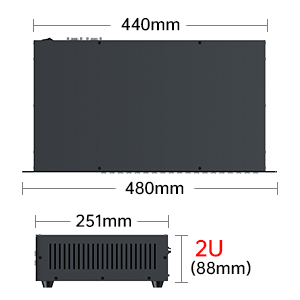
Image: Diagram showing the dimensions of the MT-VIKI HDMI Matrix Switch, indicating a width of 440mm (480mm with rack ears) and a height of 2U (88mm).
9. Waarborg en Ondersteuning
For warranty information and technical support, please refer to the documentation included with your product or visit the official MT-VIKI website. Contact information for customer service is typically provided in the user manual.