
1. Inleiding
Thank you for choosing the Hollyland Solidcom C1 Pro-8S Wireless Intercom System. This system is designed to provide clear, full-duplex communication for teams in various professional environments. Featuring advanced DECT 6.0 technology and dual-mic Environmental Noise Cancellation (ENC), it ensures reliable and high-quality audio transmission even in challenging, loud settings. This manual provides essential information for the proper setup, operation, and maintenance of your device.
2. Produk verbyview
The Solidcom C1 Pro-8S is an 8-person full-duplex wireless intercom headset system. It integrates a directional main microphone to capture the speaker's voice and an omnidirectional secondary microphone to collect environmental noise. An advanced ENC algorithm processes these signals to effectively cancel background noise, delivering crystal-clear sound. The system operates on DECT 6.0 technology, offering a wideband audio range of 150Hz to 7kHz and a reliable Line-of-Sight (LOS) communication range of up to 1,100 feet (350 meters).
3. Sleutel kenmerke
- Dual-Mic Environmental Noise Cancellation (ENC): Ensures clear communication in loud environments by effectively filtering out ambient noise.
- Wideband Audio Range: Supports 150Hz-7kHz for high-quality sound reproduction, enhancing voice clarity.
- Acoustic Echo Cancellation (AEC): Removes unwanted echo for a cleaner audio experience.
- Wind Noise Removal: Utilizes a felt paper wind filter and mic cushion to minimize wind interference.
- DECT 6.0 Tegnologie: Provides stable and secure wireless communication.
- Uitgebreide reeks: Offers up to 1,100ft (350m) Line-of-Sight (LOS) communication.
4. Pakketinhoud
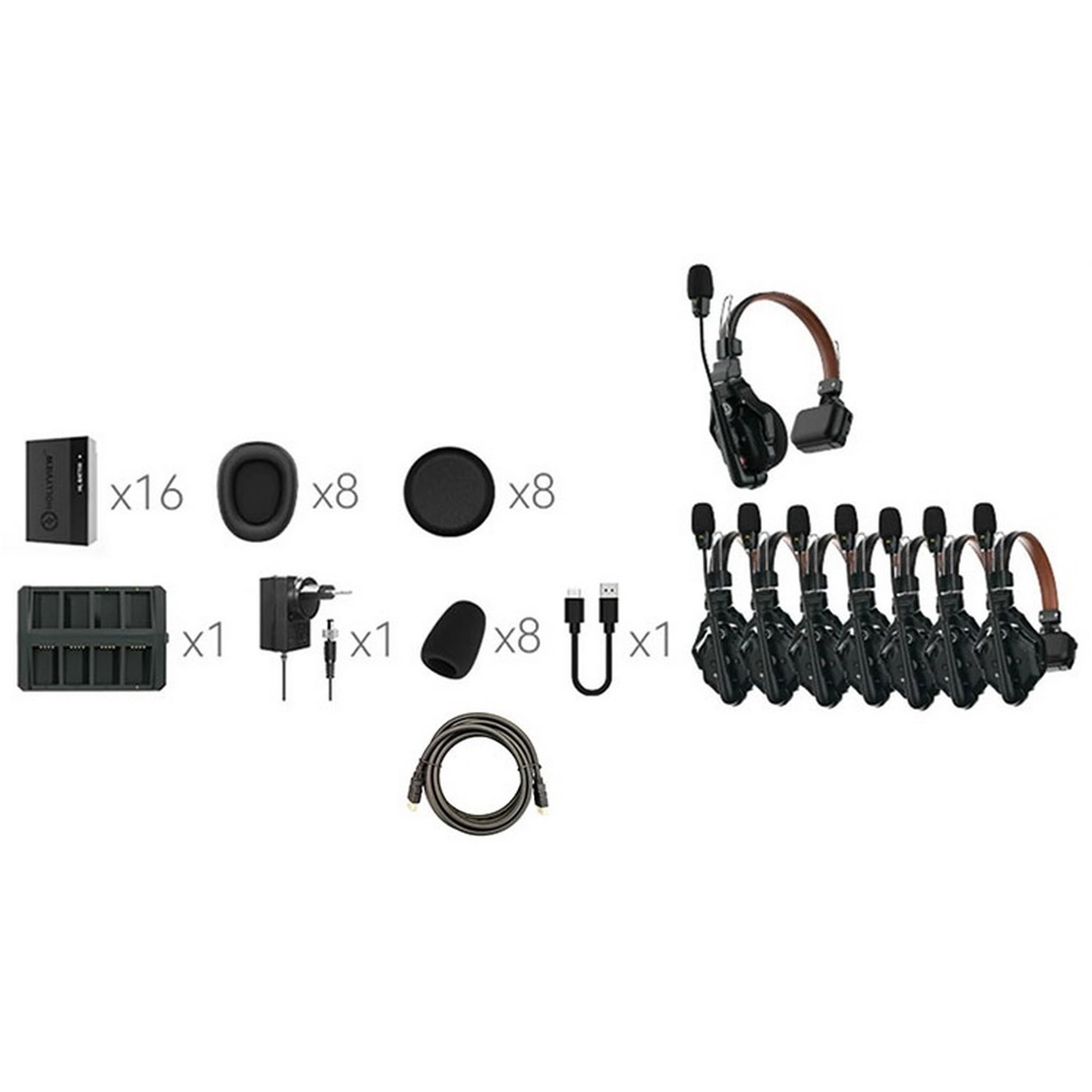
Verifieer dat alle items in jou pakket teenwoordig is:
- 1x Master Headset
- 7x Remote Headsets
- 8x Over-ear Leather Cushions
- 8x On-ear Foam Cushions
- 8x Microphone Cushions
- 1 x laaikas
- 8x batterye
- 1x USB Type-C Cable (for charging case)
- 1x Power Adapter (for charging case)
- 1x Opbergkas
- 1x Gebruikershandleiding
5. Komponentidentifikasie
Familiarize yourself with the main components of the Solidcom C1 Pro-8S system.
An illustration showing the various parts of the Hollyland Solidcom C1 Pro-8S wireless intercom system, including headsets, master headset, and charging case. This image helps users identify each component for proper setup and use.
6. Opstelgids
6.1. Laai die batterye
- Insert all headset batteries into the charging case.
- Connect the charging case to a power source using the provided USB Type-C cable and power adapter.
- The charging indicators on the case will show the charging status. Ensure all batteries are fully charged before first use.
6.2. Skakel aan/af
- Om aan te skakel: Press and hold the power button on each headset for approximately 3 seconds until the indicator light illuminates.
- Om af te skakel: Press and hold the power button on each headset for approximately 3 seconds until the indicator light turns off.
6.3. Dra die Headset
- Adjust the headband for a comfortable and secure fit over your head.
- Position the microphone boom arm so that the microphone is approximately 1-2 cm from the corner of your mouth.
- Ensure the ear cups fully cover your ears for optimal sound isolation and comfort.
6.4. System Pairing (if necessary)
The Solidcom C1 Pro-8S system is typically pre-paired at the factory. If re-pairing is required:
- Ensure all headsets are powered off.
- Refer to the detailed pairing instructions in the full user manual available on the Hollyland webwebwerf vir spesifieke stappe.
7. Bedryfsinstruksies
7.1. Basiese Kommunikasie
Once all headsets are powered on and connected, communication is full-duplex, meaning all users can speak and listen simultaneously.
7.2. Volume aanpassing
- Locate the volume up (+) and volume down (-) buttons on the headset.
- Press the (+) button to increase the listening volume.
- Press the (-) button to decrease the listening volume.
7.3. Demp funksie
- Mikrofoondemp: Flip the microphone boom arm upwards to mute your microphone.
- Ontdemp: Flip the microphone boom arm downwards to unmute your microphone and resume speaking.
7.4. ENC Activation
The Dual-Mic ENC feature is typically active by default, providing continuous noise cancellation. No manual activation is usually required during normal operation.
8. Onderhoud
8.1. Skoonmaak
- Use a soft, dry cloth to wipe the exterior of the headsets and charging case.
- Vir hardnekkige vuiligheid, effens dampen die lap met water of 'n sagte, nie-skuur skoonmaker.
- Do not use harsh chemicals or solvents. Avoid getting moisture into any openings.
- Regularly replace microphone cushions and ear cushions for hygiene and optimal performance.
8.2. Batteryversorging
- Berg batterye op 'n koel, droë plek wanneer dit nie gebruik word nie.
- Avoid fully discharging batteries for extended periods. Recharge them periodically if stored for a long time.
- Use only Hollyland-approved charging equipment.
8.3. Berging
- Store the system in its original storage case to protect it from dust, moisture, and physical damage.
- Avoid exposing the system to extreme temperatures or direct sunlight.
9. Probleemoplossing
| Probleem | Moontlike oorsaak | Oplossing |
|---|---|---|
| Geen oudio vanaf koptelefoon nie | Headset not powered on; Low battery; Out of range; Muted microphone | Ensure headset is powered on; Charge battery; Move closer to master headset; Check microphone mute status. |
| Swak klankgehalte / Staties | Interference; Out of range; Low battery; Damaged microphone/speaker | Move away from sources of interference; Move closer to master headset; Charge battery; Contact support if hardware damage is suspected. |
| Koptelefoon laai nie | Charging cable/adapter faulty; Improper battery insertion; Charging case not powered | Check cable/adapter connection; Ensure batteries are correctly inserted; Verify charging case is connected to power. |
| Cannot hear others / Others cannot hear me | Volume too low; Microphone muted; Headset not paired | Adjust volume; Check microphone mute status; Refer to pairing instructions if necessary. |
10. Spesifikasies
| Kenmerk | Detail |
|---|---|
| Handelsmerk | Hollyland |
| Modelnommer | SOLIDCOMC1PRO8SHS101 |
| Kleur | Swart |
| Oorplasing | Oor Oor |
| Geraasbeheer | Omgewingsgeruisonderdrukking (ENC) |
| Frekwensiereeks | 150Hz - 7kHz |
| Tipe oudiobestuurder | Dinamiese bestuurder |
| Bykomende kenmerke | Noise Cancellation, Echo Cancellation, Wind Noise Removal |
| Omhulselmateriaal | Plastiek |
| Verbindingstegnologie | Draadloos |
| Draadlose Tegnologie | DECT 6.0 |
| Versoenbare toestelle | Professional Communication Equipment |
11. Waarborg en Ondersteuning
The Hollyland Solidcom C1 Pro-8S Wireless Intercom System comes with a standard manufacturer's warranty. For detailed warranty terms, conditions, and registration, please refer to the official Hollyland webwebwerf of die waarborgkaart wat in u pakket ingesluit is.
For technical support, service, or further inquiries, please visit the official Hollyland support page at www.hollyland-tech.com/support of kontak jou plaaslike verspreider.