
1. Inleiding
This manual provides detailed instructions for the installation, operation, and maintenance of your Xigmatek Aqua V AIR Arctic Mid-Tower PC Case. Please read this manual thoroughly before beginning any installation to ensure proper setup and safe operation. Retain this manual for future reference.
2. Veiligheidsinligting
Neem die volgende veiligheidsmaatreëls in ag tydens installasie en werking:
- Ontkoppel altyd die kragtoevoer van die muursok voordat u enige komponente installeer of verwyder.
- Dra 'n antistatiese polsband om elektrostatiese ontlading (ESD) skade aan sensitiewe komponente te voorkom.
- Handle components carefully. Avoid touching pins or circuit boards directly.
- Verseker behoorlike ventilasie rondom die rekenaarkas om oorverhitting te voorkom.
- Hou klein onderdele en gereedskap weg van kinders.
- Moenie probeer om die kas of sy komponente te wysig nie, aangesien dit jou waarborg ongeldig kan maak en veiligheidsrisiko's inhou.
3. Pakketinhoud
Verifieer dat alle items in die pakket teenwoordig is:
- Xigmatek Aqua V AIR Arctic Mid-Tower PC Case
- Toebehore-stel (skroewe, afstandhouers, kabelbinders)
- Gebruikershandleiding (hierdie dokument)
If any items are missing or damaged, contact your retailer or Xigmatek support.
4. Produk verbyview
The Xigmatek Aqua V AIR Arctic is a mid-tower PC case designed for high-performance gaming configurations. It features tempered glass panels for component visibility and optimized airflow with pre-installed ARGB fans.

Figuur 4.1: Voor-links view of the Xigmatek Aqua V AIR Arctic PC case, showcasing the tempered glass front and side panels, and the pre-installed ARGB fans.

Figuur 4.2: Agter view of the PC case, showing the I/O shield cutout, expansion slots, and rear fan mount.
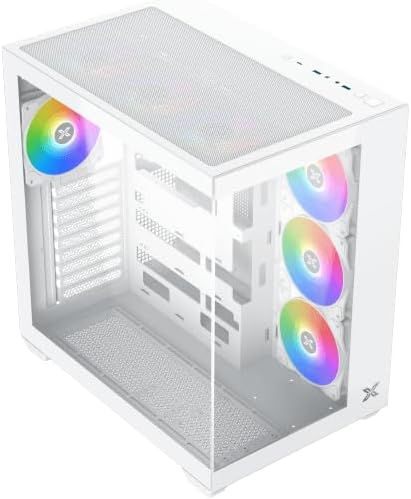
Figuur 4.3: Bo-na-onder hoekig view, highlighting the top mesh panel for additional cooling and the internal layout.
5. Opstelling en installering
Follow these steps to install your PC components into the Xigmatek Aqua V AIR Arctic case.
5.1. Voorbereiding van die Saak
- Plaas die kas op 'n plat, stabiele oppervlak.
- Remove the tempered glass side panel by unscrewing the thumb screws at the rear and carefully sliding it off. Place it on a soft, non-abrasive surface to prevent scratches.
- Remove the opposite steel side panel by unscrewing the thumb screws and sliding it off.
5.2. Moederbord Installasie
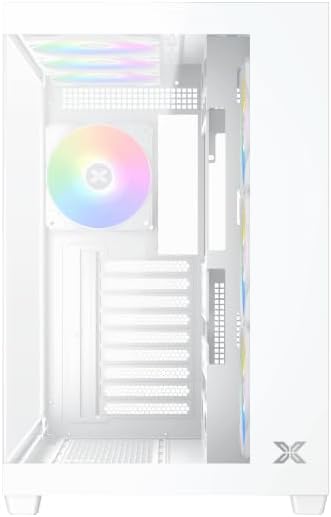
Figuur 5.1: Binne view of the case, illustrating the motherboard mounting area and cable routing cutouts.
- Installeer die I/O-skerm in die uitsparing aan die agterkant van die kas.
- Align your motherboard with the pre-installed standoffs. Ensure the standoffs match your motherboard's form factor (ATX, Micro ATX).
- Secure the motherboard using the provided screws from the accessory kit. Do not overtighten.
5.3. Installasie van die kragtoevoereenheid (PSU)
- Locate the PSU mounting bracket at the bottom rear of the case.
- Slide your PSU into the designated compartment from the rear of the case.
- Secure the PSU to the case using the screws provided with your power supply.
5.4. Installasie van stoorskyf
The case supports multiple storage drives:
- 2.5" SSD's: Mount directly to the SSD trays located behind the motherboard tray. Secure with screws.
- 3.5" HDD's: Install into the drive cage located beneath the PSU shroud. Slide the drive into the tray and secure with screws.
5.5. Graphics Card (GPU) and Expansion Card Installation
- Verwyder die nodige uitbreidingsgleufdeksels aan die agterkant van die kas.
- Insert your graphics card or other expansion cards into the appropriate PCIe slots on the motherboard.
- Secure the cards with the provided screws.
5.6. Kabelbestuur
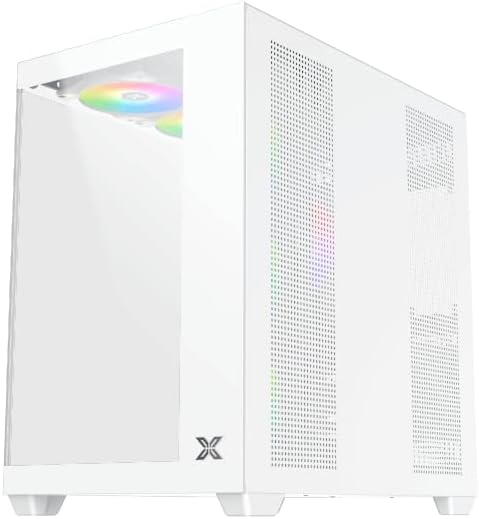
Figuur 5.2: View behind the motherboard tray, illustrating the ample space and tie-down points for effective cable management.
Gebruik die kabelgeleidingsuitsparings en vasmaakpunte agter die moederbordbak om kabels te organiseer. Dit verbeter lugvloei en estetika.
- Connect all necessary power cables from the PSU to the motherboard, GPU, and storage drives.
- Connect front panel cables (USB, audio, power/reset switches, LED indicators) to the corresponding headers on your motherboard. Refer to your motherboard manual for specific header locations.
- Connect the ARGB fan cables to the integrated fan controller or directly to your motherboard's ARGB headers if available.
5.7. Fan and Radiator Support
The Xigmatek Aqua V AIR Arctic comes with 7 pre-installed 120mm ARGB fans. Additional cooling options are available:
- Voor: Supports up to 3 x 120mm or 2 x 140mm fans / 240mm, 280mm, 360mm radiators.
- Top: Supports up to 3 x 120mm or 2 x 140mm fans / 240mm, 280mm, 360mm radiators.
- Agter: Supports 1 x 120mm fan.
- Onder: Ondersteun tot 3 x 120 mm waaiers.
Ensure proper fan orientation for optimal airflow (intake at front/bottom, exhaust at rear/top).
6. Bedryf
Once all components are installed and cables are connected, replace the side panels. Connect your monitor, keyboard, mouse, and power cable. Press the power button on the front panel to start your system.
The pre-installed ARGB fans can be controlled via the integrated controller (if present) or through compatible motherboard software, allowing customization of lighting effects and fan speeds.
7. Onderhoud
Gereelde onderhoud help om optimale werkverrigting en lang lewensduur van jou rekenaarkomponente te verseker.
- Stof skoonmaak: Periodically clean dust filters (top, front, bottom) to maintain good airflow. Use compressed air to remove dust from inside the case and components.
- Buitenste skoonmaak: Vee die buite-oppervlaktes af met 'n sagte, damp lap. Vermy skuurmiddels of oplosmiddels.
- Kabelbestuurskontrole: Occasionally check cable routing to ensure no cables are obstructing fans or airflow.
8. Probleemoplossing
Indien u probleme ondervind, raadpleeg die volgende algemene stappe vir probleemoplossing:
- System not powering on:
- Ensure the PSU is switched on and properly connected to the wall outlet.
- Verify all power cables (24-pin ATX, 8-pin CPU, PCIe, SATA) are securely connected.
- Check front panel power switch connections to the motherboard.
- Geen vertoonuitvoer nie:
- Ensure the monitor cable is connected to the graphics card (not the motherboard I/O if using a dedicated GPU).
- Plaas die grafiese kaart en RAM-modules terug.
- Fans not spinning or ARGB not working:
- Check fan power connections to the motherboard or fan controller.
- Verify ARGB connections to the controller or motherboard headers.
- Ensure any fan control software or BIOS settings are correctly configured.
For more complex issues, consult your component manuals or contact Xigmatek technical support.
9. Spesifikasies
| Kenmerk | Detail |
|---|---|
| Model Naam | Aqua V AIR Arctic |
| Modelnommer | EN45837 |
| Soort saak | Middeltoring |
| Moederbordversoenbaarheid | ATX, Mikro ATX |
| Materiaal | Steel Alloy, Tempered Glass |
| Kleur | Wit |
| Vooraf geïnstalleerde waaiers | 7 x 120 mm ARGB-waaiers |
| Maksimum GPU-lengte | 410 mm |
| USB-poorte | 3 |
| Gewig | 8.8 kilogram |
10. Waarborg en Ondersteuning
Xigmatek products are manufactured to high quality standards. For warranty information, please refer to the warranty card included with your product or visit the official Xigmatek website. For technical support or inquiries, please contact Xigmatek customer service through their official channels.
Amptelik Webwebwerf: www.xigmatek.com